Week 2- 2R Robotic Arm Challenge
AIM
Write the Matlab program to simulate the foward kinematics of a 2R Robortic arm.
Governing Equation
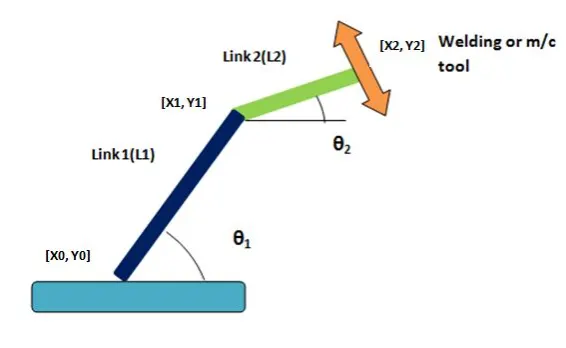
Cordinates of link-1
Starting Point =`[x_0,y_0]`= [0,0]
Ending Point = `[x_1,y_1]`=`[L_1*cosd theta_1,L_1*sind theta_1]`
Cordinates of link-2
Starting Point =`[x_1,y_1]`=`[L_1*cosd theta_1,L_1*sind theta_1]`
Ending Point =`[x_2,y_2]`=`[x_1+L_1*cosd theta_2, y_1+L_1*sind theta_2]`
Objective
We will take multiple values of theta1 and theta2 from 0 to 90 and by all different combinations of those values plots will be created,and the end stiching all the plots together to make a animation.
By closely examine the animation we are able to study workspace or motion of the robotic arm.
Program
% A program for foward kinematic of 2R robotic arm manipulator animatiom

clear all
close all
clc

%Inputs required for calculation of end position of links
%Length of the links

l1=1;
l2=0.5;

%Angle of both links with the horizondal axis
theta1=linspace(0,90,40);
theta2=linspace(0,90,40);

ct=1;
for i=1:length(theta1);
THETA1=theta1(i);
for j=1:length(theta1);
THETA2=theta1(j);
x0=0;
y0=0;
x1=l1*cosd(THETA1);
y1=l1*sind( THETA2);
x2=x1+l2*cosd(THETA2);
y2=y1+l2*sind(THETA2);

plot([x0 x1],[y0 y1],[x1 x2],[y1 y2],'linewidth',3)
axis([-0.1 1.7 0 1.7])
pause(0.03)
ct=ct+1;
title('kinematics of 2R Robotic arm');
xlabel('arm movement in x-axis');
ylabel('arm movement in y-axis');
end
end
Explanation
Result
https://drive.google.com/file/d/12CUR7jsOf9EuypWg-MAmYseyvdImgXF6/view?usp=sharing