Week 2- 2R Robotic Arm Challenge
Aim:
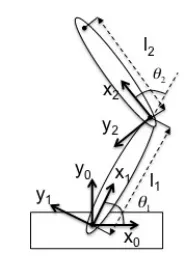
To write a program in Matlab to simulate the forward kinematics of a 2R Robotic Arm, as shown in the video.
- Create an animation file of the plot.
Upload an animation on Youtube and provide the Youtube link for an animation in your report.
Robotic arm:
Robotic manipulators are a major component in the manufacturing industry. They are used for many reasons including speed, accuracy, and repeatability. Increasingly, robotic manipulators are finding their way into our everyday life. In fact in almost every product we encounter, a robotic manipulator has played a part in its production. In robotics, one of the most difficult tasks is to perform a precise and fast movement of a robotic arm.
Code:
- The whole code was written on MATLAB.
- The animation is restricted to an angle with a range 0 to 90 degrees with values inbetween, this limit applies to both theta1 and theta2.
- A set of values for "theta1" and "theta2" are created from a difference formula which uses "theta_start" & "theta_end".
- A nested 'for loop' is used to calculate x1,y1 & x2,y2 using the idex values of "theta1 or theta2" and initial condition x0 and y0.
- Loop counter is used to automatically obtain the get current frame command to store plots as an image. These images are stitched together to form an animated movie
- After the end of the 2 for loops we write the video by giving it a name.
close all
clear all
clc

% inputs
l1=1;
l2=0.5;

theta1=linspace(0,90,10); %reducing the number of plots
theta2=linspace(0,90,10); %reducing the number of plots

ct=1;
for i=1:length(theta1)
    THETA1=theta1(i);
    for j=1:length(theta2)
        THETA2=theta2(j);
        % coordinates
        x0=0;
        y0=0;

        x1=l1*cosd(THETA1);
        y1=l1*sind(THETA1);

        x2=x1+l2*cosd(THETA2);
        y2=y1+l2*sind(THETA2);

        %plotting
        % plot command only produces a plot after every iteration
        plot([x0 x1],[y0 y1],[x1 x2],[y1 y2],'linewidth',3)
        axis([-1.5 1.5 0 2])
        % we can use 'hold on' command
        pause(0.03)
        M(ct)=getframe(gcf);
        ct=ct+1;
    end
end

movie(M)
videofile=VideoWriter('forward_kinematics.avi','uncompressed AVI');
open(videofile)
writeVideo(videofile,M)
close(videofile)
Animation: