Week 2- 2R Robotic Arm Challenge
FORWARD KINEMATICS OF A 2R ROBOTIC ARM
A. Brief Summary and Step-wise explanation of the Code:
Forward kinematics is basically performed when the end-positon of a robotic arm (i.e. the end position of the end-effector/manipulator) needs to be calculated, given the joint parameters (for ex. - angles).
In order to simulate the forward kinematics of a 2R Robotic arm, we follow the steps mentioned below (refer attached sketch as well):
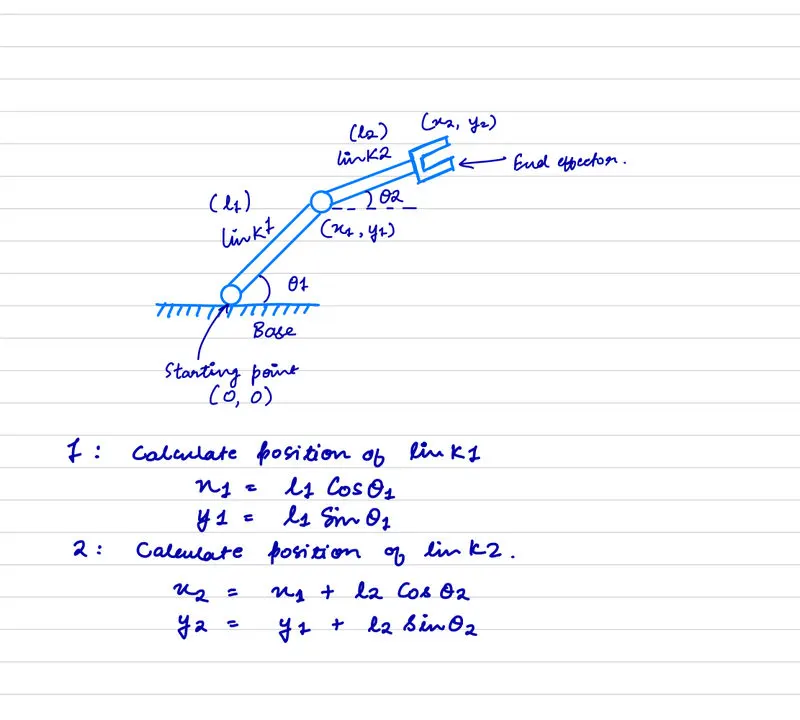
- First, we need to determine our inputs, which in this case are:
- Link lengths l1 & l2 for the first and the second arm repectively.
- Angles theta1 (`theta1`) and theta2 (`theta2`) that Links 1 & 2 make w.r.t. the x-axis respectively.
- Based on the inputs above, and assuming the origin (the base at which one end of Link 1 is permanently attached) to be at (0, 0):
- We first calculate the end postion of Link 1 for a given value of theta1.
- Using the end positon coordinates of Link 1, we can calculate the end postion of Link 2, for a given value of theta2.
- In order to create an animation/simulate a moving arm, we can use several values of theta1 & theta2 as inputs.
- For each postion of Link 1 (at a given theta1), we calculate all the positions that Link2 can move into (for all values of theta2).
- We repeat the above step for all positons that Link1 can take in the XY plane.
- This will essentially give us the region, or space within which the robot end-effector can practically reach, commonly called as the robot workspace.
- For this simulation, we will only demonstrate the robot's partial workspace.
Code:
% DHANANJAY PATEL | CHALLENGE #4 | WEEK 2 | 4 APR 2022

%2R Robotic Arm - Forward Kinematics

clear all;
close all;
clc;

%Inputs
%Since it has two links & two rotational joints, we shall define the link
%lengths and the angles the links make w.r.t. x-axis.

%Link Lengths, m
l1 = 0.75;
l2 = 0.5;

%Angles w.r.t x-axis, degrees | multiple inputs in order to create
%animation.
theta1 = linspace(0,90,10);
theta2 = linspace(0,90,10);

%Origin coordinates at (0, 0)
x0 = 0;
y0 = 0;

%Calculating (x1, y1), (x2, y2) for each value of theta1 & theta 2.

counter = 1;
for i = 1:length(theta1)

    %End coordinates for L1/Starting coordinates for L2
    x1 = l1*cosd(theta1(i));
    y1 = l1*sind(theta1(i));

    for j = 1:length(theta2)

        %End coordiantes for L2/Final End-effector position
        x2 = x1 + l2*cosd(theta2(j));
        y2 = y1 + l2*sind(theta2(j));

        %Plot
        plot([x0, x1], [y0, y1], [x1, x2], [y1, y2], 'linewidth', 4)
        axis([-0.5 1.5 0 1.5]);
        xlabel('X axis, meters');
        ylabel('Y axis, meters');
        title('Forward Kinematics - 2R Robotic Arm', 'FontWeight','bold');
        legend({'link 1', 'link 2'}, 'location', 'northeast');
        pause(0.1)
        M(counter) = getframe(gcf);
        counter = counter+1;
    end
end

%Creating a movie and writing it to a video file
movie(M)
video_file = VideoWriter('Forward_Kinematics.avi', 'Uncompressed AVI');
open(video_file)
writeVideo(video_file, M)
close(video_file)
B. Errors Faced while programming & how were they corrected.
Almost all errors that occurred were syntax errors.
- For the first error, the code was wrongly written as Movie(M)
- Correction: movie(M) - lowercase m instead of uppercase M is the correct syntax.
- For the second error, the profile provided for the video file was incorrect.
- Correction: it was supposed to be 'Uncompressed AVI' instead of 'Uncompressed'.
- The third error:
- wrote 'xaxis' & 'yaxis' instead of 'xlabel' & 'ylabel' to label the axes.
Screenshots showing the errors:
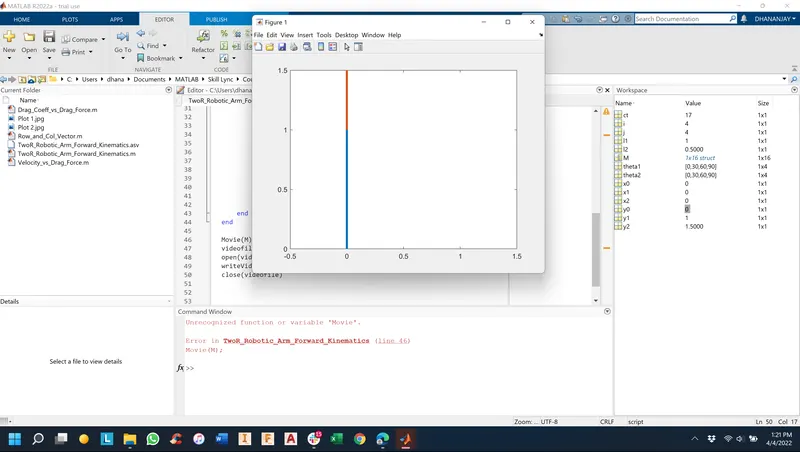
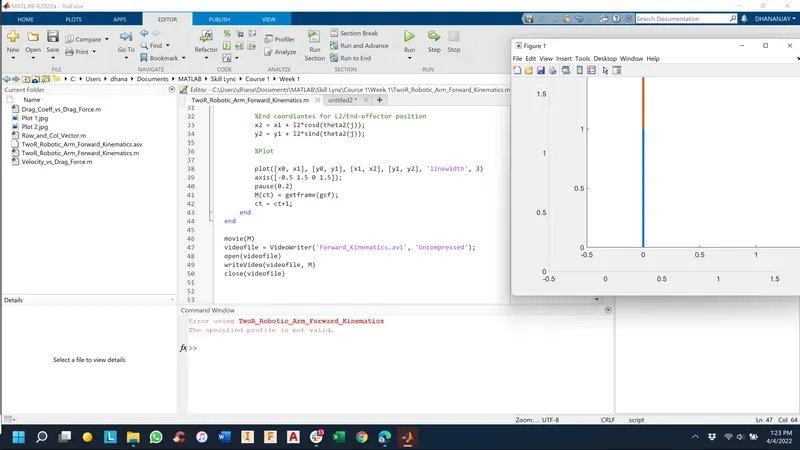
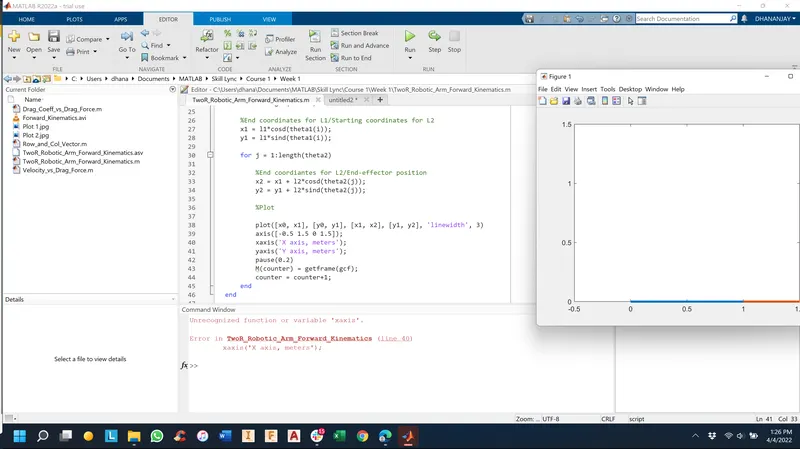
GOOGLE DRIVE LINK TO THE ANIMATED VIDEO: https://drive.google.com/file/d/1AchnEJIAK_snVKTl_9czIkg3DQQVksKm/view?usp=sharing