Week 2- 2R Robotic Arm Challenge
AIM: - TO SIMULATE THE FORWARD KINEMATICS OF A 2R ROBOTIC ARM
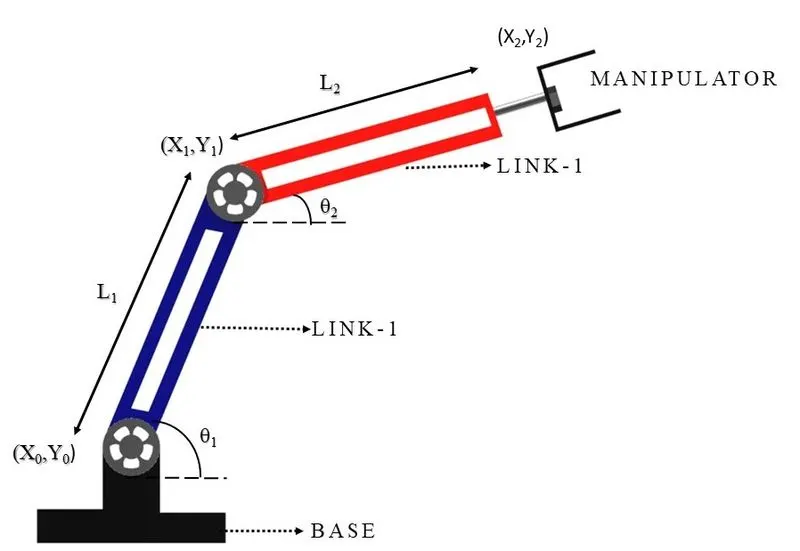
EQUATION USED: - The equation to locate the position of the link and end- effector.
X0 = Y0 = 0
X1 = L1.cosq1
Y1 = L1.sinq1
X2 = X1 + L2.cosq2
Y2 = Y1 + L2.sinq2
Summary: -
Kinematics is a branch of mathematics, physics and classic mechanical engineering. There are 2 mostly used kinematics in robotic field, they are : forward kinematics and inverse kinematics. Forward kinematics is frequently used to calculate the position of end effector when we know the degree value of each joint, meanwhile inverse kinematics is used to compute the degree of each joint when we know the position of the end effector.
MATLAB PROGRAM TO SIMULATE THE KINEMATIC OF 2R ROBOTIC ARM: -
close all
clear
clc

%inputs
l1 = 2;
l2 = 1.5;

theta1 = linspace(0,90,10);
theta2 = linspace(0,90,30);
ct = 1;
for i = 1:length(theta1)
    THETA1 = theta1(i);
    for j = 1:length(theta2)
        THETA2 = theta2(j);
        x0 = 0;
        y0 = 0;

        x1 = l1*cosd(THETA1);
        y1 = l1*sind(THETA1);

        x2 = x1 + l2*cosd(THETA2);
        y2 = y1 + l2*sind(THETA2);

        % plotting

        plot([x0,x1],[y0,y1],[x1,x2],[y1,y2],'linewidth',3)
        axis([-0.1 4.5 0 4.5])
        title('2R ROBOTIC ARM')
        xlabel('x axis')
        ylabel('y axis')
        legend('link1','link2')

        pause(0.01)
        M(ct) = getframe(gcf);
        ct = ct + 1;

    end
end
movie(M)
videofile = VideoWriter('Forward_Kinematics.avi','Uncompressed AVI');
open(videofile)
writeVideo(videofile,M)
close(videofile)
EXPLANATION OF THE PROGRAM: -
- As inputs we have L1 and L2, length of link 1 and length of link 2
- Angle made by two joints i.e., theta 1(q1) and theta 2(q2) with link 1 and link 2.
- Then two ‘for loop ‘is used for repetition control structure to efficiently write a loop that needs to execute a specific number of times.
- The position of link 1 is calculated by two equation i.e.
X1 = L1.cosq1
Y1 = L1.sinq1
- The position of link 2 is calculated these two equations i.e.
X2 = X1 + L2.cosq2
Y2 = Y1 + L2.sinq2
- Then for particular position of link 1 and link 2, a plot is made which is captured by. frame by frame to create a movie.
Pause command is used for while pausing current plot and move to next one
- M(ct) = getframe(gcf) is used to capturing the next plot to combine later.
- ct = ct + 1 is to capture each frame in M
9.The video file of ‘.AVI’ is used to save the video.
- The movie is then written into the video file and then finally animation is created.
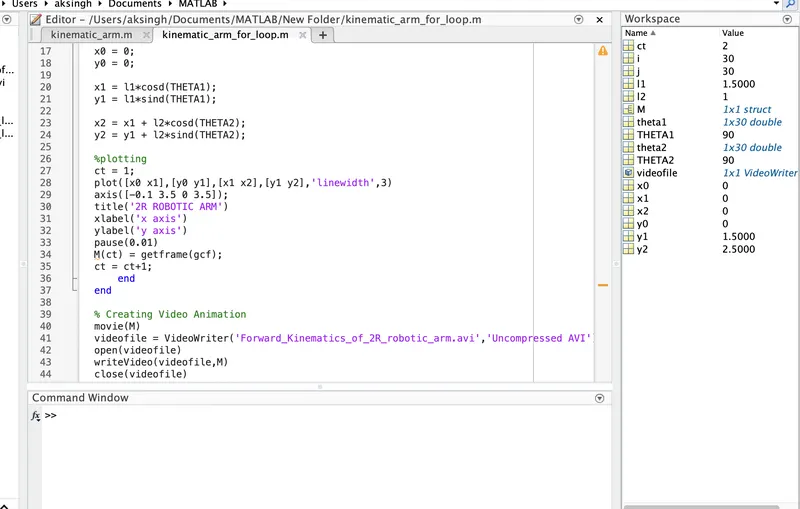
ERROR FOUND DURING WRITING PROGRAM
In this while writing a loop, don’t know that end is important to run the program.
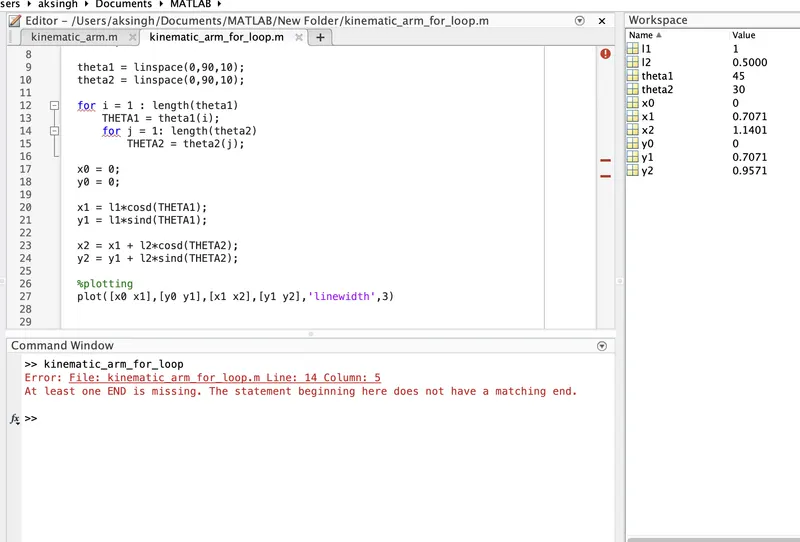
ANSWER:- LOOP ENCLOSED WITH TWO END
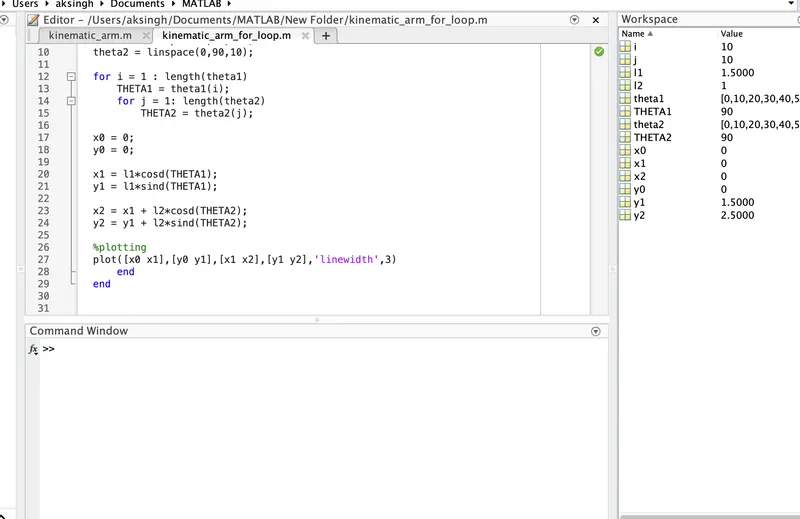
- here increment should be after the getframe command.
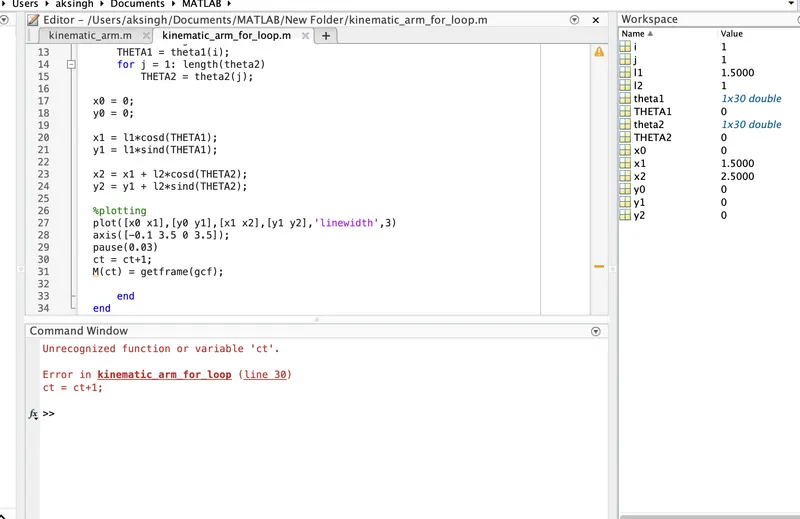
- After completing the avi.file, unable to play video in matlab folder.
Here ct = 1 command should be outside the starting of the loop