Week 2- 2R Robotic Arm Challenge
- ROBO MANIPULATOR ARM'S WORKSPACE ANIMATION
% Forward Kinematics of the robo arm with animation
%Inputs
l1 = 2;
l2 = 1;

theta1 = linspace(0,90,10);
theta2 = linspace(0,90,40);

ct = 1;
for i = 1:length(theta1)
THETA1 = theta1(i);
    for j = 1:length(theta2)
        THETA2 = theta2(j);
x0 = 0;
y0 = 0;

x1 = x0 + l1*cosd(THETA1);
y1 = y0 + l1*sind(THETA1);

x2 = x1 + l2*cosd(THETA2);
y2 = y1 + l2*sind(THETA2);

%plotting

plot([x0 x1],[y0 y1],[x1 x2],[y1 y2],'linewidth',3)
axis([-0.5 3 0 3.5])
pause(0.03)
M(ct) = getframe(gcf);
ct = ct+1;
grid on
xlabel('x axis')
ylabel('y axis')

    end
end

movie(M)

videofile = VideoWriter('robo_arm_manipulator.avi','Uncompressed AVI');
open(videofile)
writeVideo(videofile,M)
close(videofile)- The above program outputs the animation of a Robo arm manipulator using the formulas and mentioned below
Consider the 2 link Robo arm with length 'l1' and 'l2' respectively, which makes an angle of 'theta1' and 'theta2' with respect to the horizontal plane.
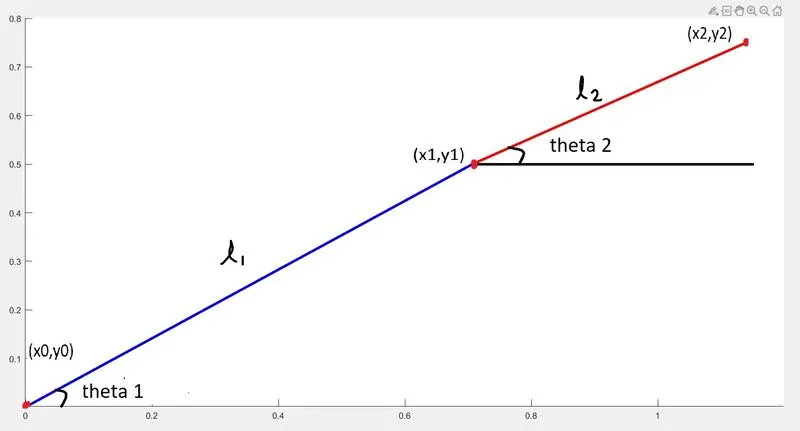
The Co-ordinates of the x0 = 0 and y0 = 0
To find the values of the other 2 Co-ordinates points of the links the below formula is used
x1 = x0 + l1*cosd(THETA1)
y1 = y0 + l1*sind(THETA1)
x2 = x1 + l2*cosd(THETA2)
y2 = y1 + l2*sind(THETA2)
By varying the values of the angles theta1 and theta2, we can track the total workspace of the Robo manipulator arm
This is achieved using the 'linspace' command as shown below
theta1 = linspace(0,90,10)
theta2 = linspace(0,90,40)
So by using the 2 'for' loops in conjunction we can plot the different values of theta2 for each iteration of the theta1 angle
Ex:
for i = 1:length(theta1)
THETA1 = theta1(i);
for j = 1:length(theta2)
THETA2 = theta2(j);
where,
'theta1' is value obtained using the linspace command, if the value is within the range of 0 to 90 then the below line of code gets executed and the value is determined as 'THETA1'.
'theta2' is value obtained using the linspace command, if the value is within the range of 0 to 90 then the below line of code gets executed and the value is determined as 'THETA2'.
Different values of 'THETA1' and 'THETA2' are used to obtain the Co-ordinates points of the Robo arm which are used to plot the graph
The line code ' M(ct) = getframe(gcf) ' is used to get all the plots of graphs.
which are then used to animate into a movie using the command ' movie(M) '
The command ' videofile ' is used to create a videofile of specific format
videofile = VideoWriter('robo_arm_manipulator.avi','Uncompressed AVI')
The file is opened and written into the videofile M and closed as specified below
open(videofile)
writeVideo(videofile,M)
close(videofile)
RESULT
- By running the program the video of specified format is saved in the mentioned file name as shown in the below figure.
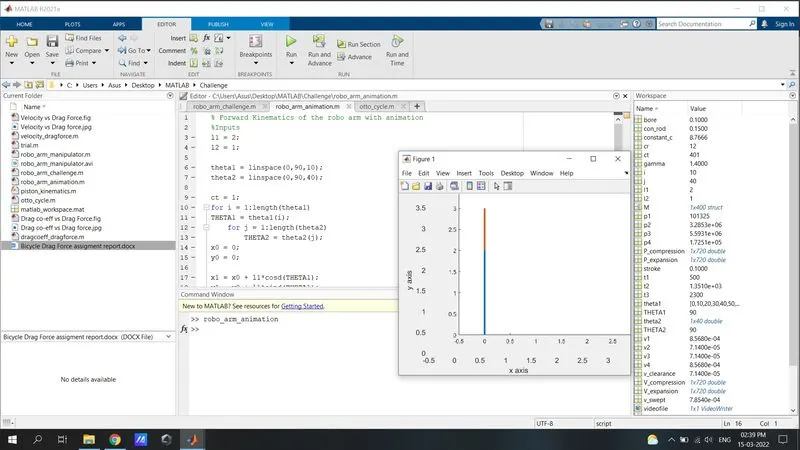
- The saved video file in the below link shows the workspace of Robo arm manipulator
https://drive.google.com/file/d/14qOVPmdeswGAU77EIs__c9oUa4dQ6nZZ/view?usp=sharing
ERRORS ENCOUNTERED
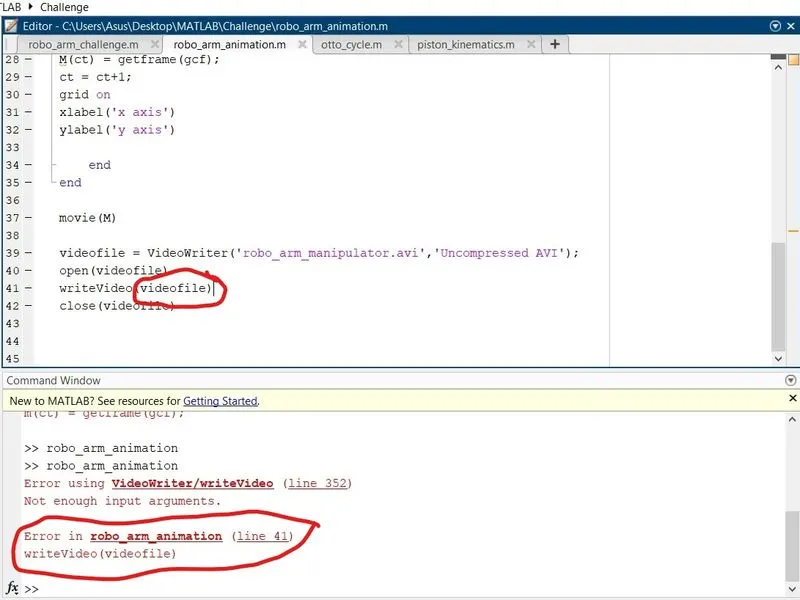
- Using the Videofile command to writevideo " writeVideo (videofile) " which resulted in the error mentioned below
CORRECTIVE ACTION
- Using the corrective code " writeVideo(videofile,M) " fixed the error.