Week 2- 2R Robotic Arm Challenge
simulation for forward kinematixs of 2R robotic arm
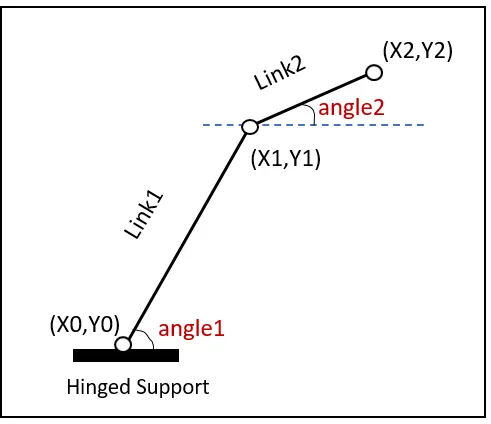
In our Project, we are going to use the basic arms of the robot to do that we are dealing with the linkage known as Forward kinematics of a 2R Robotic arm (where 2R means 2-rotating Link i.e 2 is a number of link and R is rotation). we are taking two links as a representative of the Robotic arm in which Link-1 is Hinged at (X0, Y0) and making an angle1, while Link-2 is hinged at the end of the Link-1 and making angle2 with respect to Datum.
We need to Animate the Arm and find out its behavior in Different conditions. Our Approach to Get the final Program and a series of steps that we will perform during the entire Problem is shown below in the Step chart.
clear all
close all
clc
% inputs
% length of robotic arm
l1 = 1; %link1
l2 = 0.5; %link2
% angle between the base and robotic arm
theta1 = linspace (0,90,10);
theta2 = linspace (0,90,10);
% for end loop
ct = 1;
for i = 1:length(theta1)
THETA1 = theta1(i);
for j = 1:length(theta2)
THETA2 = theta2(j);
%Calculating the position of Link-1.
From the fixed Support, the initial value of X and Y for the Link-1 (X0, Y0) and the final value is (X1, Y1)
x0 = 0;
y0 = 0;
x1 = l1.*cosd(THETA1);
y1 = l1.*sind(THETA1);
% Calculating the position of the Link-2.
For the Link-2 starting point is the Ending point if the Link-1 ie (X1, Y1) and Ending point is (X2, Y2)
x2 = x1+l2.*cosd(THETA2);
y2 = y1+l2.*sind(THETA2);
% plotting
plot([x0 x1],[y0 y1],[x1 x2],[y1 y2],'LineWidth',2)
axis([-0.5 1.5 0 2])
pause(0.1)
M(ct) = getframe(gcf); % capture the current axis as it appears on screen
ct = ct+1;
end
end
%conversion of plot into video
movie(M) %play the movie in matrix once.
Videofile = VideoWriter('forwardkinematics.avi','Uncompressed AVI'); %assign file name and file format
open(Videofile) %opens the video file
writeVideo(Videofile,M) %writes the video with plot frames in the array M
close(Videofile) %closes the video files