Week 2- 2R Robotic Arm Challenge
Program to simulate the forward kinematics of a 2R Robotic Arm:
clear all
close all
clc

% Inputs
l1 = 1;
l2 = 0.5;
theta1 = linspace(0,90,10);
theta2 = linspace(0,90,10);

ct=1;
for i = 1:length(theta1)
    THETA1= theta1(i);
    for j = 1:length(theta2)
        THETA2= theta2(j);
        x0=0;
        y0=0;

        x1= l1*cosd(THETA1);
        y1= l1*sind(THETA1);

        x2= x1+l2*cosd(THETA2);
        y2= y1+l2*sind(THETA2);

        % Plotting


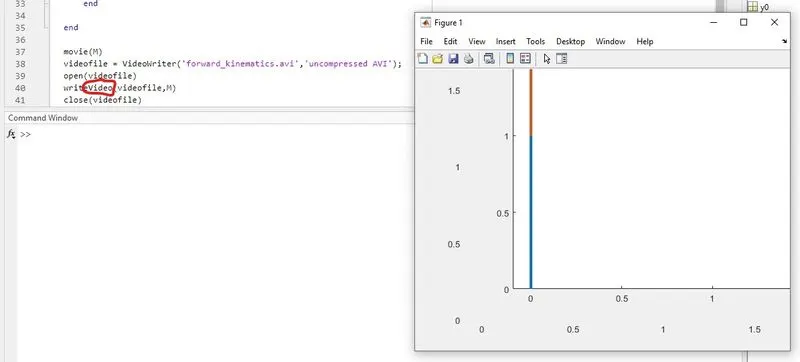
        plot([x0 x1],[y0 y1],[x1 x2],[y1 y2],'linewidth',3)
        axis([-0.1 1.5 0 1.5])
        pause(0.04)
        M(ct)= getframe(gcf);
        ct=ct+1;
    end

end

movie(M)
videofile = VideoWriter('forward_kinematics.avi','uncompressed AVI');
open(videofile)
writeVideo(videofile,M)
close(videofile)
Video link:
Summary:
This is a program used to simulate the movement of a robotic arm. It's used to control the movement required for spot welding, painting etc.
Explanation:
2R robotic arm contains 2 links & 2 rotational joints. Let's assume link1(l1) & link2(l2) & `theta1` make an angle at x axis on link1, `theta2` make an angle at x axis on link2. l1 = 1m & l2 = 0.5m
The starting point of l1 is (0,0), end point is (l1cos`theta`, l1sin`theta`) & starting point of l2 is (l1cos`theta`, l1sin`theta`), end point is (l2cos`theta`, l2sin`theta`)
The co-ordinates from the base-link-end of link: [x0 y0], [x1 y1], [x2 y2]
We use cosd, otherwise the values will be in radian instead of degree
To get a thicker line for the plot 'linewidth' command is used
i in the for loop is the loop counter, it determines the number of times the loop gets executed
THETA1 & THETA2 are variables & not arrays
ct is the counter command; ct+1 is used to increment the counter
To create a movie for the animation, we need to get the frames, so 'getframe' is used
This should be in uncompressed AVI format
Problems faced & steps taken to avoid errors:
There was an incorrect argument data type or missing argument in call to function 'write'
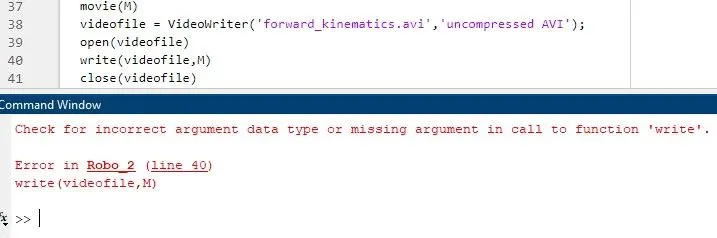
So, I had to add "Video" in write (shown in line 40 in the figure) & the error was avoided