Week 2- 2R Robotic Arm Challenge
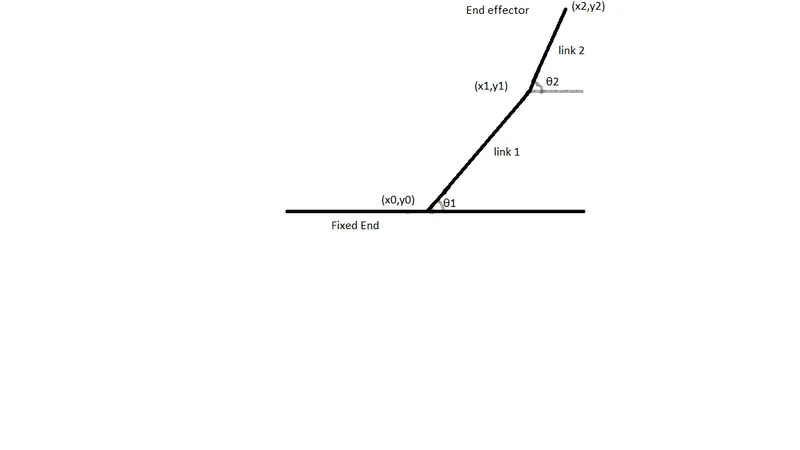
Forward kinematics of a 2R Robotic Arm
Aim:
To simulate the forward kinematics of a 2R robotic arm using a program in MATLAB and also to create the animation of a 2R robotic arm in MATLAB.
Introduction:
A robotic arm is a type of mechanical arm usually programmable, with similar functions to a human arm, the arm may be the total of the mechanism or may be part of a more complex robot. The links of such a manipulator are connected by joints allowing either rotational motion or translational(linear) displacement. The links of the manipulator can be considered to form a kinematic chain. The terminus of the kinematic chain of the manipulator is called the end effector and it is analogous to the human hand.
Robotic arms can be used to automate the process of placing goods or products onto pallets. By automating the process, palletizing becomes more accurate, cost-effective, and predictable. The use of robotic arms also frees human workers from performing tasks that present a risk of bodily injury.
Software used:
MATLAB
Program:
% To simulate forward kinematic of a 2R robotic arm

clear all
close all
clc

% Input lengths

l1 = 1;              % length of the link1 in metres(m)
l2 = 0.5;            % length of the link2 in metres(m)

% Input degrees

theta1 = linspace(0,90,10);    % the values of theta1 ranges between 0 & 90
theta2 = linspace(0,90,10);    % the values of theta2 ranges between 0 & 90

% For loop

ct = 1;
for i = 1:length(theta1)
    THETA1 = theta1(i);
    for j = 1:length(theta2)
        THETA2 = theta2(j)

        % Input coordinates

        x0 = 0;                        % X coordinate at the fixed end of the link1
        y0 = 0;                        % Y coordinate at the fixed end of the link1
        x1 = l1*cosd(THETA1);          % X coordinate at the end of the link1 or starting coordinate of link2
        y1 = l1*sind(THETA1);          % Y coordinate at the end of the link1 or starting coordinate of link2
        x2 = x1+l2*cosd(THETA2);       % X coordinate at the end of the link2
        y2 = y1+l2*sind(THETA2);       % Y coordinate at the end of the link2

        % Plotting

        plot([x0 x1],[y0 y1],[x1,x2],[y1,y2],'linewidth',3)
        axis([-0.2 2 0 2])
        pause(0.03)
        M(ct) = getframe(gcf);
        ct=ct+1;
    end
end
movie(M)
videofile = VideoWriter('forward_kinematics_of_2R_robotic_arm.avi','uncompressed AVI');
open(videofile)
writeVideo(videofile,M)
close(videofile)
Output:
The animation of the 2R robotic arm is uploaded on youtube, the link is shown below;
https://www.youtube.com/watch?v=SOjEfLH_13c
Result:
Thus the program showed the simulation of the 2R robotic arm by using MATLAB.