Week 2- 2R Robotic Arm Challenge
A PROGRAM IN MATLAB TO SIMULATE THE FORWARD KINEMATICS OF AN 2R ROBOTIC ARM
AIM:
- To write a program to simulate the Forward Kinematics of an 2R Robotic Arm using MATLAB.
OBJECTIVES:
- Basic theories of a Robotic Arm and its workspace and mechanism will be discussed.
- Few steps will be followed to create a program in MATLAB by using its mechanism and the code will be explained.
- If we face any errors, we will discuss on that and will try to figure it out.
- A program will be created when the various angle of the Robotic arm is fixed and the output diagram will be shown.
- A program will be created to show the output diagram when different angle is used to make a Robotic Arm and an Animation will be made on that.
BASIC THEORIES:
- A Robotic Arm is a type of mechanical arm that is similar to a human arm. It has various segments which is closely resembles the shoulder, an elbow and a wrist. A robotic arm is programmable and can be directed to perform a variety of function just like human arm.
- A 2R Robotic Arm which has two joints. Each and every links have independent angle to rotate. It is used in a wide range where automation is needed for welding, painting, drilling, material handling etc. Let's take example to explain a 2R Robotic Arm,
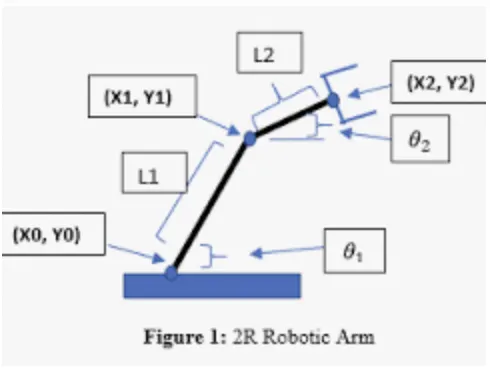
Here, Length of two links of the Robotic Arm is L1 and L2. They are rotating with their individual angle `theta1` and `theta2` with respect to X-axis. Also, we have three coordinates from
the drawing;
(x0,y0) is the starting point of link 1.
(x1,y1) is the mating point of link L1 and L2.
(x2,y2) is the end point of the manipulator.
Here in mathematical expression, we get.
x0 = 0;
y0 = 0;
x1 = L1 cos(theta1);
y1 = L1 sin(theta1);
x2 = x1+L2 cos(theta2);
y2 = y1+L2 sin(theta2);
later, we will to try to simulate the MATLAB program with the help of above information.
PROCDURES:
- Steps to be followed to create a program to simulate the forward kinematics of an 2R Robotic Arm
Step1: Open MATLAB.
Step2: Click on New Script to open the Editor Window.
Step3: Input code need to be written here and then click on Save option to save the program as a M-file.
Step4: Run the programming to get an output as a plot.
PROGRAMMING FOR FIXED VALUE OF `theta`:
% Program for Forward Kinematics of a 2R Robotic Arm manupulator

clear all
close all
clc

% Inputs for the Robotic Arm

% Length (m)
L1 = 1;
L2 = 0.5;

% Angle (deg)
theta1 = 30;
theta2 = 45;

% coordinates
x0=0;
y0=0;

x1=L1*cosd(theta1);
y1=L1*sind(theta1);

x2=x1+L2*cosd(theta2);
y2=y1+L2*sind(theta2);

% For plotting the diagram for the Robotic Arm manupulator

plot([x0 x1], [y0 y1], [x1 x2], [y1 y2], 'linewidth',3)
xlabel('X axis')
ylabel('Y axis')
CODE EXPLANATION:
To simulate the forward kinematics of a 2R robotic arm in MATLAB, we have created the above Program.
where,
- clear all: It removes items from workspace, freeing up system memory.
- close all: It deletes all figures whose handles are not hidden.
- clc: It clears Command Window.
- All the input values are taken as explained in theory.
- plot command is use to plot the diagram by the coordinates as defined.
- Linewidth command is used to define the thickness of the line to be displayed.
- xlabel and ylabel command is used to name the x and y axis respectively.
OUTPUT:
The program ran successfully and no error faced, and the output is displayed.
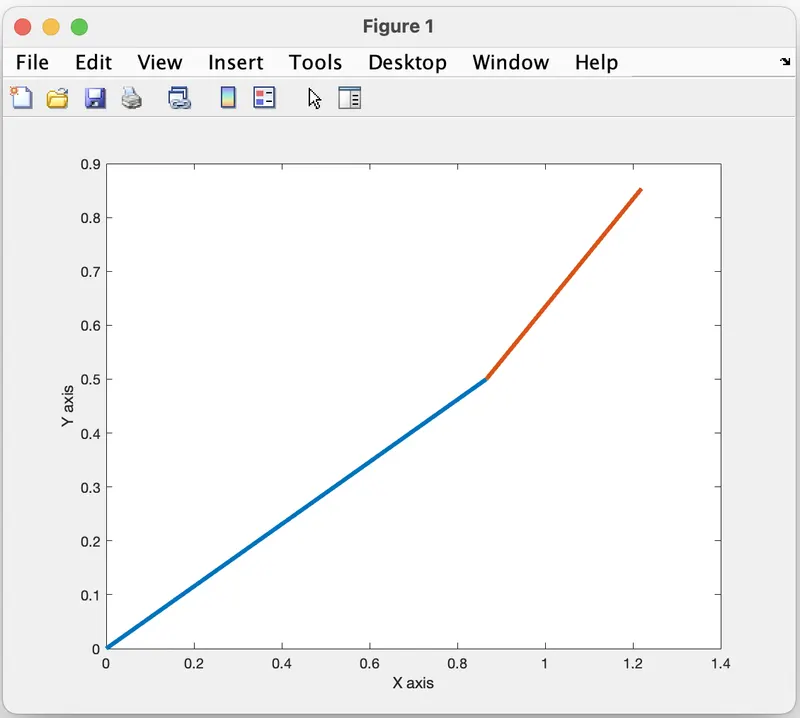
PROGRAMMING FOR MULTIPLE VALUES OF THETA :
% Program for Forward Kinematics of a 2R Robotic Arm manupulator

clear all
close all
clc

% Inputs for the Robotic Arm

% Length (m)
L1 = 1;
L2 = 0.5;

% Angle (deg)
theta1 = linspace(0,90,10);
theta2 = linspace(0,90,10);
ct = 1;

for i=1:length(theta1);
    THETA1=theta1(i);
    for j=1:length(theta2);
        THETA2=theta2(j);

% coordinates
x0=0;
y0=0;

x1=L1*cosd(THETA1);
y1=L1*sind(THETA1);

x2=x1+L2*cosd(THETA2);
y2=y1+L2*sind(THETA2);

% For plotting the diagram for the Robotic Arm manupulator

plot([x0 x1], [y0 y1],[x1 x2],[y1 y2],'linewidth',3)
axis([-0.1 2 0 2])
xlabel('X axis')
ylabel('Y axis')
pause(0.03)
M(ct) = getframe(gcf);
ct = ct+1;
    end
end

movie(M)
videofile = VideoWriter('robotic_arm_for_random_angle.avi','uncompressed AVI');
open(videofile)
writeVideo(videofile,M)
close(videofile)
CODE EXPLANATION
To simulate the forward kinematics of an 2R Robotic arm manipulator, we have created the above Program where,
- clear all: It removes items from workspace, freeing up system memory.
- close all: It deletes all figures whose handles are not hidden.
- clc: It clears Command Window.
- All the input values lengths and angles being taken for plotting the diagram as input in the program from theory explained.
- Here linspace command is used to take multiple values with same intervals.
- A for loop has been created to generate frames and the variable called 'counter(ct)' to starts with.
- First loop i and second loop j are ranging from 1 to maximum value of 'theta1' and 'theta2' respectively.
- The graph has been plotted by using plot.
- The counter will increment by 1 until the loop is finished.
- M, an array is created to store all the frames which are created by using getframe().
- An animation of all frames is created by using few commands such as,
- The function 'movie' is used to play the recorded movie frames, 'VideoWriter' is used to create a videofile from an array and specifies.
- The file type 'open', 'writeVideo' and 'close' are used to open the file, to write data to the file and to close the file respectively.
ERROR FACED:
1. 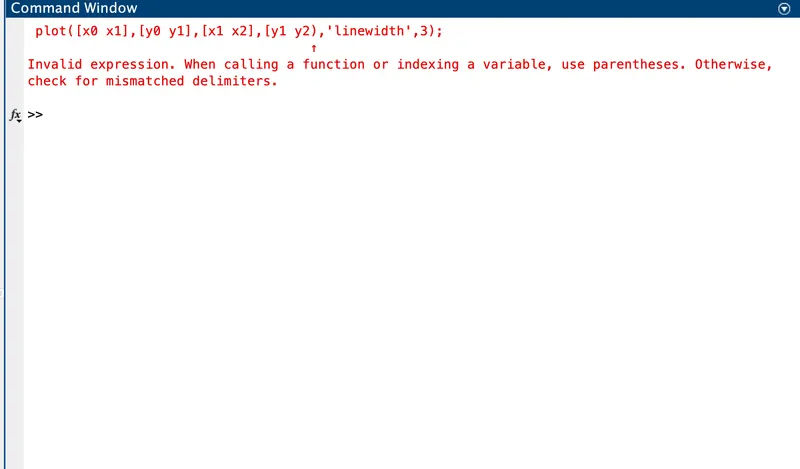 2.
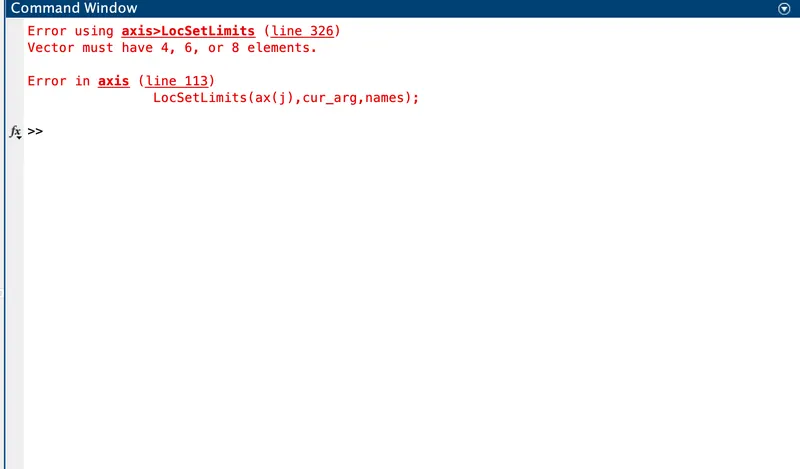
2.
REASON:
1. The first error is faced because of using normal brackets instead of square brackets.
2. While setting axis limits the vector should contain 4,6 or 8 elements whereas, the code has only 3 elements causing the 2nd error.
SOLUTION:
1. Verifying the proper use of normal and square brackets.
2. Verify the input elements in a vector.
OUTPUT:
After rectifying the errors, obtained output is shown below
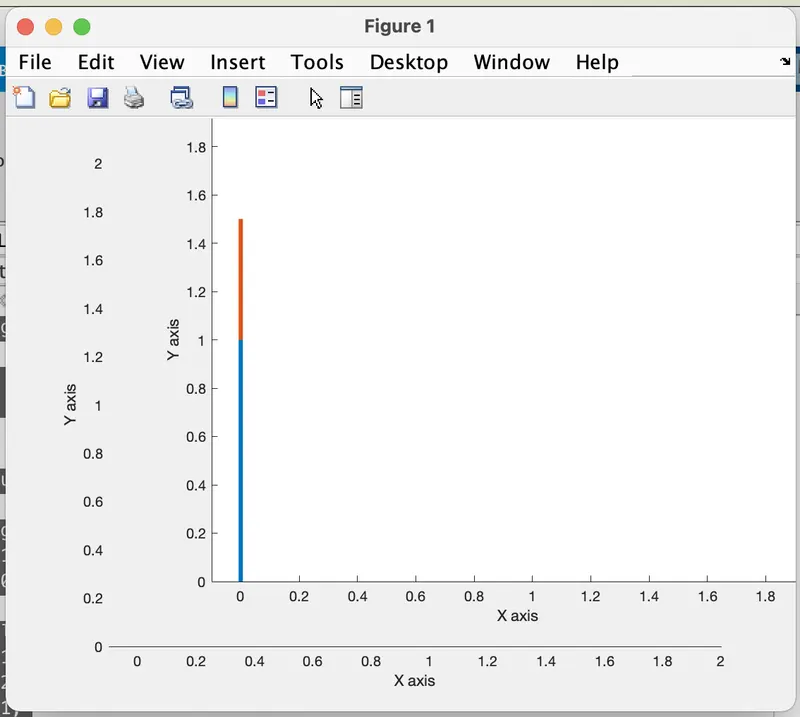
Note: It's an screenshot image of the output. The google drive link for animated output is mentioned below.
GOOGLE DRIVE LINK FOR OUTPUT:
'https://drive.google.com/file/d/1mZX0hnLcVDi-R_kKDQnTGa6EZkfTlo3e/view?usp=sharing'
CONCLUSION:
So, the program to simulate the Forward kinematics of a 2R Robotic arm using MATLAB has been made and the workspace of the Manupulator or the Robotic Arm is plotted in the animation.