Week 2- 2R Robotic Arm Challenge
AIM;
To write a matlab program to stimulate the forward kinemstics of a 2R robotic Arm
Objective;
to create an animation file of the plot
theory:
kinematics is the analysis of motion without considering the forces. here,we need only geometric properties such as length and dgree of freedom of the manipulator bodies. forward kinematics refer to use of kinematics equation of a robot to compute the position of end effector from specified values for the joint parameters. if we know the geometry of the robot and its joint points,we can do the math and figure out the position and orientation of any point on the robot i.e, if we can able to figure out how the robot is going to move then we can figure out its workspace.
These robots have various complex industral application
welding handling
assembly operation
machine loading and unloading
spray pinting of automobile bodies
it consist of base, two arms or kinematic link and two rotational joints.these link will have motion in them when they are programmed
the link one will make an angle theta1 similarly link two make an angle theta2
so we need to create a plot at various angular positions upto which these arms can move. for this we need to findout the coordinate invoved at the joints
In this project, we consider a 2R robotic arm.2R robotic arm is a robotic arm with two rotational i.e, has two links which rotate orwork over a two-dimensional plane with each the link having a single degree of freedom. Also,both the link are restricted to a 90degree rotation with respect to axes.
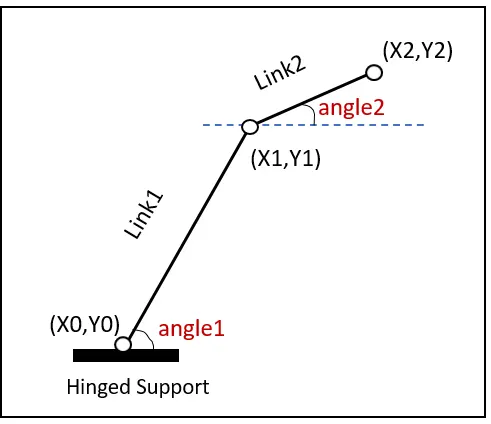
In this program, we consider the robotic arm as shown in the picture:
the links being link1 and link2 L1and L2 being the length of the two links respectively. consider the link 1 to be fixed to the horizontal plane and making an angle theta1 with the horizontal. The link2 is connected to link1 and the second joint making an angle theta2.
considering the start ans end co-ordinates of link 1 to be (X0,Y0)and(X1,Y1) respectively.
similarly,the start and end co-ordinates of link 2 to be (X1,Y1)and(X2,Y2)respetively
where,
X0 = 0, Y0 = 0
X1 = L1*cosd(theta1), Y1 = L1*sind(theta1)
X2 = X1+L2*cosd(theta2), Y2 = Y1+L2*sind(theta2)
EXPLANATION TO THE CODE:
initially the required input variables such as lengths of the links,angle and co-ordinates are declared along with a counter variable 'ct'.
once the variables are declared, value are being assigned to the variables. the angles are assigned values with help of linspace command as we consider 10 position of each link between 0degree and 90degree.
as we required the link at multiple position i.e, rotate it.Af FOR loopis written for link1 and a similar FOR loop is written for link2 under the first FOR loop
now under the FOR loop we define the co-ordinates (X1,Y1)and (X2,Y2)using the equations:
X1 = L1*cosd(theta1) Y1 = L1*sind(theta1)
X2 = X1+L2*cosd(theta2) Y2 = Y2+L2*sind(theta2)
the plot command is used to plot te link on the graph.and to animate the plot,getframe command is used.and the counter variable is incremented.
both FOR loop are then ended.
MATLAB CODE:
clear all
close all
clc

%inputs
ct = 1;
%angles
theta1 = linspace(0,90,10);
theta2 = linspace(0,90,10);

%length of the links
L1 = 1; %link 1
L2 = 0.5 %link 2

%coordinates of starting point of link1
X0 = 0;
Y0 = 0;

for i=1:length(theta1)
    THETA1=theta1(i);

 for j=1:length(theta2)
     Theta2=theta2(j);

 X1=L1.*cosd(THETA1);
 Y1=L1.*sind(THETA1);

 X2=X1+L2.*cosd(THEtA2);
 Y2=Y1+L2.*sind(THETA2);

%plotting
plot([X0 X1],[Y0 Y1],[X1 X2],[Y1 Y2],'linewidth',3)
axis([-0.1 1.5 0 1.5])

M(ct)=getframe(gcf);
ct=ct+1;
pause(0.1)

   end
end

movie(M)
videofile=VideoWriter('roboticarm.avi','uncompressed AVI');
open(videofile)
writeVideo(Videofile,M)
close(videofile)
OUTPUT MOVIE;
https://1drv.ms/u/s!AnQDpfVzCnQDapLOAwlHJ6ggjNI?e=tWICjo
result:
The program in matlab to stimulatte the forward kinematics of a 2r robotic arm was obtained.