Week 2- 2R Robotic Arm Challenge
A program in Matlab to simulate the forward kinematics of a 2R Robotic Arm
AIM
To write a program in matlab to stimulate the forward kinematics of a 2R robatic arm.
OBJECTIVE
- The main objective is to write a program to stimulate forward kinematics of a 2Rrobotic arm
- The possible location that the robot can reach
- To creat a animation video fro the plots obtained from the program
EXPLAINATION
- A 2r robotic arm consist of base, two arms or kinematic links and two rotational joints. These links will have motion in them when they are programmed.
- Reference image used
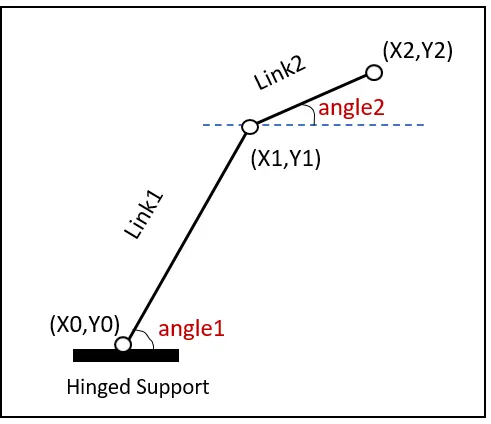
The starting point of the link 1 is connected to the base and end point connected to the link 2
link 1 makes an angle with respect to x axis and the link 2 makes an angle with x axis
l1 and l2 is fixed for the given problem- The starting point is taken as (0,0) and end point as (x1 x2) end point of arm 2 is taken as (x2 y2)
where - `x0 = 0`
- `y0 = 0`
- `x1 = l1*cosd(theta1)`
- `y1 = l1*sind(theta1)`
- `x2 = x1 + l2*cosd(theta2)`
- `y2 = y1 + l2*sind(theta2)`
- With (x0,y0) (x1,y1) (x2,y2) these 3 coordinates the 2 links can be plotted.
- On taking the value of theta1 and theta2 the final position of the manipulator is calculated
- The links of the manipulator can be considered to form a kinematic chain.
- An end effector is the device at the end of a robotic arm, designed to interact with the environment. The exact nature of this device depends on the application of the robot.
CODE EXPLAINATION
- l1 and l2 are the length of link1 and link2 , l1 is taken as 1 mand l2 is taken as
0.5m - theta1 and theta2 are taken as 45 and 30 in the first case and after execution of for loop ten different values for theta 1 and theta 2 are taken between 0 to 90 degree
- The value of x1 is l1*cosd (THETA1), y1 is l1*sind(THETA1) , x2 is x1+l2cosd(THETA2) , y is y+l2sind(THETA2)
- Now using for command for looping the values of the desired variables.
- Now with the values of (x0 x1)(y0 y1)(x1 x2)(y1 y2)the coordinates of the robotic arm is defined
- With all the coordinate values with respect to the axis the plot is further proceeded
- plot command is used to make the plot look more realistic
- All the figure obtained are assigned to the variable M on by one using the command cr
- end command is used twice for both the for loop
- movie command is used to combine all thefiguressaved in the M file to make the animation video or the movie
gcf is get current figure window- File name with .avi is used in saving and executing the file and at the end writeVideo is used in executing the output.
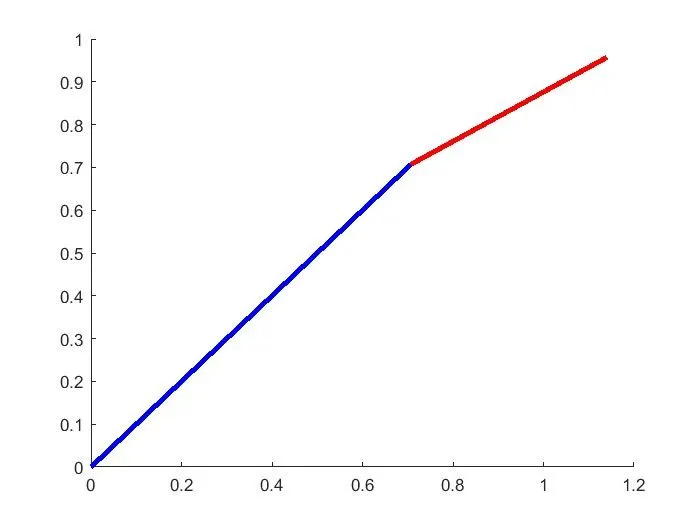
- Plot obtaine before using for loop is shown below
- % Forward kinematics of a 2R robotic arm manipulator clear all close all clc % Inputs l1 = 1; l2 = 0.5; theta1 = 45; theta2 = 30; %coordinates x0 = 0; y0 = 0; x1 = l1*cosd(theta1); y1 = l1*sind(theta1); x2 = x1 + l2*cosd(theta2); y2 = y1 + l2*sind(theta2); %plotting line([x0 x1],[y0 y1], 'linewidth',3,'color','b') line([x1 x2],[y1 y2], 'linewidth',3,'color','r')
%  Forward kinematics of a 2R robotic arm manipulator
clear all
close all
clc

% Inputs
l1 = 1;
l2 = 0.5;
theta1 = 45;
theta2 = 30;

%coordinates
x0 = 0;
y0 = 0;

x1 = l1*cosd(theta1);
y1 = l1*sind(theta1);

x2 = x1 + l2*cosd(theta2);
y2 = y1 + l2*sind(theta2);

%plotting
line([x0 x1],[y0 y1], 'linewidth',3,'color','b')
line([x1 x2],[y1 y2], 'linewidth',3,'color','r')
For loop used here for a particular values for a specific number of times for making the animation look much clear.
clear all
close all
clc

%Inputs
l1 = 1;
l2 = 0.5;
theta1 = linspace(0,90,10);
theta2 = linspace(0,90,10);

ct=1;

for i = 1:length(theta1)
    THETA1 = theta1(i);
    for j = 1:length(theta2)
        THETA2 = theta2(j);
        x0 = 0;
        y0 = 0;

        x1 = l1*cosd(THETA1);
        y1 = l1*sind(THETA1);

        x2 = x1 + l2*cosd(THETA2);
        y2 = y1 + l2*sind(THETA2);

        %plotting

        plot([x0 x1],[y0 y1],[x1 x2],[y1 y2],'linewidth',3)
        axis([-0.1 1.5 0 1.5 ])
        pause(0.01)
        M(ct) = getframe(gcf);
        ct=ct+1;

    end
end
movie(M)
videofile = VideoWriter('forward_kinematics.avi','uncompressed AVI');
open(videofile)
writeVideo(videofile,M)
close(videofile)
The animation video obtained from from the stimulation of 2Rrobotic arm using matlab is shown in the link below
I have attached the program file for further reference.
RESULT
The above mentioned plot and the video is obtained as the output for the following program.