Week 2- 2R Robotic Arm Challenge
Aim:- Write a program in Matlab to simulate the forward kinematics of a 2R Robotic Arm, as shown in the video.
Object:- Create 2r aobot arm to performed arm in matlab.
Procedure:-First thing we have to understand the linkage kinematic this decided the moment of robotic arm so we used 2 link and 2 joints to prformed this function.
Formula:- Concept of Length*side(theta_angle)=side of triangle
- x1= L_arm*cosd(eqn_THETA_1);
- y1= L_arm*sind(eqn_THETA_1);
- x2= x1 + S_arm*cosd(eqn_THETA_2);
- y2= y1 + S_arm*sind(eqn_THETA_2);
Explanation:- Firstly we undrstand the kinematic linkage used in this project, there are 2 link and 2 joints.
fisrt step is to calculate the positon of link 1 or L_arm this contain cordinates of (0 0) means x0=0 and y0=0 for starting point and L_arm*cosd(theta_1) for x1 and L_arm*sind(theta_1) for y1 or for ending point.
(Note:-here we use theta for because of finding 1 joint angle in range of 0 to 90 of 10 value we use linspace)
after geting first eqn values we get to find values for eqn 2 by calculating position of link 2 or S_arm this contain starting piont of link 1 end point means the starting cordinats for link 2 or S_arm is x1 and y1 and end points is x2 y2, and for x2 and y2 we use x1 + S_arm*cosd(eqn_THETA_1) and y1 + S_arm*sind(eqn_THETA_1) respectively. And we get the cordinates [x0 y0, x1 y1, x2 y2] like this. After that we plot this together in this format [x0 x1],[y0 y1],[x1 x2],[y1 y2] by axis of axis([-0.2 1.8 0 1.8]), and we put all this in a nested loop which help use to get multiple position by repeting or create loop of process by giving condition of i=1:length(theta_1) for 1st loop and j=1:length(theta_2) for 2nd loop.
for i=1:length(theta_1) ---1s loop
eqn_THETA_1= theta_1(i);
its means run the value for i from 1to length of theta_1 or 10
and this theta_(i) is store in eqn_THETA_1 and then this value is put in eqn---1 or for in formua of X1, Y1 cordinates.
same concept is used in 2nd loop and in this loop and values geted and ploted after the end of 2 and 1 we put movie comand to get motion of robot arm in video format.
for i=1:length(theta_1) loop 1(i)
eqn_THETA_1= theta_1(i); -----create eqn_THETA_1= means storing the value of theta_1 of i.
for j=1:length(theta_2) loop 2(j)
eqn_THETA_2= theta_2(j);
end
endIn the 1st loop they put the 10 value in between 0 to 90 so put i=1 for eg then in 1st loop there is 2nd loop this will executed and they also contain 10 value in 0to 90 range this perform for 10 time of j in 1 st time of i and hence this loop done for 10 of i and in every one time of i there j runs 10 time.
So this type is the nested loop performed in this scenario.
Code:-
close all
clear all
clc
%Input
%length of arm:- L_arm = large amr of (1), S_arm = small arm of (0.5)
L_arm = 1;
S_arm = 0.5;

%get 2 theta for two arm in linspace to get 10 value in between range of(0 to 90)
theta_1 =linspace(0,90,10);
theta_2 =linspace(0,90,10);

%formation of nested loop
ct=1; %loop 1st start
for i=1:length(theta_1)             % 1 st loop (i) value of 1 to thete_1 length means 1 to 10 at value of (0to90 range)---theta_1
    eqn_THETA_1= theta_1(i);        %create eqn_THETA_1= means storing the value of theta_1 of i means store 10 values of theta_1 in range of 0,90 and this 10 value is getimg as a degree value which we put in equation 1 to solve and get value for eqn 1 and plot it.

    %loop 2 start
    for j=1:length(theta_2)         % 2 nd loop (j) value of 1 to thete_2 length means 1 to 10 at value of (0to90 range)---theta_2
    eqn_THETA_2= theta_2(j);                    %create eqn_THETA_2= means storing the value of theta_2 of j means store 10 values of theta_2 in range of 0,90 and this 10 value is getimg as a degree value which we put in equation 2 to solve and get value for eqn 2 and plot it.


    x0=0;                           %}initial of code or initail of ploting point(starting point\FIXED POINT).
    y0=0;                           %}-\\-
    x1= L_arm*cosd(eqn_THETA_1);    %___equation 1 finding position for x1 point or end point of link 1 / starting point of link 2
    y1= L_arm*sind(eqn_THETA_1);    %              finding position for y1 point or end point of link 1 / starting point of link 2

    x2= x1 + S_arm*cosd(eqn_THETA_2);%___equation 2 finding position x2 point or end point of link 2
    y2= y1 + S_arm*sind(eqn_THETA_2);%              finding position y2 point or end point of link 2
    figure(1)

    %plotting
    plot([x0 x1],[y0 y1],[x1 x2],[y1 y2],'linewidth',3) %plot the arm of robot
    axis([-0.2 1.8 0 1.8])                              % set axis for understanding
    M(ct)=getframe(gcf);                                %use for Nested loop
    ct=ct+1;
    end %end loop 2nd

end %end loop 1st
%movie command is used to create movie of array(M)
movie(M)
%videofile is a variable store video bye using comand ViodeWrite
videofile= VideoWriter('robotic.avi','Uncompressed AVI')
open(videofile)
writeVideo(videofile,M)
close(videofile)
I get an error of this kind
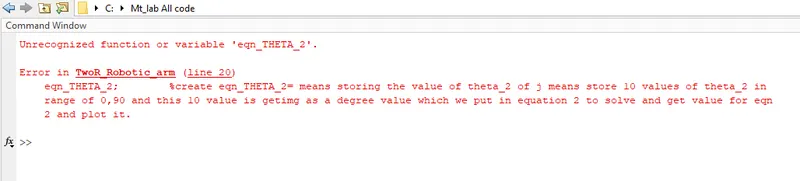
Hence i resolved with the help of my Live class teacher and by finding this ans
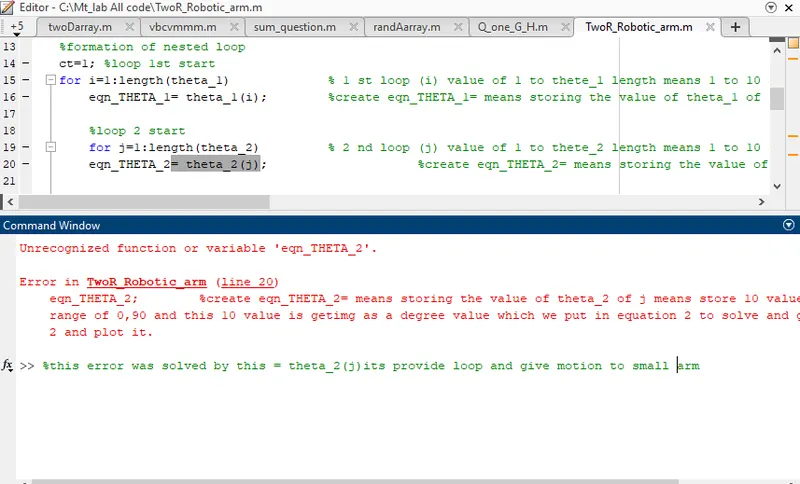
so we have to used theta_2(j) to resolved error and this provide movement to small arm.
Animation Link:- https://drive.google.com/file/d/1UoeMFl7J1BgfD1kggfhhSgXc-fjuuSHl/view?usp=sharing
Result Video :- https://drive.google.com/file/d/1UoeMFl7J1BgfD1kggfhhSgXc-fjuuSHl/view?usp=sharing
Result:- The loop1 performed for 10 time in this of 1 out of 10 j will performed for 10 times means i performed for total 10 time and j perforned for 100 times, and this type we get the forward kinematics of a 2R robotic arm motion.
And apart form this problem I make one more project same as like 3 arm robot:-
I share code of 3r robot arm created by my self,
%practice 3r robot arm
close all
clear all
clc

large_arm= 2;
small_arm=1;
last=0.5;

theta_1=linspace(0,90,8); %I used 8 motion for link 1
theta_2=linspace(0,90,3); %I used 3 motion for link 2
theta_3=linspace(0,90,3); %I used 3 motion for link 3

ct=1
for i=1:length(theta_1)  % In this project is used 3 foor loop to get desired motion for 3 arm
    eqn_THE=theta_1(i);

    for j=1:length(theta_2)
        eqn_THE_2=theta_2(j);

        for k=1:length(theta_3)
            eqn_THE_3=theta_3(k)

        x=0;
        y=0;

        x1=large_arm*cosd(eqn_THE);
        y1=large_arm*sind(eqn_THE);

        x2=x1+small_arm*cosd(eqn_THE_2);
        y2=y1+small_arm*sind(eqn_THE_2);

        x3=x2+last*cosd(eqn_THE_3);
        y3=y2+last*sind(eqn_THE_3);
        figure(1)

        plot([x x1],[y y1],[x1 x2],[y1 y2],[x2 x3],[y2 y3],'linewidth',3)
        axis([-0.2 5 0 5])
        M(ct)=getframe(gcf);
        ct=ct+1;
        end
    end
end
movie(M)
videofile = VideoWriter('Three_robotic.avi','Uncompressed AVI')
open(videofile)
writeVideo(videofile,M)
close(videofile)
in this i used 3 for loop
result of this 3r arm :- https://drive.google.com/file/d/1Ndh8G-QQwzY6vxfUlawPCvbn1mqlZBLq/view?usp=sharing