Week -2
1. Simulink Model of Doorbell using Solenoid.
Blocks Used: Battery, Solenoid, Pulse Generator, Ideal Translational Motion Sensor, Solver Configuration, Switch, PS converter, Reference(Electrical & Mechanical)
Pulse Generator produces signal and operates the switch, depending on the switch position the plunger of solenoid is activated by the effect of electromagnetic induction with the help of motion sensor the movement of plunger is seen, Battery provides supply to the system.
The switch is closed for 2secs at that time the plunger is pulled and bell creates a sound.
The folowing is the screenshot describing the simulink model and waveforms.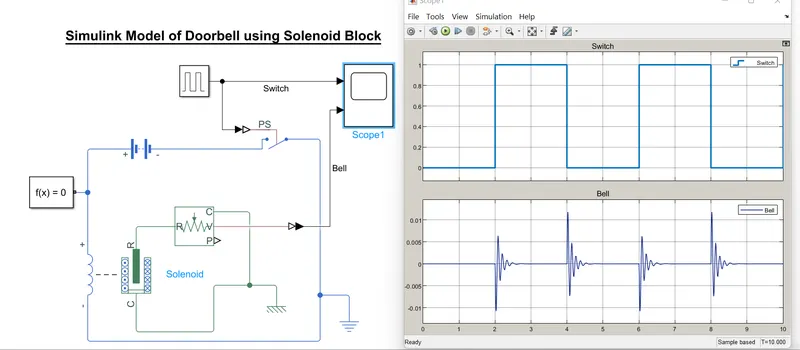
From the Graph we can see their is disturbance in the waveform of Bell this indicates it was active for 2secs, Upper graph is form the position of switch and the lower is for the Bell.
The MATLAB model is attached.
2. Use a thermistor to sense the temperature of a heater & turn on or turn off the fan as per the below conditions:
Temperature source: 20 °C from 0 to 10 seconds, 27 °C from 10 to 30 seconds, 23 °C from 30 to 50 seconds
Fan conditions: ON if the temperature above 25 °C, OFF otherwise
Ans= Following blocks are used for the simulink model:
Signal Builder: to put the condtions and simulate the thermistor.
Controlled Temperature Source: to maintian the temperature, and temperature differnece.
Thermistor: Temperature controll device.
Battery: to store energy
Voltage sensor: to sense the voltage
Solver Configuration: to solve the simulink model.
DC Motor: to start the fan or stop the fan (indicates the fan)
Controlled Source: to maintain specified voltage.
Ideal Rotational Motion Sensor: to sense the motion of the DC Motor.
Reference: (Electrical and Mechanical)
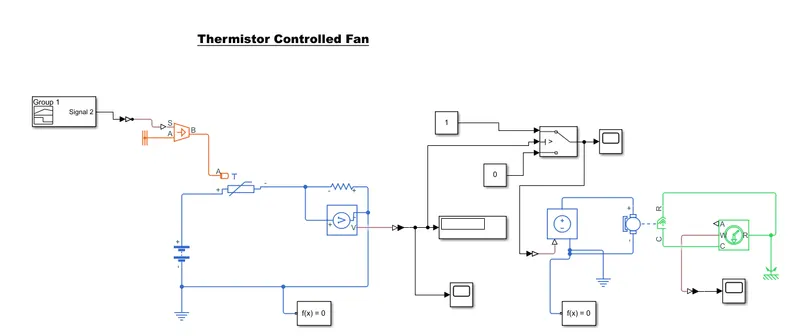
In signal Builder block all the necessary conditions are set,
Temperature source: 20 °C from 0 to 10 seconds, 27 °C from 10 to 30 seconds, 23 °C from 30 to 50 seconds (temp converted to kelvin)
Fan conditions: ON if the temperature above 25 °C, OFF otherwise
Threshold temperature is set for switch,
if the temperature is more than threshold signal will be high (1) and the switch will operate through it DC motor will be ON
if the temperature is less than threshold signal will be low (0) and the switch will not operate through it DC motor will be OFF
Ideal Rotational Motor sensor senses the motion of DC motor, it can be seen through the scope.
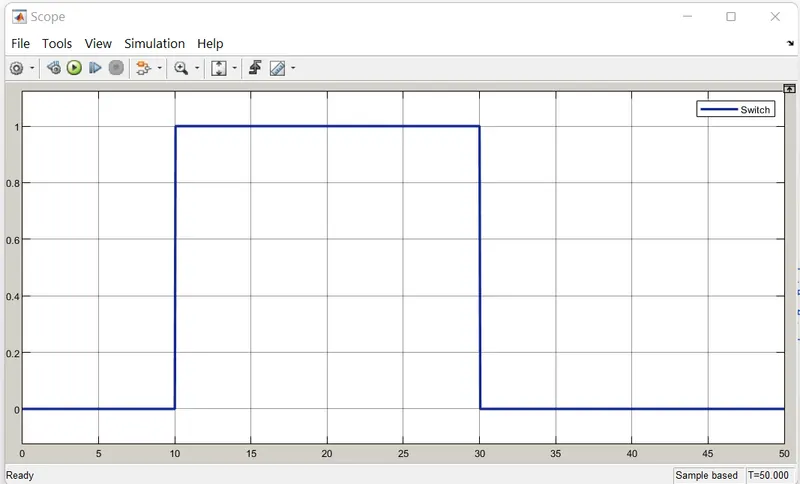
From 10 to 30 sec the switch is at 1, DC motor is ON. All other condition the switch is at 0 as the temperature is below the thershold temperature.
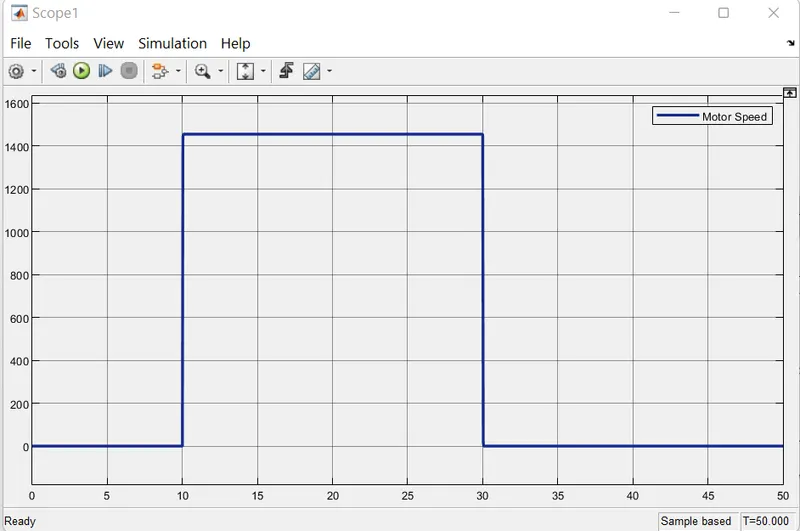
The motor speed is close to 1450 rpm from 10 to 30 secs when the temperature is more than the threshold, other time it is zero DC motor is in OFF state.
The Simulink model is attached.