Week 11 - Simulation of Flow through a pipe in OpenFoam
Fully developed internal flow:
Consider a fluid entering a circular pipe at a uniform velocity. Because of the no-slip condition, the fluid particles in the layer in contact with the wall of the pipe come to a complete stop. This layer also causes the fluid particles in the adjacent layers to slow down gradually as a result of friction. To make up for this velocity reduction, the velocity of the fluid at the mid-section of the pipe has to increase to keep the mass flow rate through the pipe constant. As a result, velocity gradient develops along the pipe.
The region of the flow in which the effects of the viscous shearing forces caused by fluid viscosity are felt is called the boundary layer. The thickness of this boundary layer increases in the flow direction until the boundary layer reaches the pipe center and thus fills the entire pipe and the velocity becomes fully developed a little farther downstream. The region from the pipe inlet to the point at which the velocity profile is fully developed is called the hydrodynamic entrance region and the length is called the hydrodynamic entrance length.
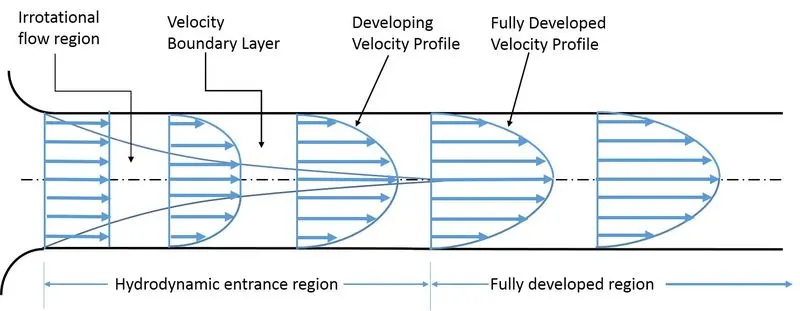
For a laminar flow, The hydrodynamic entrance length is given by the expression,
`L/D ~= 0.05Re`
Values:
Reynolds number: Re=2100
Diameter of the pipe = 0.004m
Length of the pipe = 1.2m
Dynamic viscosity of the working fluid (water) = 0.00009 pa.s
Hydrodynamic entrance length: L=0.05.Re.D = 0.05*2100*0.004 = 0.42m
Initially MATLAB is used to generate the blockMeshDict file for varying values of wedge angle.
MATLAB code for generating blockMeshDict file:
clear all
close all
clc

Re=2100;
D=0.004;
L=0.06*Re*D;
L_p=L+0.7;
r=D/2;
theta=4;
mu=0.89e-3;
rho=997;

v_avg=(Re*mu)/(rho*D);
v_max=2*(v_avg);
del_p=(8*mu*L_p*v_avg)/(r^2);
kinematic_p=del_p/rho;

R=linspace(0,(D/2),1000);

for i=1:length(R)
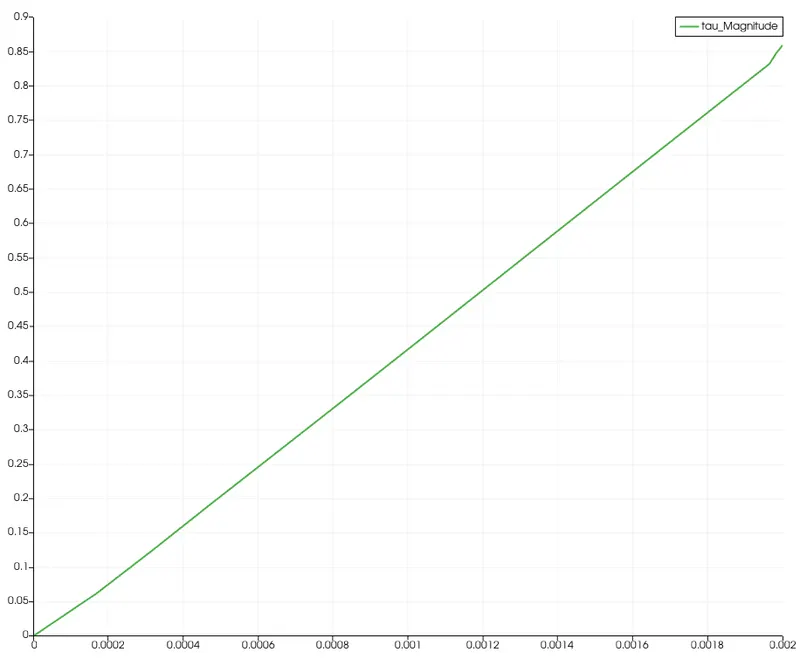
    tau(i)=2*mu*v_max*(abs(R(i)))/r^2;
end

plot(R,tau)
xlabel('Radius')
ylabel('Shear stress')
legend('Shear stress')

header1='/*------------------------------------------*- C++ -*------------------------------------*\';
header2=' =========                         |                                                       ';
header3='  \\      /  F ield                | OpenFOAM: The Open Source CFD Toolbox                 ';
header4='   \\    /   O peration            | Website: https://openfoam.org                         ';
header5='    \\  /    A nd                  | Version: 7                                            ';
header6='     \\/     M anipulation         |                                                       ';
header7='\* --------------------------------------------------------------------------------------*/';

f1=fopen('blockMeshDict','w');
fprintf(f1, '%s\n', header1);
fprintf(f1, '%s\n', header2);
fprintf(f1, '%s\n', header3);
fprintf(f1, '%s\n', header4);
fprintf(f1, '%s\n', header5);
fprintf(f1, '%s\n', header6);
fprintf(f1, '%s\n', header7);

fprintf(f1, 'FoamFile\n{\n');
fprintf(f1, '%12s \t 2.0;\n','version');
fprintf(f1, '%12s \t ascii;\n','format');
fprintf(f1, '%12s \t dictionary;\n','class');
fprintf(f1, '%12s \t blockMeshDict;\n','object');
fprintf(f1, '}\n');

header8='//***************************************************************************************//';
fprintf(f1, '%s\n\n', header8);
fprintf(f1, 'convertToMetres 1;\n\n');
fprintf(f1, 'vertices\n');
fprintf(f1, '(\n');

fprintf(f1, '\t (%d %d %d)\n',0,0,0);
fprintf(f1, '\t (%d %d %d)\n',0,r*cosd(theta/2),r*sind(theta/2));
fprintf(f1, '\t (%d %d %d)\n',0,r*cosd(theta/2),-r*sind(theta/2));
fprintf(f1, '\t (%d %d %d)\n',L_p,0,0);
fprintf(f1, '\t (%d %d %d)\n',L_p,r*cosd(theta/2),r*sind(theta/2));
fprintf(f1, '\t (%d %d %d)\n',L_p,r*cosd(theta/2),-r*sind(theta/2));
fprintf(f1, ');\n\n');

fprintf(f1, 'blocks\n');
fprintf(f1, '(\n');
fprintf(f1, '\t hex (0 3 5 2 0 3 4 1) (%d %d %d)',300,30,1);
fprintf(f1, 'SimpleGrading (1 0.1 1)\n\n');
fprintf(f1, ');\n\n');

fprintf(f1, 'edges\n');
fprintf(f1, '(\n');
fprintf(f1, '\t arc %d %d (%d %d %d)\n',1,2,0,r,0);
fprintf(f1, '\t arc %d %d (%d %d %d)\n',4,5,L_p,r,0);
fprintf(f1, ');\n\n');

fprintf(f1, 'boundary\n');
fprintf(f1, '(\n');
fprintf(f1, '\t inlet \n');
fprintf(f1, '\t {\n');
fprintf(f1, '\t\t type patch;\n');
fprintf(f1, '\t\t faces \n');
fprintf(f1, '\t\t (\n');
fprintf(f1, '\t\t\t (0 1 2 0)\n');
fprintf(f1, '\t\t );\n');
fprintf(f1, '\t }\n');

fprintf(f1, '\t outlet\n');
fprintf(f1, '\t {\n');
fprintf(f1, '\t\t type patch;\n');
fprintf(f1, '\t\t faces\n');
fprintf(f1, '\t\t (\n');
fprintf(f1, '\t\t\t (3 5 4 3)\n');
fprintf(f1, '\t\t );\n');
fprintf(f1, '\t }\n');

fprintf(f1, '\t top\n');
fprintf(f1, '\t {\n');
fprintf(f1, '\t\t type wall;\n');
fprintf(f1, '\t\t faces\n');
fprintf(f1, '\t\t (\n');
fprintf(f1, '\t\t\t (1 4 5 2)\n');
fprintf(f1, '\t\t );\n');
fprintf(f1, '\t }\n');

fprintf(f1, '\t front\n');
fprintf(f1, '\t {\n');
fprintf(f1, '\t\t type wedge;\n');
fprintf(f1, '\t\t faces\n');
fprintf(f1, '\t\t (\n');
fprintf(f1, '\t\t\t (0 3 4 1)\n');
fprintf(f1, '\t\t );\n');
fprintf(f1, '\t }\n');

fprintf(f1, '\t back\n');
fprintf(f1, '\t {\n');
fprintf(f1, '\t\t type wedge;\n');
fprintf(f1, '\t\t faces\n');
fprintf(f1, '\t\t (\n');
fprintf(f1, '\t\t\t (0 2 5 3)\n');
fprintf(f1, '\t\t );\n');
fprintf(f1, '\t }\n');

fprintf(f1, '\t axis\n');
fprintf(f1, '\t {\n');
fprintf(f1, '\t\t type empty;\n');
fprintf(f1, '\t\t faces\n');
fprintf(f1, '\t\t (\n');
fprintf(f1, '\t\t\t (0 3 3 0)\n');
fprintf(f1, '\t\t );\n');
fprintf(f1, '\t }\n');
fprintf(f1, '); \n\n');

fprintf(f1, 'mergePatchPairs\n');
fprintf(f1, '(\n');
fprintf(f1, ');\n');

header9='//***************************************************************************************//';
fprintf(f1, '%s\n',header9);

fclose(f1);
Then Cavity tutorial is selected for a steady state iteration in openFOAM.
blockMeshDict generated from MATLAB is used to form the mesh in openFOAM.
MATLAB generated blockMeshDict file:
/*------------------------------------------*- C++ -*------------------------------------*\
 =========                         |
  \\      /  F ield                | OpenFOAM: The Open Source CFD Toolbox
   \\    /   O peration            | Website: https://openfoam.org
    \\  /    A nd                  | Version: 7
     \\/     M anipulation         |
\* --------------------------------------------------------------------------------------*/
FoamFile
{
     version 	 2.0;
      format 	 ascii;
       class 	 dictionary;
      object 	 blockMeshDict;
}
//***************************************************************************************//

convertToMetres 1;

vertices
(
	 (0 0 0)
	 (0 1.998782e-03 6.979899e-05)
	 (0 1.998782e-03 -6.979899e-05)
	 (1.204000e+00 0 0)
	 (1.204000e+00 1.998782e-03 6.979899e-05)
	 (1.204000e+00 1.998782e-03 -6.979899e-05)
);

blocks
(
	 hex (0 3 5 2 0 3 4 1) (300 30 1)SimpleGrading (1 0.1 1)

);

edges
(
	 arc 1 2 (0 2.000000e-03 0)
	 arc 4 5 (1.204000e+00 2.000000e-03 0)
);

boundary
(
	 inlet
	 {
		 type patch;
		 faces
		 (
			 (0 1 2 0)
		 );
	 }
	 outlet
	 {
		 type patch;
		 faces
		 (
			 (3 5 4 3)
		 );
	 }
	 top
	 {
		 type wall;
		 faces
		 (
			 (1 4 5 2)
		 );
	 }
	 front
	 {
		 type wedge;
		 faces
		 (
			 (0 3 4 1)
		 );
	 }
	 back
	 {
		 type wedge;
		 faces
		 (
			 (0 2 5 3)
		 );
	 }
	 axis
	 {
		 type empty;
		 faces
		 (
			 (0 3 3 0)
		 );
	 }
);

mergePatchPairs
(
);
//***************************************************************************************//
'blockMesh' command is used to form the required mesh and is checked using 'checkMesh' command.
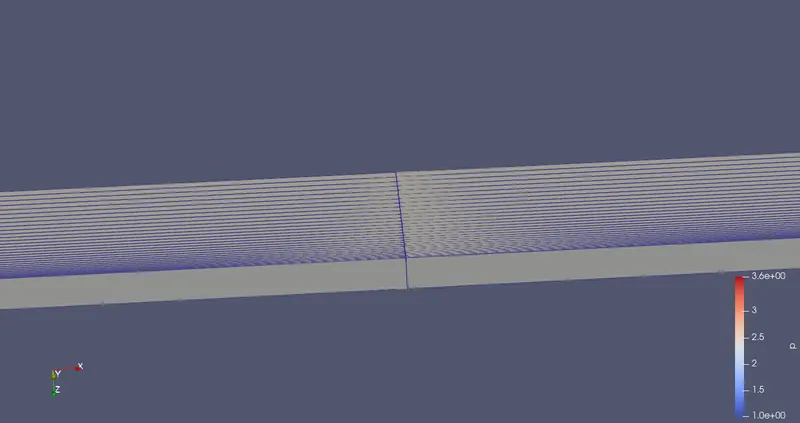
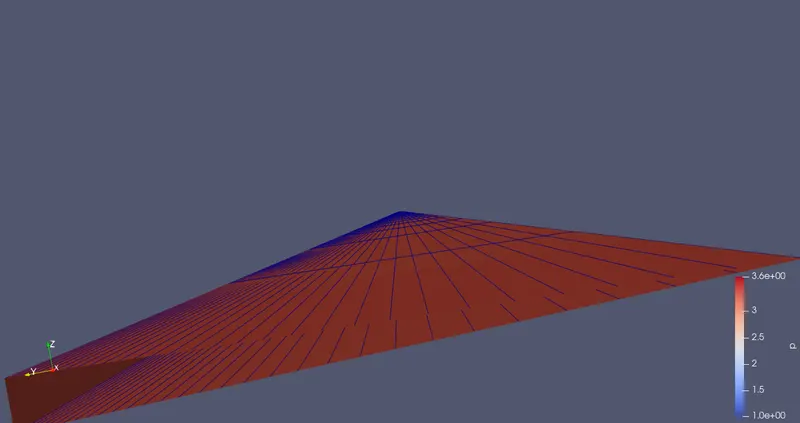
After meshing is done and checked, controlDict,U and p files are modified for the current case.
controlDict file:
/*--------------------------------*- C++ -*----------------------------------*\
| =========                 |                                                 |
| \\      /  F ield         | OpenFOAM: The Open Source CFD Toolbox           |
|  \\    /   O peration     | Version:  v2012                                 |
|   \\  /    A nd           | Website:  www.openfoam.com                      |
|    \\/     M anipulation  |                                                 |
\*---------------------------------------------------------------------------*/
FoamFile
{
    version     2.0;
    format      ascii;
    class       dictionary;
    location    "system";
    object      controlDict;
}
// * * * * * * * * * * * * * * * * * * * * * * * * * * * * * * * * * * * * * //

application     icoFoam;

startFrom       startTime;

startTime       0;

stopAt          endTime;

endTime         1;

deltaT          0.001;

writeControl    timeStep;

writeInterval   20;

purgeWrite      0;

writeFormat     ascii;

writePrecision  6;

writeCompression off;

timeFormat      general;

timePrecision   6;

runTimeModifiable true;


// ************************************************************************* //
p file:
/*--------------------------------*- C++ -*----------------------------------*\
| =========                 |                                                 |
| \\      /  F ield         | OpenFOAM: The Open Source CFD Toolbox           |
|  \\    /   O peration     | Version:  v2012                                 |
|   \\  /    A nd           | Website:  www.openfoam.com                      |
|    \\/     M anipulation  |                                                 |
\*---------------------------------------------------------------------------*/
FoamFile
{
    version     2.0;
    format      ascii;
    class       volScalarField;
    object      p;
}
// * * * * * * * * * * * * * * * * * * * * * * * * * * * * * * * * * * * * * //

dimensions      [0 2 -2 0 0 0 0];

internalField   uniform 0;

boundaryField
{
    inlet
    {
        type            zeroGradient;
    }

    outlet
    {
        type            fixedValue;
        value uniform 1.0073;
    }

    axis
    {
        type            empty;
    }

    top
    {
        type            zeroGradient;
    }

    front
    {
	type		wedge;
    }

    back
    {
	type 		wedge;
    }

}

// ************************************************************************* //
U file:
/*--------------------------------*- C++ -*----------------------------------*\
| =========                 |                                                 |
| \\      /  F ield         | OpenFOAM: The Open Source CFD Toolbox           |
|  \\    /   O peration     | Version:  v2012                                 |
|   \\  /    A nd           | Website:  www.openfoam.com                      |
|    \\/     M anipulation  |                                                 |
\*---------------------------------------------------------------------------*/
FoamFile
{
    version     2.0;
    format      ascii;
    class       volVectorField;
    object      U;
}
// * * * * * * * * * * * * * * * * * * * * * * * * * * * * * * * * * * * * * //

dimensions      [0 1 -1 0 0 0 0];

internalField   uniform (0 0 0);

boundaryField
{
    inlet
    {
        type            fixedValue;
        value           uniform (0.4686 0 0);
    }

    outlet
    {
        type            zeroGradient;
    }

    axis
    {
        type            empty;
    }

    top
    {
        type            fixedValue;
        value  uniform  (0 0 0);
    }

    front
    {
        type            wedge;
    }

    back
    {
        type            wedge;
    }
}

// ************************************************************************* //
'icoFoam' command is used to run the simulation.
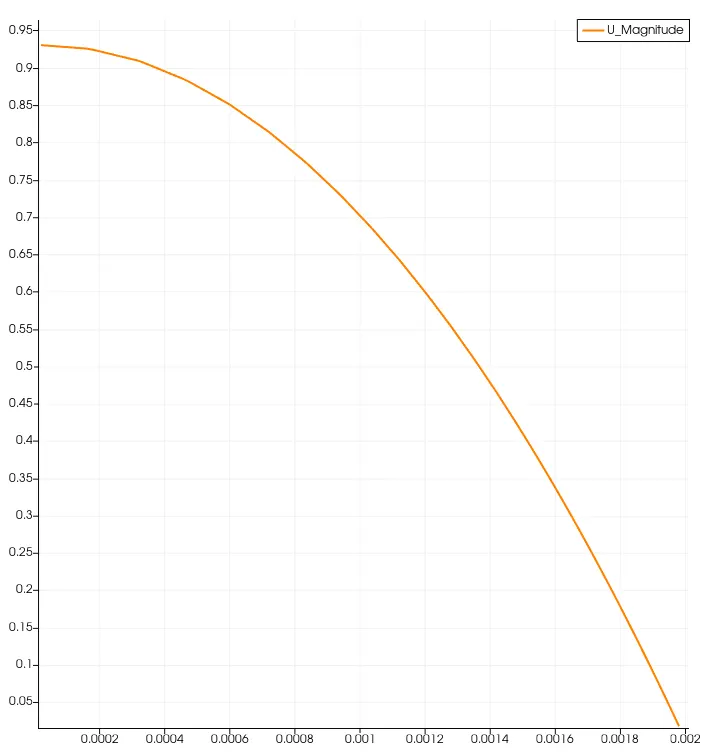
Velocity profile:
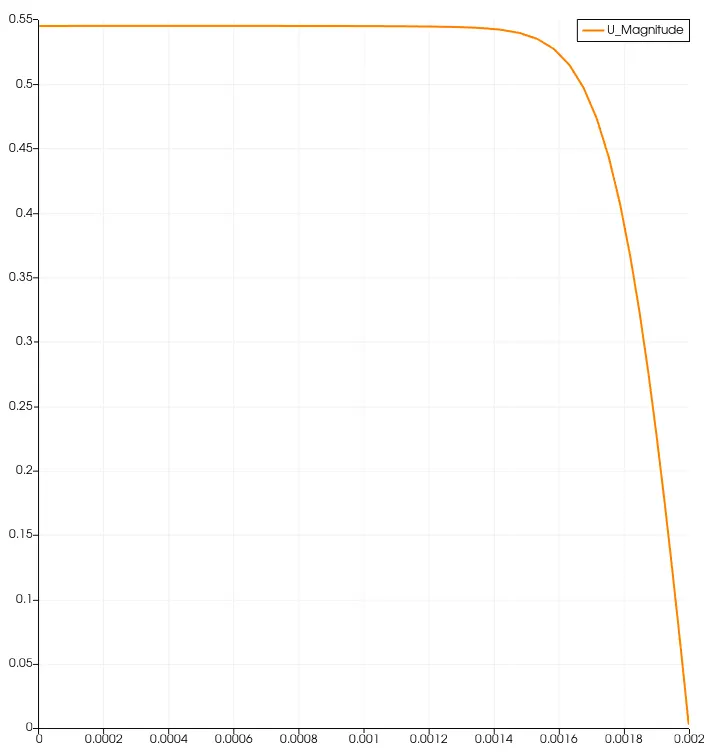
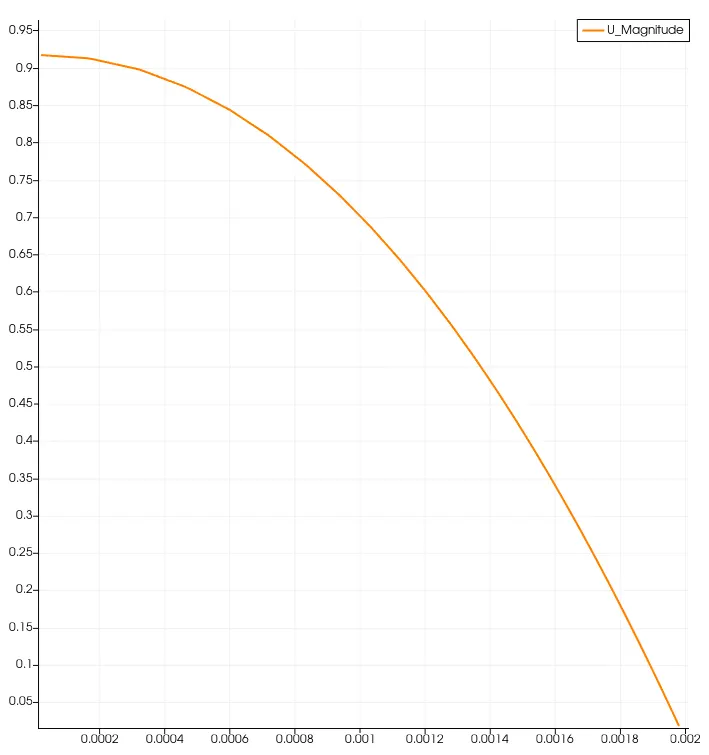
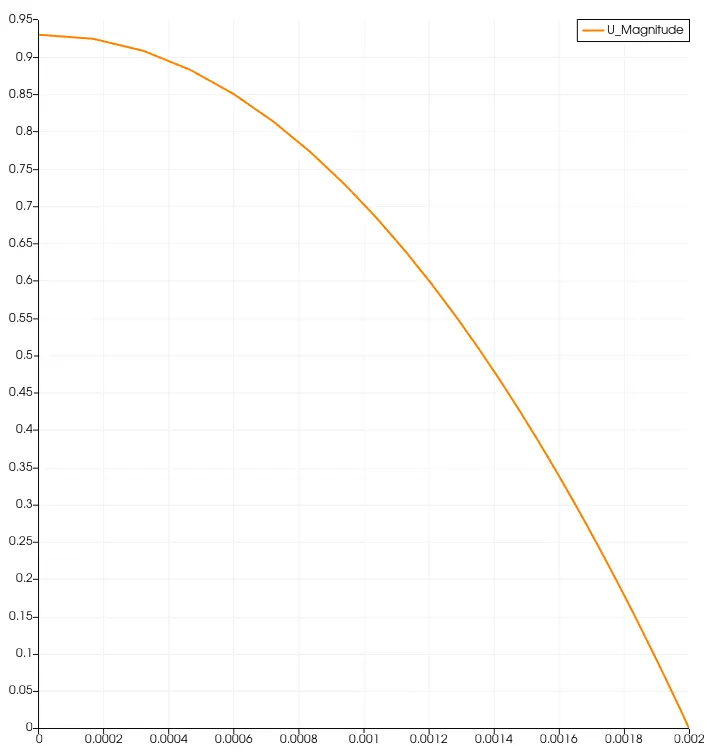
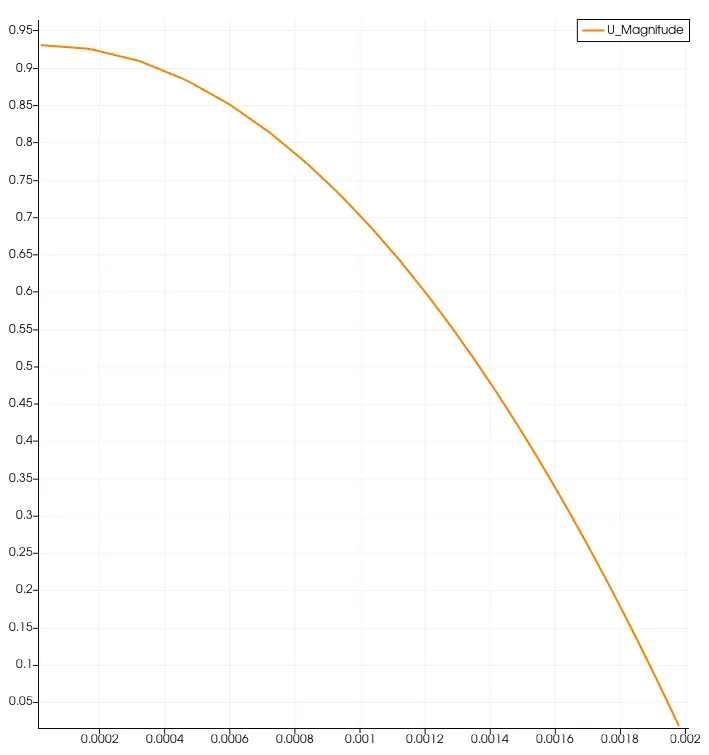
All the velocity graphs below show the velocity at m/s over the y-axis corresponding to the pipe length in metres over the x-axis
velocity profile at 0.2m of pipe length:
velocity profile at 0.4m of pipe length:
velocity profile at 0.6m of pipe length:
velocity profile at 0.8m of pipe length:
velocity profile at 1m of pipe length:
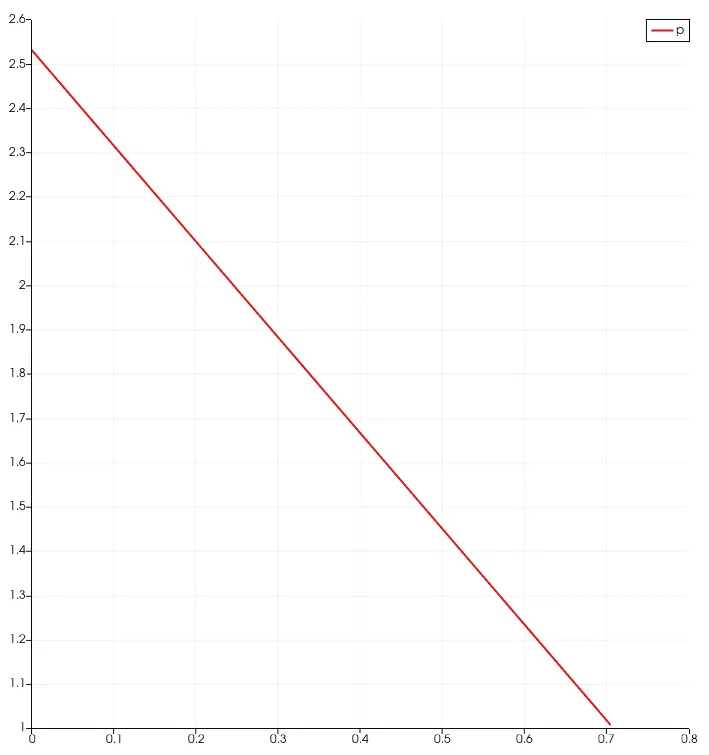
Pressure profile:
Shear stress: