Week 1- Mixing Tee
AIM:
Have to created two versions of the mixing tee. One of them is longer than the other.Use the k-epsilon and k-omega SST model for the first case and based on your judgment use the more suitable model for further cases.
- Case 1
- Short mixing tee with a hot inlet velocity of 3m/s.
- Momentum ratio of 2, 4.
- Case 2
- Long mixing tee with a hot inlet velocity of 3m/s.
- Momentum ratio of 2, 4.
Momentum ratio = velocity at cold inlet / velocity at hot inlet.
PROCEDURE:
Case 1 :
SHORT MIXING TEE:
Download the short mixing tee model from the skill lync challange page.
the ansys workbench is opened,then the flow fluid (fluent) is opened.now the open the geometric by double click it.
the space claim is opened then the model is uploaded.this tee is solid so do the volume extrxction by using the volume extract option.
after completing the geometry in the space claim update the model in the ansys workbench.
MESHING OF SHORT MIXING TEE:
Now double click on meshing in the ansys workbench, the interface of the meshing is opened .
The model is updated in this mesh. now open meshing - generate, the mesh is generated.
By using the new section plane button to cut the model geometry into half, so in the insert tool bar - temperature - 300

SETUP OF THE SHORT MIXING TEE:
after completing the meshing of the model now open the setup bar in the ansys workbench by double click.
by clicking the double precesion andd enable four processor .
check the mesh quality of the model and that result shows in the console tap.
in the setup physics - pressure based solver - obsolute - energy equation - k- epsilon - realizable - standard wall function is carried out by puting the respective input as per in the video.
Now in the material tap cell zones and bounderies are assigned.
inlet X - Velocity - 3m/s and 36 degree ccelcius.
inlet Y - velocity - 3 m/s and temp - 19Degree celcius.
outlet - gauge pressure = 0
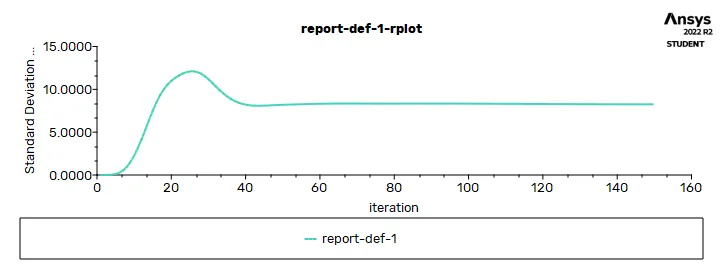
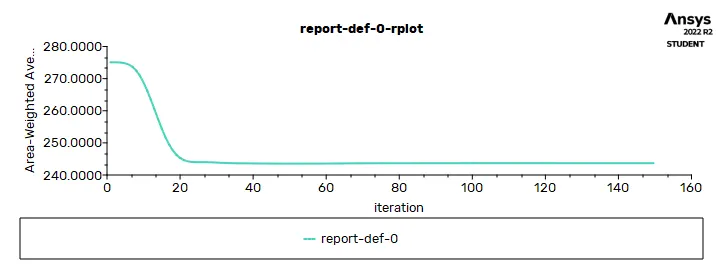
Now in the solving tap create the reportfile for standard devation and temperature variance
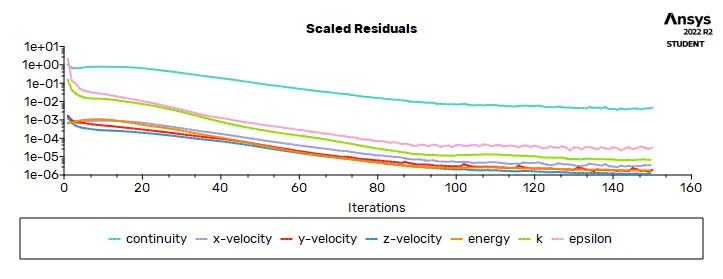
and also residue is created.
after doing all this start intialize hybrid method.
Run calculation with 150 iteration..
the total resuidal plot of the short mixing tee;
the velocity contour plot of the short mixing tee;
the temperature contour plot of the short mixing tee;
POST PROCESSING OF THE SHORT MIXING TEE:
Back to work bench and see result and off the ansys fluent.
wall - rendring - apply. transperincy, insert location plane - plane z = 0 - apply.
wall - render - bit more transparent - change color as white.
after this pre processeser update in the ansys workbench the flow simulation of the mixing tee is succesfully carried out.
Case 2 :
LONG MIXING TEE:
Download the short mixing tee model from the skill lync challange page.
the ansys workbench is opened,then the flow fluid (fluent) is opened.now the open the geometric by double click it.
the space claim is opened then the model is uploaded.this tee is solid so do the volume extrxction by using the volume extract option.
after completing the geometry in the space claim update the model in the ansys workbench.
MESHING OF LONG MIXING TEE:
Now double click on meshing in the ansys workbench, the interface of the meshing is opened .
The model is updated in this mesh. now open meshing - generate, the mesh is generated.
By using the new section plane button to cut the model geometry into half, so in the insert tool bar - temperature - 300

SETUP OF THE LONG MIXING TEE:
after completing the meshing of the model now open the setup bar in the ansys workbench by double click.
by clicking the double precesion andd enable four processor .
check the mesh quality of the model and that result shows in the console tap.
in the setup physics - pressure based solver - obsolute - energy equation - k- epsilon - realizable - standard wall function is carried out by puting the respective input as per in the video.
Now in the material tap cell zones and bounderies are assigned.
inlet X - Velocity - 3m/s and 36 degree ccelcius.
inlet Y - velocity - 3 m/s and temp - 19Degree celcius.
outlet - gauge pressure = 0
Now in the solving tap create the reportfile for standard devation and temperature variance
and also residue is created.
after doing all this start intialize hybrid method.
Run calculation with 150 iteration..
POST PROCESSING OF THE LONG MIXING TEE:
Back to work bench and see result and off the ansys fluent.
wall - rendring - apply. transperincy, insert location plane - plane z = 0 - apply.
wall - render - bit more transparent - change color as white.
after this pre processeser update in the ansys workbench the flow simulation of the mixing tee is succesfully carried out.
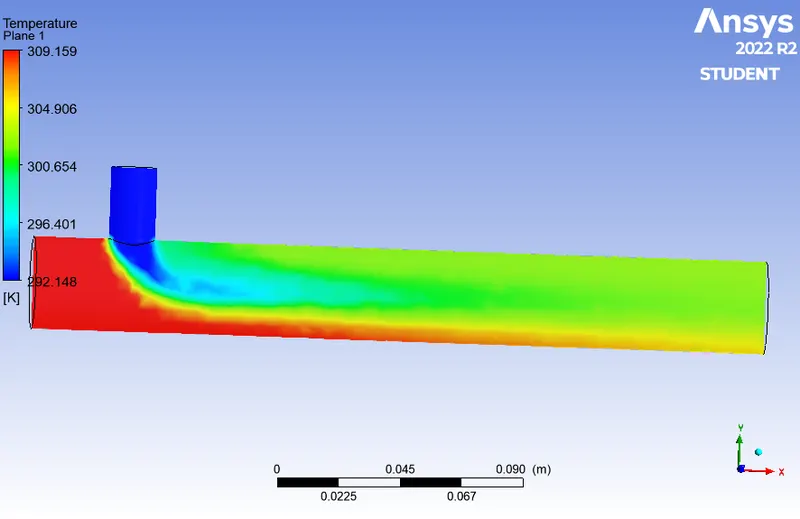
the temperature plot of the long mixee tee,
the velocity flow of the long mixing tee:
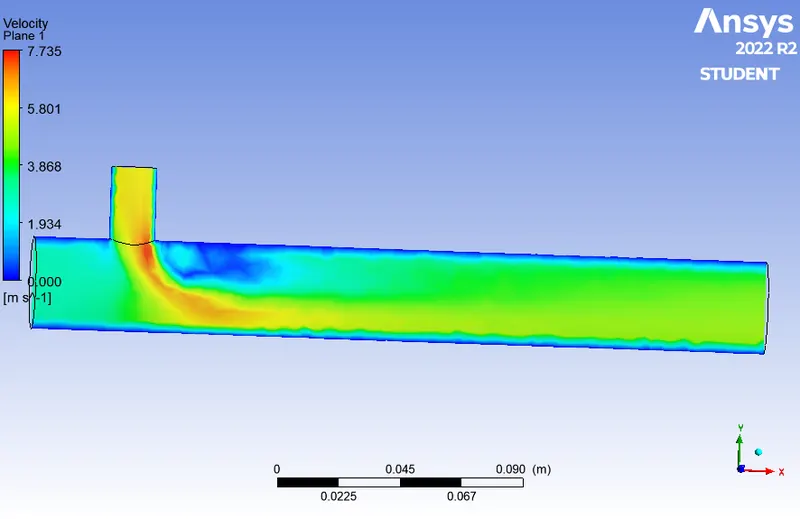
the velocity contour plots of the long mixing tee:
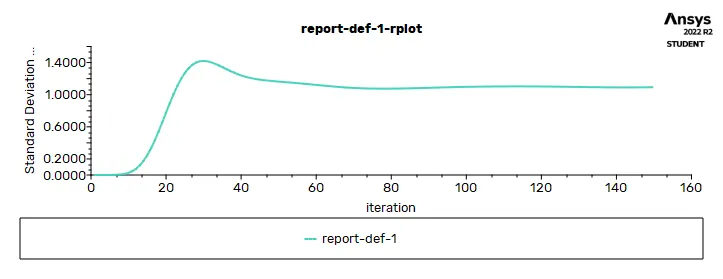
the temperature contour plot of the long mixing tee:
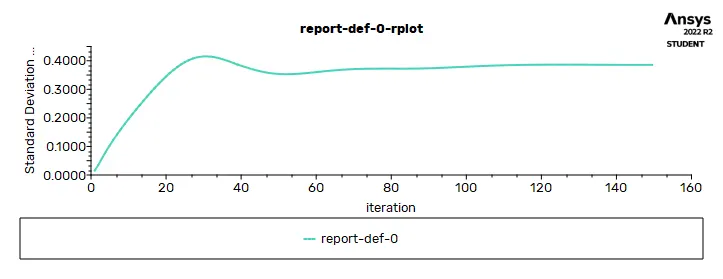
the total resuidal plots of the long mixing tee:
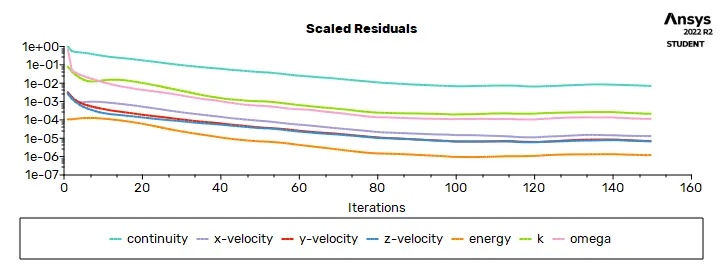
RESULTS:
The length of the model is also one of the affecting factor of the simulation.because the velocity and temperature have some desired changes with depand on the length of the tee.
so the tee need the specific flow velocity and specific temperature is requried for the respective tee.
Momentum ratio is also important in the simulation of the mixing tee.because the momentum ratio depands on the velocity of the hot inlet by velocity of cold inlet.
hence the velocity annd temperature is changed if momentum ratio is changed.