Sketch a G+1 residential plan according to Vaastu Shastra and Calculation of Loads as per IS code
Aim of the project-
- To sketch a G+1 floor residential plan according to Vastu Shastra and to list down the names of structural drawings required to be provided to the site for construction.
- To assume the size of structural elements (Column, Beam, slab, etc) and to calculate the loads from the members as per IS code.
INTRODUCTION:
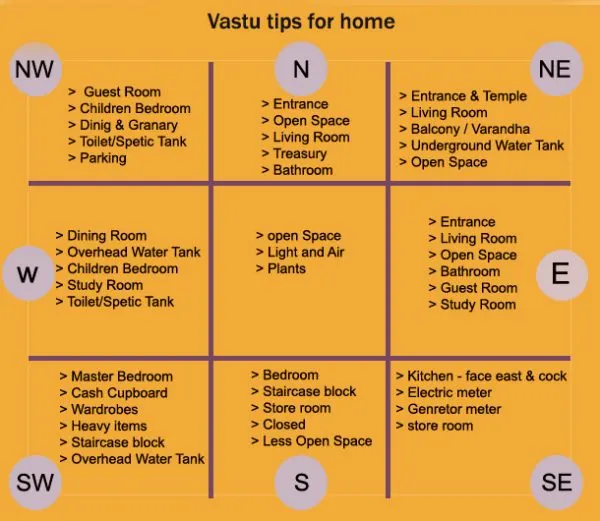
- Vastu Shastra is the ancient Indian science of architecture and acts as a guideline to design your home in the way that enhances positive energy
- Our nature is abundant with powerhouses of energy sources like the sun, wind, moon, wat earth and fire
- Effect of sunrays, flow of winds, pull of earth's magnetic field and other such cosmic energ
- A good home needs to radiate the right kind of energy
- A person dwelling in a house comes under the influence of a specific energy field which comes under the influence of specific energy field
- Architectural changes are not possible for a ready to move in house
- 4 cardinal directions in vaastu shastra are as follows
NORTH, EAST, WEST and SOUTH
- 4 inter cardinal directions in vaastu shastra are given below
NORTHEAST, NORTH WEST, SOUTH EAST and SOUTH WEST
- Significance of directions
North –Wealth
South –Dharma
West –Prosperity
East – Prosperity
Basic principles of vaastu shastra are as follows
- Shape: The rooms of your house should preferably be square or rectangular
- Room Basics:Rooms should be airy, well lit, bright, and clean. This rule also extends to the corners of each room.
- Home Centre:The centre of the house should be an empty space.
- Stairs and Furniture:Heavy furniture (like almira etc.) should be kept in the South-west direction. If you are planning to build a duplex house, building stairs in this direction is a good idea.
- Water:Avoid keeping plants and water features like a water fountain, aquarium, painting depicting water, etc. in the bedroom.
- Dining Table:Ensure that your dining space is near the kitchen and not the main door.
- Mirror Placement:Placing a mirror in the bedroom that reflects the sleeping couple is a strict no-no. If at all you place a mirror in the bedroom, ensure that the bed cannot be seen in it.
Vastu Shastra followed during planning is-
- Entrance of the house is provided in the east direction which is the symbol of progress in life.
- Living room is placed in north east direction.
- Master bedroom is placed in south west position this direction brings good health and prosperity.
- Kitchen is placed in south east direction.
- Study room is placed in east direction.
- Staircase is placed at Northwest corner.
- Bathroom, WC and toilet is placed in West direction.
g+1 story building according to vastu , all plan is sketch by using autocad
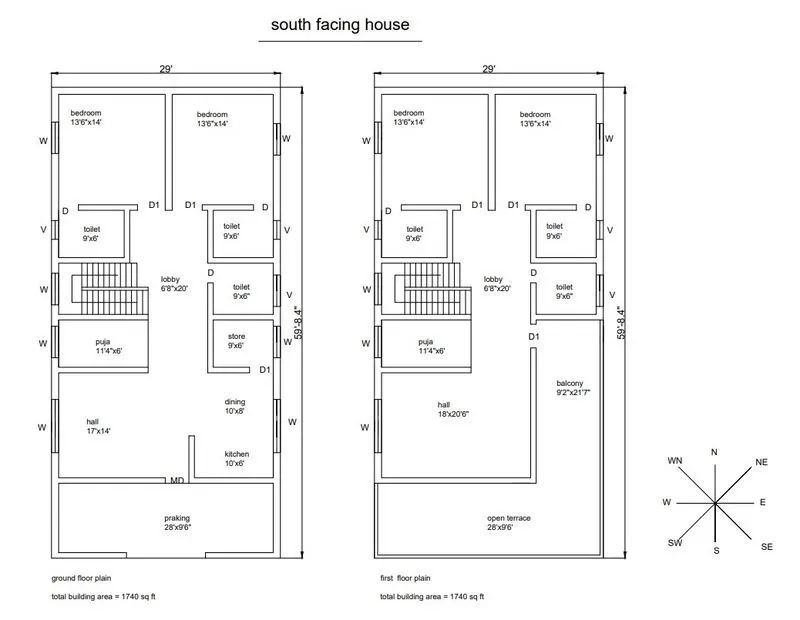
Ground Floor plan -
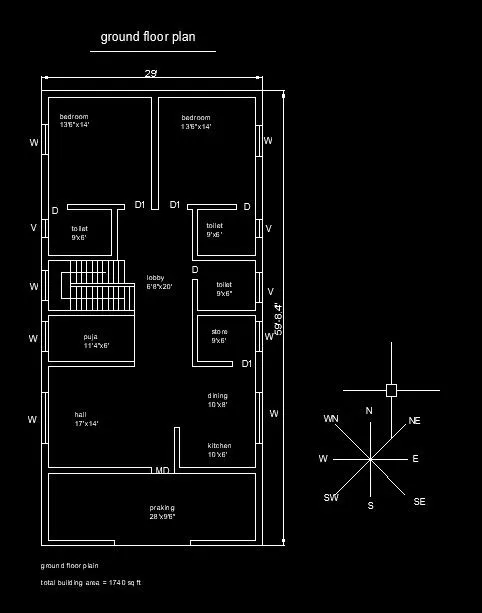
Dimensions of Ground Floor plan-
bed room = 13'6" x 14'
toilet = 9' x 6'
hall = 17' x 14'
puja = 11'4" x 6'
kitchen = 10' x 6'
store = 9' x 6'
dinning = 10' x 8'
parking = 28' x 9'6"
--------------------------
First Floor plan -
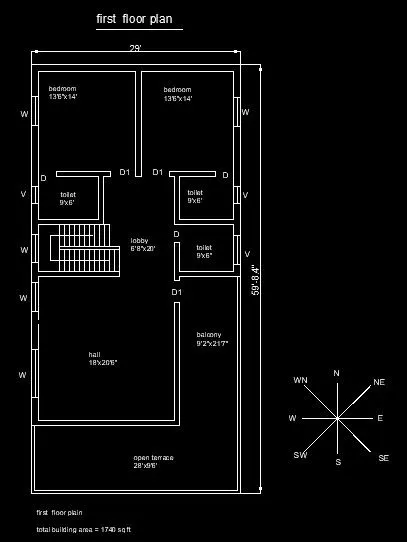
Dimensions of First Floor Plan-
bed room = 13'6" x 14'
toilet = 9' x 6'
hall = 18' x 20'6"
balcony = 9'2" x 21'7"
open terrace = 28' x 9'6"
Other dimensions
-Thickness of internal wall- 0.15m (150mm)
-Thickness of external wall- 0.23m (230mm)
-Thickness of slab- 0.25m (250mm)
-Dimensions of column – 0.3m X 0.3m
-Dimensions of beam-0.3m X 0.45m
-Height of the wall of each floor- 3m
List of drawings provided at the construction project
- Centre line drawing
- Footing and column layout with reinforcement details
- Column schedule with reinforcement details
- Plinth beam layout without reinforcement details
- First floor beam layout without reinforcement details
- First floor slab layout without reinforcement details
- Lift pit and headroom reinforcement details
CALCULATION :
- Dead load
- COLUMN
- Dimension of column= 0.3m X 0.3m (300mm X 300mm)
- Height of column= (Slab thickness X 2) + (Height of wall for each floor X 2) = (0.25 X 2) + (3 X 2) = 6.5m
- Total volume of concrete = 0.3 X 0.3 X 6.5 = 0.585m3.
- Unit weight of RCC= 25KN/m3.
- Dead load of column= 25 X 0.585=14.62KN.
- BEAM
- Dimension of beam= 0.3m X 0.45m (300mm X 450mm)
- Total volume of concrete = 0.3 X 0.45 X 1 = 0.135m3.
- Unit weight of RCC= 25KN/m3.
- Dead load of beam= 25 X 0.135=3.375KN (per meter)
- SLAB -
- Slab is always designed for the span of 1m.
- Hence assume size of slab as 1m X 1m.
- Thickness of slab= 0.25m
- Density of RCC= 25KN/m3.
- Self-weight of slab= 1 X 1 X 0.25 X 25= 6.25KN. ( Per meter square )
- WALLS
-Dead load of external wall
- Thickness of External wall = 0.23m. (230mm)
- Unit weight of brick wall= 20KN/m3
- Height of wall = 3m.
- Load of wall on beam= 3 X 0.23 X 20= 13.8KN.
-Dead load of internal wall
- Thickness of Internal wall = 0.15m. (150mm)
- Unit weight of brick wall= 20KN/m3
- Height of wall = 3m.
- Load of wall on beam= 3 X 0.15 X 20= 9KN.
- Live load
(According to IS 875 Part 2)
- Bed room= 2KN/m2
- Living room= 2KN/m2
- Bath=2KN/m2
- Terrace = 3KN/m2
- Toilet= 2KN/m2
- Staircase= 3KN/m2
- Kitchen= 2KN/m2
- Wind load calculation-
Wind load is designed only when the height of the building exceeds 10m.
The height of designed building is 6.5m which is less than 10m.
So, the calculation of wind load is not required.
REFERENCES :
IS 875:1987, Part 1 for Dead load
IS 875:1987, Part 2 for Live load
IS 875:1987, Part 3 for Wind load
IS 456:2000, for Reinforced Concrete.
Results;
- A G+1 floor residential plan, according to Vaastu Shastra was sketched , using autocad
- Listed down the names of the structural drawings required to be provided to the site for construction.
- By assuming the sizes of the structural elements (Column, Beam, Slab, etc.,) individual corresponding loads from the members was calculated as per IS code.