Section Modulus calculation and optimization
Aim: Calculate the Section Modulus of the Hood Design.
Formula:
Section Modulus:
Section Modulus is a geometric property for a given cross-section to resist the bending motion. The higher the section modulus, the more resistance to bending is offered at that cross-section.
Procedure:
- We will take a section of our hood assembly in the z-z axis.
- We will use the Intersection command and intersect between the hood assembly and yz-plane.
- We only want the top line of the hood's outer panel and the bottom line of the hood's inner panel so we will use split to cut all unwanted lines.
- We will join all the gaps using the line command's point-point option.
- Now we will create a surface by using the fill command inside the curve.
- After creating the surface, we will use Measure Inertia 2D option in the Measure Inertia command which will give us Moment of Inertia (I).
- To calculate the distance of the neutral axis, from the end of the object, we will measure the distance between two ends of the section and divide it by two.
- We will put all the values we got in the given formula which will give us section modulus.
Modification:
- To improve the section modulus of our cross-section, we will modify our section so that the value of inertia increases.
- First we will offset a plane from the yz-axis for creating a sketch.
- Now in the sketch we will project the line of the surface by using Project 3D Elements command.
- After the project, we will isolate the sketch.
- We cannot change the upper profile as it of outer hood panel surface so we will modify the lower profile.
- We will offset the middle line by 1 mm, increasing our ‘I’ value.
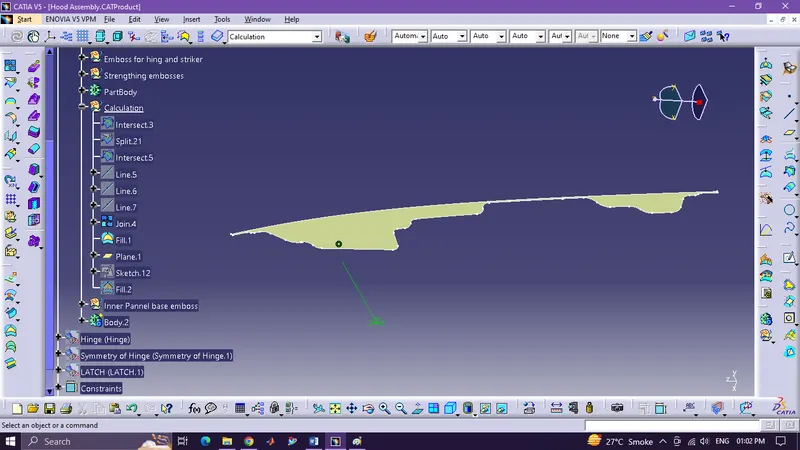
Before
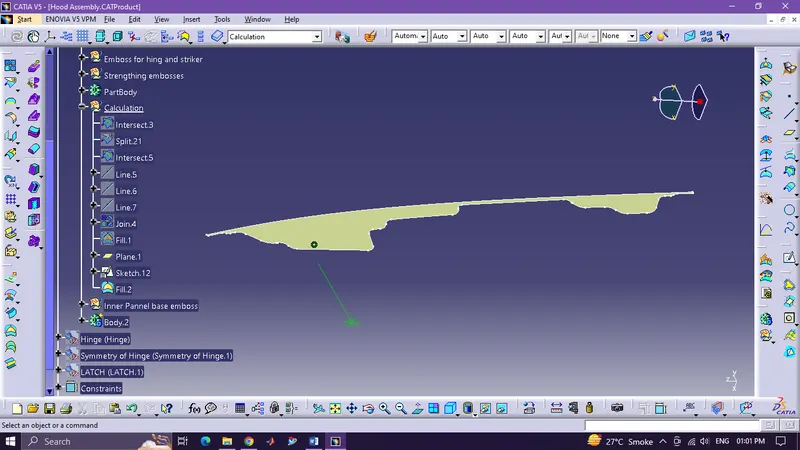
After
Original calculation
`S=1036000/242.5306`
S=4271.628mm^3
Modified Calculation
`S=1060000/242.5305`
S=4987.531mm^3