REVIT_Usage of Collabrate tool_Week 6
- 1.Open an architectural template. Using the Manage tab set project base point and project shared coordinates for the project
Ans) AIM: To set project base point and project shared coordinates for the project.
TOOLS USED:
Collaborate
Architectural -> grids
Manage -> sepecify coordinates at a point
PROCEDURE:
- Firstly save the project as Residendial building_Architectural
- Select the archictural tab and select the grids icon.
- Now draw the grids and name them accordingly.
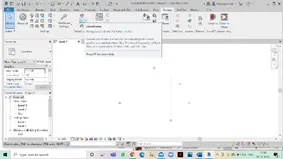
- Select the manage tab and select sepecify coordinates at point option.
- Now select a grid and sepecify its location as 0'0" to use it as datum.
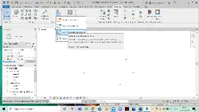
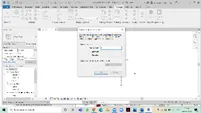
- Now repeate the previous step with another grid that we have drawn
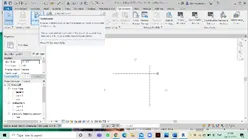
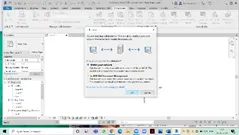
- Now select the collaborate tab and collaborate the drawing.
-
RESULT:
Hence the base points are changed and the project file is ready to collaborate.
- 2.Open another new file but with a structural template. Using manage tab set project parameters the same as the architectural model. Copy the parameters from the architectural model to the structural template or enter the parameters manually into the structural model
Ans) AIM:To create a structural template and using manage tab select the parameters and repeate the same as architectural template.
TOOLS USED:
Collaborate
Structural -> grids
Manage -> sepecify coordinates at a point
PROCEDURE:
- Firstly save the project as Residendial building_Structural.
- Select the archictural tab and select the grids icon.
- Now draw the grids and name them accordingly.
- Select the manage tab and select sepecify coordinates at point option.
- Now select a grid and sepecify its location as 0'0" to use it as datum.
- Now repeate the previous step with another grid that we have drawn.
- Now select the collaborate tab and collaborate the drawing.
- 3.Re-open the architectural model. Using the tools under the Collaborate tab make the architectural model a central model ( enabling simultaneous working on the model )
Ans) AIM: To collaborate the architectural and structural drawings.
TOOLS USED:
Collaborate
Manage -> manage links
PROCEDURE:
- Firstly open the architectural file that we have perviously saved.
- Select the collaborate tab and select the collaborate icon.
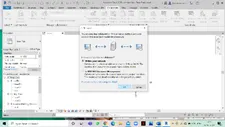
- A dialog box appears and we can see different options that are present, select with the network option and click ok.
RESULT: Hence the projects are collaborated .
4.Question: Create the Grids Longitudinal and Transverse pattern for the project similar to the task done in Week 2.
Ans) AIM: To Create the Grids Longitudinal and Transverse pattern for the project.
TOOLS USED:
Architectural -> grids
PROCEDURE:
- Firstly open a new file with arechitectural templete.
- Now click on architectural tab and select grids option.
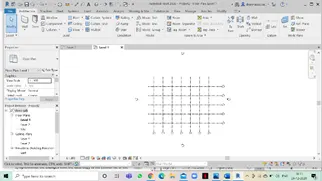
- Now draw the grids with equivalant distances.
- Draw the grids horizontally and vertically.
- Rename the grids as per the NBC standards.
RESULT:
Hence Grids Longitudinal and Transverse pattern are obtained.
5.Synchronize the changes from the local copy to the central file of the architectural model.
Ans) AIM: To Synchronize the changes from the local copy to the central file of the architectural model.
TOOLS USED:
Collaborate -> synchronize tab
PROCEDURE:
- Firstly open the revit file.
- Now select the collaborate tab and select synchronize tab and click ok.
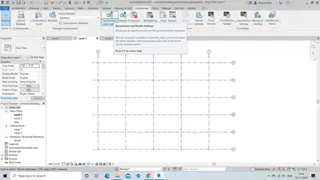
- The drawing will be synchronized with the central file.
RESULT:
Hence the synchronization of local copy to central copy is done.
6) Open the structural model and using the collaborate tools to save the model as a central file.
Ans) AIM: To Open the structural model and using the collaborate tools to save the model as a central file.
TOOLS USED:
Collaborate
PROCEDURE:
- Firstly open a new file with structural template .
- Select the collaborate tab and select collaborate icon.
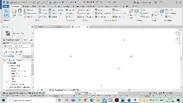
- Select the collaborate tab within your network and save it as saving for the first time it will make a central file.
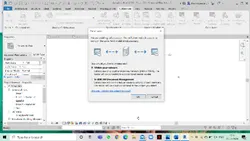
RESULT:
Hence the structural model is been collaborated .
7) Under the Collaborate tab, select the grids and levels from the architectural model, and using Copy Monitor try to copy the grids to the structural model. See what happens when the copy monitored grid is moved around in the structural model
Ans) AIM: Under the Collaborate tab, select the grids and levels from the architectural model, and using Copy Monitor try to copy the grids to the structural model.
TOOLS USED:
Collaborate -> copy monitor -> select link -> copy
PROCEDURE:
- Firstly open the architectural tab and select the collaborate tab .
- Now select the copy monitor option and under that select the select link option so that the structural drawing is been linked.
- Select the grids and levels and select the multiple and select copy option.
- Now select the finish command.
- Now open the structural templete file, we could see the grids and columns in it.
RESULT:
Hence the grids are coppied to the structural model.
8) Create another new file with a construction template. Save the new file as a central model. This file will include both architectural and structural model. Under the manage tab, Click manage links to link both architectural and structural files. Save the file and close all the files.
Ans) AIM: To create construction templete and save it as central model and link both architectural and structural files.
TOOLS USED:
Manage -> manage links
PROCEDURE:
- Firstly open a new file and save it as construction templete.
- Now select the collaborate tab and click on collaborate the file as central file.
- Select the manage tab and select manage link.
- Now find the architectural and structural drawings and add them to this by clicking ok.
- Now both the fiels will be seen in the present file.
RESULT:
Hence the linking of both architectural and structural files is done.
9) Are the grids from structural and architectural model matching in the construction template created? If yes the model is set up for project 2. If not work on the shared parameters and linking options under Manage links
( Hint: origin to origin, by shared coordinates or by project base point to base point ) to link the models in an appropriate manner
Ans) AIM: Insert the grid from structural templete to architectural templete and checek weather it is conisidering with each other.
TOOLS USED:
Manage -> manage links ->project coordinates -> Acquired coordinates
Position -> relocate position.
PROCEDURE:
- Firstly open a new file with architectural templete and select manage tab.
- Now in the manage tab select manage linksand select the structural templete drawing.
- Now we could see the grids of structural drawing in the architectural templete but they aren't coinciding.
- To make them coincide select the architectural grid and select acquire coordinates and select the archicetural templete grid.
- Select the position icon and click on the relocate position and select the intersection point of the grids.
RESULT:
Hence the grids are positioned.
10) List a flow chart of a project tree set up in terms of Construction model, Architecture & Structure model, in this exercise and understand how many people can work on the same project using Revit simultaneously