Project 3
Your Answer-
Project3:
Build an object-oriented library which can be used to track automobile maintenance. There can be different car types such as petrol, diesel, gas, electric etc., This library should be able to support at least three of the car types.
Maintenance tasks include activities like oil change or replace oil filter, replace air filter, replace fuel filter, tire rotations, infotainment system debug, replace spark plugs, replace the cabin or a/c filter, check the level and refill clutch fluid or brake fluid, examine belts, wipers, hoses, check the tire conditions, check the charging systems and battery.
Every vehicle should have the following details:
- Make
- Model
- Year
- Odometer reading
The library interfaces or the API’s (Application Program Interface) should be capable of adding, updating, listing and removing the entries at runtime.
Consider there are three classes such as
- Vehicle
- This class includes protected members such as Make, Model, Year and Odometer. These members are initialized using the class constructor.
- The functions include getter and setter functions of Make(), Model(), Year() and Odometer().
- Maintenance activities that should be done are checkTireRotation(), getCarInformation()
- Let the three fuel types be
enum Type{
GAS,
DIESEL,
ELECTRIC
};
- Let there be a pure virtual method to get the fuel type i.e.,
- virtual Type getType() = 0;
- GasCar
- This is inherited from the vehicle class and has functions getType() and getFuelType()
- DieselCar
- This class is also a subclass of vehicle and the functions include getFuelType() and getType()
- ElectricCar
- This is a subclass of Vehicle class and methods include
- checkTireRotation()- based on odometer reading, we decide whether the car needs to rotate tires or not.
- checkChargerPower- based on odometer reading this advices to recharge power
- getType() – to get the fuel type
- FuelVehicle
- This is an abstract class that inherits vehicle class. The methods in this class include checkOil() and pure virtual function getFuelType()
Maintenance activities that has to be done are as follows,
- Check tire rotation: Let the tire cycle be 50,000 km. Calculate the distance the car has run and if this distance run is at 50k km, then advise rotation, else tires are good to go. Also, calculate the remainder of each 50k km, If remainder >=0 then advice to rotate tires.
- Check Power: Let the distance be 400km, If the distance the car has run is at 400km, then advise battery to be recharged else your vehicle is good to go.
Now that we have learnt about the classes to be created, we need to write our driver code i.e., main.cpp
- In the main class, initialize the inventory and ask the user to select whether to add, update, list or delete the Vehicle list.
- addVehicle() – to add new vehicle to inventory
- ListVehicle()- to list the vehicles in the inventory
- UpdateVehicle()- to update the vehicle in the inventory list
- RemoveVehicle()- to remove the vehicle from the inventory list
- Tire Rotation() – Check if tires need rotation
- OilChange()- check if car requires oil change
- Recharge() – check if vehicle needs recharge
- Check for the user input, 0-1-2-3-4-5-6-7, Functions will be called based on the input provided by the user. If the input is wrong, ask again.
- Menu should be as below,
|
<< " 0. Quit.\n" |
|
|
<< " 1. List inventory.\n" |
|
|
<< " 2. Add vehicle.\n" |
|
|
<< " 3. Update vehicle\n" |
|
|
<< " 4. Remove vehicle\n" |
|
|
<< " 5. Tire Rotation\n" |
|
|
<< " 6. Oil Change\n" |
|
|
<< " 7. Recharge\n" |
|
- Retrieve the user input on the vehicle’s make, model, year, type and odometer.
- getNewMake() – If input is blank, request again
- getNewModel() – If input is blank, request again
- getYear() – If input doesn’t have 4 digits, request again
- getNewOdometer()- Input should be only numericals
- getNewType() – Input should be within 0-2, else request again
- Retrieve the selected car from the user input
- selectCar() – Input should be within the size of vehicle list, else request again
- getNewOdometerReading() – New odometer reading is used to calculate the oil change, tire rotation, power recharge etc.
Solution:
This program is an object-oriented library for tracking automobile maintenance. It allows you to manage different types of cars such as gas, diesel, and electric. The library provides functionalities to add, update, list, and remove car entries.
The program consists of several classes:
- Vehicle: The base class that holds common information like make, model, year, and odometer reading. It also has getter functions to retrieve this information and pure virtual functions for maintenance activities.
· GasCar, DieselCar, and ElectricCar: These classes inherit from Vehicle and provide specific implementations for fuel type and maintenance activities.
· Library: Manages the collection of vehicles, allowing you to add, list, and remove them. It also provides a function to perform maintenance activities on a specific vehicle.
In the main function, the program presents a menu where you can choose different options such as listing the inventory, adding a new vehicle, removing a vehicle, and performing maintenance activities. The program interacts with the user to gather the necessary information for each action.
The main goal of the program is to provide a simple interface for managing and tracking automobile maintenance for different car types.
C-Program:
#include <iostream>
#include <vector>
using namespace std;
enum class Type {
GAS,
DIESEL,
ELECTRIC
};
class Vehicle {
protected:
string make;
string model;
int year;
int odometer;
public:
Vehicle(const string& make, const string& model, int year, int odometer)
: make(make), model(model), year(year), odometer(odometer) {}
string getMake() const { return make; }
string getModel() const { return model; }
int getYear() const { return year; }
int getOdometer() const { return odometer; }
virtual Type getFuelType() = 0;
virtual void performMaintenanceActivities() = 0;
};
class GasCar : public Vehicle {
public:
GasCar(const string& make, const string& model, int year, int odometer)
: Vehicle(make, model, year, odometer) {}
Type getFuelType() override { return Type::GAS; }
void performMaintenanceActivities() override {
// Perform gas car specific maintenance activities
}
};
class DieselCar : public Vehicle {
public:
DieselCar(const string& make, const string& model, int year, int odometer)
: Vehicle(make, model, year, odometer) {}
Type getFuelType() override { return Type::DIESEL; }
void performMaintenanceActivities() override {
// Perform diesel car specific maintenance activities
}
};
class ElectricCar : public Vehicle {
public:
ElectricCar(const string& make, const string& model, int year, int odometer)
: Vehicle(make, model, year, odometer) {}
Type getFuelType() override { return Type::ELECTRIC; }
void performMaintenanceActivities() override {
// Perform electric car specific maintenance activities
}
};
class Library {
vector<Vehicle*> vehicles;
public:
void addVehicle(Vehicle* vehicle) {
vehicles.push_back(vehicle);
}
void listVehicles() {
cout << "Inventory:" << endl;
for (const auto& vehicle : vehicles) {
cout << "Make: " << vehicle->getMake() << ", Model: " << vehicle->getModel()
<< ", Year: " << vehicle->getYear() << ", Odometer: " << vehicle->getOdometer()
<< endl;
}
}
void removeVehicle(int index) {
if (index >= 0 && index < vehicles.size()) {
delete vehicles[index];
vehicles.erase(vehicles.begin() + index);
cout << "Vehicle removed from inventory." << endl;
} else {
cout << "Invalid index. No vehicle found." << endl;
}
}
void performMaintenanceActivities(int index) {
if (index >= 0 && index < vehicles.size()) {
vehicles[index]->performMaintenanceActivities();
cout << "Maintenance activities performed." << endl;
} else {
cout << "Invalid index. No vehicle found." << endl;
}
}
};
int main() {
Library library;
int choice;
do {
cout << "Menu:\n"
<< " 0. Quit.\n"
<< " 1. List inventory.\n"
<< " 2. Add vehicle.\n"
<< " 3. Remove vehicle.\n"
<< " 4. Perform maintenance activities.\n"
<< "Enter your choice: ";
cin >> choice;
switch (choice) {
case 0:
cout << "Quitting the program." << endl;
break;
case 1:
library.listVehicles();
break;
case 2: {
cout << "Enter vehicle details:" << endl;
string make, model;
int year, odometer;
cout << "Make: ";
cin >> make;
cout << "Model: ";
cin >> model;
cout << "Year: ";
cin >> year;
cout << "Odometer: ";
cin >> odometer;
int fuelTypeChoice;
cout << "Fuel type:\n"
<< " 0. Gas\n"
<< " 1. Diesel\n"
<< " 2. Electric\n"
<< "Enter fuel type choice: ";
cin >> fuelTypeChoice;
Vehicle* vehicle = nullptr;
switch (fuelTypeChoice) {
case 0:
vehicle = new GasCar(make, model, year, odometer);
break;
case 1:
vehicle = new DieselCar(make, model, year, odometer);
break;
case 2:
vehicle = new ElectricCar(make, model, year, odometer);
break;
default:
cout << "Invalid fuel type choice." << endl;
break;
}
if (vehicle != nullptr) {
library.addVehicle(vehicle);
cout << "Vehicle added to inventory." << endl;
}
break;
}
case 3: {
int index;
cout << "Enter the index of the vehicle to remove: ";
cin >> index;
library.removeVehicle(index);
break;
}
case 4: {
int index;
cout << "Enter the index of the vehicle to perform maintenance activities: ";
cin >> index;
library.performMaintenanceActivities(index);
break;
}
default:
cout << "Invalid choice. Please try again." << endl;
break;
}
} while (choice != 0);
return 0;
}
Output:
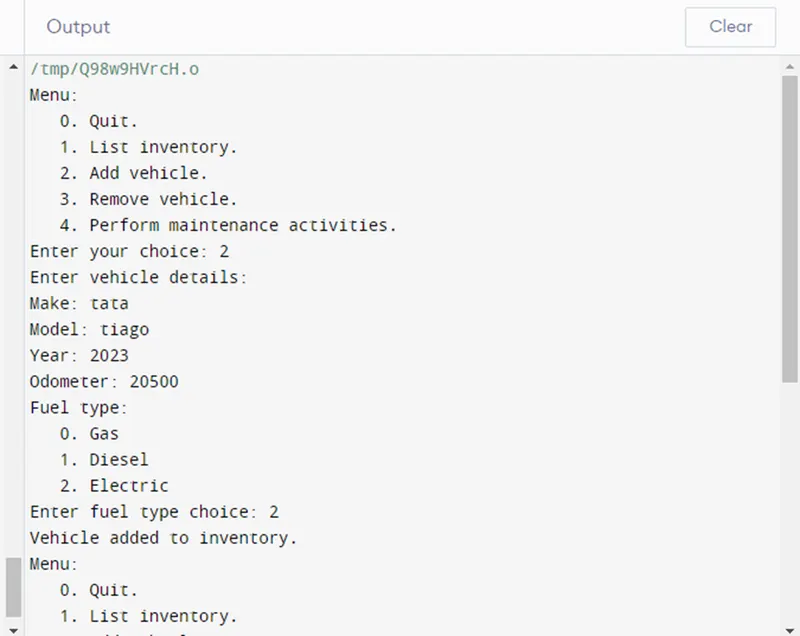
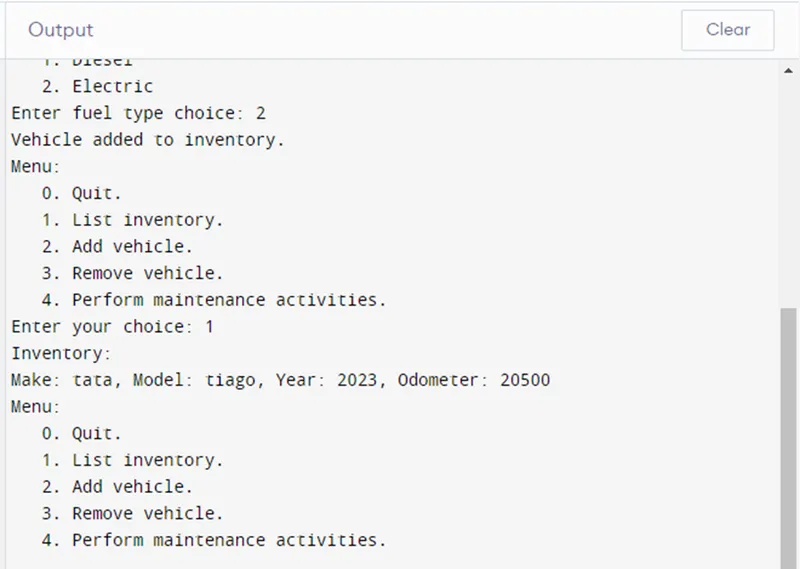
- When you run the program, you will see a menu with options to perform various operations on the automobile maintenance library.
- If you choose to list the inventory (option 1), it will display the details of all the vehicles in the inventory, including their make, model, year, and odometer reading.
- If you choose to add a vehicle (option 2), you will be prompted to enter the details of the vehicle such as make, model, year, odometer reading, and fuel type. The program will add the vehicle to the inventory.
- If you choose to update a vehicle (option 3), you will be prompted to enter the index of the vehicle you want to update. Then, you can enter the new odometer reading for the vehicle. The program will update the vehicle's information.
- If you choose to remove a vehicle (option 4), you will be prompted to enter the index of the vehicle you want to remove. The program will remove the vehicle from the inventory.
- If you choose to perform maintenance activities (option 5), you will be prompted to enter the index of the vehicle for which you want to perform maintenance activities. The program will execute the relevant maintenance activities based on the vehicle type and odometer reading.
- You can repeat these operations until you choose to quit (option 0).