Project 2 - Measuring the distance of an object using ultrasonic sensor and also smoothen the sensor data using moving average filter
Overview of the Project:
In this project the implementation of code for Measuring distance of an object using ultrasonic distance sensor (28015 Ping) and also smoothen the sensor data using moving average filter method.
About Ultrasonic distance sensor:
The 28015 PING sensor measures distance using sonar; an ultrasonic (well above human hearing) pulse is transmitted from the unit and distance-to-target is determined by measuring the time required for the echo return.
It works by sending out a burst of ultrasound and listening for the echo when it bounces off of an object. It pings the obstacles with ultrasound.
Output from the PING sensor is a variable-width pulse that corresponds to the distance to the target.It detects the distance of the closest object in front of the sensor (from 3 cm up to 400 cm). It works by sending out a burst of ultrasound and listening for the echo when it bounces off of an object. It pings the obstacles with ultrasound
Ultrasonic sensors are used primarily as proximity sensors. They can be found in automobile self-parking technology and anti-collision safety systems. Ultrasonic sensors are also used in robotic obstacle detection systems, as well as manufacturing technology.Although This sensor is perfect for any number of applications that require you to perform measurements between moving or stationary objects.
Goals:
-> Receiving data from sensor.
-> Displaying the distance in centimeters and in inhes on LCD
Key Highlights of the Project:
-> A Ultrasonic sensor (28015 Ping) sensor is configured.
-> Using moving average filter method to smoothen data.
-> One LCD display is printing results.
Program working:
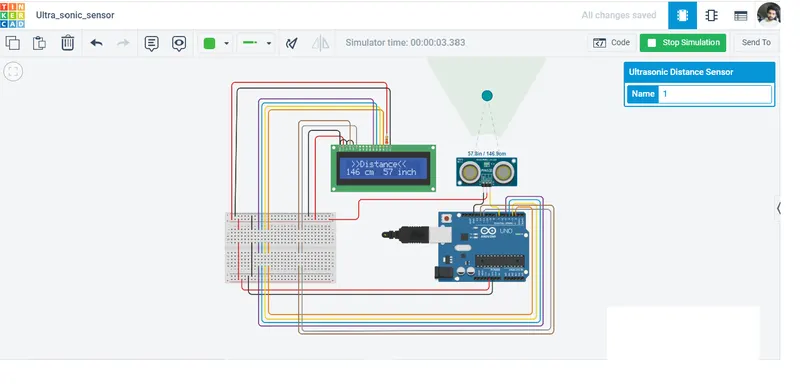
-> In this program conversion of data coming from ultra sonic sensor is done as well as this data is also smoothen using moving average filter method. A LCD (16 * 2) is also configured which is printing the value of converted data.This program converts the sensor data in centimeters and also in inhes.With the help of Serial communication present in this program user can see smoothen data on serial moniter.
Code:
#include <LiquidCrystal.h>

LiquidCrystal lcd(12 ,11 ,5 ,4 ,3 ,2); //Define LCD Module Pins (RS,RN,D4,D5,D6,D7)
int window[10] = {0}; // Creating a integer array of 10 element.
int signalPin = 7; // connected signal pin of sensor to pin No.7 of Ardunio
long duration; // Time
long cm; // Centimeters
long inch; // Inches
void setup()
{
  Serial.begin(9600);// Initialize serial communication:
  lcd.begin(16, 2); // Initialize LCD
}

void loop()
{
  pinMode(signalPin, OUTPUT); // Enble pin 7 as output
  digitalWrite(signalPin, LOW); // clearing previous data
  delayMicroseconds(2); // Micro seconds delay
  digitalWrite(signalPin, HIGH); // Triggered by a HIGH pulse
  delayMicroseconds(10); // Micro seconds delay
  digitalWrite(signalPin, LOW); // Again low

  // The same pin is used to read the signal from the PING))):

  pinMode(signalPin,INPUT); // Enble pin 7 as input
  duration = pulseIn(signalPin,HIGH); //a HIGH pulse duration is the time (in microseconds
  cm = duration * 0.0346/2; // conversion
  inch = duration * 0.01348/2; // conversion
  lcd.setCursor(0, 0); // Setting cursor of LCD
  lcd.print(" >>Distance<<"); // Printing this message
  lcd.setCursor(0, 1); // Again setting cursor
  lcd.print(cm); // Printing converted value i.e. 'Time into Centimeters'
  lcd.print(" cm  ");
  lcd.print(inch);// Printing converted value i.e. 'Time into Inhes'
  lcd.print(" inch");

  // Now smoothen the sensor data
  int current_samp = 0;
  current_samp = (duration); // duration = current_samp
  delayMicroseconds(300); // taking delay
  pushVal(current_samp);// calling function
  Serial.println(takeAvg()); // calling function
}

void pushVal(int val)
{
  int i = 0;
  for(i = 1;i < 10; i++)// This for loop run for 10 time
  {
    window[i-1] = window[i]; // here setting window previous value as window new value
  }
  window[10 - 1] = val; // finally giving to val
}

int takeAvg() // this funtion is just taking simple avg of 10  element
{
  int i = 0;
  long sum = 0;
  for(i = 0; i < 10; i++) // This for loop is adding 10 element
  {
    sum += window[i]; //in each cycle sum value is incressing
  }
  return (sum / 10); // dividing sum with number of element i.e. '10'.
}
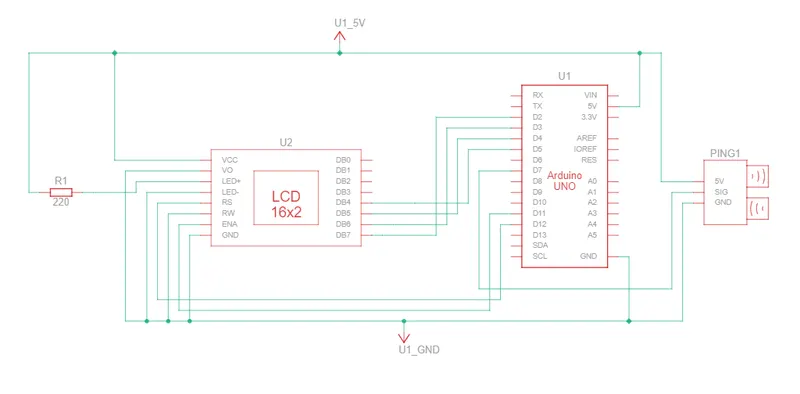
Schematic Diagram:
Output: