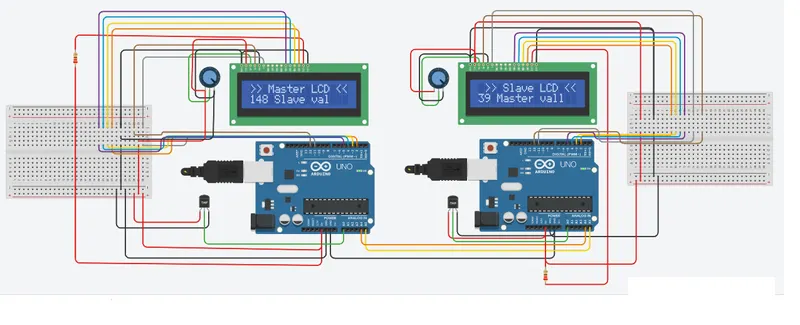
Project 1 - Interfacing a 16*2 LCD with Arduino using I2C protocol
Overview of the Project:
In this project implementing the Code for “Interfacing a 16*2 LCD with two Arduino’s (one for Master and one for Slave) using Inter-Integrated Circuit (I2C) communication protocol” by sending the message to LCD using I2C communication protocol and display the message on LCD screen.
About I2C Bus Communication:
I2C is a serial Communication protocol for low-speed 2 wire interface. Developed by Phillips in 1982 for the television industry, Now used by every major semiconductor manufacturer.It is a synchronous, muti-controller/multi-target,packed switched, single-ended,serial Communication protocol.I2C is suitable for use over short distances ~ 1 meter @100Kbaud.The Original I2C bus had maximum speed of 100KHz,Fast mode up to 400KHz,High-Speed mode up to 3.4MHz,Ultra Fast mode upto 5MHz.
There are several names and pronunciation for I2C bus:
-> Full name is "Inter Integrated Circuit" bus.
-> Also called "I-squared-C","I2C" and "IIC" bus.
-> TWI bus is "Twin Wire Interface",subset of I2C.
-> SMBus developed by Intel in 1995 is a subset of I2C.
Working of I2C bus Communication:
-> Master initiates communication, Master generates clock and has no address.
-> Slaves use unique 7-bit address to communicate with Master and we can connect 128 devices maximum.
-> Several Slave addresses are reserved by NXP (formerly Phillips).
-> Some I2C devices can be configured for multiple addresses.
-> New 10-bit address scheme will allow us to connent more devices.
Goals:
-> Communication between Arduino and 16*2 LCD using I2C protocol.
-> Displaying the message sent by Master and received by slave i.e. LCD display.
Key Highlights of the Project:
-> Using the inter-integrated circuit communication protocol, transferring the data i.e. the message we want to display is sent to the LCD.
-> Two Arduino’s connected to the two different LCD display and the communication is executed using I2C protocol between Arduino and the LDC display.
Program working:
In the program communication between two Arduino is established using I2C protocol. Both arduino taking analog valve from separate temperature sensor. This analog valve then converted into digital. After conversion the converted valve is printed on serial monitor and sent to another ardunio. (From Master to slave and from Slave to Master). Received value is than printed on 16*2 LCD display by both arduino (both arduino are connnected with separate LCD). Program has some animation code for LCD display also. Included libraries are:
(1) <Wire.h>
(2) <LiquidCrystal.h>
Code:
// Master Arduino
#include <Wire.h> // Include this library for I2C Communication.

#include<LiquidCrystal.h> // This Library includes LCD display Functions

LiquidCrystal lcd_1(12, 11, 5, 4, 3, 2);// Define LCD Module Pins (RS,RN,D4,D5,D6,D7)

void setup()
{
  lcd_1.begin(16, 2); // Initialize LCD display
  lcd_1.setCursor(0, 0); Sets Cursor at first line of Display
  lcd_1.print("Project on I2C communications");
  for (int i = 0; i < 14; i++) // For loop for repeating 14 times
  {
    lcd_1.scrollDisplayLeft(); // scrolling whole screen
    delay(150); // delay for animation
  }

  delay(2000);
  lcd_1.clear(); // Clears LCD screen
  Serial.begin(9600); // Serial communication start with baud rate '9600'
  Wire.begin(); // I2C communication start at pin (A4,A5)
  pinMode(A0, INPUT); // Initialize A0 as input to read  data
}

void loop()
{
  Wire.requestFrom(1,1); // Request 1 byte from slave (1)
  byte MasterReceive = Wire.read(); // 'MasterReceive' receive data coming from slave
  float volt = analogRead(A0); // Reading Analog value
  volt = volt * 4.99; // conversion
  float temperature = volt / 10;
  byte MasterSend = (temperature);
  Wire.beginTransmission(1); // Transmission start with slave arduino(1)
  Wire.write(MasterSend); // sending converted data
  Wire.endTransmission(); // Transmission end
  lcd_1.setCursor(0, 0); Seting Cursor again for animation
  lcd_1.print(">> Master LCD << ");
  lcd_1.setCursor(0, 1);
  lcd_1.print(MasterReceive); // Printing valve coming from slave arduino
  lcd_1.print(" Slave val");
  Serial.println("Master sending data to Slave:"); // Printing on serial Moniter
  Serial.println(MasterSend); // Master valve printing on serial Monitor

}
// Slave Arduino
#include <Wire.h>
#include<LiquidCrystal.h>
LiquidCrystal lcd_1(12, 11, 5, 4, 3, 2);
byte SlaveReceived = 0; // Global variable (byte data type)
void setup()
{
lcd_1.begin(16, 2);
lcd_1.setCursor(0, 0);
lcd_1.print("Project on I2C communications");
for (int i = 0; i < 14; i++)
{
lcd_1.scrollDisplayLeft();
delay(150);
}
delay(2000);
lcd_1.clear();
Serial.begin(9600);
Wire.begin(1); // Wire communication start with address as 1
Wire.onReceive(receiveEvent); // caling function
Wire.onRequest(requestEvent); // caling function
pinMode(A0, INPUT);
}
void loop(void)
{
lcd_1.setCursor(0, 0); // Set cursor
lcd_1.print(" >> Slave LCD << "); // animation
lcd_1.setCursor(0, 1);
lcd_1.print(SlaveReceived); // Printing data coming from master arduion
lcd_1.print(" Master val");
}
void receiveEvent (int howMany) // This function is hepling in read data
{
SlaveReceived = Wire.read(); // store data in 'SlaveReceived'
}
void requestEvent()
{
float volt = analogRead(A0); // Reading analog value
volt = volt * 4.99; // conversion
float temperature = volt / 10;
byte SlaveSend = (temperature); // converted value
Wire.write(SlaveSend); // Sending converted valve
Serial.println(" Slave sending data to Master:"); // Printed on Serial Moniter
Serial.println(SlaveSend); // Slave valve is printing on Serial Moniter
}
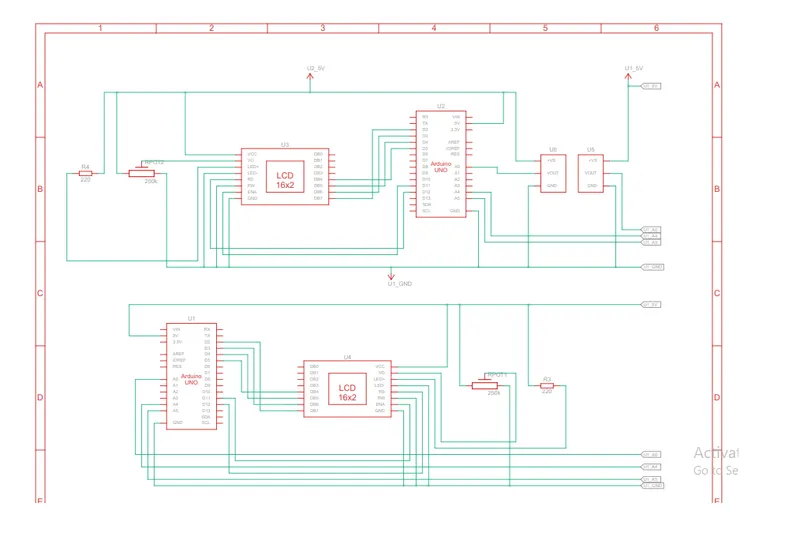
Schematic Diagram :
Output: