Project 2 - Measuring the distance of an object using ultrasonic sensor and also smoothen the sensor data using moving average filter
Project 2 - Measuring the distance of an object using ultrasonic sensor and also smoothen the sensor data using moving average filter
About this project:
Measuring distance using an ultrasonic distance sensor, such as the HC-SR04 (commonly referred to as the "Ping" sensor), and smoothing the sensor data with a moving average filter is a common task in robotics, automation, and various DIY projects. These sensors are affordable and widely available, making them popular for distance measurement applications. Here's an overview of how to measure distance using the HC-SR04 sensor and then smoothen the data using a moving average filter:
1. Ultrasonic Distance Sensor (HC-SR04):
The HC-SR04 sensor works on the principle of sending out an ultrasonic pulse (sound wave) and measuring the time it takes for the pulse to bounce back after hitting an object. This time measurement can then be used to calculate the distance between the sensor and the object.
The basic steps for measuring distance with an HC-SR04 sensor are as follows:
-
Trigger the Sensor: To start a measurement, you send a short pulse to the trigger pin of the sensor.
-
Emit Ultrasonic Pulse: The sensor emits an ultrasonic pulse, which travels at the speed of sound.
-
Receive Echo: When the pulse hits an object, it bounces back as an echo, and the sensor detects it.
-
Calculate Distance: By measuring the time it took for the pulse to travel to the object and back (round-trip time), you can calculate the distance using the formula:
Distance = (Round-trip time × Speed of Sound) / 2
The speed of sound at room temperature is approximately 343 meters per second (or about 0.0343 cm/µs).
2. Smoothing Sensor Data with Moving Average Filter:
Ultrasonic distance sensors can sometimes produce noisy data due to factors like ambient noise, sensor inaccuracies, or object surface irregularities. Smoothing the sensor data using a moving average filter can help reduce this noise and provide a more stable distance measurement. Here's how you can implement a moving average filter:
- Collect Data: Continuously collect distance measurements from the sensor.
- Create a Data Buffer: Maintain a buffer (array or list) to store a certain number of recent measurements.
- Calculate the Average: Calculate the average of the measurements in the buffer. This is your smoothed distance reading.
- Update the Buffer: Add the new measurement to the buffer and remove the oldest measurement to maintain a constant buffer size.
- Repeat: Continuously update and recalculate the average as new measurements come in.
Components Needed:
1. Arduino board (e.g., Arduino Uno)
2. HC-SR04 ultrasonic sensor
3. Breadboard and jumper wires
4. A computer with the Arduino IDE installed
Connect the Ultrasonic Sensor:
Connect the HC-SR04 sensor to the Arduino as follows:
• VCC (Sensor) -> 5V (Arduino)
• Trig (Sensor) -> Digital Pin 7 (Arduino)
• Echo (Sensor) -> Digital Pin 6 (Arduino)
• GND (Sensor) -> GND (Arduino)
Arduino Code:
const int trigPin = 7;
const int echoPin = 6;
const int numReadings = 10; // Number of readings for moving average
long readings[numReadings]; // Array to store readings
int index = 0; // Index of the current reading
long total = 0; // Running total of readings
void setup() {
Serial.begin(9600);
pinMode(trigPin, OUTPUT);
pinMode(echoPin, INPUT);
}
void loop() {
// Trigger a pulse
digitalWrite(trigPin, LOW);
delayMicroseconds(2);
digitalWrite(trigPin, HIGH);
delayMicroseconds(10);
digitalWrite(trigPin, LOW);
// Read the pulse duration
long duration = pulseIn(echoPin, HIGH);
// Calculate distance in centimeters
float distance = duration * 0.034 / 2.0;
// Update the moving average
total = total - readings[index]; // Subtract the oldest reading
readings[index] = distance; // Store the new reading
total = total + readings[index]; // Add the new reading
index = (index + 1) % numReadings; // Increment index and wrap around if necessary
// Calculate the moving average
float smoothedDistance = total / numReadings;
// Print the smoothed distance to the serial monitor
Serial.print("Smoothed Distance: ");
Serial.print(smoothedDistance);
Serial.println(" cm");
delay(100); // Delay between readings
}
Simulation:
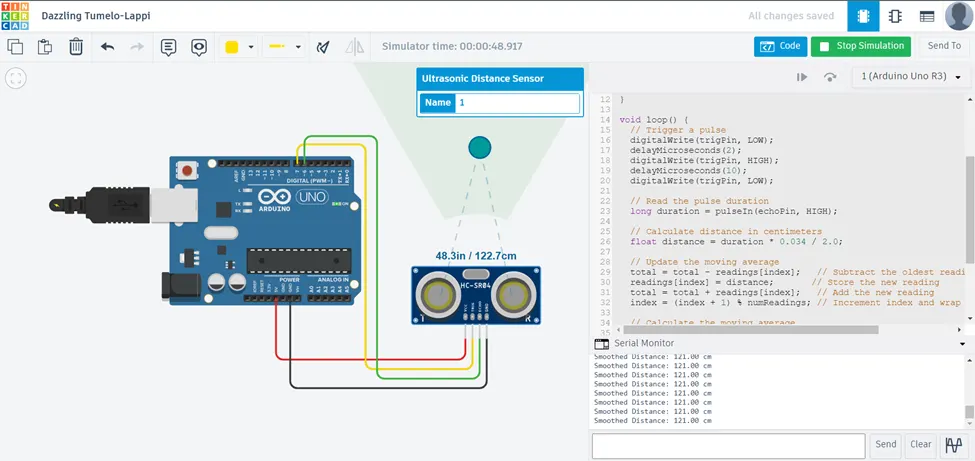
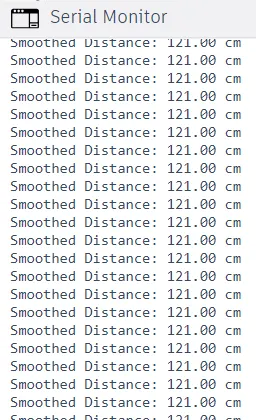
Serial Monitor Output: