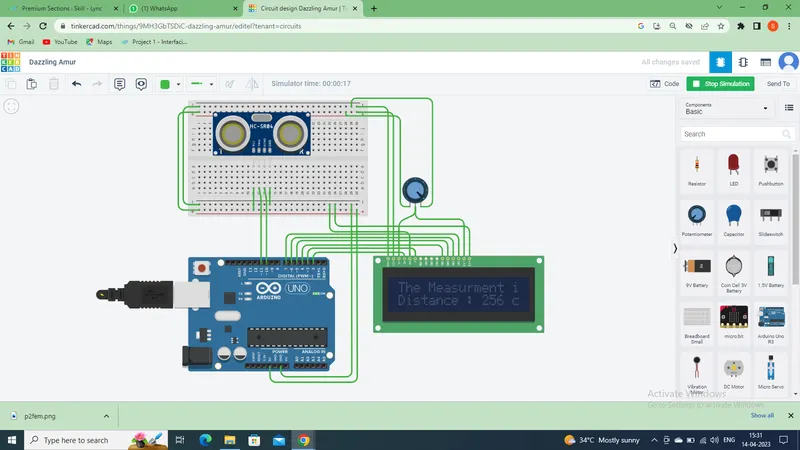
Project 2 - Measuring the distance of an object using ultrasonic sensor and also smoothen the sensor data using moving average filter
Overview of the Project:
In this project the implementation of code for “Measuring distance of an object using ultrasonic distance sensor (28015 Ping) and also smoothen the sensor data using moving average filter”.
Goals:
- Measuring the distance in terms of inches of an object using Ultrasonic Distance Sensor (28015 Ping).
- The sensor data is smoothened by using Moving average filter technique to eliminate the high frequency variations from the sensor data.
Key Highlights of the Project:
- Measuring the distance travelled by the wave to the object and gets bounced back from the object to sensor.
- Smoothening the sensor data by moving average filter technique, the filter has a window of certain size. That window determines that how many data the filter can take.
Deliverables of this project:
- The distance travelled by a wave to the object for which we want to measure the distance using Ultrasonic Distance Sensor (28015 Ping).
- Eliminate the high frequency jitters from the sensor data by Moving Average filter to smoothen the sensor data.
Expected Outcomes:
The students will get the Knowledge on Ultrasonic sensor (28015 Ping) to measure the distance travelled by wave to the object, the hardware connection of 2 Arduino’s connected to the sensor and smoothening the sensor data by removing high frequency variations using Moving Average Filter Technique.
Ultrasonic sensors are great tools to measure distance and detect objects without any actual contact with the physical world. It is used in several applications, like in measuring liquid level, checking proximity and even more popularly in automobiles to assist in self-parking or anti-collision systems. Previously we have also build many Ultrasonic Sensor projects like water level detecting, Ultrasonic Radar etc . This is an efficient way to measure small distances precisely. In this project, we have used the HC-SR04 Ultrasonic Sensor with Arduino to determine the distance of an obstacle from the sensor. The basic principle of ultrasonic distance measurement is based on ECHO. When sound waves are transmitted in the environment then waves return back to the origin as ECHO after striking on the obstacle. So we only need to calculate the traveling time of both sounds means outgoing time and returning time to origin after striking on the obstacle. As the speed of the sound is known to us, after some calculation we can calculate the distance. We are going to use this same technique for this Arduino distance measurement project, so let's get started.
Ultrasonic Sensor Module:
There are many types of Arduino distance sensors, but in this project we have used the HC-SR04 to measure distance in range of 2cm-400cm with an accuracy of 3mm. The sensor module consists of an ultrasonic transmitter, receiver and control circuit. The working principle of ultrasonic sensor is as follows:
- High level signal is sent for 10us using Trigger.
- The module sends eight 40 KHz signals automatically, and then detects whether pulse is received or not.
- If the signal is received, then it is through high level. The time of high duration is the time gap between sending and receiving the signal.
Distance= (Time x Speed of Sound in Air (340 m/s))/2
CODE:
#include <LiquidCrystal.h>
const int trigPin = 11;
const int echoPin = 10;
long duration;
int distance;
bool measured = false;
int maxReferenceHeight = 500;
int referenceHeight;
int maxHeight = 220;
int minHeight = 30;
const int rsPin = 2;
const int enablePin = 3;
const int data_4 = 4;
const int data_5 = 5;
const int data_6 = 6;
const int data_7 = 7;
LiquidCrystal lcd(rsPin, enablePin, data_4, data_5, data_6, data_7);
// 16*2 LCD Display | RS - 42, Enable - 44, Data - 46, 48, 50, 52 (R/W - GND)
void setup() {
// put your setup code here, to run once:
lcd.begin(16, 2);
lcd.clear();
pinMode(trigPin, OUTPUT);
pinMode(echoPin, INPUT);
}
void loop() {
if (measured == false){
lcdInitialAlert();
clearTrigger();
triggerON(10);
distance = distanceMeasured();
printDistanceToLCD(distance);
measured = true;
}
}
void clearTrigger(){
// Clears the trigPin
digitalWrite(trigPin, LOW);
delayMicroseconds(2);
}
void triggerON(int MicroSeconds){
// Sets the trigPin on HIGH state for X micro seconds
digitalWrite(trigPin, HIGH);
delayMicroseconds(MicroSeconds);
digitalWrite(trigPin, LOW);
}
int distanceMeasured(){
// Reads the echoPin, returns the sound wave travel time in microseconds
duration = pulseIn(echoPin, HIGH);
// Calculating the distance
distance = duration*0.034/2;
Serial.print("Distance: ");
Serial.println(distance);
return distance;
}
void printDistanceToLCD(int distance){
lcd.setCursor(0, 1);
lcd.print("Distance : ");
lcd.print(distance);
lcd.print(" cm");
}
void lcdInitialAlert(){
lcd.clear();
lcd.setCursor(0, 0);
lcd.print("The Measurment is");
delay(2000);
}