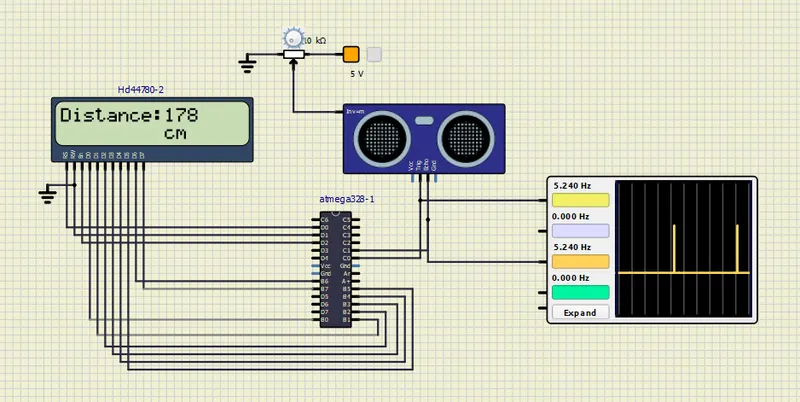
Project 2 - Measuring distance of an object using ultrasonic sensor (HC-SR04)
Overview of the Project:
This code is designed to measure distance using an ultrasonic sensor (HC-SR04) and display the measured distance on an LCD in the ATMega328 AVR Microcontroller.
#include <avr/io.h> // Include AVR input/output library
#define F_CPU 16000000L // Define the clock frequency to be 16 MHz
#include <util/delay.h> // Include delay library
#include <stdlib.h> // Include standard library

// Define PORTD bits for RS, EN and RW pins of the LCD
#define rs_high PORTD |=(1<<0);
#define rs_low PORTD &=~(1<<0);
#define en_high PORTD |= (1<<2);
#define en_low PORTD &=~(1<<2);
#define rw_high PORTD |= (1<<1);
#define rw_low PORTD &= ~(1<<1);

// Define the Ultrasonic Sensor Pins
#define SENSOR_PORT PORTC // Define the port that the Ultrasonic Sensor is connected to
#define	SENSOR_PIN	PINC // Define the input pin for the Ultrasonic Sensor

#define SENSOR_TRIG	PC0 // Define the trigger pin for the Ultrasonic Sensor
#define SENSOR_ECHO	PC1 // Define the echo pin for the Ultrasonic Sensor


// Function to send LCD commands
void lcd_cmd(unsigned char cmd)
{
	PORTB = cmd; // Set the PORTB to the command value
	rs_low; // Set RS to low to indicate command mode
	rw_high; // Set RW to high to indicate a write operation
	en_high; // Set EN to high to enable the command
	_delay_ms(10); // Wait for the command to be executed
	en_low; // Set EN to low to disable the command
}

// Function to send LCD data
void lcd_data(unsigned char data)
{
	PORTB = data; // Set the PORTB to the data value
	rw_low; // Set RW to low to indicate a write operation
	rs_high; // Set RS to high to indicate data mode
	en_high; // Set EN to high to enable the data
	_delay_ms(10); // Wait for the data to be executed
	en_low; // Set EN to low to disable the data
}

// Function to initialize the LCD
void lcd_init()
{
	rw_high; // Set RW to high to indicate a write operation
	rs_high; // Set RS to high to indicate data mode
	en_high; // Set EN to high to enable the data

	PORTB = 0xff; // Set PORTB to all ones

	_delay_ms(30); // Wait for the command to be executed
	 lcd_cmd(0x38); // Set the LCD to 2-line mode
     lcd_cmd(0x02); // Set the cursor to the home position
     lcd_cmd(0x01); // Clear the LCD screen
     lcd_cmd(0x0c); // Turn on the display
     lcd_cmd(0x06); // Set the cursor to move right
     lcd_cmd(0x80); // Set the cursor to the beginning of the first line
	_delay_ms(30); // Wait for the command to be executed
}


void cursorpos(char row,char column)//CURSOR POSITION FUNCTION
{
	if((row<1 || row>2)||(column<1 || column>16)) // check if the cursor position is within the limits of the LCD screen
	{
		row=1; // set row position to 1 if out of range
		column=1; // set column position to 1 if out of range
	}
	if (row == 1)
	{
		lcd_cmd(0x80 + column-1 );
	}
	else
	 {
		lcd_cmd(0xC0 + column-1 );
	 }

}

void lcd_out(char row, char column,char *str)//LCD OUT FUNCTION
{
	cursorpos(row,column); // set cursor position to a, b
	while(*str)
	{
		lcd_data(*str); // print each character of the string on the LCD
		str++;
	}
}


void HCSR04Trigger()
{
	SENSOR_PORT |=(1<<SENSOR_TRIG);	// set the trigger pin high
	_delay_us(15);				    // wait for 15 microseconds
	SENSOR_PORT &=~(1<<SENSOR_TRIG);	// set the trigger pin low
}

/*Measure the pulse duration*/
int GetPulseWidth()
{
	// Wait for the echo pin to go high to start measuring the pulse duration
	while (!(SENSOR_PIN & (1 << SENSOR_ECHO)));

	//Setup Timer1
	TCCR1A=0X00;
	TCCR1B=(1<<CS11);	// This line sets the resolution of the timer 8 bit prescaler
	TCNT1=0x00;			// This line starts the timer counter to begin counting the duration of the pulse

	// Wait for the echo pin to go low to stop measuring the pulse duration
	while (SENSOR_PIN & (1 << SENSOR_ECHO))
	{
		if (TCNT1 > 65535) // If the pulse is too long, break out of the loop to avoid overflow.
		break;
	}

	uint16_t result =TCNT1;    // Store the value of the counted pulse time in the TCNT1 register, which represents the pulse width duration.
	TCCR1B=0x00; // Stop the timer

	return (result); // Return the pulse width
}

int main()
 {
	lcd_init(); // Initialize the LCD
	char numberString[7]; // Define an array to store char to be display on the LCD
  _delay_ms(100); // Wait for the LCD module to start

		while(1)
		 {
			HCSR04Trigger(); // Send a trigger pulse
			uint16_t width = GetPulseWidth(); // Measure the width of the pulse

			// Calculate the distance in centimeters
			int distance = (width * 0.034 / 2.0);//speed * time

			// Display the distance on the LCD
			lcd_out(1, 0, "Distance:");
			itoa(distance, numberString, 10);
			lcd_out(1, 10, numberString);
			lcd_out(2, 10, "cm");


			_delay_ms(30);
		}

}