Project 2-Highway Assistant-Lane Changing Assistant
AIM:
- Model development of one specific requirement of Highway Assistant-Lane changing Assistant algorithm which is an advanced driver assistance system(ADAS) feature using MATLAB.
Objective of the project:
- The model is developed in MATLAB simulink as per Model Based design (MBD) guidelines.
- The code generation profile is selected as autosar coder.
- Simulink Data Dictionary (SLDD) is created and linked to the model.
- All the input & output signals are mapped into the AUTOSAR editor.
- Model Advisor Report is checked,followed By AUTOSAR complaint code generation.
Introduction to the Highway Lane Change Assistant feature:
- The Highway Asistant supports the driver and takes over the longitudinal and lateral guidance of the vehicle in monotonous driving situations on highways.The partially automated function can automatically start,accelerate,brake as well as steer the vehicle to a certain extent. The driver must permanently supervise the system and be ready to take over the complete control of the vehicle at any time.
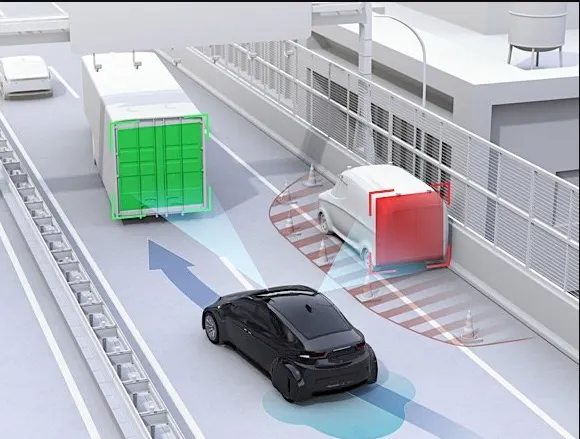
- Drivers are taught to assess surrounding traffic before changing lanes by checking their rearview and side mirriors and looking over each shoulder.However even for those who follow this sequence of checks,the vehicles blind spot- the are alongside and just behind the vehicle-is aconstant source of danger and often the cause of serious accidents.Even vehciles quickly from behind can pose a rick.To make changing lanes safer,This feature has been developed.
Basic working principle:
- Highway Assistant is a partially automated driving function for a speed range of up to 180 km/h (112 mph) on highways. It combines the radar-based longitudinal guidance of Adaptive Cruise Control (ACC) with the video-based lateral guidance of lane keeping support in one system. Highway Assistant can be supplemented by an automatic lane change initiated and monitored by the driver in a speed range of 60 – 130 km/h (35 – 80 mph).
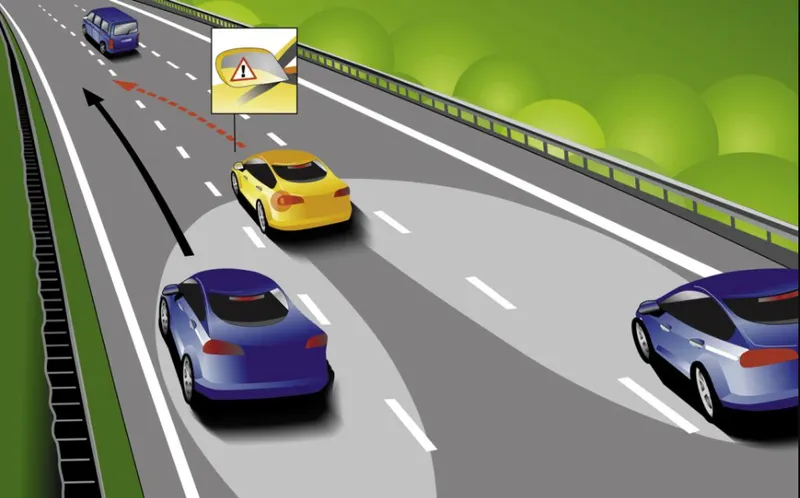
- The lane Change Assistant works by using two mid-range radar sensors that are concealed in the rear bumper – one on the left, one on the right. These two sensors monitor the area alongside and behind the car. Powerful control software collates the sensor information to create a complete picture of all traffic in the area behind the vehicle.Whenever another vehicle approaches at speed from behind or is already present in the blind spot, a signal such as a warning light in the side mirror alerts the driver to the hazard. Should the driver still activate the turn signal with the intention of changing lanes, the system issues an additional acoustic and/or haptic warning.
STEPS TO BE FOLLOWED TO BUILD THE MODEL:
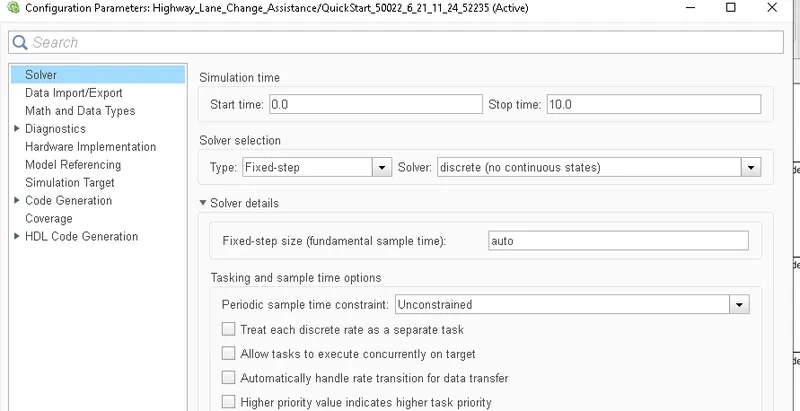
- First we should configure the solver settings to fixed step type and discrete(no continuous states) and sample time will be Auto.
- And then we have to create an SLDD file where the parmaters have been given in the question itself.
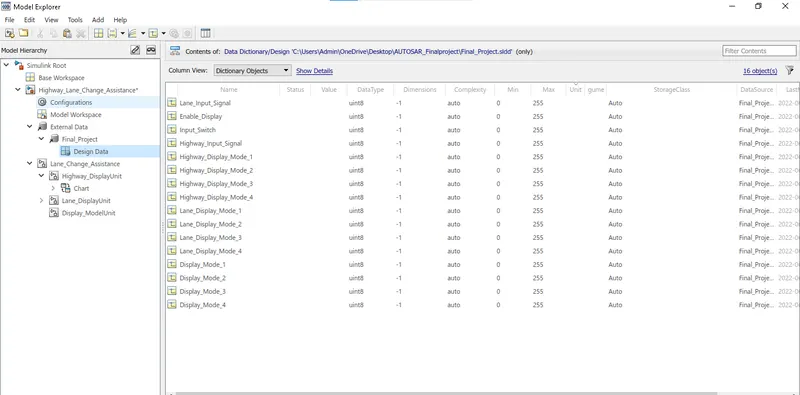
Requirement No 1 [Highway_DisplayUnit]:
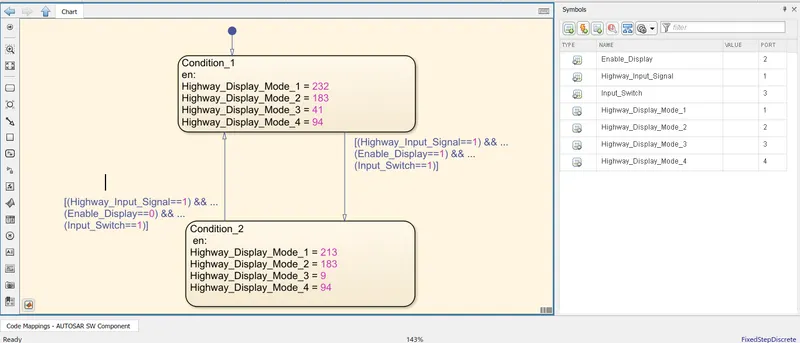
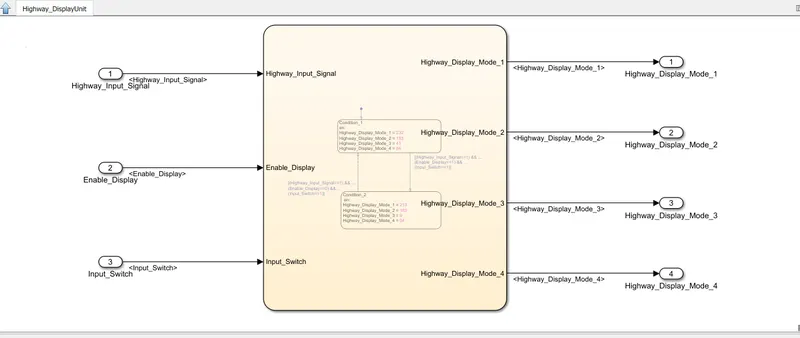
- Inputs to this particular subsystem are “Highway_Input_Signal”, “Enable_Display”, “Input_Switch”. These three input signals, when assigned to a particular value will give output signals of specific value. The output signals are “Highway_Display_Mode_1”, “Highway_Display_Mode_2”, “Highway_Display_Mode_3”, “Highway_Display_Mode_4”. The requirement must be implemented in the form of a Stateflow logic.
|
Condition |
Action |
|
Highway_Input_Signal = 1 Enable_Display = off Input_Switch = on |
Highway_Display_Mode_1 = 232 Highway_Display_Mode_2 = 183 Highway_Display_Mode_3 = 41 Highway_Display_Mode_4 = 94 |
|
Highway_Input_Signal = 1 Enable_Display = on Input_Switch = on |
Highway_Display_Mode_1 = 213 Highway_Display_Mode_2 = 183 Highway_Display_Mode_3 = 9 Highway_Display_Mode_4 = 94 |
Model:
Requirement No 2 [Lane_DisplayUnit]:
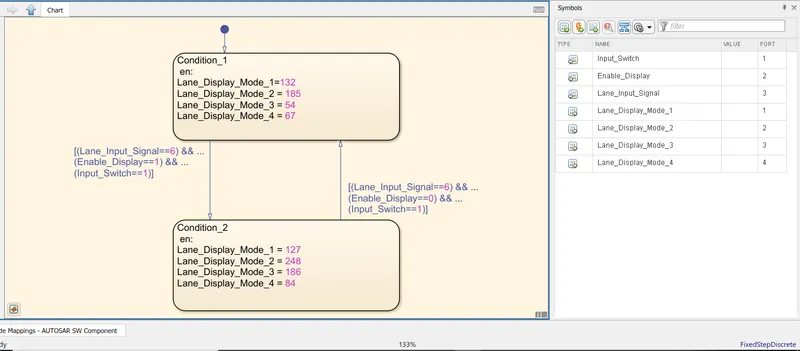
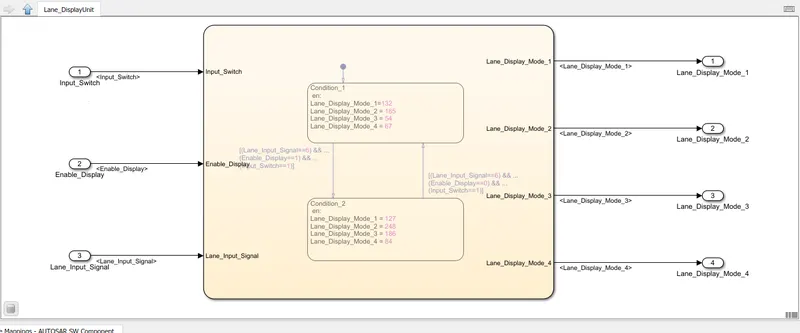
- Inputs to this particular subsystem are “Enable_Display”, “Input_Switch”, “Lane_Input_Signal”. These three input signals, when assigned to a particular value will give output signals of specific value. The output signals are “Lane_Display_Mode_1”, “Lane_Display_Mode_2”, “Lane_Display_Mode_3”, “Lane_Display_Mode_4”. The requirement must be implemented in the form of Stateflow logic.
|
Condition |
Action |
|
Lane_Input_Signal= 6 Enable_Display = off Input_Switch = on |
Lane_Display_Mode_1 = 132 Lane_Display_Mode_2 = 185 Lane_Display_Mode_3 = 54 Lane_Display_Mode_4 = 67 |
|
Lane_Input_Signal= 6 Enable_Display = on Input_Switch = on |
Lane_Display_Mode_1 = 127 Lane_Display_Mode_2 = 248 Lane_Display_Mode_3 = 186 Lane_Display_Mode_4 = 84 |
Model:
Requirement No 3:
- Signals coming from both subsystems “Highway_Display_Mode_1” & “Lane_Display_Mode_1” are given as inputs to a switch block which will have input signal “Highway_Input_Signal” given as 2nd input to the switch block. Corresponding output from this particular switch block is output signal “Display_Mode_1”.
- Signals coming from both subsystems “Highway_Display_Mode_2” & “Lane_Display_Mode_2” are given as inputs to a switch block which will have input signal “Highway_Input_Signal” given as 2nd input to the switch block. Corresponding output from this particular switch block is output signal “Display_Mode_2”.
- Signals coming from both subsystems “Highway_Display_Mode_3” & “Lane_Display_Mode_3” are given as inputs to a switch block which will have input signal “Highway_Input_Signal” given as 2nd input to the switch block. Corresponding output from this particular switch block is output signal “Display_Mode_3”.
- Signals coming from both subsystems “Highway_Display_Mode_4” & “Lane_Display_Mode_4” are given as inputs to a switch block which will have input signal “Highway_Input_Signal” given as 2nd input to the switch block. Corresponding output from this particular switch block is output signal “Display_Mode_4”.
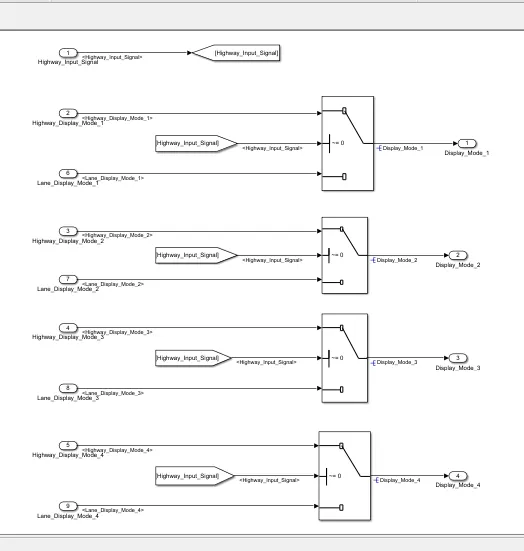
- Overall model looks as shown below:
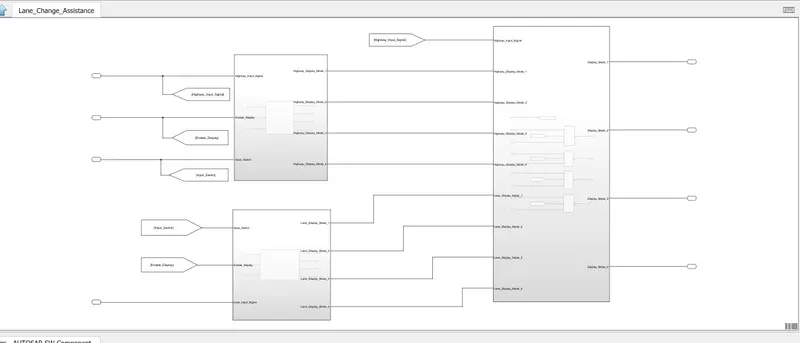
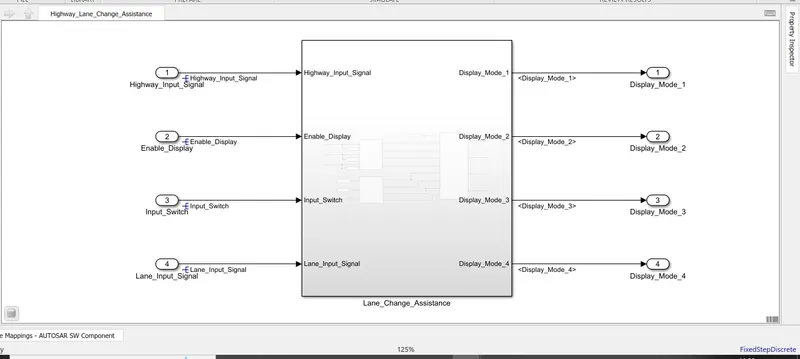
- The whole model has kept in an subsystem for better understanding analysing and performing Model advsor check with MAAB guidelines and for AUTOSAR port mapping also.
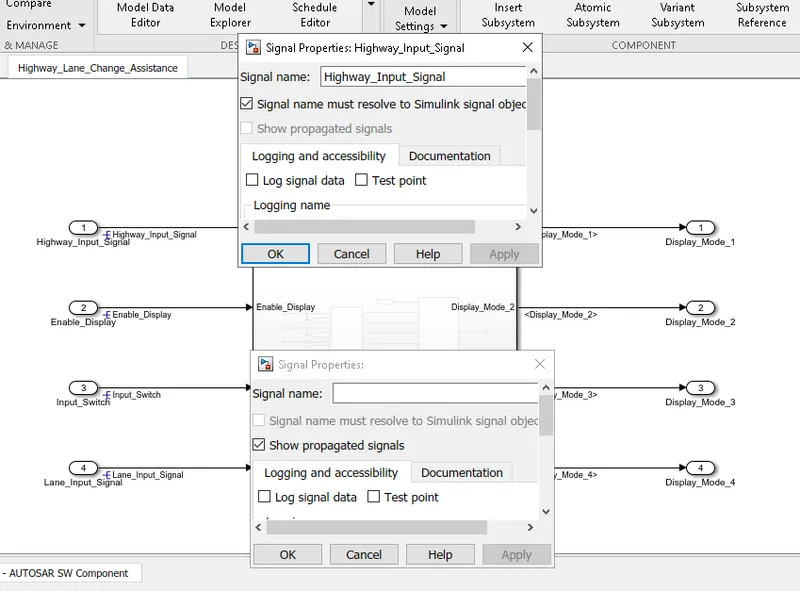
- After making whole system as a subsystem we need to propogate and resolve the signal.
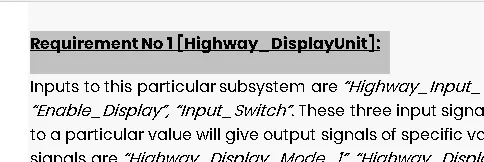
- Next step is we need to do requirement tagging to the word file, by selecting the word file and need to go to model and can do the requirement taggings.
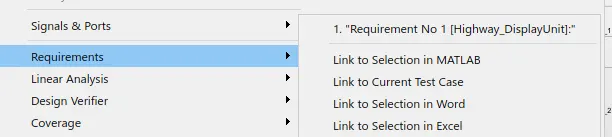
- And then we will do the Model advisor check with MAAB guidelines and the report has been attached to he file.
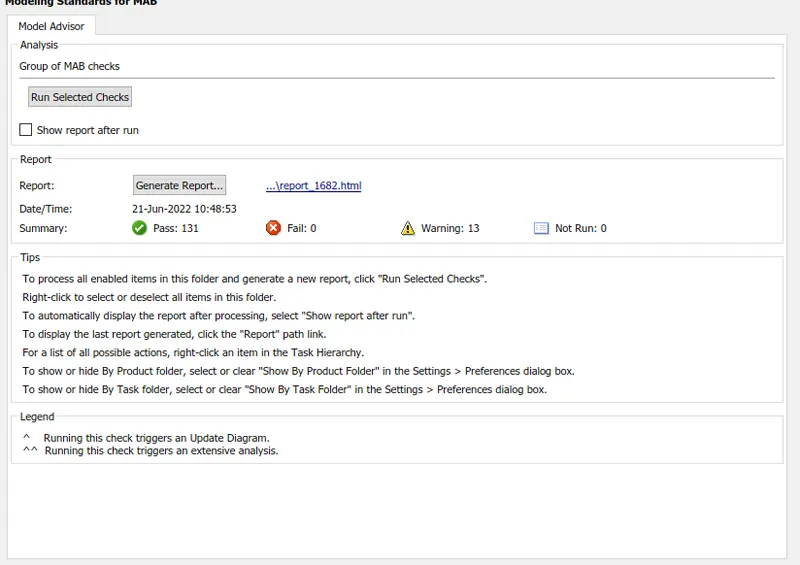
- After making our model to ready to perform AUTOSAR port mapping and autosar code generation by doing Model advisor check with MAAB guidelines.
- We need to make change model settings - code generation-system target file as autosar.tlc
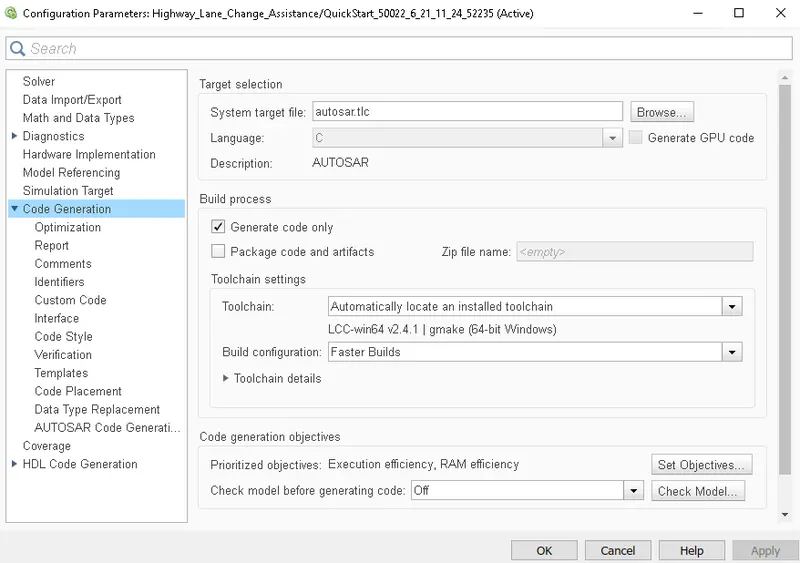
- After making changes in model settings the bottom right side we get the bold dotted lines if we click on this we will get a pop up to select enter perspective.
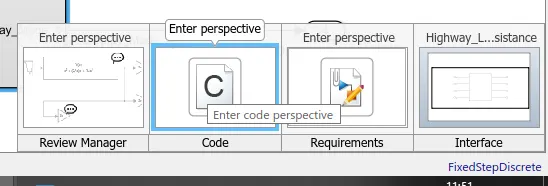
- After selecting the enter perspective we click on the configure AUTOSAR dictionary.
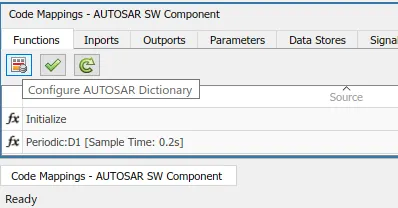
- We need to edit the XML interfaces as we have done in mini project.
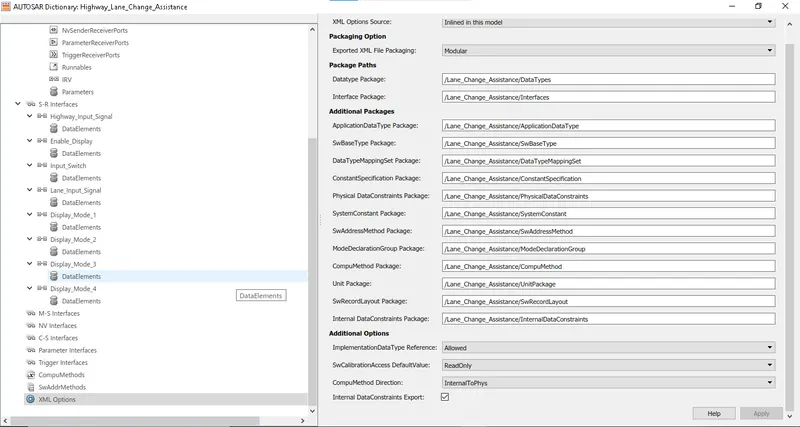
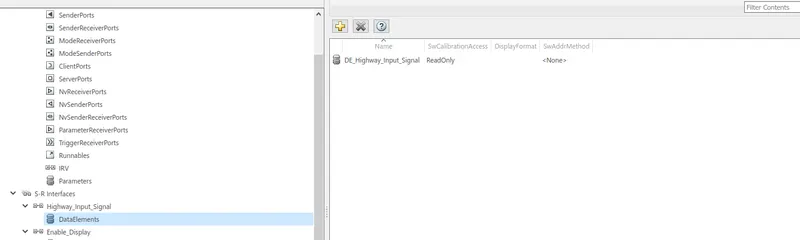
- We need to configure the S-R interfaces and for every S-R interface we need to select a DE (Data Element)
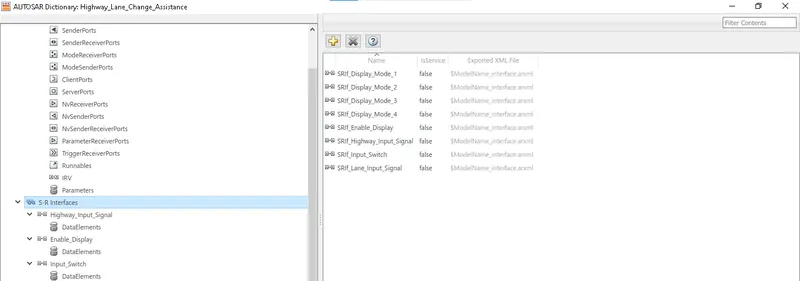
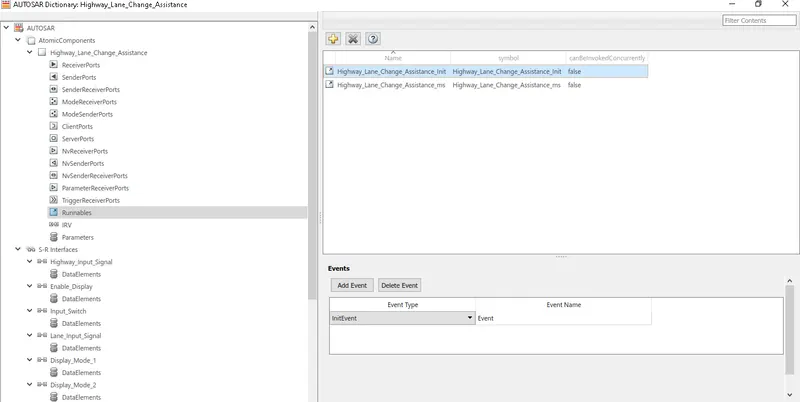
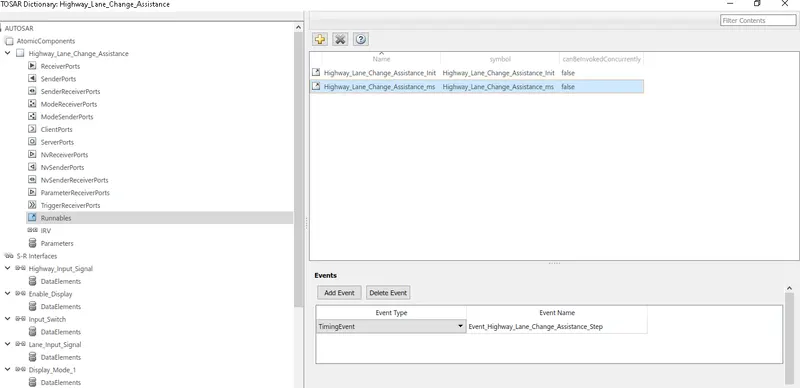
- After we create a runnables for the model,we select as initevent and timingvent for these two runnables.
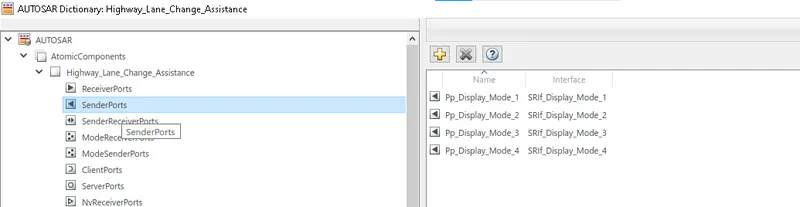
- We create a senderports as Pp and Receiver ports as Rp
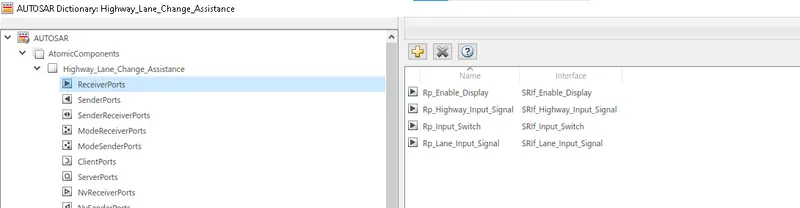
- After making sender and receiver ports we need to check the inport and outports whether the data elements are linked or not.
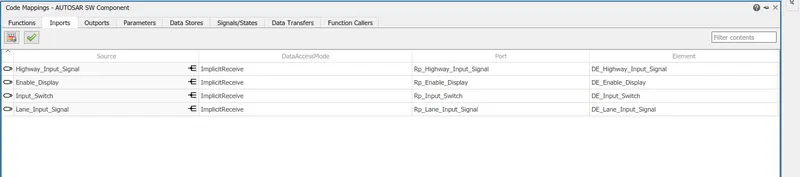
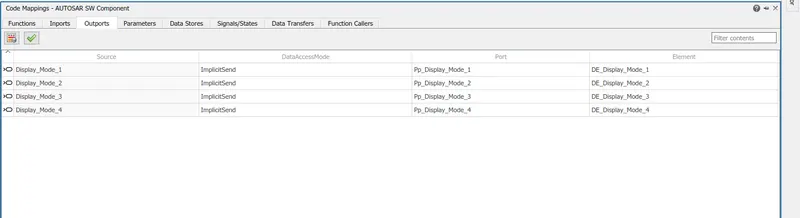
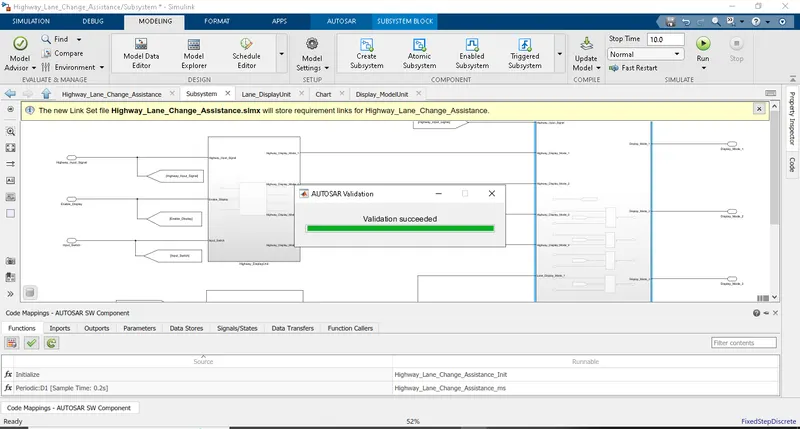
After cheking the inports and outports we click on the validate code mapping.
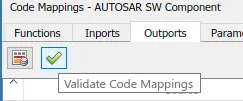
After done port mappings in correct manner we will get the validation succeeded.
For AUTOSAR Code generation:
- we need click on the AUtosar - quick start. Then we need to follow the instructions and then final we can generate the autosar code as follows.

- Thus AUTOSAR Code has been generated.
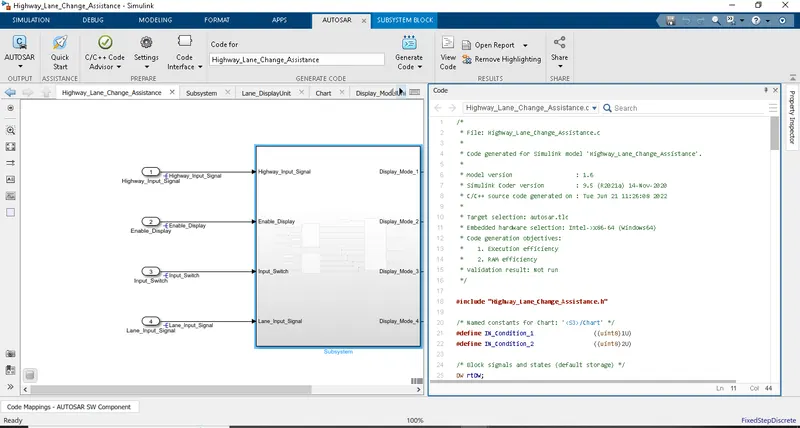
- The code is then inserted and shown in below for reference.
/*
 * File: Highway_Lane_Change_Assistance.c
 *
 * Code generated for Simulink model 'Highway_Lane_Change_Assistance'.
 *
 * Model version                  : 1.6
 * Simulink Coder version         : 9.5 (R2021a) 14-Nov-2020
 * C/C++ source code generated on : Tue Jun 21 11:26:08 2022
 *
 * Target selection: autosar.tlc
 * Embedded hardware selection: Intel->x86-64 (Windows64)
 * Code generation objectives:
 *    1. Execution efficiency
 *    2. RAM efficiency
 * Validation result: Not run
 */

#include "Highway_Lane_Change_Assistance.h"

/* Named constants for Chart: '/Chart' */
#define IN_Condition_1                 ((uint8)1U)
#define IN_Condition_2                 ((uint8)2U)

/* Block signals and states (default storage) */
DW rtDW;

/* Model step function */
void Highway_Lane_Change_Assistance_ms(void)
{
  sint32 rtb_Highway_Display_Mode_1;
  sint32 rtb_Highway_Display_Mode_3;
  sint32 rtb_Lane_Display_Mode_1;
  sint32 rtb_Lane_Display_Mode_2;
  sint32 rtb_Lane_Display_Mode_3;
  sint32 rtb_Lane_Display_Mode_4;
  sint32 tmp_0;
  uint8 tmp;

  /* Chart: '/Chart' incorporates:
   *  Inport: '/Enable_Display'
   *  Inport: '/Highway_Input_Signal'
   *  Inport: '/Input_Switch'
   */
  if (rtDW.is_active_c3_Highway_Lane_Chang == 0U) {
    rtDW.is_active_c3_Highway_Lane_Chang = 1U;
    rtDW.is_c3_Highway_Lane_Change_Assis = IN_Condition_1;
    rtb_Highway_Display_Mode_1 = 232;
    rtb_Highway_Display_Mode_3 = 41;
  } else if (rtDW.is_c3_Highway_Lane_Change_Assis == IN_Condition_1) {
    rtb_Highway_Display_Mode_1 = 232;
    rtb_Highway_Display_Mode_3 = 41;
    if ((Rte_IRead_Highway_Lane_Change_Assistance_ms_Rp_Highway_Input_Signal_DE_Highway_Input_Signal
         () == 1) &&
        (Rte_IRead_Highway_Lane_Change_Assistance_ms_Rp_Enable_Display_DE_Enable_Display
         () == 1) &&
        (Rte_IRead_Highway_Lane_Change_Assistance_ms_Rp_Input_Switch_DE_Input_Switch
         () == 1)) {
      rtDW.is_c3_Highway_Lane_Change_Assis = IN_Condition_2;
      rtb_Highway_Display_Mode_1 = 213;
      rtb_Highway_Display_Mode_3 = 9;
    }
  } else {
    /* case IN_Condition_2: */
    rtb_Highway_Display_Mode_1 = 213;
    rtb_Highway_Display_Mode_3 = 9;
    if ((Rte_IRead_Highway_Lane_Change_Assistance_ms_Rp_Highway_Input_Signal_DE_Highway_Input_Signal
         () == 1) &&
        (Rte_IRead_Highway_Lane_Change_Assistance_ms_Rp_Enable_Display_DE_Enable_Display
         () == 0) &&
        (Rte_IRead_Highway_Lane_Change_Assistance_ms_Rp_Input_Switch_DE_Input_Switch
         () == 1)) {
      rtDW.is_c3_Highway_Lane_Change_Assis = IN_Condition_1;
      rtb_Highway_Display_Mode_1 = 232;
      rtb_Highway_Display_Mode_3 = 41;
    }
  }

  /* End of Chart: '/Chart' */

  /* Chart: '/Chart' incorporates:
   *  Inport: '/Enable_Display'
   *  Inport: '/Input_Switch'
   *  Inport: '/Lane_Input_Signal'
   */
  if (rtDW.is_active_c1_Highway_Lane_Chang == 0U) {
    rtDW.is_active_c1_Highway_Lane_Chang = 1U;
    rtDW.is_c1_Highway_Lane_Change_Assis = IN_Condition_1;
    rtb_Lane_Display_Mode_1 = 132;
    rtb_Lane_Display_Mode_2 = 185;
    rtb_Lane_Display_Mode_3 = 54;
    rtb_Lane_Display_Mode_4 = 67;
  } else if (rtDW.is_c1_Highway_Lane_Change_Assis == IN_Condition_1) {
    rtb_Lane_Display_Mode_1 = 132;
    rtb_Lane_Display_Mode_2 = 185;
    rtb_Lane_Display_Mode_3 = 54;
    rtb_Lane_Display_Mode_4 = 67;
    if ((Rte_IRead_Highway_Lane_Change_Assistance_ms_Rp_Lane_Input_Signal_DE_Lane_Input_Signal
         () == 6) &&
        (Rte_IRead_Highway_Lane_Change_Assistance_ms_Rp_Enable_Display_DE_Enable_Display
         () == 1) &&
        (Rte_IRead_Highway_Lane_Change_Assistance_ms_Rp_Input_Switch_DE_Input_Switch
         () == 1)) {
      rtDW.is_c1_Highway_Lane_Change_Assis = IN_Condition_2;
      rtb_Lane_Display_Mode_1 = 127;
      rtb_Lane_Display_Mode_2 = 248;
      rtb_Lane_Display_Mode_3 = 186;
      rtb_Lane_Display_Mode_4 = 84;
    }
  } else {
    /* case IN_Condition_2: */
    rtb_Lane_Display_Mode_1 = 127;
    rtb_Lane_Display_Mode_2 = 248;
    rtb_Lane_Display_Mode_3 = 186;
    rtb_Lane_Display_Mode_4 = 84;
    if ((Rte_IRead_Highway_Lane_Change_Assistance_ms_Rp_Lane_Input_Signal_DE_Lane_Input_Signal
         () == 6) &&
        (Rte_IRead_Highway_Lane_Change_Assistance_ms_Rp_Enable_Display_DE_Enable_Display
         () == 0) &&
        (Rte_IRead_Highway_Lane_Change_Assistance_ms_Rp_Input_Switch_DE_Input_Switch
         () == 1)) {
      rtDW.is_c1_Highway_Lane_Change_Assis = IN_Condition_1;
      rtb_Lane_Display_Mode_1 = 132;
      rtb_Lane_Display_Mode_2 = 185;
      rtb_Lane_Display_Mode_3 = 54;
      rtb_Lane_Display_Mode_4 = 67;
    }
  }

  /* End of Chart: '/Chart' */

  /* Switch: '/Switch' incorporates:
   *  Inport: '/Highway_Input_Signal'
   *  Switch: '/Switch1'
   *  Switch: '/Switch2'
   *  Switch: '/Switch3'
   */
  tmp_0 =
    Rte_IRead_Highway_Lane_Change_Assistance_ms_Rp_Highway_Input_Signal_DE_Highway_Input_Signal
    ();
  if (tmp_0 != 0) {
    tmp = (uint8)rtb_Highway_Display_Mode_1;
  } else {
    tmp = (uint8)rtb_Lane_Display_Mode_1;
  }

  /* End of Switch: '/Switch' */

  /* Outport: '/Display_Mode_1' */
  Rte_IWrite_Highway_Lane_Change_Assistance_ms_Pp_Display_Mode_1_DE_Display_Mode_1
    (tmp);

  /* Switch: '/Switch1' */
  if (tmp_0 != 0) {
    tmp = 183U;
  } else {
    tmp = (uint8)rtb_Lane_Display_Mode_2;
  }

  /* Outport: '/Display_Mode_2' */
  Rte_IWrite_Highway_Lane_Change_Assistance_ms_Pp_Display_Mode_2_DE_Display_Mode_2
    (tmp);

  /* Switch: '/Switch2' */
  if (tmp_0 != 0) {
    tmp = (uint8)rtb_Highway_Display_Mode_3;
  } else {
    tmp = (uint8)rtb_Lane_Display_Mode_3;
  }

  /* Outport: '/Display_Mode_3' */
  Rte_IWrite_Highway_Lane_Change_Assistance_ms_Pp_Display_Mode_3_DE_Display_Mode_3
    (tmp);

  /* Switch: '/Switch3' */
  if (tmp_0 != 0) {
    tmp = 94U;
  } else {
    tmp = (uint8)rtb_Lane_Display_Mode_4;
  }

  /* Outport: '/Display_Mode_4' */
  Rte_IWrite_Highway_Lane_Change_Assistance_ms_Pp_Display_Mode_4_DE_Display_Mode_4
    (tmp);
}

/* Model initialize function */
void Highway_Lane_Change_Assistance_Init(void)
{
  /* (no initialization code required) */
}

/*
 * File trailer for generated code.
 *
 * [EOF]
 */
RESULT:-
- Thus we have created the model and performed model advisor check and performed the port mappings and generated autosar code.
- The whole file has been attached as an Zip file.