Project 2 Adaptive Cruise Control
Main Project – Adaptive Cruise Control (ACC)
General Overview:
Adaptive Cruise Control Feature for passenger cars allows the host vehicle to adapt to the speed in line with the flow of traffic. Driving in heavy traffic or keeping a safe distance to the preceding vehicle calls for a high level of concentration. The Adaptive Cruise Control feature can reduce the stress on the driver by automatically controlling the vehicle speed & maintaining a predefined minimum distance to the preceding vehicle. As a consequence, the driver enjoys more comfort & can concentrate on the road little better.
A radar sensor is usually at the core of the Adaptive Cruise Control. Installed at the front of the vehicle, the system permanently monitors the road ahead. As long as the road ahead is clear, cruise control feature maintains the speed set by the driver. If the system spots a slower vehicle within its detection range, it gently reduces speed by releasing the accelerator or actively engaging the brake control system. If the vehicle ahead speeds up or changes lanes, the cruise control automatically accelerates to the driver’s desired speed.
Standard Adaptive Cruise Control can be activated from speeds of around 30 km/h (20 mph) upwards and supports the driver, primarily on cross-country journeys or on freeways. The cruise control stop & go variant is also active at speeds below 30 km/h (20 mph). It can maintain the set distance to the preceding vehicle even at very low speeds and can decelerate to a complete standstill. When the vehicle remains stopped longer, the driver needs only to reactivate the system, for example by briefly stepping on the gas pedal to return to cruise control mode. In this way, cruise control stop & go supports the driver even in heavy traffic and traffic jams.
Since Adaptive Cruise Control is a comfort and convenience system, brake interventions and vehicle acceleration only take place within defined limits. Even with Adaptive Cruise Control switched on, it remains the driver’s responsibility to monitor the speed and distance from the vehicle in front.
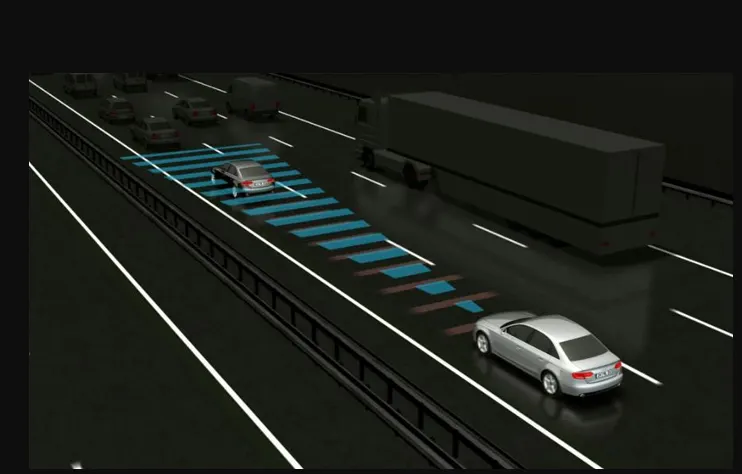
adaptive Cruise Control (ACC) is an automotive feature that allows a vehicle's cruise control system to adapt the vehicle's speed to the traffic environment. A radar system attached to the front of the vehicle is used to detect whether slower-moving vehicles are in the ACC vehicle's path.
Objective of Main Project:
- Developing Adaptive Cruise Control feature as per the Requirement Document using MATLAB Simulink.
- Follow all the MBD related processes: Requirement Tagging & Traceability, SLDD creation, Configuration Parameter changes, Model Advisor check & Code Generation.
- In Configuration Parameters: enable “Support Floating Numbers” under Code Generation settings.
- Use Embedded Coder to generate the code.
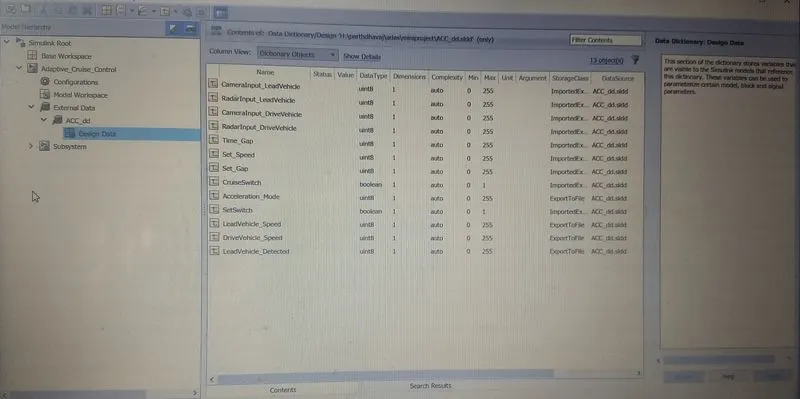
- If choosing code generation, Storage class for Input signals: ImportedExtern; Storage class for Output signal: Export to File; Storage class for local signals: localizable; Storage class for calibration signals: Const.
- Choose sample time for all signals as 0.01s
Signals & Calibration Data List:
|
Signal / Calibration Name |
Signal Type |
Data Type |
Dimension |
Min |
Max |
Initial Value |
Units |
|
CameraInput_LeadVehicle |
Input |
Uint8 |
1 |
0 |
255 |
- |
- |
|
RadarInput_LeadVehicle |
Input |
Uint8 |
1 |
0 |
255 |
- |
- |
|
CameraInput_DriveVehicle |
Input |
Uint8 |
1 |
0 |
255 |
- |
- |
|
RadarInput_DriveVehicle |
Input |
Uint8 |
1 |
0 |
255 |
- |
- |
|
Time_Gap |
Input |
Uint8 |
1 |
0 |
255 |
- |
- |
|
Set_Speed |
Input |
Uint8 |
1 |
0 |
255 |
- |
- |
|
Set_Gap |
Input |
Uint8 |
1 |
0 |
255 |
- |
- |
|
CruiseSwitch |
Input |
Boolean |
1 |
0 |
1 |
- |
- |
|
SetSwitch |
Input |
Boolean |
1 |
0 |
1 |
- |
- |
|
Acceleration_Mode |
Output |
Uint8 |
1 |
0 |
255 |
- |
- |
|
LeadVehicle_Speed |
Output |
Uint8 |
1 |
0 |
255 |
- |
- |
|
DriveVehicle_Speed |
Output |
Uint8 |
1 |
0 |
255 |
- |
- |
|
LeadVehicle_Detected |
Output |
Uint8 |
1 |
0 |
255 |
- |
- |
Main model:
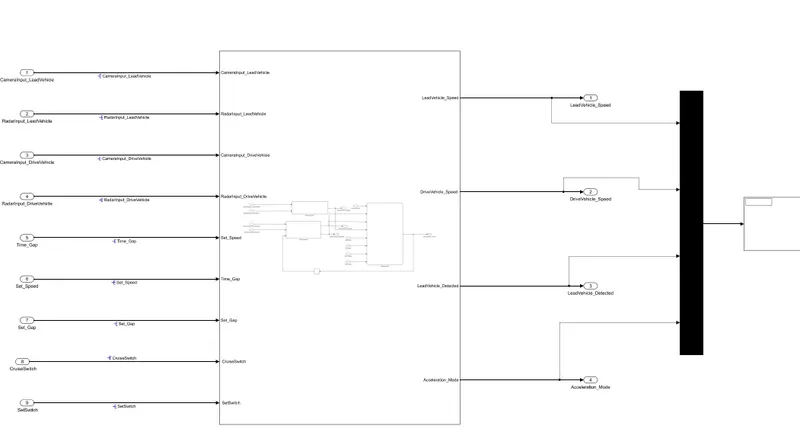
subsystem:
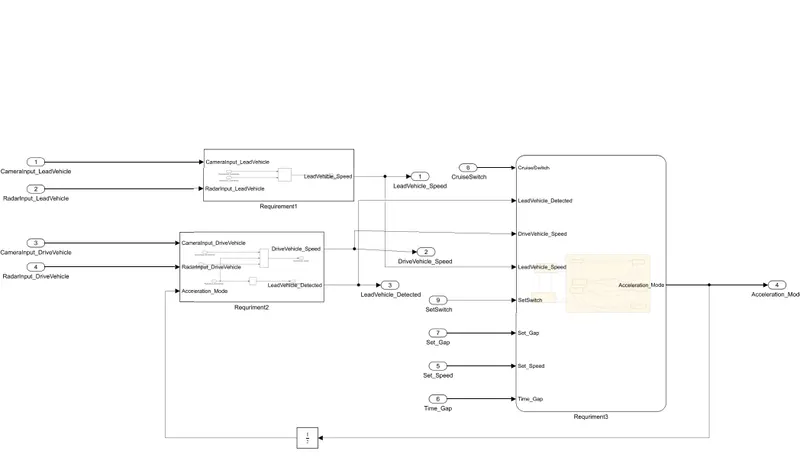
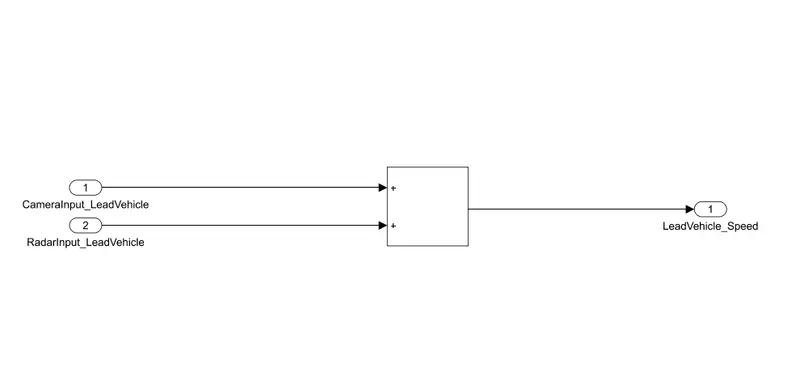
Requirement 1– Lead Vehicle:
- Lead Vehicle is a vehicle which is driving in the road ahead of our drive vehicle. Two input signals (Signal Name: CameraInput_LeadVehicle & RadarInput_LeadVehicle).
- Ideally sensor fusion techniques will be deployed to process & analyze data from camera & radar. For complexity reasons, let’s not adapt to any such algorithms.
- We can simply add both the radar & camera inputs & the corresponding output is read as Speed profile output (Signal Name: LeadVehicle_Speed).
- Speed data of the lead vehicle is critical in implementing the Adaptive Cruise Control algorithm.
Requirement 2 – Drive Vehicle:
- Drive Vehicle is the vehicle driven by the user & this is the vehicle which has ACC algorithm in it.
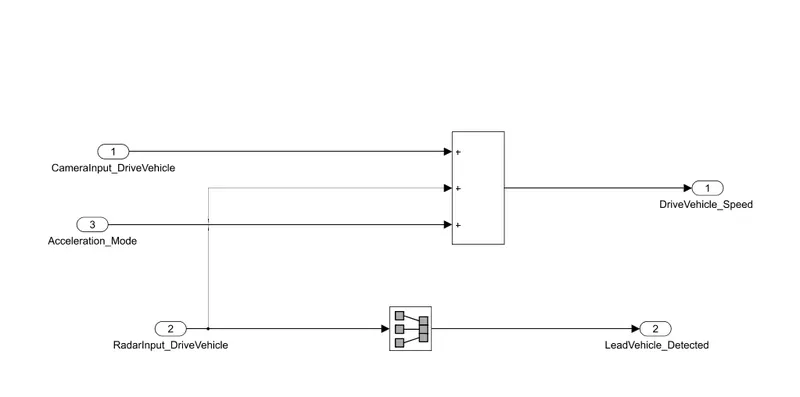
- Like the Lead Vehicle, Drive Vehicle algorithm also has 2 input signals (Signal Name: CameraInput_DriveVehicle, RadarInput_DriveVehicle) & one signal coming as an Input to this subsystem (Signal Name: Acceleration_Mode) – three inputs into this requirement in total.
- Like the above requirement, sensor fusion techniques will also be deployed here, for complexity reasons we are ignoring them.
- Two output signals come from this subsystem (Signal Name: DriveVehicle_Speed & LeadVehicle_Detected).
- Signal DriveVehicle_Speed is summation of three input signals mentioned above & LeadVehicle_Detected is renamed from Input Signal RadarInput_DriveVehicle by mere use of Signal Conversion block.
Requirement 3 – Adaptive Cruise Control Algorithm:
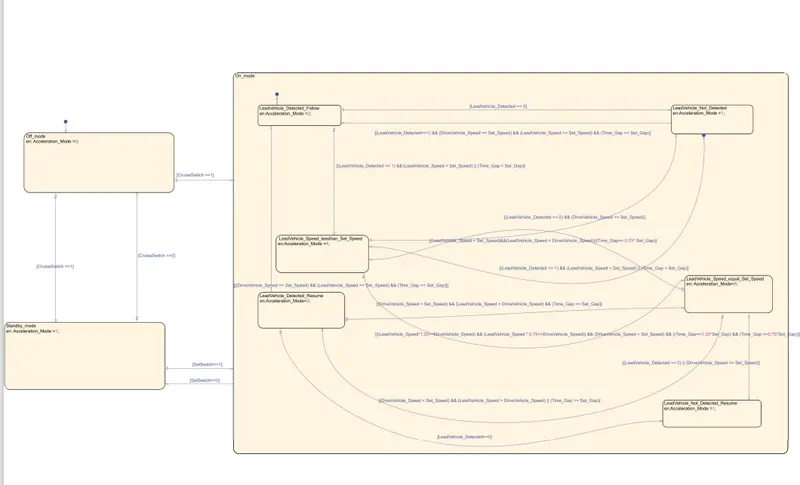
- Adaptive Cruise Control feature has 3 major modes of operation: OFF Mode, STANDBY Mode & ON Mode. This particular requirement has to be implemented as state machine logic in Simulink.
- The input signals to this state machine system are (Signal Name: Time_Gap, Set_Speed, Set_Gap, CruiseSwitch, SetSwitch).
- Also, the output signals (Signal Name: DriveVehicle_Speed & LeadVehicle_Detected) from requirement-2 is fed back as an input signal into this state machine block.
- Additionally, output signal (Signal Name: LeadVehicle_Speed) from requirement-1 is given as an input signal to this state machine block as well.
- Output from this subsystem is a signal (Signal Name: Acceleration_Mode) which governs the vehicular speed of the drive vehicle which automatically adjusts its speed & velocity to match the lead vehicle.
Requirement 3a – ACC OFF MODE state logic:
- This is the default state inside state machine logic. Output signal Acceleration_Mode is at value 0 in this state.
- This state is governed by input signal CruiseSwitch.
- If CruiseSwitch is equal to 1, state ACC STANDBY mode will get activated. If CruiseSwitch is equal to 0, state ACC OFF mode will get activated, from either ACC ON mode or ACC STANDBY mode
Requirement 3b – ACC STANDBY MODE state logic:
- This is the second activated state inside state machine logic. Output signal Acceleration_Mode is at value 1 in this state.
- This state is governed by both input signals CruiseSwitch & SetSwitch.
- If CruiseSwitch is equal to 1, state ACC STANDBY mode will get activated. If CruiseSwitch is equal to 0, state ACC OFF mode will get activated, from either ACC ON mode or ACC STANDBY mode
- If SetSwitch is equal to 1, state ACC ON mode will get activated. If SetSwitch is equal to 0, state ACC STANDBY mode will get activated.
Requirement 3c – ACC ON MODE state logic:
This state will be activated when input signal SetSwitch is equal to 1. There are 6 sub states to this state logic: They are:
- LeadVehicle_Detected_Follow (Default)
- LeadVehicle_Not_Detected
- LeadVehicle_Detected_Resume
- LeadVehicle_Not_Detected_Resume
- LeadVehicle_Speed_lessthan_Set_Speed
Requirement 3c (i) – LeadVehicle_Detected_Follow (ACC ON MODE):
- This is the default sub state inside ACC ON MODE state. Output signal Acceleration_Mode is equal to 2.
- Condition to transit from LeadVehicle_Detected_Follow to LeadVehicle_Not_Detected; Input signal condition LeadVehicle_Detected == 0.
- Condition to transit from LeadVehicle_Detected_Follow to LeadVehicle_Speed_lessthan_Set_Speed; Input Signals condition (LeadVehicle_Detected == 1) && (LeadVehicle_Speed < Set_Speed) || (Time_Gap < Set_Gap).
Requirement 3c (ii) – LeadVehicle_Not_Detected (ACC ON MODE):
- Output signal Acceleration_Mode is equal to 1.
- Condition to transit from LeadVehicle_Not_Detected to LeadVehicle_Detected_Follow; Input signals condition [(LeadVehicle_Detected==1) && (DriveVehicle_Speed == Set_Speed) && (LeadVehicle_Speed >= Set_Speed) && (Time_Gap >= Set_Gap)]
- Condition to transit from LeadVehicle_Not_Detected to LeadVehicle_Speed_lessthan_Set_Speed; Input signals condition [(LeadVehicle_Detected == 1) && (LeadVehicle_Speed < Set_Speed) || (Time_Gap < Set_Gap)]
Requirement 3c (iii) – LeadVehicle_Detected_Resume (ACC ON MODE):
- Output signal Acceleration_Mode is equal to 3.
- Condition to transit from LeadVehicle_Detected_Resume to LeadVehicle_Detected_Follow; Input signals condition [(DriveVehicle_Speed == Set_Speed) && (LeadVehicle_Speed >= Set_Speed) && (Time_Gap >= Set_Gap)]
- Condition to transit from LeadVehicle_Detected_Resume to LeadVehicle_Not_Detected_Resume; Input signal condition LeadVehicle_Detected==0.
- Condition to transit from LeadVehicle_Detected_Resume to LeadVehicle_Speed_equal_Set_Speed; Input Signal condition [(DriveVehicle_Speed < Set_Speed) && (LeadVehicle_Speed > DriveVehicle_Speed) && (Time_Gap >= Set_Gap)]
Requirement 3c (iv) - LeadVehicle_Not_Detected_Resume (ACC ON MODE):
- Output signal Acceleration_Mode is equal to 1.
Requirement 3c (v) - LeadVehicle_Speed_lessthan_Set_Speed (ACC ON MODE):
- Output signal Acceleration_Mode is equal to 4.
- Condition to transit from LeadVehicle_Speed_lessthan_Set_Speed to LeadVehicle_Not_Detected; Input signal condition [(LeadVehicle_Detected == 0) && (DriveVehicle_Speed == Set_Speed)]
- Condition to transit from LeadVehicle_Speed_lessthan_Set_Speed to LeadVehicle_Speed_equal_Set_Speed; Input signals condition [((LeadVehicle_Speed*1.25>=DriveVehicle_Speed) && (LeadVehicle_Speed * 0.75<=DriveVehicle_Speed)) && (DriveVehicle_Speed < Set_Speed) && ((Time_Gap<=1.25*Set_Gap) && (Time_Gap >=0.75*Set_Gap))]
Requirement 3c (vi) - LeadVehicle_Speed_equal_Set_Speed (ACC ON MODE):
- Output signal Acceleration_Mode is equal to 5.
- Condition to transit from LeadVehicle_Speed_equal_Set_Speed to LeadVehicle_Not_Detected_Resume; Input signal conditions is [(LeadVehicle_Detected == 0) || (DriveVehicle_Speed <= Set_Speed)]
- Condition to transit from LeadVehicle_Speed_equal_Set_Speed to LeadVehicle_Detected_Resume; Input signal conditions [(DriveVehicle_Speed < Set_Speed) && (LeadVehicle_Speed > DriveVehicle_Speed) || (Time_Gap >= Set_Gap)]
- Condition to transit from LeadVehicle_Speed_equal_Set_Speed to LeadVehicle_Speed_lessthan_Set_Speed; Input signals conditions[(LeadVehicle_Speed < Set_Speed)&&(LeadVehicle_Speed < DriveVehicle_Speed)||(Time_Gap== 0.75* Set_Gap)]
SLDD file:
MODEL ADVISORY REPORT:
| Model Advisor Report - Adaptive_Cruise_Control.slx | |
| Simulink version: 10.1 | Model version: 1.9 |
| System: Adaptive_Cruise_Control/Subsystem | Current run: 29-Dec-2021 11:05:29 |
| Treat as Referenced Model: off | |
Run Summary
| Pass | Fail | Warning | Not Run | Total |
|---|---|---|---|---|
 95 95 |
 0 0 |
 23 23 |
 23 23 |
141 |
Modeling Standards for MAB
1 Naming Conventions
14 0 3 3
1.1 General
2 0 2 0
Check file namesCharacters allowed for file names
Warning
The following files have invalid names:
- H:\parthdhavaj\adas\miniproject\1-0.pdf
- H:\parthdhavaj\adas\miniproject\2-0.pdf
- H:\parthdhavaj\adas\miniproject\4-1.pdf
- H:\parthdhavaj\adas\miniproject\Adaptive_Cruise_Control.slx.autosave
- H:\parthdhavaj\adas\miniproject\acc2-1.pdf
- H:\parthdhavaj\adas\miniproject\acc2-2.pdf
- H:\parthdhavaj\adas\miniproject\acc2-3.pdf
Consider having only alphanumeric characters and underscores in file name.
_________________________________________________________________________________________
Number at the beginning
Warning
The following files have numbers at the beginning of the file name:
- H:\parthdhavaj\adas\miniproject\1-0.pdf
- H:\parthdhavaj\adas\miniproject\1.pdf
- H:\parthdhavaj\adas\miniproject\2-0.pdf
- H:\parthdhavaj\adas\miniproject\2.pdf
- H:\parthdhavaj\adas\miniproject\3.pdf
- H:\parthdhavaj\adas\miniproject\4-1.pdf
- H:\parthdhavaj\adas\miniproject\4.pdf
- H:\parthdhavaj\adas\miniproject\5.pdf
- H:\parthdhavaj\adas\miniproject\6.pdf
Consider having alphabetic character at the beginning of the file name.
Check folder namesUnderscore at the beginning
Warning
The following folders have underscores at the beginning of the folder name:
- H:\parthdhavaj\adas\miniproject\Miniproject_ert_rtw\slprj\ert\_sharedutils
- H:\parthdhavaj\adas\miniproject\slprj\_jitprj
- H:\parthdhavaj\adas\miniproject\slprj\_sfprj
- H:\parthdhavaj\adas\miniproject\slprj\_sfprj\Adaptive_Cruise_Control\_self
- H:\parthdhavaj\adas\miniproject\slprj\ert\_sharedutils
Consider having alphabetic character at the beginning of the folder name.
_________________________________________________________________________________________
Number at the beginning
Warning
The following folders have numbers at the beginning of the folder name:
- H:\parthdhavaj\adas\miniproject\slprj\modeladvisor\Adaptive_Cruise_Control\14
- H:\parthdhavaj\adas\miniproject\slprj\modeladvisor\Vehicle_Direction_Determination\1
Consider having alphabetic character at the beginning of the folder name.
1.2 Content
12 0 1 3
Check subsystem namesIdentify subsystem names with incorrect characters.
Passed
All the subsystem names use correct characters.
Check port block namesCharacters allowed for port block names
Warning
The following port blocks have invalid names:
- Adaptive_Cruise_Control/Subsystem/ CruiseSwitch
- Adaptive_Cruise_Control/Subsystem/ SetSwitch
- Adaptive_Cruise_Control/Subsystem/Requriment2/DriveVehicle_Speed
- Adaptive_Cruise_Control/Subsystem/Requriment2/ LeadVehicle_Detected
- Adaptive_Cruise_Control/Subsystem/DriveVehicle_Speed
- Adaptive_Cruise_Control/Subsystem/ LeadVehicle_Detected
Consider having only alphanumeric characters and underscores in port block name.
Check character usage in block namesIdentify block names with incorrect characters.
Passed
All the block names use correct characters.
Check length of subsystem namesCheck length of subsystem names
Passed
All subsystem names are valid.
Check length of Inport and Outport namesCheck length of Inport and Outport names
Passed
All Inport and Outport names are valid.
Check usable characters for signal names and bus namesIdentify invalid characters in signal and bus names
Passed
No invalid characters are used in signal and bus names.
Check length of signal and bus namesCheck length of signal and bus names
Passed
All signal and bus names are valid.
Check usable characters for Stateflow data namesIdentify invalid characters in Stateflow data names.
Passed
No invalid characters are used in Stateflow data names.
Check length of Stateflow data nameCheck if the length of Stateflow data names are within limit.
Passed
All Stateflow data names are valid.
Check duplication of Simulink Data namesSimulink Data names should be unique across base workspace, model workspace and data dictionary.
Passed
All Simulink Data names are unique.
Check for unused data in Stateflow ChartsChecks if the model parameter 'Unused data, events, messages and functions' is not set to 'none'.
Passed
All constraints on model configuration parameters have been met.
| Status | Parameter | Current Value | Recommended Values |
|---|---|---|---|
| Pass | Unused data, events, messages and functions (SFUnusedDataAndEventsDiag) | warning | error, warning |
2 Simulink
37 0 12 13
2.1 Configuration Parameters
2 0 2 0
Check Implement logic signals as Boolean data (vs. double)Identify whether Implement logic signals as Boolean data (vs. double) is selected.
Passed
Implement logic signals as Boolean data (vs. double) is selected.
Check Signed Integer Division Rounding modejc_0642: Integer rounding mode setting
Identifies blocks with block parameter 'Integer Rounding Mode' set to 'Simplest' when the configuration parameter 'Signed integer division rounds to' is set to 'Undefined'.
Passed
Configuration parameter 'Signed integer division rounds to' is not set to 'Undefined'.
Check diagnostic settings for incorrect calculation resultsIdentify data validity diagnostic settings which detect incorrect calculation results.
Warning
The model configuration parameters are not set to the recommended values specified in the data file.
| Status | Parameter | Current Value | Recommended Values |
|---|---|---|---|
| Warning | Division by singular matrix (CheckMatrixSingularityMsg) | none | error |
| Warning | Inf or NaN block output (SignalInfNanChecking) | none | error |
| Warning | Wrap on overflow (IntegerOverflowMsg) | warning | error |
| Warning | Saturate on overflow (IntegerSaturationMsg) | warning | error |
Recommended Action
Follow the links in the result table to modify the model configuration parameters.
2.2 Diagram Appearance
11 0 5 1
Check for Simulink diagrams using nonstandard display attributesIdentify nonstandard display attributes in Simulink diagrams.
_________________________________________________________________________________________
Check format settings
Identify incorrect model-level format options.
Warning
NOTE: The following subchecks were performed on a subsystem, but are based on root-level settings.The following format display options are incorrect.
| Display Attribute | Recommended Value | Actual Value |
|---|---|---|
| Debug > Information Overlays > Nonscalar Signals | on | off |
| Modeling > Environment > Model Browser | off | on |
| Debug > Information Overlays > Colors | none | disabled |
Recommended Action
Set the format options to the recommended value.
_________________________________________________________________________________________
Check block colors
Identify blocks using nonstandard colors.
Passed
All blocks use standard colors.
_________________________________________________________________________________________
Check canvas colors
Identify canvases that are not white.
Passed
All diagrams use a white canvas.
_________________________________________________________________________________________
Check diagram zoom
Identify diagrams that do not have zoom factor set to 100 %.
Note: Zoom factors can differ for each instance of a model diagram opened in Simulink Editor
Warning
The following diagrams do not have zoom factor set to 100 percent:
- Adaptive_Cruise_Control/Subsystem
- Adaptive_Cruise_Control/Subsystem/Requirement1
- Adaptive_Cruise_Control/Subsystem/Requriment2
For each listed diagram, select Modeling > Environment > Zoom > Normal View (100%).
Check Model font settingsIdentify blocks and charts with different font settings from input parameters.
Passed
Font settings of the blocks and charts and input parameters are same.
Check whether block names appear below blocksIdentify blocks where the name is not displayed below the block.
Warning
The following blocks have names that do not display below the blocks:
Change the location such that the block name is below the block.
Check the display attributes of block namesIdentify whether to display block names.
Check for blocks with hidden names and obvious function
Identify block names that are displayed but can be hidden due to obvious behavior.
Passed
All blocks with obvious behavior have hidden names.
Check for non-descriptive displayed block names
Identify block names that are displayed but should be hidden due to a lack of a descriptive name.
Passed
All displayed names provide descriptive information.
Check for missing block names
Identify block names that are hidden but should be displayed to show a descriptive name.
Passed
All displayed names provide descriptive information.
Check for nondefault block attributesIdentify blocks that use and fail to display nondefault values.
Passed
Model displays all block parameter values that are not default values.
Check Model DescriptionIdentify layers in the model having inconsistent description format.
Warning
Following layers do not have model descriptions:
- Adaptive_Cruise_Control/Subsystem
- Adaptive_Cruise_Control/Subsystem/Requirement1
- Adaptive_Cruise_Control/Subsystem/Requriment2
Consider adding model description for all the layers.
Check if blocks are shaded in the modelCheck if blocks are shaded in the model
Passed
Blocks in the model are not shaded.
Check for unconnected ports and signal linesIdentify unconnected block input ports, output ports, and signal lines.
Passed
All lines and ports in the model are connected.
Check signal line connectionsCheck signal intersections
Warning
The following signals intersect with other signals in the diagram:
- Adaptive_Cruise_Control/Subsystem
- Adaptive_Cruise_Control/Subsystem
- Adaptive_Cruise_Control/Subsystem/Requriment2
Reposition the above listed signals to avoid intersections.
_________________________________________________________________________________________
Check if signals are drawn as slanting lines
Warning
The following signals are drawn as slanting lines in the diagram:
Consider redrawing the above listed signals as vertical or horizontal lines.
Check signal flow in modelIdentify subsystems which do not have a signal flow from left to right.
Warning
The signal flow of diagrams in the following subsystems can be improved:
Ensure that the signal flow in the mentioned subsystems is from left to right.
- All sequential blocks, except the blocks on feedback path,must be placed from left to right.
- All parallel blocks, except the blocks on feedback path, must be placed from top to bottom.
- All blocks should be oriented to the right.
Check usage of tunable parameters in blocksIdentify tunable parameters used to specify expressions, data type conversions, or indexing operations.
Passed
Tunable parameters are not used in the model.
Check for consistency in model element namesCheck if model elements connected to a signal are following consistent naming.
Passed
Model elements connected to a signal are following consistent names.
Check trigger signal namesIdentify trigger blocks where the origin of the trigger signal and the destination have dissimilar names.
Passed
No violation of the guideline for use of trigger signal names.
Check for mixing basic blocks and subsystemsIdentify levels in the model that include basic blocks and subsystems. Each level of a model must be designed with blocks of the same level (for example, only subsystems or only basic blocks).
Passed
The model does not mix basic blocks and subsystems at the same level.
2.3 Signal
3 0 2 1
Check signal line labelsIdentify blocks that require labeled signals. A subset of source and destination blocks require labeled signals.
Check source block labels
Warning
The following signals have no label:
- Adaptive_Cruise_Control/Subsystem/CameraInput_LeadVehicle/
- Adaptive_Cruise_Control/Subsystem/RadarInput_LeadVehicle/
- Adaptive_Cruise_Control/Subsystem/CameraInput_DriveVehicle/
- Adaptive_Cruise_Control/Subsystem/RadarInput_DriveVehicle/
- Adaptive_Cruise_Control/Subsystem/Set_Speed/
- Adaptive_Cruise_Control/Subsystem/Time_Gap/
- Adaptive_Cruise_Control/Subsystem/Set_Gap/
- Adaptive_Cruise_Control/Subsystem/ CruiseSwitch/
- Adaptive_Cruise_Control/Subsystem/ SetSwitch/
- Adaptive_Cruise_Control/Subsystem/Requirement1/CameraInput_LeadVehicle/
- Adaptive_Cruise_Control/Subsystem/Requirement1/RadarInput_LeadVehicle/
- Adaptive_Cruise_Control/Subsystem/Requriment2/CameraInput_DriveVehicle/
- Adaptive_Cruise_Control/Subsystem/Requriment2/RadarInput_DriveVehicle/
- Adaptive_Cruise_Control/Subsystem/Requriment2/Acceleration_Mode/
- Adaptive_Cruise_Control/Subsystem/
- Adaptive_Cruise_Control/Subsystem/
- Adaptive_Cruise_Control/Subsystem/
- Adaptive_Cruise_Control/Subsystem/
- Adaptive_Cruise_Control/Subsystem/Requirement1/
- Adaptive_Cruise_Control/Subsystem/Requriment2/
- Adaptive_Cruise_Control/Subsystem/Requriment2/
- Adaptive_Cruise_Control/Subsystem/Requriment3/
Recommended Action
Add a new or propagated label to the signal line.
_________________________________________________________________________________________
Identify blocks that require labeled signals. A subset of source and destination blocks require labeled signals.
Check destination block labels
Warning
The following signals have no label:
- Adaptive_Cruise_Control/Subsystem/Requirement1/LeadVehicle_Speed/
- Adaptive_Cruise_Control/Subsystem/Requriment2/DriveVehicle_Speed /
- Adaptive_Cruise_Control/Subsystem/Requriment2/ LeadVehicle_Detected/
- Adaptive_Cruise_Control/Subsystem/LeadVehicle_Speed/
- Adaptive_Cruise_Control/Subsystem/DriveVehicle_Speed /
- Adaptive_Cruise_Control/Subsystem/ LeadVehicle_Detected/
- Adaptive_Cruise_Control/Subsystem/Acceleration_Mode/
- Adaptive_Cruise_Control/Subsystem/Requirement1/
- Adaptive_Cruise_Control/Subsystem/Requirement1/
- Adaptive_Cruise_Control/Subsystem/Requriment2/
- Adaptive_Cruise_Control/Subsystem/Requriment2/
- Adaptive_Cruise_Control/Subsystem/Requriment2/
- Adaptive_Cruise_Control/Subsystem/Requriment3/
- Adaptive_Cruise_Control/Subsystem/Requriment3/
- Adaptive_Cruise_Control/Subsystem/Requriment3/
- Adaptive_Cruise_Control/Subsystem/Requriment3/
- Adaptive_Cruise_Control/Subsystem/Requriment3/
- Adaptive_Cruise_Control/Subsystem/Requriment3/
- Adaptive_Cruise_Control/Subsystem/Requriment3/
- Adaptive_Cruise_Control/Subsystem/Requriment3/
Recommended Action
Add a new or propagated label to the signal line.
Check for propagated signal labelsIdentify propagated labels on signal lines.
Passed
All inputs and outputs to the subsystems and blocks have labels and display propagated signals.
Check position of signal labelsIdentify inappropriately placed signal labels.
Passed
No signals found with inappropriately placed labels.
Check signal line labelsIdentify blocks that require labeled signals. A subset of source and destination blocks require labeled signals.
Check source block labels
Warning
The following signals have no label:
- Adaptive_Cruise_Control/Subsystem/CameraInput_LeadVehicle/
- Adaptive_Cruise_Control/Subsystem/RadarInput_LeadVehicle/
- Adaptive_Cruise_Control/Subsystem/CameraInput_DriveVehicle/
- Adaptive_Cruise_Control/Subsystem/RadarInput_DriveVehicle/
- Adaptive_Cruise_Control/Subsystem/Set_Speed/
- Adaptive_Cruise_Control/Subsystem/Time_Gap/
- Adaptive_Cruise_Control/Subsystem/Set_Gap/
- Adaptive_Cruise_Control/Subsystem/ CruiseSwitch/
- Adaptive_Cruise_Control/Subsystem/ SetSwitch/
- Adaptive_Cruise_Control/Subsystem/Requirement1/CameraInput_LeadVehicle/
- Adaptive_Cruise_Control/Subsystem/Requirement1/RadarInput_LeadVehicle/
- Adaptive_Cruise_Control/Subsystem/Requriment2/CameraInput_DriveVehicle/
- Adaptive_Cruise_Control/Subsystem/Requriment2/RadarInput_DriveVehicle/
- Adaptive_Cruise_Control/Subsystem/Requriment2/Acceleration_Mode/
- Adaptive_Cruise_Control/Subsystem/
- Adaptive_Cruise_Control/Subsystem/
- Adaptive_Cruise_Control/Subsystem/
- Adaptive_Cruise_Control/Subsystem/
- Adaptive_Cruise_Control/Subsystem/Requirement1/
- Adaptive_Cruise_Control/Subsystem/Requriment2/
- Adaptive_Cruise_Control/Subsystem/Requriment2/
- Adaptive_Cruise_Control/Subsystem/Requriment3/
Recommended Action
Add a new or propagated label to the signal line.
_________________________________________________________________________________________
Identify blocks that require labeled signals. A subset of source and destination blocks require labeled signals.
Check destination block labels
Warning
The following signals have no label:
- Adaptive_Cruise_Control/Subsystem/Requirement1/LeadVehicle_Speed/
- Adaptive_Cruise_Control/Subsystem/Requriment2/DriveVehicle_Speed /
- Adaptive_Cruise_Control/Subsystem/Requriment2/ LeadVehicle_Detected/
- Adaptive_Cruise_Control/Subsystem/LeadVehicle_Speed/
- Adaptive_Cruise_Control/Subsystem/DriveVehicle_Speed /
- Adaptive_Cruise_Control/Subsystem/ LeadVehicle_Detected/
- Adaptive_Cruise_Control/Subsystem/Acceleration_Mode/
- Adaptive_Cruise_Control/Subsystem/Requirement1/
- Adaptive_Cruise_Control/Subsystem/Requirement1/
- Adaptive_Cruise_Control/Subsystem/Requriment2/
- Adaptive_Cruise_Control/Subsystem/Requriment2/
- Adaptive_Cruise_Control/Subsystem/Requriment2/
- Adaptive_Cruise_Control/Subsystem/Requriment3/
- Adaptive_Cruise_Control/Subsystem/Requriment3/
- Adaptive_Cruise_Control/Subsystem/Requriment3/
- Adaptive_Cruise_Control/Subsystem/Requriment3/
- Adaptive_Cruise_Control/Subsystem/Requriment3/
- Adaptive_Cruise_Control/Subsystem/Requriment3/
- Adaptive_Cruise_Control/Subsystem/Requriment3/
- Adaptive_Cruise_Control/Subsystem/Requriment3/
Recommended Action
Add a new or propagated label to the signal line.
2.4 Block Consistency
4 0 1 1
Check Indexing ModeCheck for Zero-Based Indexing Mode.
Warning
The following blocks or charts have One-Based Indexing mode:
Consider remodeling by using Zero-Based Indexing.
Check block orientationIdentify blocks which are rotated or reversed
Passed
No blocks found with rotated or reversed orientation
Check if tunable block parameters are defined as named constantsCheck if tunable block parameters are defined as named constants
Passed
All tunable block parameters are defined as named constants
Check for sample time settingCheck if sample time property of a block is set to -1 (inherited).
Passed
All permitted blocks have sample time set to -1 (inherited).
2.5 Conditional Subsystem relations
4 0 0 1
Check position of conditional blocks and iterator blocksIdentify conditional and iterative blocks that are positioned inconsistently in the model.
Passed
The conditional and iterative blocks are correctly placed in the model.
Check usage of Merge blockjc_0659: Usage restrictions of signal lines inputted to Merge block
There must not be any block between a Conditional Subsystem block and a Merge block.
Passed
No Merge block found.
2.6 Operation Blocks
8 0 1 5
Check usage of Sum blocksCheck number of inputs for Sum block
Warning
Following Sum blocks have more than two inputs:
Set Sum block to have no more than two inputs.
Check operator order of Product blocksOperator order for Product blocks.
Passed
All Product blocks have valid operator order.
Check for parentheses in Fcn block expressionsjc_0622: Guideline for using the Fcn block
Passed
All Fcn blocks use parentheses to mark operator precedence.
Check icon shape of Logical Operator blocksIcon shape of Logical Operator blocks
Passed
All Logical Operator blocks have consistent icon shape.
Check usage of Relational Operator blocksIdentify Relational Operator blocks that connect to constants with the first (upper) input value.
Passed
This model does not contain Relational Operator blocks.
Check usage of Lookup Tablesjc_0626: Guideline for using the Lookup Table system block
Checks for the recommended parameter settings in Lookup Tables to prevent unexpected results.
Passed
All the Lookup Tables pass the check.
Check for cascaded Unit Delay blocksIdentify cascaded and tapped pattern of Unit Delay blocks.
Passed
No cascaded Unit Delay blocks found that can be changed to Tapped Delay/Delay block.
2.7 Other blocks
5 0 1 4
Check position of Inport and Outport blocksCheck positions of Inport blocks
Warning
The following Inport blocks are not placed to left side of the diagram:
- Adaptive_Cruise_Control/Subsystem/ CruiseSwitch
- Adaptive_Cruise_Control/Subsystem/Requriment2/CameraInput_DriveVehicle
- Adaptive_Cruise_Control/Subsystem/Requriment2/RadarInput_DriveVehicle
Move the Inport blocks identified to the left of all other blocks in the diagram.
It is acceptable to move the Inport block to the right only to prevent signal crossings.
_________________________________________________________________________________________
Check positions of Outport blocks
Warning
The following Outport blocks are not placed to right side of the diagram:
- Adaptive_Cruise_Control/Subsystem/Requriment2/ LeadVehicle_Detected
- Adaptive_Cruise_Control/Subsystem/LeadVehicle_Speed
- Adaptive_Cruise_Control/Subsystem/DriveVehicle_Speed
Move the Outport blocks identified to the right of all other blocks in the diagram.
It is acceptable to move the Outport block to the left only to prevent signal crossings.
Check display for port blocksIdentify Inport and Outport blocks that do not specify Port number for the Icon display block parameter.
Passed
All port blocks display the port number.
Check for usage of Data Store Memory blocksIdentify the usage of Data Store Memory blocks.
Passed
Usage of Data Store Memory blocks is correct.
Check for missing ports in Variant SubsystemsCheck for number of inputs/outputs to a Variant Subsystem.
Passed
No Variant Subsystems found having different number of inputs/outputs in the Variant Subsystem choices.
3 Stateflow
38 0 8 5
3.1 Block/Data/Events
6 0 0 1
Check for Strong Data Typing with Simulink I/OCheck whether labeled input and output signals are strongly typed.
Passed
No Stateflow charts have Use Strong Data Typing with Simulink I/O cleared.
Check execution timing for default transition path'Execute (enter) Chart At Initialization' should be set to OFF.
Passed
All Stateflow Charts pass the check.
Check definition of Stateflow dataIdentify the Scope value set on Stateflow data defined at machine level.
Passed
All Stateflow data at machine level has been defined as per guideline.
Check usable number for first indexIdentify usage of first index of Stateflow data.
Passed
All Stateflow data first index values are uniform.
3.2 Diagram
12 0 2 0
Check for unconnected objects in Stateflow ChartsIdentify dangling transitions and unconnected Stateflow States and Junctions in Stateflow Charts.
Passed
No unconnected transitions, states or junctions found in Stateflow Charts.
Check usage of exclusive and default states in state machinesIdentify Stateflow charts and substates that incorrectly use or define exclusive and default states.
_________________________________________________________________________________________
Check Stateflow charts for exclusive states
Identify Stateflow charts that have singular exclusive (OR) states.
Passed
The Stateflow charts do not have singular exclusive (OR) states.
_________________________________________________________________________________________
Check Stateflow charts for undefined default states
Identify Stateflow charts that do not define default states.
Passed
Each Stateflow chart defines a default state.
_________________________________________________________________________________________
Check for multiple states assigned as the default state
At the root level in the Stateflow hierarchy only one state should be assigned as the default.
Passed
The root level of the chart has only one default state assigned.
_________________________________________________________________________________________
Check for substates with singular OR states
States configured as OR should always be part of a group of states.
Passed
No singular OR states were detected.
_________________________________________________________________________________________
Check for substates without default states defined
At every level in the Stateflow hierarchy a default state should be assigned.
Passed
All substates have default states assigned.
_________________________________________________________________________________________
Check for substates with multiple default states defined
At every level in the Stateflow hierarchy only one state should be assigned as the default.
Passed
All levels of the chart have only one default state assigned.
Check for parallel Stateflow state used for groupingjc_0721: Guidelines for using parallel states
Identify parallel Stateflow States used for grouping.
Passed
All Stateflow Charts pass the check.
Check Stateflow transition appearanceCheck for transition lines that cross over one another
Warning
The following transition lines cross over one another:
- Adaptive_Cruise_Control/Subsystem/Requriment3/On_mode/transition(#40)
- Adaptive_Cruise_Control/Subsystem/Requriment3/On_mode/transition(#37)
- Adaptive_Cruise_Control/Subsystem/Requriment3/On_mode/transition(#36)
- Adaptive_Cruise_Control/Subsystem/Requriment3/On_mode/transition(#39)
- Adaptive_Cruise_Control/Subsystem/Requriment3/On_mode/transition(#38)
Consider remodeling so that transition lines do not cross over one another.
_________________________________________________________________________________________
Check orientation of transition lines
Warning
The following transitions are not vertical or horizontal and/or diagonal for flow chart loops:
- Adaptive_Cruise_Control/Subsystem/Requriment3/On_mode/transition(#36)
- Adaptive_Cruise_Control/Subsystem/Requriment3/On_mode/transition(#37)
- Adaptive_Cruise_Control/Subsystem/Requriment3/On_mode/transition(#38)
- Adaptive_Cruise_Control/Subsystem/Requriment3/On_mode/transition(#39)
- Adaptive_Cruise_Control/Subsystem/Requriment3/On_mode/transition(#40)
- Adaptive_Cruise_Control/Subsystem/Requriment3/On_mode/transition(#41)
- Adaptive_Cruise_Control/Subsystem/Requriment3/On_mode/transition(#43)
Consider remodeling using either horizontal or vertical transitions only and diagonal transitions for flow chart loops.
Check default transition placement in Stateflow chartsjc_0531: Placement of default transition.
Warning
The following destination states or junctions of default transitions are not on the top:
- Adaptive_Cruise_Control/Subsystem/Requriment3/Off_mode
- ..../Subsystem/Requriment3/On_mode/LeadVehicle_Detected_Follow
- ..../Subsystem/Requriment3/On_mode/LeadVehicle_Speed_lessthan_Set_Speed
The transition destination state or transition destination junction for the default transition must be positioned in the far upper left within the same level.
_________________________________________________________________________________________
jc_0531: Placement of default transition.
Warning
The following default transitions are not connected to the upper part of the state or junction:
Default transitions must be directly connected to the upper part of the state or junction.
_________________________________________________________________________________________
jc_0531: Placement of default transition.
Warning
The following states have multiple default transitions at the same level:
- ..../Subsystem/Requriment3/On_mode/LeadVehicle_Detected_Follow
- ..../Subsystem/Requriment3/On_mode/LeadVehicle_Speed_lessthan_Set_Speed
Multiple default transitions cannot be included in the same level.
Check usage of transitions to external statesIdentify transitions ending on external child states.
Passed
No direct transitions found from external state to child state.
Check for unexpected backtracking in state transitionsIdentify configuration parameter settings which identify unexpected backtracking in state transitions.
Passed
All constraints on model configuration parameters have been met.
| Status | Parameter | Current Value | Recommended Values |
|---|---|---|---|
| Pass | Unexpected backtracking (SFUnexpectedBacktrackingDiag) | error | error |
Check starting point of internal transition in Stateflowjc_0760: In all state charts and flow charts, internal transitions from state boundaries must start from the left edge of the state.
Passed
No Stateflow transitions found that violate the guidelines for starting point of internal transition in Stateflow.
Check usage of internal transitions in Stateflow statesIdentify Stateflow states using multiple internal transitions.
Passed
No Stateflow states found with multiple internal transitions
Check prohibited combination of state action and flow chartjc_0762: State actions within states and flow chart statements should not be used in combination.
Passed
No Stateflow states found that combine state action and flow chart.
Check transition orientations in flow chartsIdentify transitions in Stateflow flow charts that are drawn incorrectly.
_________________________________________________________________________________________
Check for conditions drawn horizontally
Condition expressions should be drawn on the horizontal segments of flow charts.
Passed
All condition expressions were drawn horizontally.
_________________________________________________________________________________________
Check for action transitions drawn vertically
Transitions with condition actions should be drawn on the vertical segments of flow charts.
Passed
All transitions with condition actions were drawn vertically.
_________________________________________________________________________________________
Check for transition actions in flow chart
Transition actions should not be used in flow charts.
Passed
No transition actions are used in flow charts.
_________________________________________________________________________________________
Check for junctions for default transitions
All Junctions in a flow chart should have a default exit transition.
Passed
All Junctions have a default exit transition.
_________________________________________________________________________________________
Check for transitions that combine condition and action
Flow charts should not combine condition evaluations and action expressions in a single transition.
Passed
No combined expressions were found in the chart.
Check usage of unconditional transitions in flow chartsIdentify unconditional transitions in flow charts.
Passed
All unconditional transitions adhere to the guideline.
3.3 Condition Transition/Action
10 0 2 4
Check Stateflow chart action languageCheck if the action language of Stateflow charts is set to 'C'.
Warning
The following Stateflow Charts do not have action language set to 'C':
Consider setting Stateflow Chart action language to 'C'.
Check usage of numeric literals in StateflowCheck for numeric literals in Stateflow
Warning
The following expressions contain numeric literals:
| Block Path | Expression |
|---|---|
| ..../On_mode/LeadVehicle_Not_Detected | Acceleration_Mode =1; |
| ..../On_mode/LeadVehicle_Detected_Follow | Acceleration_Mode =2; |
| ..../LeadVehicle_Speed_lessthan_Set_Speed | Acceleration_Mode =4; |
| ..../LeadVehicle_Speed_equal_Set_Speed | Acceleration_Mode=5; |
| ..../On_mode/LeadVehicle_Detected_Resume | Acceleration_Mode=3; |
| ..../On_mode/LeadVehicle_Not_Detected_Resume | Acceleration_Mode =1; |
| ..../Requriment3/On_mode/transition(#32) | LeadVehicle_Detected == 0 |
| ..../Requriment3/On_mode/transition(#33) | (LeadVehicle_Detected==1) && (DriveVehicle_Speed == Set_Speed) && (LeadVehicle_Speed >= Set_Speed) && (Time_Gap >= Set_Gap) |
| ..../Requriment3/On_mode/transition(#35) | (LeadVehicle_Detected == 1) && (LeadVehicle_Speed < Set_Speed) || (Time_Gap < Set_Gap) |
| ..../Requriment3/On_mode/transition(#36) | (LeadVehicle_Detected == 0) && (DriveVehicle_Speed == Set_Speed) |
| ..../Requriment3/On_mode/transition(#37) | (LeadVehicle_Detected == 1) && (LeadVehicle_Speed < Set_Speed) || (Time_Gap < Set_Gap) |
| ..../Requriment3/On_mode/transition(#38) | (LeadVehicle_Speed < Set_Speed)&&(LeadVehicle_Speed < DriveVehicle_Speed)||(Time_Gap== 0.75* Set_Gap) |
| ..../Requriment3/On_mode/transition(#39) | ((LeadVehicle_Speed*1.25>=DriveVehicle_Speed) && (LeadVehicle_Speed * 0.75<=DriveVehicle_Speed)) && (DriveVehicle_Speed < Set_Speed) && ((Time_Gap<=1.25*Set_Gap) && (Time_Gap >=0.75*Set_Gap)) |
| ..../Requriment3/On_mode/transition(#42) | (LeadVehicle_Detected == 0) || (DriveVehicle_Speed <= Set_Speed) |
| ..../Requriment3/On_mode/transition(#43) | LeadVehicle_Detected==0 |
| ..../Subsystem/Requriment3/Standby_mode | Acceleration_Mode =1; |
| ..../Subsystem/Requriment3/transition(#59) | SetSwitch==1 |
| ..../Subsystem/Requriment3/transition(#60) | SetSwitch==0 |
Recommended Action
Consider remodeling to use named parameters and constants instead of numeric literals.
Check for pointers in Stateflow chartsIdentify pointer operations on custom code variables.
Note: This check applies only to Stateflow charts that use C as the action language.
Passed
No pointer operations were found.
Check for usage of events and broadcasting events in Stateflow chartsIdentify undirected event broadcasts in Stateflow
Passed
No instances of undirected event broadcast were found.
Check order of state action typesIdentify out of order state action types in Stateflow states.
Passed
No Stateflow states found with out of order state action types
Check repetition of Action typesjc_0734: Number of state action types
Identifies repeated action types in a Stateflow State.
Passed
All Stateflow States pass the check.
Check if state action type 'exit' is used in the modelCheck if state action type 'exit' is used in the model.
Passed
State action type 'exit' is not used in the model.
Check updates to variables used in state transition conditionsjc_0741: Variables used in state transition conditions must not perform an update by "during" state action type.
Passed
No Stateflow states found that violate the guidelines for updating the variables used in state transition conditions.
Check usage of transition conditions in Stateflow transitionsjc_0772: Identify unconditional Stateflow transitions with higher priority than conditional transitions
Passed
No unconditional Stateflow transitions found with higher priority than conditional transitions
Check condition actions and transition actions in StateflowIdentify usage of transition actions in Stateflow.
Passed
No Stateflow charts have transition actions.
Check for MATLAB expressions in Stateflow blocksIdentify MATLAB expressions that are not suitable for code generation in Stateflow blocks.
Passed
No Stateflow objects found using MATLAB expressions unsuitable for code generation.
3.4 Label Description
6 0 4 0
Check uniqueness of Stateflow State and Data namesjc_0732: Distinction between state name and data item name
Identify Stateflow State and Stateflow Data that have identical names in a given chart.
Passed
All Stateflow charts pass the check.
Check uniqueness of State namesjc_0730: Independence of state name in charts
Identifies identical State names within a Stateflow Chart.
Passed
All Stateflow charts pass the check.
Check usage of State namesjc_0731: Slash (/) in the state name
Identify state names with '/' at its end.
Passed
All State names pass the check.
Check entry formatting in State blocks in Stateflow chartsIdentify missing line breaks between entry action (en), during action (du), and exit action (ex) entries in states. Identify missing line breaks after semicolons (;) in statements.
Warning
The following entries use incorrect formatting.
| Action Entry or Statement | State |
|---|---|
|
en: Acceleration_Mode =0; |
Adaptive_Cruise_Control/Subsystem/Requriment3/Off_mode |
|
en: Acceleration_Mode =1; |
Adaptive_Cruise_Control/Subsystem/Requriment3/Standby_mode |
|
en: Acceleration_Mode =1; |
Adaptive_Cruise_Control/Subsystem/Requriment3/On_mode/LeadVehicle_Not_Detected |
|
en: Acceleration_Mode =2; |
Adaptive_Cruise_Control/Subsystem/Requriment3/On_mode/LeadVehicle_Detected_Follow |
|
en: Acceleration_Mode =4; |
Adaptive_Cruise_Control/Subsystem/Requriment3/On_mode/LeadVehicle_Speed_lessthan_Set_Speed |
|
en: Acceleration_Mode=5; |
Adaptive_Cruise_Control/Subsystem/Requriment3/On_mode/LeadVehicle_Speed_equal_Set_Speed |
|
en: Acceleration_Mode=3; |
Adaptive_Cruise_Control/Subsystem/Requriment3/On_mode/LeadVehicle_Detected_Resume |
|
en: Acceleration_Mode =1; |
Adaptive_Cruise_Control/Subsystem/Requriment3/On_mode/LeadVehicle_Not_Detected_Resume |
Recommended Action
Ensure that the entries (en:,du:,ex:) and each statement begin on a new line.
Check indentation of code in Stateflow statesCheck for uniform indentation of action language in Stateflow states
Warning
The following Stateflow states do not have uniform indentation:
| Block Path | Expression |
|---|---|
| ..../On_mode/LeadVehicle_Not_Detected | LeadVehicle_Not_Detected<br > en:Acceleration_Mode =1;</br > |
| ..../On_mode/LeadVehicle_Detected_Follow | LeadVehicle_Detected_Follow<br > en:Acceleration_Mode =2;</br > |
| ..../LeadVehicle_Speed_lessthan_Set_Speed | LeadVehicle_Speed_lessthan_Set_Speed<br > en:Acceleration_Mode =4;</br > |
| ..../On_mode/LeadVehicle_Detected_Resume | LeadVehicle_Detected_Resume <br > en:Acceleration_Mode=3;</br > |
| ..../On_mode/LeadVehicle_Not_Detected_Resume | LeadVehicle_Not_Detected_Resume<br > en:Acceleration_Mode =1;</br > |
Recommended Action
Consider deleting the blank spaces before state action types and adding 1 single byte space before executable statements.
Check for usage of text inside statesIdentify Stateflow states with text exceeding the boundary of the state
Warning
The following Stateflow states have text exceeding the boundary of the state:
Ensure the text inside the Stateflow state is not described outside the boundary of the state.
Check position of label string in Stateflow transitionTransition labels should be placed near the point of origin of the transition
Warning
The following transitions do not have label string placed near the origin of the transition:
- Adaptive_Cruise_Control/Subsystem/Requriment3/On_mode/transition(#32)
- Adaptive_Cruise_Control/Subsystem/Requriment3/On_mode/transition(#35)
- Adaptive_Cruise_Control/Subsystem/Requriment3/On_mode/transition(#36)
- Adaptive_Cruise_Control/Subsystem/Requriment3/On_mode/transition(#37)
- Adaptive_Cruise_Control/Subsystem/Requriment3/On_mode/transition(#38)
- Adaptive_Cruise_Control/Subsystem/Requriment3/On_mode/transition(#39)
- Adaptive_Cruise_Control/Subsystem/Requriment3/On_mode/transition(#41)
- Adaptive_Cruise_Control/Subsystem/Requriment3/On_mode/transition(#42)
- Adaptive_Cruise_Control/Subsystem/Requriment3/On_mode/transition(#43)
- Adaptive_Cruise_Control/Subsystem/Requriment3/transition(#57)
- Adaptive_Cruise_Control/Subsystem/Requriment3/transition(#58)
- Adaptive_Cruise_Control/Subsystem/Requriment3/transition(#59)
- Adaptive_Cruise_Control/Subsystem/Requriment3/transition(#60)
Recommended Action
Consider placing the label string near the point of origin of the transition.
Check position of comments in transition labelsIdentify comments in transition labels that are not positioned uniformly.
Passed
Comments in transition labels are positioned uniformly.
3.5 Miscellaneous
4 0 0 0
Check return value assignments in Stateflow graphical functionsIdentify graphical functions with multiple assignments of return values in Stateflow charts.
Passed
No multiple assignments of return values were found.
Check uniqueness of Stateflow State and Data namesjc_0732: Distinction between state name and data item name
Identify Stateflow State and Stateflow Data that have identical names in a given chart.
Passed
All Stateflow charts pass the check.
4 MATLAB
6 0 0 2
4.1 Data and Operations
2 0 0 1
Check MATLAB code for global variablesCheck for global variables in MATLAB code
_________________________________________________________________________________________
Check for global variables in MATLAB code used in MATLAB Function blocks
Passed
No MATLAB Function blocks found
_________________________________________________________________________________________
Check for global variables in MATLAB functions defined in Stateflow charts
Passed
No MATLAB functions defined in Stateflow charts found
_________________________________________________________________________________________
Check for global variables in called MATLAB functions
Passed
No external MATLAB functions found
_________________________________________________________________________________________
4.2 Usage
4 0 0 1
Check MATLAB Function metricsIdentify MATLAB Functions that violate complexity limits.
Passed
No MATLAB Functions were found.
Input Parameters Selection
| Name | Value |
|---|---|
| Maximum effective lines of code per function | 60 |
| Minimum density of comments | 0.2 |
| Maximum cyclomatic complexity per function | 15 |
Check the number of function calls in MATLAB Function blocksChecks whether number of function calls in MATLAB Function blocks is less than 3.
Passed
Number of function calls in MATLAB Function blocks is less than 3.
CODE GENERATION: