Project 2
# firstly we import cv2 library to optimising opencv features through this notebook
import cv2
# importing numpy library as the shortform of "np", numpy is working tool library to perform our multidimensional arrays
import numpy as np
def gaussian_filter(image, filter_size, sigma):
filtered_image = cv2.GaussianBlur(image, (filter_size, filter_size), sigma)
return filtered_image
# gaussianBlur:- it provides a less noised image with the minimizing effect of sprinking deformities.
TASK 2-Script two functions to perform edge detection on a given image using Prewitt filter and Laplacian filter
PREWITT FILTRE:-
The Prewitt operator was developed by Judith M. S. Prewitt. Prewitt operator is used for edge detection in an image.
Prewitt operator detects both types of edges, these are:
1.Horizontal edges or along the x-axis,
2.Vertical Edges or along the y-axis.
Wherever there is a sudden change in pixel intensities, an edge is detected by the mask. Since the edge is defined as the change in pixel intensities. Prewitt mask is a first-order derivate mask. In the graph representation of Prewitt-mask’s result, the edge is represented by the local maxima or local minima.
Both the first and second derivative masks follow these three properties:
(A)More weight means more edge detection.
(B)The opposite sign should be present in the mask. (+ and -)
(C)The Sum of the mask values must be equal to zero.
METHODOLOGY OF PREWITT FILTRE:-
(1)Read the image.
(2)Convert into grayscale if it is colored.
(3)Convert into the double format.
(4)Define the mask or filter.
(5)Detect the edges along X-axis.
(6)Detect the edges along Y-axis.
(7)Combine the edges detected along the X and Y axes.
(8)Display all the images.
def prewitt_filter(image):
image = gaussian_filter(image,5,5)
# vertical filter
vertical_filter = np.array([[-1,0,1],[-1,0,1],[-1,0,1]])
# horizontal filter
horizontal_filter = np.array([[-1,-1,-1],[0,0,0],[1,1,1]])
vertical_filtered = cv2.filter2D(image,-1,vertical_filter)
horizontal_filtered = cv2.filter2D(image,-1,horizontal_filter)
abs_grad_x = cv2.convertScaleAbs(vertical_filtered)
abs_grad_y = cv2.convertScaleAbs(horizontal_filtered)
grad = cv2.addWeighted(abs_grad_x,0.5,abs_grad_y,0.5,0)
return grad
# filtre 2D:- it helps in the depth of the output image with the optimization of two matrices
# convertScaleAbs:- this function scales, calculates absolute values, and converts the result to 8-bit.
Laplacian filter:-
Laplacian filter is a second-order derivate filter used in edge detection, in digital image processing. In 1st order derivative filters, we detect the edge along with horizontal and vertical directions separately and then combine both. But using the Laplacian filter we detect the edges in the whole image at once.
METHODOLOGY OF LAPLACIAN FILTER:-
.Read the image using imread() function.
.If the image is colored then convert it into GREY format.
.Define the Laplacian filter.
.Convolve the image with the filter.
.Display the binary edge-detected image.
def laplacian_filter(image, ddepth, ksize):
G_filtered_image = gaussian_filter(image,5,5)
gray_image = cv2.cvtColor(G_filtered_image, cv2.COLOR_BGR2GRAY)
laplace_image = cv2.Laplacian(gray_image, ddepth = ddepth, ksize=ksize)
filtered_image = cv2.convertScaleAbs(laplace_image)
return filtered_image
#cvtColor:- it provides an given image a differently new color format, for such problems grey color image will be prefered
# laplacian :- it concludes the depth of an output image as an input
image = cv2.imread('challenge2.png')
gray_image = cv2.cvtColor(image, cv2.COLOR_BGR2GRAY)
prewitt_filtered_image = prewitt_filter(gray_image)
cv2.imshow('Prewitt Filter', np.hstack((gray_image, prewitt_filtered_image)))
cv2.imwrite('Prewitt_Image.png', prewitt_filtered_image)
cv2.waitKey(0)

FIG.1-prewitt filtered image
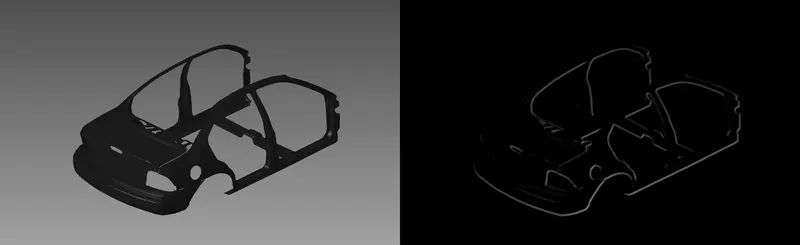
image = cv2.imread('challenge2.png')
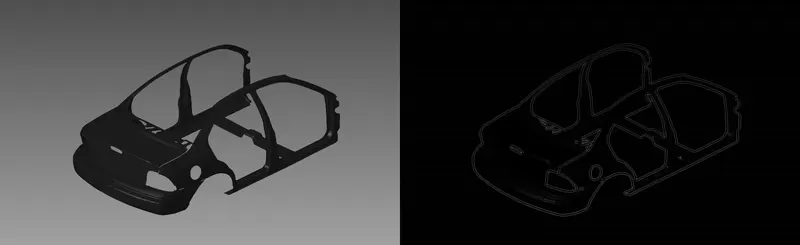
laplacian_filtered_image = laplacian_filter(image,cv2.CV_16S,3)
cv2.imshow('Laplacian Filter', np.hstack((gray_image, laplacian_filtered_image)))
cv2.imwrite('Laplacian_Image.png', laplacian_filtered_image)
cv2.waitKey(0)
FIG.-LAPLACIAN FILTERED IMAGE
TASK 2:-Compare both the images and justify which output is better than the other
cv2.imwrite('Prewitt_Laplacian.png',np.hstack((prewitt_filtered_image,laplacian_filtered_image)))
# Edges are thin & clear in the image which is filterd by by the Laplacian filter
# the edges are thick & fine in the image which is filterd by the prewitt filter
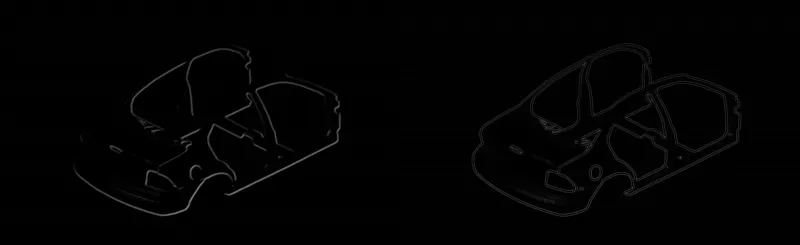
FIG.-PREWITT - LAPLACIAN COMPARISION IMAGE