Project 1 - V&V SW Analysis - I
Batch- Live Batch(Preeti)
Name- Madhu D
AIM:
To write a Test plan to test the features of a new mobile phone, that needs to be implemented based on the given requirements.
Theory of test plan:
The main objective for a test plan is to produce documentation that describes how the tester will verify that the system works as desired.
This document should describe what needs to be tested, how it will be tested, and who's responsible for doing so.
Types of system testing-
1) Performance Testing: This is designed to test the runtime performance of software within the context of an integrated system. Performance testing occurs throughout all steps in the testing process. It measures the scalability, responsiveness, and reliability of the software.
2) Interrupt Testing: It ensures that an system handles interruptions without failure or anomaly, when being used by real users.
3) Installation and launch Testing: In this installation testing checking full or partial upgrades and other features install/uninstall processes are included.
4) Functional Testing: This testing that seeks to establish whether each system's application feature works as per the software requirements or not.
5) Security Testing: Security testing involves testing a mobile app in ways that a malicious user would try to attack it.
6) Regression Testing: Regression testing is testing existing software applications to make sure that a change or addition hasn't broken any existing functionality.
7) Usability Testing: Usability testing refers to evaluating a product or service by testing it with representative users.
8) Test report: It is a document which contains detailed information of testing which are made on a system with it's results.
Test Plan:
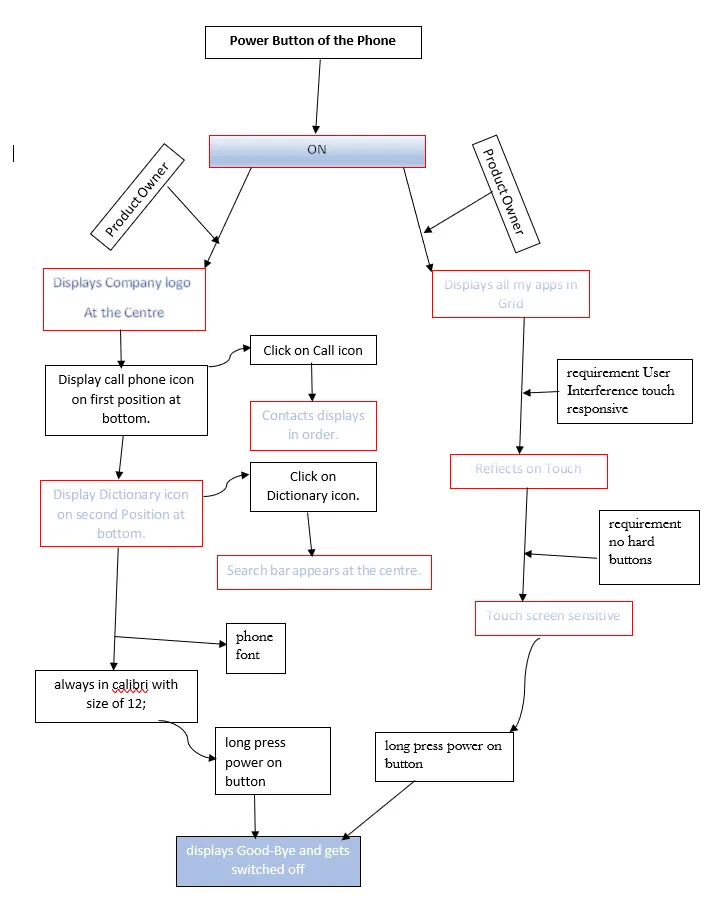
if(owner long press the power button)
{
Phone switch “ON” with the company logo at centre;
}
else if(customer press the power button)
{
Phone Switch “ON” and see all my apps in grid;
}
else if(As a owner power “ON” of the phone)
{
Displays call the phone icon on first position at bottom;
}
else if(As a owner power “ON” of the phone)
{
Displays Dictionary icon on second position at bottom;
}
else if( owner click on call icon of the phone )
{
contacts appears in chronological order;
}
else if(owner click on Dictionary icon of the phone)
{
search bar appears at centre;
}
else if(owner long press power on button)
{
displays Good-Bye and gets switched off;
}
else if(owners phone font)
{
always in calibri with size of 12;
}
else if(customer requirement User Interference touch responsive)
{
reflects on touch;
}
else ( customer requirement no hard buttons)
{
touch screen sensitive;
}
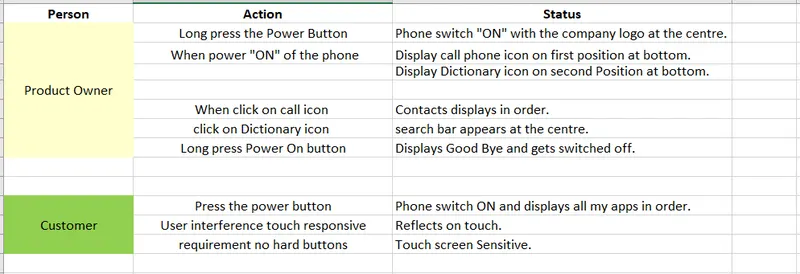
Test Case:
Flow Chart: