Project 1 - Parsing NASA thermodynamic data
MATLAB for Mechanical Engineers
AIM: Write a code in matlab to parse the NASA thermodynamic data file and then calculate the thermodynamic properties of various gas species.To Write a function that extracts the 14 coefficients and calculates the enthalpy, entropy and specific heats for all the species in the data file. You will be reading this file NASA thermodynamic data.
FORMULAE:
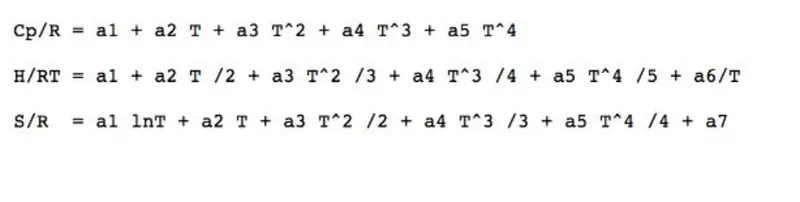
Where
R = Universal Gas Constant
T = Temperature
Cp = Specific Heat (KJ)
S = Entropy (KJ/mol-K)
H = Enthalpy (KJ/mol)
a(i) = Coefficients where, i = 1 to 14
OBJECTIVE:
- To Write a function that extracts the 14 coefficients and calculates the enthalpy, entropy and specific heats for all the species in the data file. You will be reading this file NASA thermodynamic data.
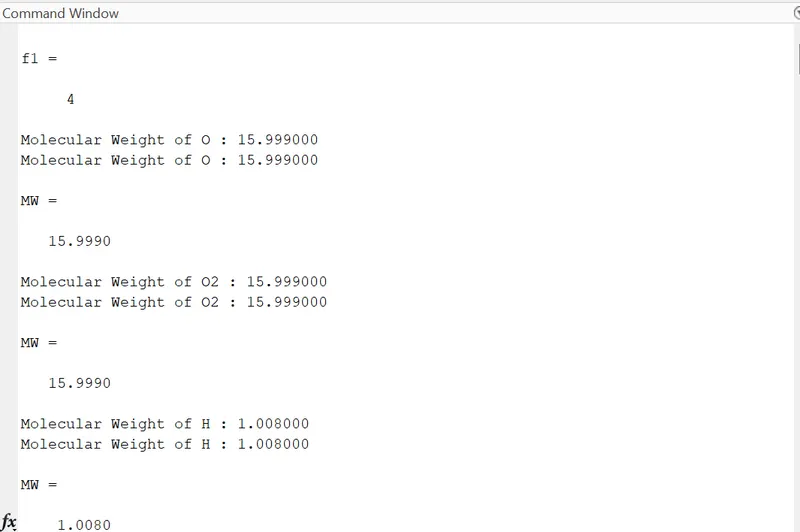
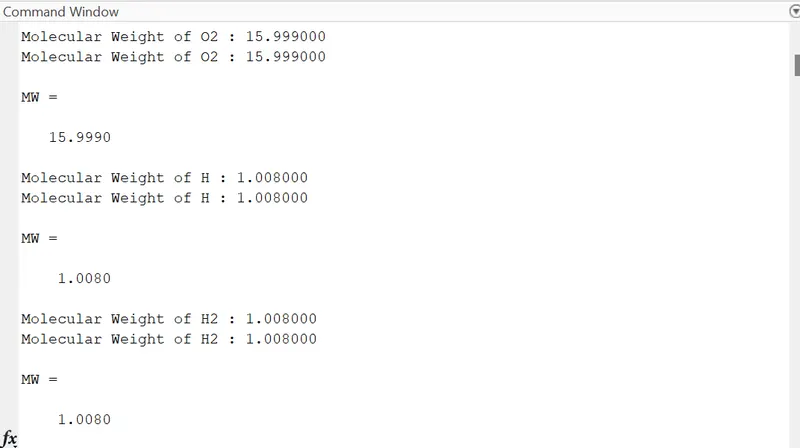
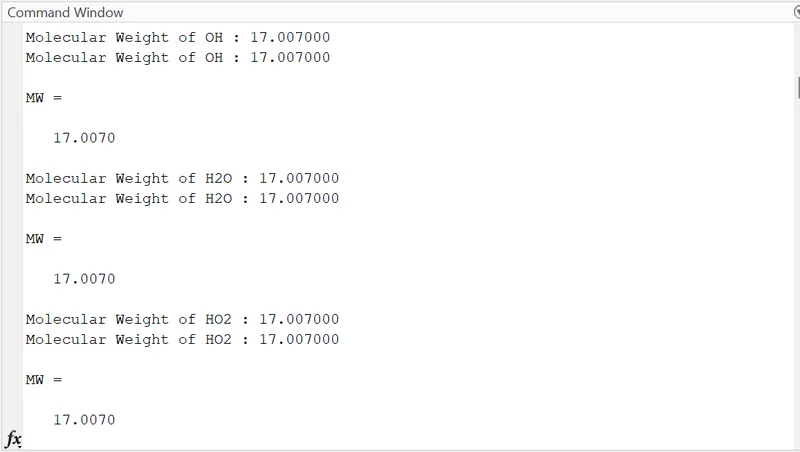
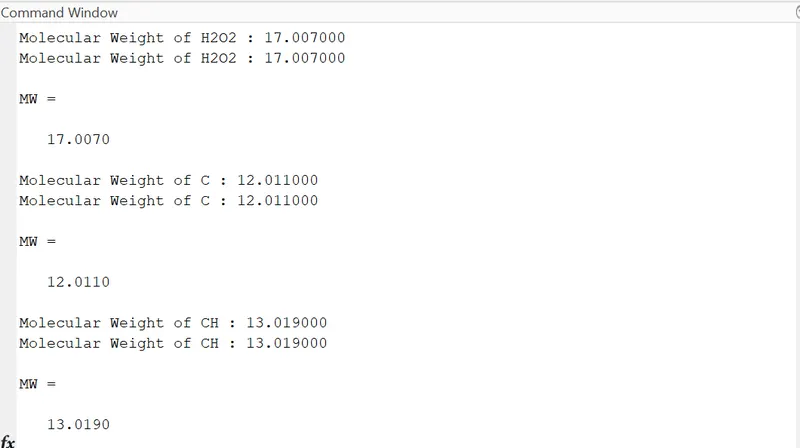
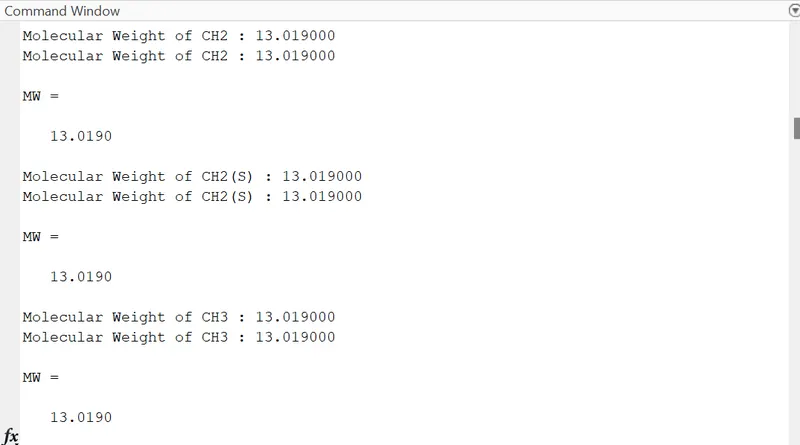
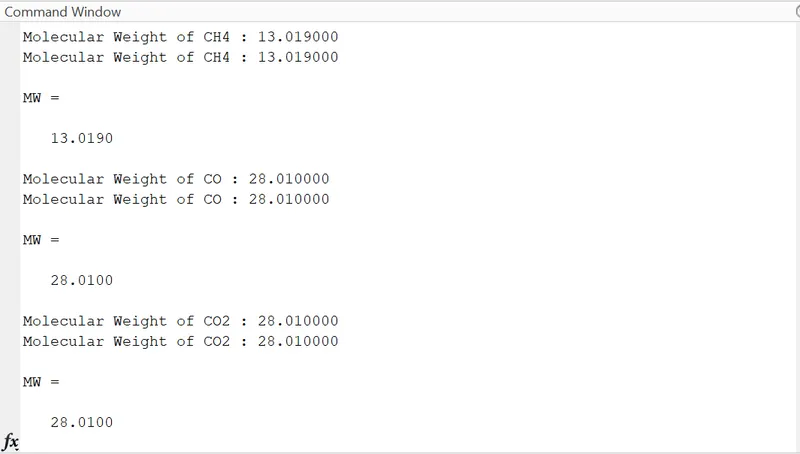
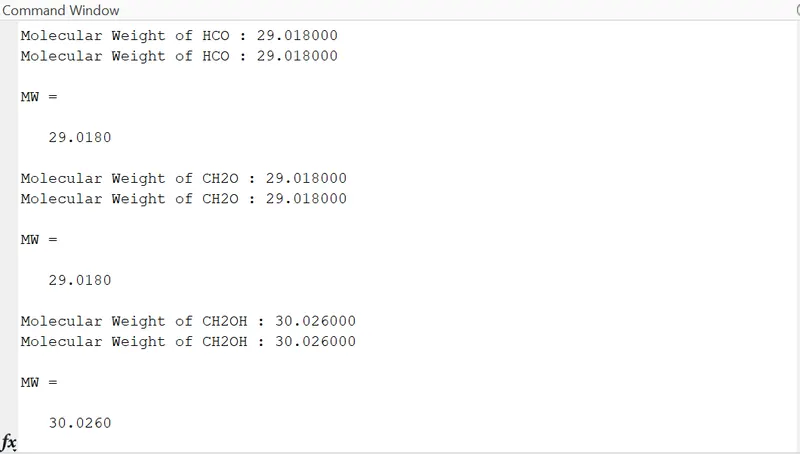
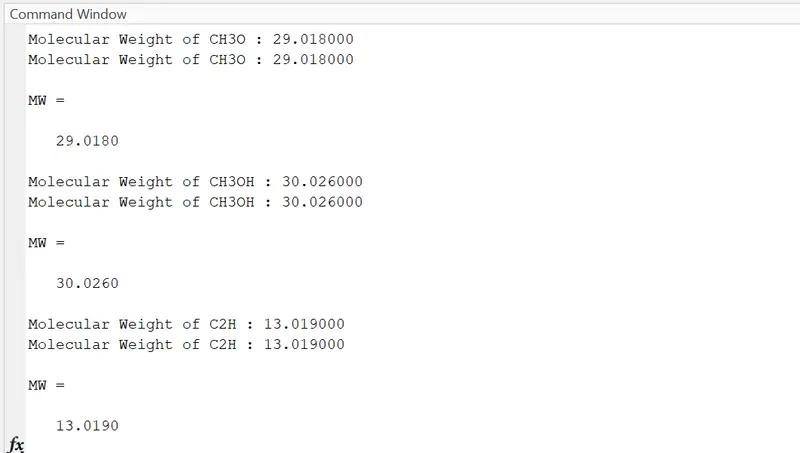
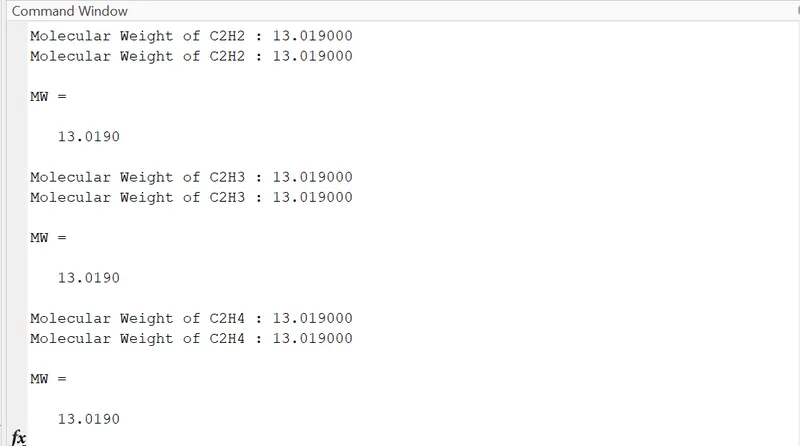
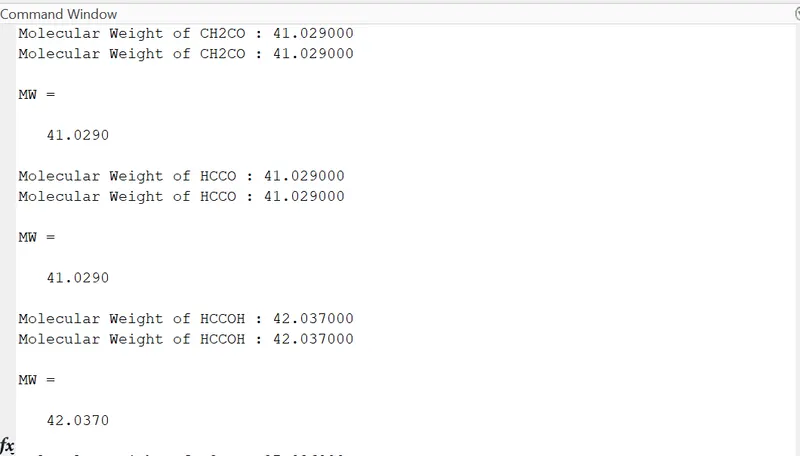
- To calculate the molecular weight of each species and display it in the command window.
- To plot the Cp, Enthalpy and Entropy for the local temperature range (low temperature : high temperature) specific for each species.
- To save the plots as images with appropriate names and dump them in separate folders for each species with suitable name. All these should be generated automatically.
- The main program that you will submit will just take the "THERMO.dat" file as an input and generate Cp, H and S plots.
- Screenshot of the window where all the folders are saved.
- Plots for o2, N2 and Co2 speciesto be shown.
PROGRAM:
Function to find specific Heat:-

% Specific Heat Calculation Function

function Cp = Specific_heat(a1,a2,a3,a4,a5,a8,a9,a10,a11,a12,T,R,tempmid)

  % calculating specific heat for higher and lower temperature respectively.

if (T <= tempmid)

   Cp = R*(a8+ (a9*T) + (a10*(T).^2) + (a11*(T).^3) + (a12*(T).^4));

 else
   Cp = R*(a1+ (a2*T) + (a3*(T).^2) + (a4*(T).^3) + (a5*(T).^4));

 end
end
Explanation:
- Now we will find the Specific Heat by creating specific heat function and assigning its related formula coefficient from 14 coefficients, Gas constant, Temperature and mid temperature.
- Now we will create a condition using the “if” loop and make the temperature less than and equal to mid temperature to specify lower temperature coefficient in the formula.
- Then we will use the else condition to specify coefficient of Higher temperature coefficient in the formula.
- Then end the loop and function to calculate the “Specific Heat”.
Function to find Entropy:-

% Entropy Calculation Function

function S = Entropy(a1,a2,a3,a4,a5,a7,a8,a9,a10,a11,a12,a14,T,R,tempmid)

  % calculating entropy for higher and lower temperature respectively.

  if (T <= tempmid)

    S = R*(a8.*log(T) + (a9*T) + ((a10*(T).^2)/2) + ((a11*(T).^3)/3) + ((a12*(T).^4)/4) + a14);

  else
    S = R*(a1.*log(T) + (a2*T) + ((a3*(T).^2)/2) + ((a4*(T).^3)/3) + ((a5*(T).^4)/4) + a7);
 end
end
Explanation:
- Now we will find the Entropy function and assigning its related formula coefficient from 14 coefficients, Gas constant, temperature and mid temperature..
- Now we will create a condition using the “if” loop and make the temperature less than and equal to mid temperature to specify lower temperature coefficient in the formula.
- Then we will use the else condition to specify coefficient of Higher temperature coefficient in the formula.
- Then end the loop and function to calculate the “Entropy”.
Function to find Enthalpy:-

% Enthalpy Calculation function

function H = Enthalpy(a1,a2,a3,a4,a5,a6,a8,a9,a10,a11,a12,a13,T,R,tempmid)

  % calculating enthalpy for higher and lower temperature respectively.

  if (T <= tempmid)

    H = R*T.*(a8 + ((a9*T)/2) + ((a10*(T).^2)/3) + ((a11*(T).^3)/4) + ((a12*(T).^4)/5) + ((a13./T)));

  else
    H = R*T.*(a1 + ((a2*T)/2) + ((a3*(T).^2)/3) + ((a4*(T).^3)/4) + ((a5*(T).^4)/5) + ((a6./T)));

  end
end
Explanation:
- Now we will find the Enthalpy function and assigning its related formula coefficient from 14 coefficients, Gas constant, temperature and mid temperature..
- Now we will create a condition using the “if” loop and make the temperature less than and equal to mid temperature to specify lower temperature coefficient in the formula.
- Then we will use the else condition to specify coefficient of Higher temperature coefficient in the formula.
- Then end the loop and function to calculate the “Enthalpy”.
Function to find Molecular Weight of different Species:-
% Molecular Weight Calculation Function

function MW = Molecular_weight(species)

  % Defining Atomic Name of the species

  atomic_name = ['H', 'C', 'O', 'N', 'Ar'];
   % Hydrogen , Carbon, Oxygen, Nitrogen, Argon


   % Defining Atomic masses of main species
   atomic_weight = [1.008 12.011 15.999 14.007 39.948];

   MW = 0;                           % Molecular weight starting range

   % Adding Atomic Number to obtain particular value

   for  i=1:length(species)          % Loop runs to the length of the species
       for j=1:length(atomic_name)   % Loop runs to the length of the atomic name
         if strcmp(species(i), atomic_name(j)) % function to compare 2 strings
         MW = MW + atomic_weight(j);
         position = j;
       end
     end
     n = str2num(species);           % Finding more elements in the species and incrementing  atomic weight of the species

   if n>1
       MW = MW + atomic_weight(position)*(n-1);
     end
   end
   fprintf('Molecular Weight of %s : ',species);
   fprintf('%f',MW);
   disp(' ');
 end
Explanation:
- Firstly we create an Molecular_weightfunction MW and assigning its species input to that.
- Then define the main element of all 53 species in an array atomic_name that are :- ‘H’,’C’,’O’,’N’,’Ar’.
- Then by taking the above main elements we will create thereatomic_weight array from any source like internet that are :- 008 12.011 15.999 14.007 39.948.
- Then we will assign molecular starting range from MW to zero and then create “for” loop condition which runs to the length of the species and an another nested “for” loop is created which runs to the length of the string atomic_name.
- Then we will create a condition using “If” condition and “strcmp” command to compare the species and atomic_name strings to calculate molecular masses if by comparison both string found same then we will assign its molecular weight.
- Now we will convert the string to numbers using “str2num” command and assign to then we run a condition of “if” loop to find whether the species contains more than one element and if there are more than 1 elements that is n>1 then we will increment the atomic weight by multiplication of position and n-1 to the atomic_weight array.
- Then we will print the molecular weight using fprintfcommand and display it using disp
MAIN PROGRAM:
clear all
close all
clc

% Input
R = 8.314; % Gas Constant (J/(mol-K))

% Reading data File
% Open and read THERMO.dat file

f1 =   fopen('THERMO.dat','r')
get = fgetl(f1);


% NOW reading Temperature from this file
temp = fgetl(f1);

% Splitting
s = strsplit(temp);

% Converting   strings cells into numbers
templow = str2num(s{2});
tempmid = str2num(s{3});
temphigh = str2num(s{4});

% Temperature Range
T = linspace(templow,temphigh,1000);

% Skipping Comment lines
for i= 1:3
    get = fgetl(f1);

end

% Reading the species
for j = 1:53
  tline = fgetl(f1);


  A = strsplit(tline, ' ');   % Splitting cell into array

 species = (A{1});            % To read the name of the species

% Converting   strings cells into numbers
lowtemp = str2num(A{end-3});
midtemp = str2num(A{end-2});
hightemp = str2num(A{end-1});

tline1 = fgetl(f1);            % getting next line
a = strfind(tline1, 'E');      % Finding the string E

% Finding first 7 higher and second & lower coefficients

% Finding the Higher coefficients
a1 = tline1(1:a(1)+3);
a1 = str2num(a1);
a2 = tline1(a(1)+4:a(2)+3);
a2 = str2num(a2);
a3 = tline1(a(2)+4:a(3)+3);
a3 = str2num(a3);
a4 = tline1(a(3)+4:a(4)+3);
a4 = str2num(a4);
a5 = tline1(a(4)+4:a(5)+3);
a5 = str2num(a5);

tline2 = fgetl(f1);
b = strfind(tline2, 'E');
a6 = tline2(1:b(1)+3);
a6 = str2num(a6);
a7 = tline2(b(1)+4:b(2)+3);
a7 = str2num(a7);


% Finding lower coefficients
a8 = tline2(b(2)+4:b(3)+3);
a8 = str2num(a8);
a9 = tline2(b(3)+4:b(4)+3);
a9 = str2num(a9);
a10 = tline2(b(4)+4:b(5)+3);
a10 = str2num(a10);

tline3 = fgetl(f1);
c = strfind(tline3, 'E');
a11 = tline(1:c(1)+3);
a11 = str2num(a11);
a12 = tline3(c(1)+4:c(2)+3);
a12 = str2num(a12);
a13 = tline3(c(2)+4:c(3)+3);
a13 = str2num(a13);
a14 = tline3(c(3)+4:c(4)+3);
a14 = str2num(a14);

% calculate specific heat
Cp = Specific_heat(a1,a2,a3,a4,a5,a8,a9,a10,a11,a12,T,R,tempmid);

% calculate Entropy
S = Entropy(a1,a2,a3,a4,a5,a7,a8,a9,a10,a11,a12,a14,T,R,tempmid);

% calculate Enthalpy
H = Enthalpy(a1,a2,a3,a4,a5,a6,a8,a9,a10,a11,a12,a13,T,R,tempmid);

% calculate Molecular Weight of the species
MW = Molecular_weight(species);

% writing molecular weight file
MW_file = fopen('Molecular Weight.txt','w');
fprintf(MW_file,'Molecular weight of %s is %d ',species,MW);
fclose(MW_file);                           % closing the file


% Plot 1 | Cp vs T
figure(1)
plot(T,Cp,'linewidth',3,'color','r');
xlabel('Temperature (K)');
ylabel('Specific heat (KJ)');
title(sprintf('Specific heat vs Temperature range of %s', species));
grid on
saveas(figure(1),'Specific Heat.jpg');

% Plot 2 | S vs T
figure(2)
plot(T,S,'linewidth',3,'color','g');
xlabel('Temperature (K)');
ylabel('Entropy (KJ/mol-K)');
title(sprintf('Entropy vs Temperature range of %s', species));
grid on
saveas(figure(2),'Entropy.jpg');

% Plot 3 | H vs T
figure(3)
plot(T,H,'linewidth',3,'color','b');
xlabel('Temperature (K)');
ylabel('Enthalpy (KJ/mol)');
title(sprintf('Enthalpy vs Temperature range of %s', species));
grid on
saveas(figure(3),'Enthalpy.jpg');


% Molecular Weight
MW = Molecular_weight(species)

end
Explanation:
- Clear all, close all and clc is used to clear all previous commands and plots.
- ‘fopen’ is used to open the file named ‘dat’.
- ‘r’is used for read mode.
- ‘fgetl’is used to read the file line-by-line.
- ‘strplit’ command is used for splitting the string or character vectors at specified delimiter.
- ‘str2num’ command is used to convert character array or string to numeric array.
- Using ‘for & end’ loops to skip the next 3 comments
- ‘linspace’ is used to generate the temperature range.
- ‘for’ loop to read all 53 species one by one and plot them to different folder.
- ‘strfind’ to find one string within another
- All function defined previously like the “specific Heat, Entropy, Enthalpy & Molecular weight” are called one by one.
- Calculate and display molecular weight.
- ‘fclose’ is used to close the data file.
OUTPUTS:
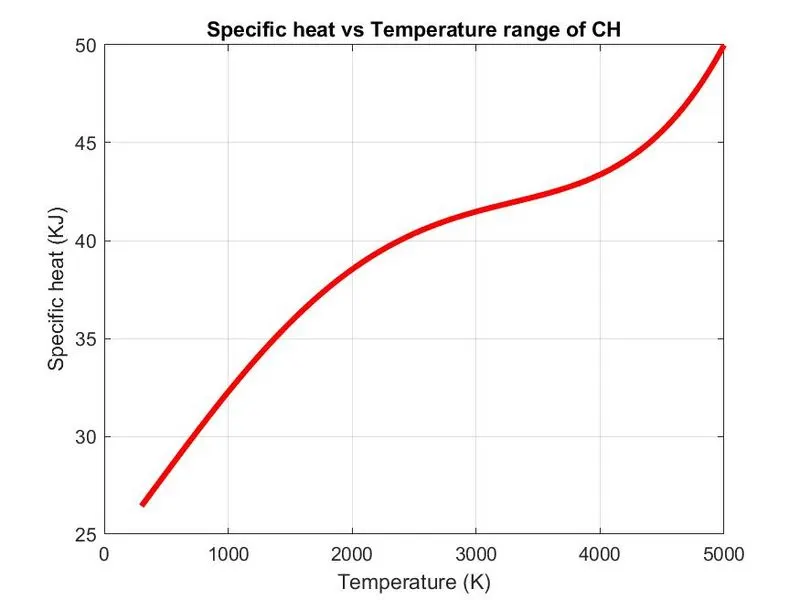
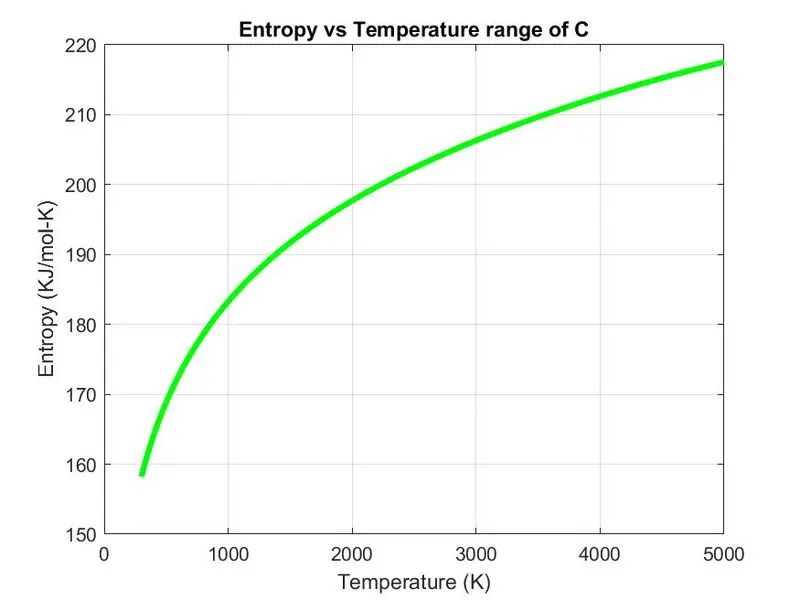
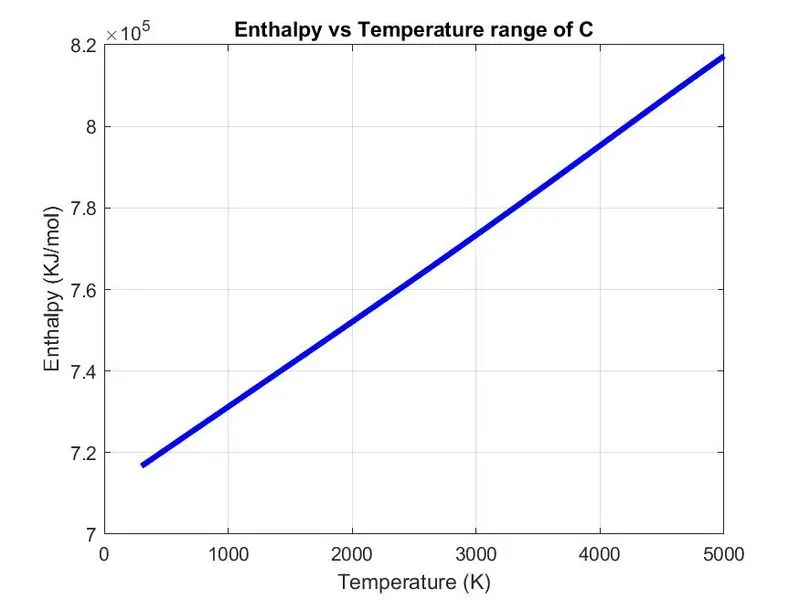
Command window outputs:
CONCLUSION:
The code in matlab to parse the NASA thermodynamic data file is weeiten and calculation of thermodynamic properties of various gas species is done. Function that extracts the 14 coefficients is written and calculation of enthalpy, entropy and specific heats for all the species id done and the data is obtained
GOOGLE LINKS
Functions
specific heat: https://drive.google.com/file/d/1-Lhc9s9507wNgF_393bXyC9ro-sgzi6O/view?usp=sharing
enthalpy: https://drive.google.com/file/d/1xM5f4IblQgSKFxOQ7oqRagibbHxMtGel/view?usp=sharing
entropy: https://drive.google.com/file/d/1UT_jmk6_2thF8rhv6udSetpxZYJJsUUK/view?usp=sharing
molecular weight:
Main program:https://drive.google.com/file/d/1sj4geZ8k4pyRzUDvH2L15QYRkJDQgCk5/view?usp=sharing