Project 1 - Parsing NASA thermodynamic data
AIM:-
To parse the NASA thermodynamic data file and then to evaluate thermodynamic properties such as Cp, H, and S of various gas species through MATLAB
OBJECTIVE:-
- Writing a function that extracts the 14 co-efficient and calculation of the enthalpy, entropy, and specific heats for all the species in the data file.
- Calculation the molecular weight of each species and display it in the command window.
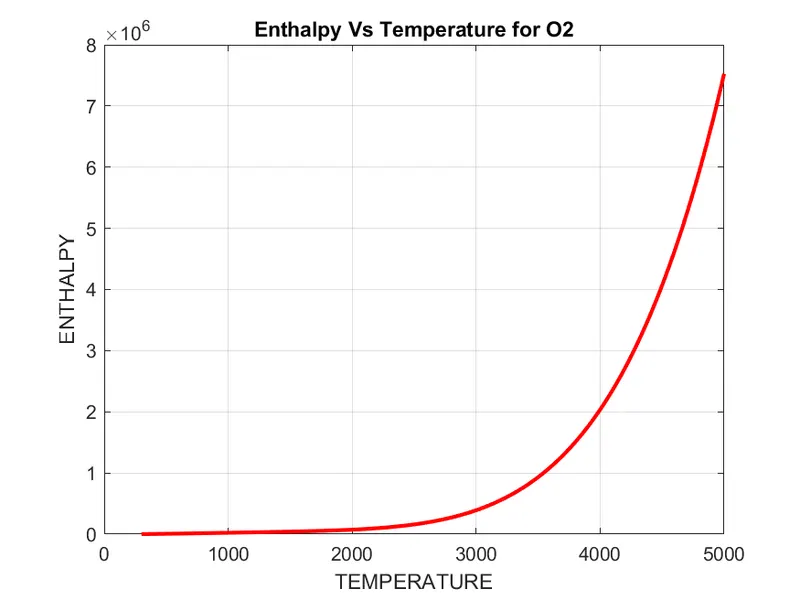
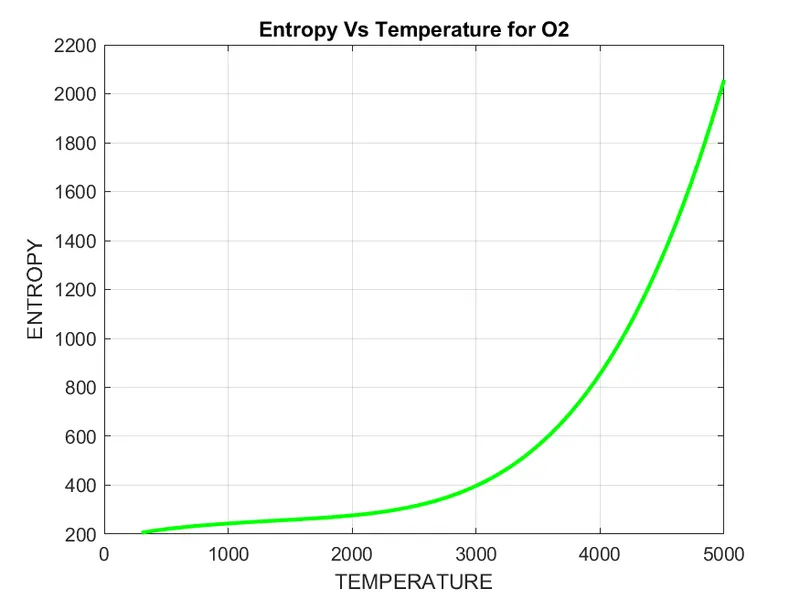
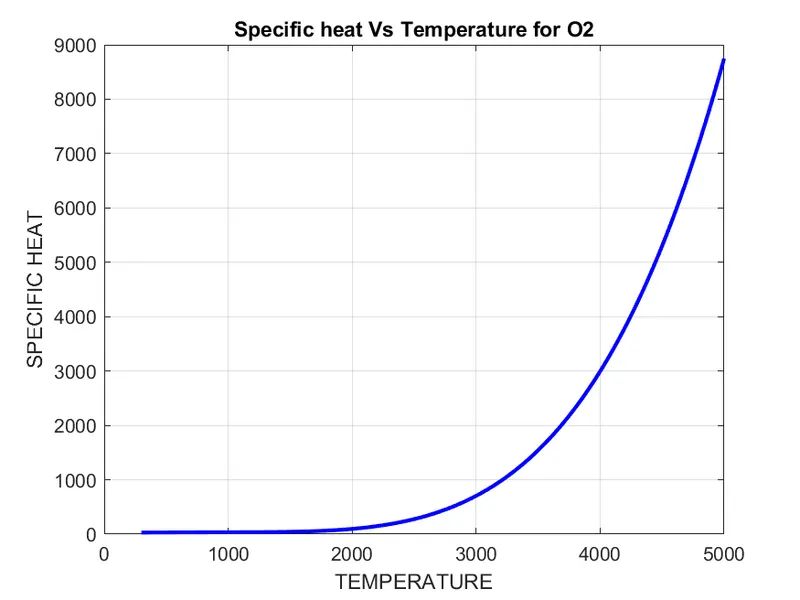
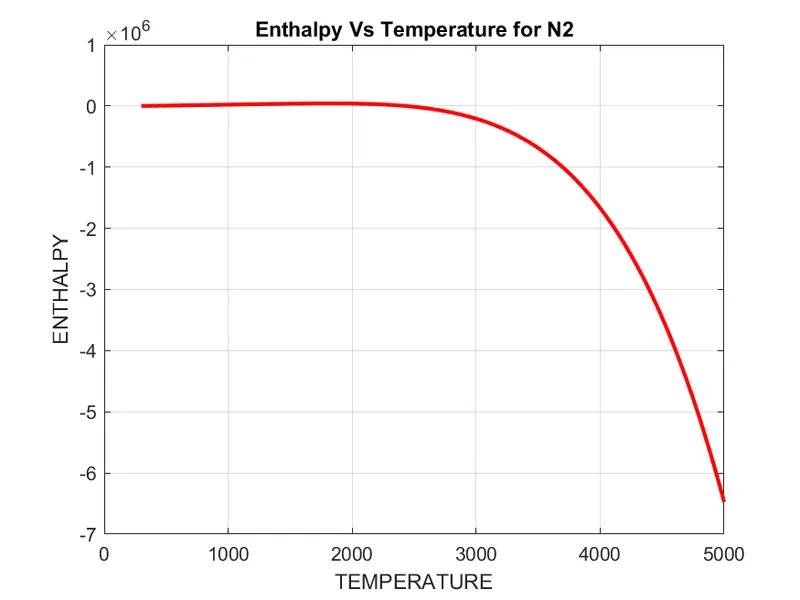
- Plot the Cp, Enthalpy, and Entropy for the local temperature range (low temperature: high temperature) specific for each species.
- Save the plots as images with appropriate names and dump them in separate folders for each species with a suitable name.
- All of these should be generated automatically.
- The main program that you will be submitted will just take the "THERMO.dat" file as an input and generation of Cp, H, and S plots. Screenshot of the window where all the folders are to be saved.
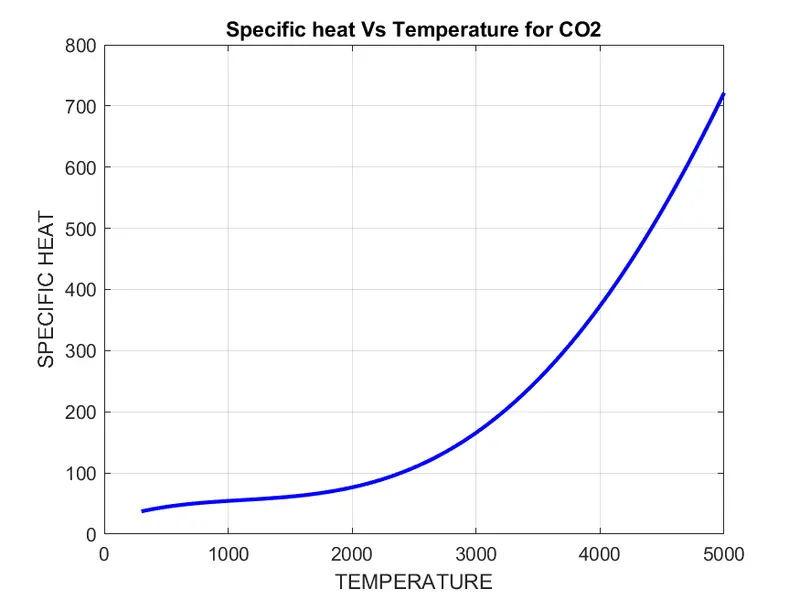
- Plots for O2, N2, and CO2 species.
NASA Thermodynamic File:-
- NASA thermodynamics file which is THERMO.dat file in which there are temperature range and 53 species are given in these data and each species contains 14 coefficients and temperature ranges and we have to parse these 14 coefficients to find Specific heat, Entropy and Enthalpy using the formula as below
where,
R = Universal Gas constant
T = Temperature
Cp = Specific heat at constant pressure (KJ/mol)
S = Entropy (KJ/mol-K)
H = Enthalpy (KJ/mol)
Specific heat at constant pressure (Cp)
The specific heat at constant pressure is the amount of heat per unit mass required to raise the temperature at constant pressure by one degree Celsius. The relationship between heat and temperature change is usually expressed in the form shown below
Entropy (s)
Entropy, the measure of a system's thermal energy per unit temperature that is unavailable for doing useful work. Because work is obtained from ordered molecular motion, the amount of entropy is also a measure of the molecular disorder, or randomness, of a system.
Enthalpy (h)
A property of a thermodynamic system is equal to the system's internal energy plus the product of its pressure and volume. In a system contained to prevent the mass transfer, for processes at constant pressure, the heat absorbed or released equals the change in enthalpy.
clear all
close all
clc


f1 = fopen('THERMO.dat','r');
first_line = fgetl(f1);  %reading the 1st line from data


% Obtaining global max, min, and medium temperatures

global_temp = fgetl(f1)  %reading 2nd line from data
temp_range = strsplit(global_temp,' ') %splitting 2nd line using blank space as delimiter

%obtaining temperature values from splitted data
global_min_temp = str2num(temp_range{2})
global_med_temp = str2num(temp_range{3})
global_max_temp = str2num(temp_range{4})

%Create a vector of 400 evenly spaced temperature points
T = linspace(global_min_temp,global_max_temp,400);
R = 8.314; % Universal gas constant

comments1 = fgetl(f1);  %reading 3rd line from data
comments2 = fgetl(f1);  %reading 4th line from data
comments3 = fgetl(f1);  %reading 5th line from data

for i = 1:53


line1 = fgetl(f1);
element_name = strtok(line1);

line2 = fgetl(f1);
A = strfind(line2,'E');

line3 = fgetl(f1);
B = strfind(line3,'E');

line4 = fgetl(f1);
C = strfind(line4,'E');

a1 = str2num(line2(1:A(1)+3));
a2 = str2num(line2(A(1)+4:A(2)+3));
a3 = str2num(line2(A(2)+4:A(3)+3));
a4 = str2num(line2(A(3)+4:A(4)+3));
a5 = str2num(line2(A(4)+4:A(5)+3));

a6 = str2num(line3(1:B(1)+3));
a7 = str2num(line3(B(1)+4:B(2)+3));

b1 = str2num(line3(B(2)+4:B(3)+3));
b2 = str2num(line3(B(3)+4:B(4)+3));
b3 = str2num(line3(B(4)+4:B(5)+3));
b4 = str2num(line4(1:C(1)+3));
b5 = str2num(line4(C(1)+4:C(2)+3));
b6 = str2num(line4(C(2)+4:C(3)+3));
b7 = str2num(line4(C(3)+4:C(4)+3));

%specific heat
cp = specific_heat(a1,a2,a3,a4,a5,b1,b2,b3,b4,b5,T,R,global_med_temp);


% Enthalpy
h = enthalpy(a1,a2,a3,a4,a5,a6,b1,b2,b3,b4,b5,b6,T,R,global_med_temp);

% Entropy
s = entropy_calc(a1,a2,a3,a4,a5,a7,b1,b2,b3,b4,b5,b7,T,R,global_med_temp);

% Calculating molecular weight of species
Molecular_wt(i) = molecular_weight(element_name);


%saving and plotting the data

cd('C:\Users\Thilak K.A\Documents\MATLAB\namo\O\component')
dir_name = element_name;
mkdir(dir_name);


figure(1)
plot(T,cp,'linewidth',2,'color','b')
title(sprintf('Specific heat Vs Temperature for %s',element_name))
xlabel('TEMPERATURE')
ylabel('SPECIFIC HEAT')
grid on

figure(2)
plot(T,h,'linewidth',2,'color','r')
title(sprintf('Enthalpy Vs Temperature for %s',element_name))
xlabel('TEMPERATURE')
ylabel('ENTHALPY')
grid on

figure(3)
plot(T,s,'linewidth',2,'color','g')
title(sprintf('Entropy Vs Temperature for %s',element_name))
xlabel('TEMPERATURE')
ylabel('ENTROPY')
grid on

 %pause the loop so that you can see each species plot in real time
  pause(0.0001)

   cd(dir_name);
saveas(1,'Specific heat.png');
saveas(2,'Enthalpy.png');
saveas(3,'Entropy.png');


end

fclose(f1);
Main Code Explanation :-
- I have used ‘fopen’ command to open Nasa’s experimental data.
- If you open the experimental data and analyze what’s happening, we can easily code it according to our requirements.
- 1st line consists of text (THERMO). I gave ‘fgetl’ command to read the 1st
- Second-line consists of 3 temperature values. Like 1st line use ‘fgetl’ to read the 2nd line and store it in variable global_temp.
- After reading the 2nd line, I have used ‘strsplit’ command using ‘blank space’ as a delimiter. ‘strsplit’ splits the data using the given delimiter. Therefore, temp_range consists of all 3 temperature values in a vector.
- Now, obtain the global minimum, medium, and maximum temperatures from the split data, use ‘str2num’ as this converts character array to numeric array.
- Then create a vector of 400 evenly spaced temperature points using ‘linspace’ command and provide universal gas constant value.
- 3rd,4th & 5th lines in the data are comments. Use ‘fgetl’ again for reading those 3 lines.
- From line ‘6’ to line ‘218’, there are a set of 4 lines. 1st line consists of the name of species 2nd, 3rd, 4th lines consist of experimental data.
- Now, I will explain the code for these 4 lines of data.
- Line 1 – I have read line ‘6’ using ‘fgetl’ and stored it in line 1 variable.
- I have used ‘strtok’ command to get the selected parts of the string (i.e, species name ‘O’)
- Line 2 – I have read line ‘7’ using ‘fgetl’ and stored it in line 2 variable.
- Use ‘strfind’ command to find the places of ‘E’ in line 7, ‘strfind’ is used to find strings within other strings. Now store them in an array named ‘A’
- Similarly, follow these steps for the next 2 lines. Then, you will get A, B, C arrays respectively.
- Now, extract all the coefficients (a1, a2, a3, a4, a5, a6, a7, b1, b2, b3, b4, b5, b6, b7) using ‘str2num’ command.
- All this process should be done again for line 7 to line 212. Therefore, I have created a ‘for-loop’ for all the 53 species.
Code for molecular weight calculation,
function MW =molecular_weight(element_name)
atoms = ['H','C','N','O','A'];
     fprintf('Molecular Weight of ');
    fprintf(element_name);
    fprintf(' : ');
    atomic_weight = [1 12 14 15 39];
    MW = 0;
    for i = 1:length(element_name)
        for j = 1:length(atoms)
            if strcmp(element_name(i),atoms(j))
                MW = MW +atomic_weight(j);
                position = j;
            end
        end
        n = str2num(element_name(i));
        if n>1
            MW = MW + atomic_weight(position)*(n-1);
        end
    end
    fprintf('%d',MW);
    disp(' ');
    end
Molecular weight Code Explanation :-
- For molecular weight calculation, create a function which takes weight of Hydrogen, Carbon, Nitrogen, Oxygen, and Argon as inputs. As all the elements consists of all these atoms.
- Now, I have created a loop and used ‘strcmp’ command to compare elements with species. If they both match then the molecular weight will be calculated.
- Now, take the string of species name and position to calculate their weight. Here ‘n’ is number of molecules of elements present in the species.
Code for specific heat,
%program to specific heat
function cp = specific_heat(a1,a2,a3,a4,a5,b1,b2,b3,b4,b5,T,R,global_med_temp)
% Comparing with global temp

if T > global_med_temp
    cp = R.*(a1+a2.*T+a3.*T.^2+a4.*T.^3+a5.*T.^4);

else
    cp = R.*(b1+b2.*T+b3.*T.^2+b4.*T.^3+b5.*T.^4);
end
Code for enthalpy,
%program to calculate enthalpy
function h = enthalpy(a1,a2,a3,a4,a5,a6,b1,b2,b3,b4,b5,b6,T,R,global_med_temp)
if T > global_med_temp
    h = R.*(a1.*T+(a2.*T.^2)./2+(a3.*T.^3)./3+(a4.*T.^4)./4+(a5.*T.^5)./5+a6);
else
    h = R.*(b1.*T+(b2.*T.^2)./2+(b3.*T.^3)./3+(b4.*T.^4)./4+(b5.*T.^5)./5+b6);

end
Code for entropy,
%Program to calculate entropy
function s = entropy_calc(a1,a2,a3,a4,a5,a7,b1,b2,b3,b4,b5,b7,T,R,global_med_temp)
if T<=global_med_temp
    s =  R*(a1.*log(T)+a2.*T+a3.*(T.^2)./2+a4.*(T.^3)./3+a5.*(T.^4)./4+a7);
else
    s = R*(b1.*log(T)+b2.*T+b3.*(T.^2)./2+b4.*(T.^3)./3+b5.*(T.^4)./4+b7);
end
Specific heat, Enthalpy & Entropy Code Explanation :-
- Now, create functions for calculating specific heat, enthalpy, and entropy.
- For entropy function, if the temperature is less than or equal to global medium temperature it will take 1st six high-temperature values, otherwise, it will take the next six vales.
- Similarly, create functions for specific heat and Enthalpy use the respective formulae to create functions.
Plotting and saving the plots in individual folders
- Use ‘cd’ to create new folders for every iteration of loop create a folder name with ‘species’ and paste its directory in cd.
- Now use ‘mkdir’ to provide name for the folder created in the earlier step.
- Now save using ‘saveas’ command into png format.
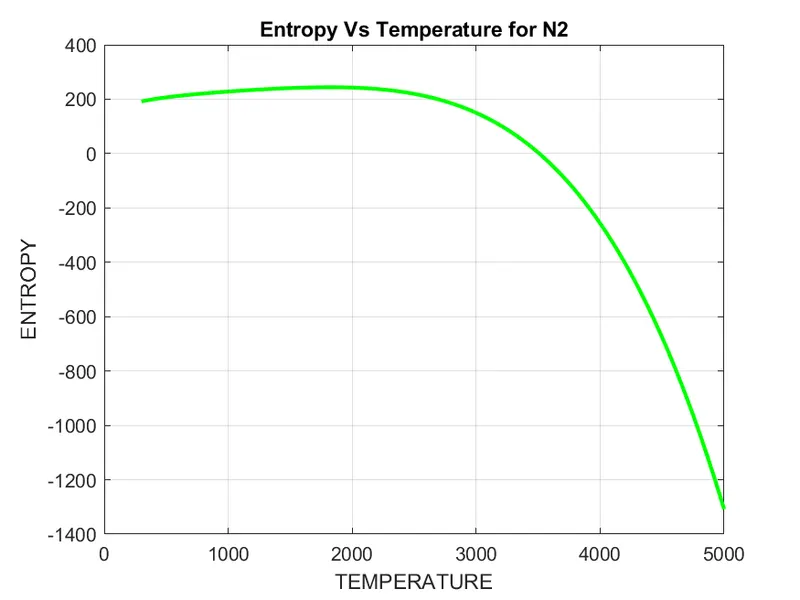
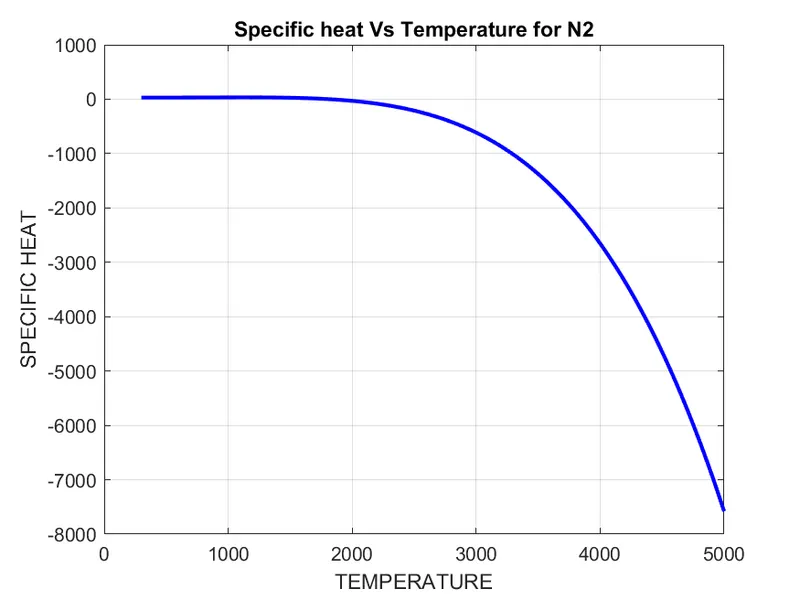
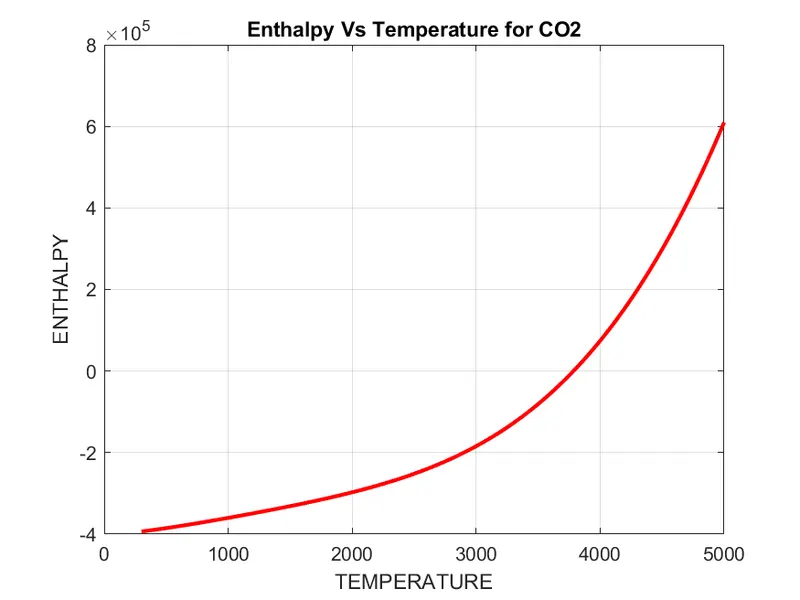
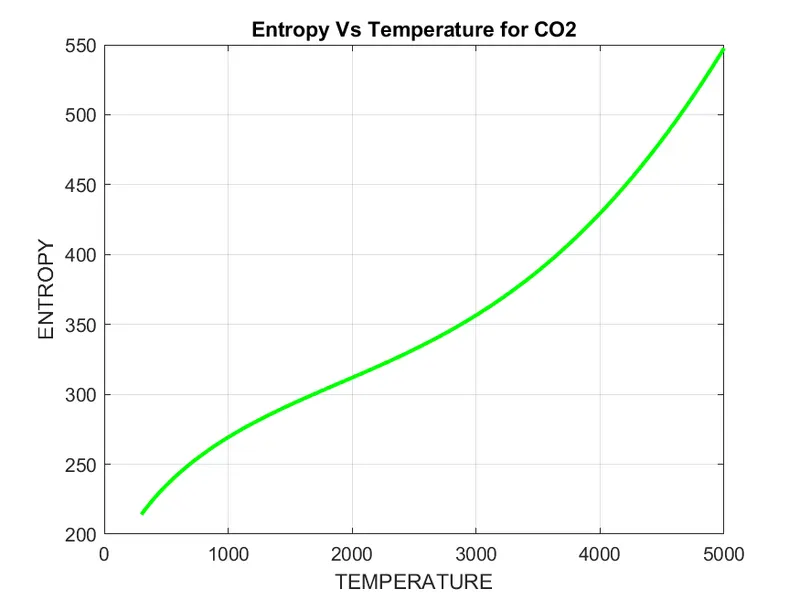
OUTPUT :-
Molecular Weight of O2 : 30
Molecular Weight of H : 1
Molecular Weight of H2 : 2
Molecular Weight of OH : 16
Molecular Weight of H2O : 17
Molecular Weight of HO2 : 31
Molecular Weight of H2O2 : 32
Molecular Weight of C : 12
Molecular Weight of CH : 13
Molecular Weight of CH2 : 14
Molecular Weight of CH2(S) : 14
Molecular Weight of CH3 : 15
Molecular Weight of CH4 : 16
Molecular Weight of CO : 27
Molecular Weight of CO2 : 42
Molecular Weight of HCO : 28
Molecular Weight of CH2O : 29
Molecular Weight of CH2OH : 30
Molecular Weight of CH3O : 30
Molecular Weight of CH3OH : 31
Molecular Weight of C2H : 25
Molecular Weight of C2H2 : 26
Molecular Weight of C2H3 : 27
Molecular Weight of C2H4 : 28
Molecular Weight of C2H5 : 29
Molecular Weight of C2H6 : 30
Molecular Weight of CH2CO : 41
Molecular Weight of HCCO : 40
Molecular Weight of HCCOH : 41
Molecular Weight of H2CN : 28
Molecular Weight of HCN : 27
Molecular Weight of HNO : 30
Molecular Weight of N : 14
Molecular Weight of NNH : 29
Molecular Weight of N2O : 43
Molecular Weight of NH : 15
Molecular Weight of NH2 : 16
Molecular Weight of NH3 : 17
Molecular Weight of NO : 29
Molecular Weight of NO2 : 44
Molecular Weight of HCNO : 42
Molecular Weight of HOCN : 42
Molecular Weight of HNCO : 42
Molecular Weight of NCO : 41
Molecular Weight of CN : 26
Molecular Weight of HCNN : 41
Molecular Weight of N2 : 28
Molecular Weight of AR : 39
Molecular Weight of C3H8 : 44
Molecular Weight of C3H7 : 43
Molecular Weight of CH3CHO : 43
Molecular Weight of CH2CHO : 42
References:-
https://www.mathworks.com/matlabcentral/answers/317006-create-new-folders-by-mkdir
https://www.mathworks.com/matlabcentral/answers/17580-how-to-define-a-path-in-saveas-command
https://www.mathworks.com/matlabcentral/answers/106320-make-a-loop-to-calculate-molecular-weight