Project 1 - Parsing NASA thermodynamic data
AIM : To write code in MATLAB to parse NASA thermidynamic data and calculate thermodynamic properties of various gas species.
OBJECTIVE :
- Write a function that extracts the 14 co-efficients and calculates the enthalpy, entropy and specific heats for all the species in the data file.
- Calculate the molecular weight of each species and display it in the command window.
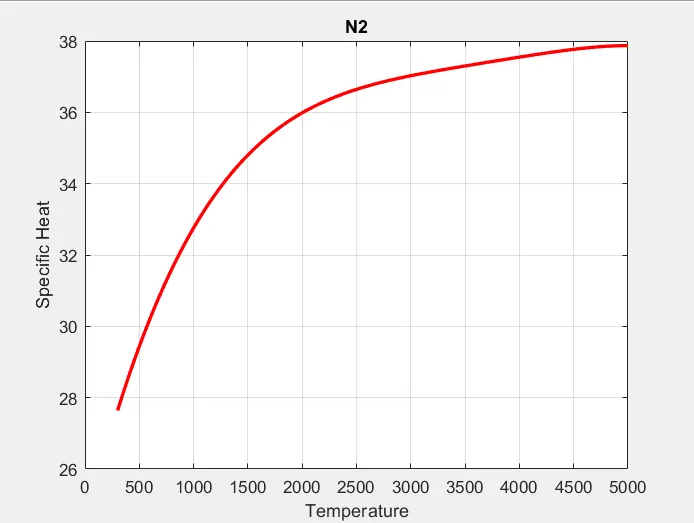
- Plot the Cp, Enthalpy and Entropy for the local temperature range (low temperature : high temperature) specific for each species.
- Save the plots as images with appropriate names and dump them in separate folders for each species with suitable name. All these should be generated automatically.
- The main program that you will submit will just take the "THERMO.dat" file as an input and generate Cp, H and S plots.
THEORY:
File Parsing :- Parse essentially means to ''resolve (a sentence) into its component parts and describe their syntactic roles''.It is method of splitting the file or order input into a piece of data that can be easily stored or manipulated. By doing this we are going to split a string into parts then recognizing the parts to convert it into something similar than a string.
Hare we extract data from the given thermodynamic data file. To perform the calculation for thermodynamic properties, we need some sort of co-efficient values and temperature ranges which is available in NASA file.
So, we are going to parse the values which are all needed for our calculation from that file.
Specific Heat :- The specific heat is the amount of heat per unit mass required to raise the temperature by one degree Celsius. The relationship between heat and temperature change is usually expressed in the form shown below where c is the specific heat. The relationship does not apply if a phase change is encountered, because the heat added or removed during a phase change does not change the temperature.
Enthalpy :- is a property of a thermodynamic property, and is defined as the sum of the system's internal energy and the product of its pressure and volume. It is a state function used in many measurements in chemical, biological, and physical systems at a constant pressure, that is conveniently provided by the large ambient atmosphere. As a state function, enthalpy depends only on the final configuration of internal energy, pressure, and volume, not on the path taken to achieve it.
Entropy :- A thermodynamic quantity representing the unavailability of a system's thermal energy for conversion into mechanical work, often interpreted as the degree of disorder or randomness in the system.
GOVERNING EQUATIONS :
Here R is the universal gas constant, T is the temeprature
PROGRAM:
clear all
close all
clc

% Getting the data from the provided file

f1 = fopen('thermo.dat','r');
fgetl(f1);
tline = fgetl(f1);
A = strsplit(tline,' ');
Global_low_temp = str2num(A{2});
Global_mid_temp = str2num(A{3});
Global_high_temp = str2num(A{4});

% Eliminating the lines

for i = 3:5
    b = fgetl(f1);

end

% Getting the Temperature and coefficients for each species

for j = 1:53
    header=fgetl(f1);
    x=strsplit(header,' ');

    species_name=(x{1});
    z=length(x);

    local_low_temp=str2double(x{z-3});
        local_high_temp=str2double(x{z-2});
            local_mid_temp=str2double(x{z-1});

            Tl1=local_low_temp;
            Tm1=local_mid_temp;
            Th1=local_high_temp;

            %getting first line coeffecients (a1-a5)
            line_1=fgetl(f1);

            a=strfind(line_1,'E');
            a1=str2double(line_1(1:a(1)+3));
            a2=str2double(line_1(a(1)+4:a(2)+3));
            a3=str2double(line_1(a(2)+4:a(3)+3));
            a4=str2double(line_1(a(3)+4:a(4)+3));
            a5=str2double(line_1(a(4)+4:a(5)+3));

            %getting second line coeffeceints (a6-a10)
             line_2=fgetl(f1);

            a_1=strfind(line_2,'E');
            a6=str2num(line_2(1:a_1(1)+3));
            a7=str2double(line_2(a_1(1)+4:a_1(2)+3));
            a8=str2double(line_2(a_1(2)+4:a_1(3)+3));
            a9=str2double(line_2(a_1(3)+4:a_1(4)+3));
            a10=str2double(line_2(a_1(4)+4:a_1(5)+3));

            %getting third line coeffeceints (a10-a14)
             line_3=fgetl(f1);

            a_2=strfind(line_1,'E');
            a11=str2double(line_3(1:a_2(1)+3));
            a12=str2double(line_3(a_2(1)+4:a_1(2)+3));
            a13=str2double(line_3(a_2(2)+4:a_1(3)+3));
            a14=str2double(line_3(a_2(3)+4:a_1(4)+3));

   % Creating folders to save the plots

     mkdir(['C:\Users\KANCHAN\Documents\MATLAB\NASA File Parsing',species_name]);

   % Calculating the specific heat, Enthalpy, Entropy

     T = linspace(Tl1,Th1,100);
     R = 8.314;

    % To get array of specific heat, enthalpy and entropy

    for k=1:length(T)

    %a1-a7 (high temperature coeffeceints), a8-a14(low temperature coeffecients)

    if T(k)>Tm1

        %high temperature coeffeceints.

        cp=(a1+a2.*T+a3.*T.^2+a4.*T.^3+a5.*T.^4)*R;

        H=(a1+(a2.*T)/2+(a3.*T.^2)/3+(a4.*T.^3)/4+(a5.*T.^4)/5+(a6./T))*R.*T;

        S=a1.*log(T)+a2.*T+(a3.*T.^2)/2+(a4.*T.^3)/3+(a5.*T.^4)/4+a7;

    else
        %low temperature coeffecients

        cp=(a8+a9.*T+a10.*T.^2+a11.*T.^3+a12.*T.^4)*R;

        H=(a8+(a9.*T)/2+(a10.*T.^2)/3+(a11.*T.^3)/4+(a12.*T.^4)/5+(a13./T))*R.*T;

        S=a8.*log(T)+a9.*T+(a10.*T.^2)/2+(a11.*T.^3)/3+(a12.*T.^4)/4+a14;

    end
    end

   % Plotting

   figure(1)
  plot(T,cp,'linewidth',2,'color','r')
  grid on
  title(species_name)
  xlabel('Temperature')
  ylabel('Specific Heat')

  figure(2)
  plot(T,H,'linewidth',2,'color','k')
  grid on
  title(species_name)
  xlabel('Temperature')
  ylabel('Enthalpy')

  figure(3)
  plot(T,S,'linewidth',2,'color','b')
  grid on
  title(species_name)
  xlabel('Temperature')
  ylabel('Entropy')

  % Changing the directory and saving the file

  cd=(['C:\Users\KANCHAN\Documents\MATLAB\NASA File Parsing',species_name]);


  saveas(1,'Specific heat','jpg');
  saveas(2,'Enthalpy','jpg');
  saveas(3,'Entropy','jpg');

 % Molecular_mass calculation


     elements=['H','C','O','N','A'];

     atomic_weight=[1.0079 12.0107 15.999 14.0067 39.948];
     mol_mass=0;

for l=1:length(species_name)
    for m=1:length(atomic_weight)
        if strcmp(species_name(l),elements(m))
            mol_mass = mol_mass+atomic_weight(m);
            position = m;
        end
    end

n = str2double(species_name(l));
if n>1
   mol_mass = mol_mass+atomic_weight(position)*(n-1);

end
end

  sprintf('Molecular Weight of %s:%f u',species_name,mol_mass)


end

fclose(f1)
EXPLAINATION :
- Initially we will be opening the given "thermo.dat" file using fopen command amd then we will extract all the information provided in the file using fgetl command.
- First we will get global temperature by using strsplit command and then skip some lines using the fgetl command.
- Now we make used of for loop command to get all temperatures and co-efficients that are present in our file.
- For getting temperature and co-efficients we use strfind command in order to input the accurate spot and specifying it so that we can get all the data.
- Now, str2double will convert the text into str to double precision values.
- The loical temperature for the respective gas species is found. Similarly, using strfind we are going to locate the string using which we will find out values of low, mid and high temperature which is assigned to variables Tl1, Tm1 and Th1. But the values we have achieved are string values so we have to change these string values to numeric values using str2double command.
- We are going to extract these values similarly like we did for finding out the local temperature by using strfind and str2double commands and store it in the variables a1 to a14. For extracting we are going to locate the values in the same line and then we can proceed for next lines.
- The values from a1 to a1 represents high temperature values and a8 to a14 represents low temperature value.
- Creating a new directory for saving the files.
- Temperature range values from low to high values are assigned using linspace command.
- The for loop command is used to calculate the values of specific heat, enthalpy and entropy using formula and if else command is used to find out required values if temp is below mid-temp or above mid-temp.
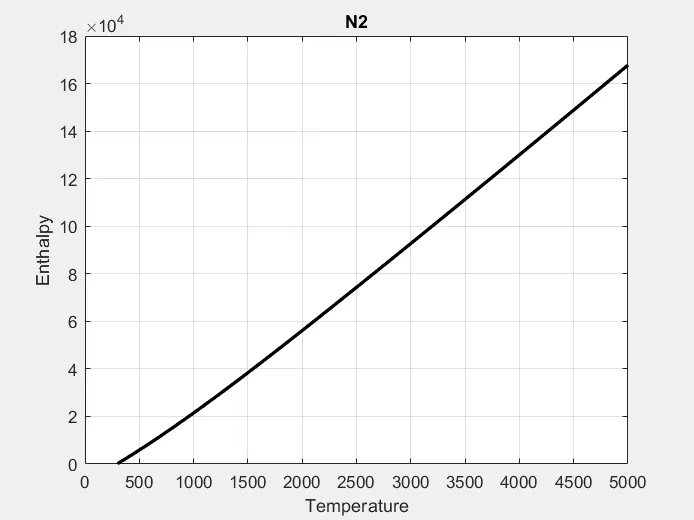
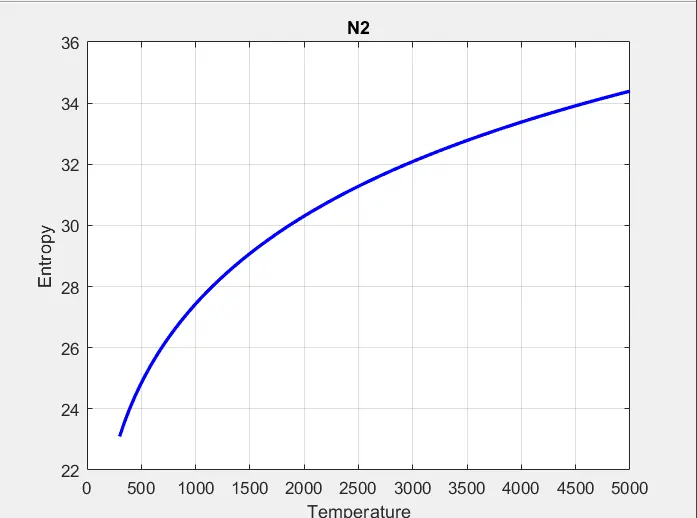
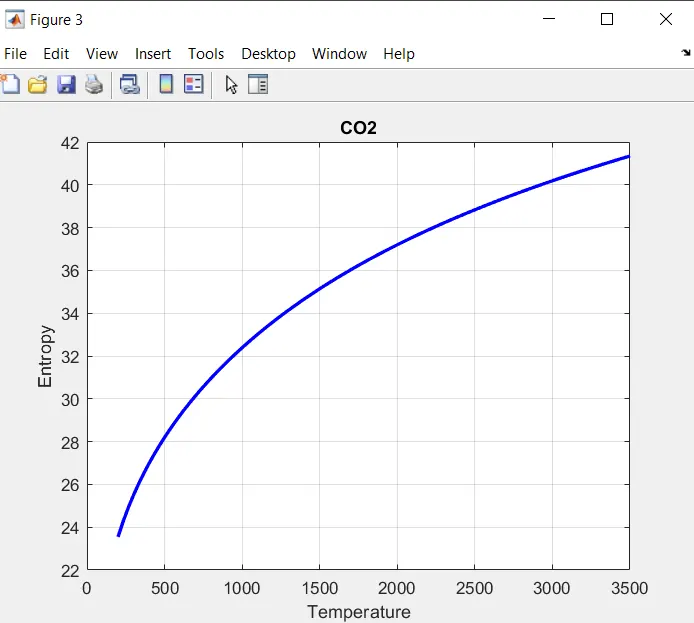
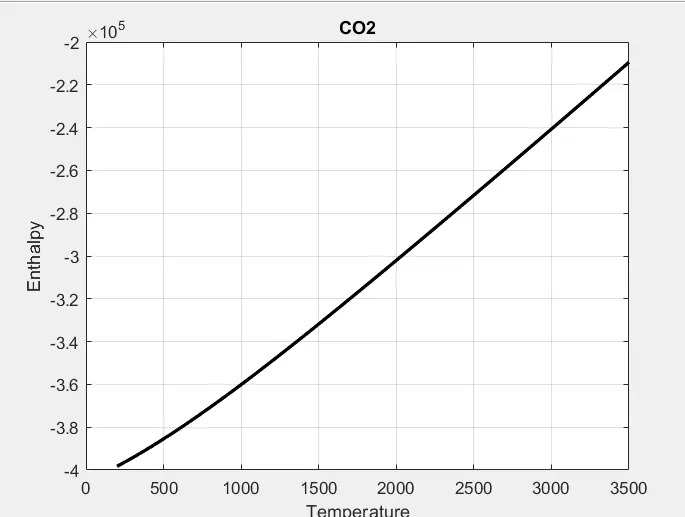
- The graphs are plot for specific heat, enthalpy and entropy vs temperature and to give each species name to graph. Saving the file for each species and converting to jpg.
- For calculating the molecular mass we will assign the atomic weight of each element. Then converting these string values to numeric values.
OUTPUT :
O2 PLOT :
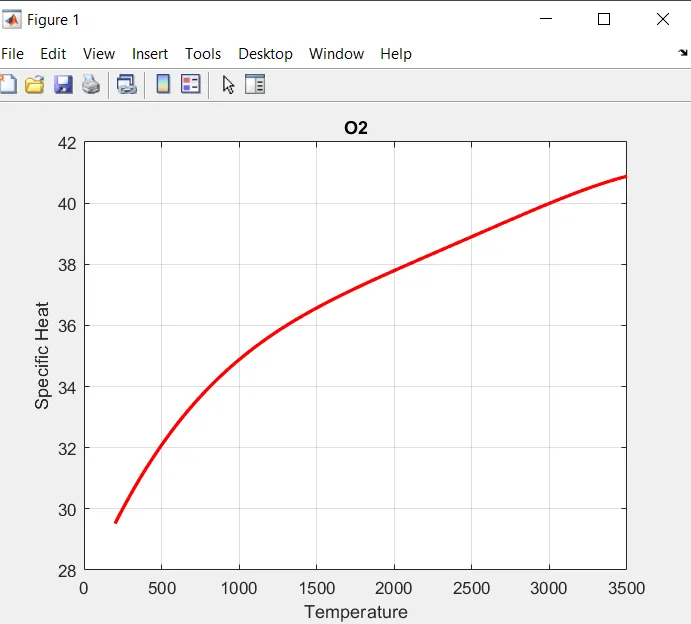
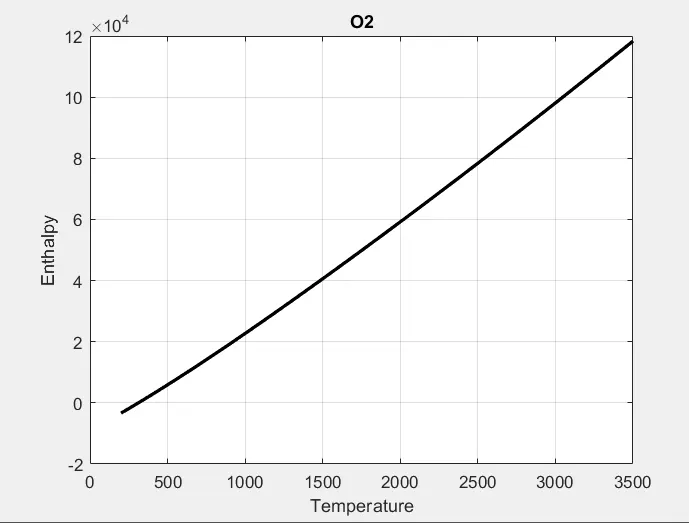
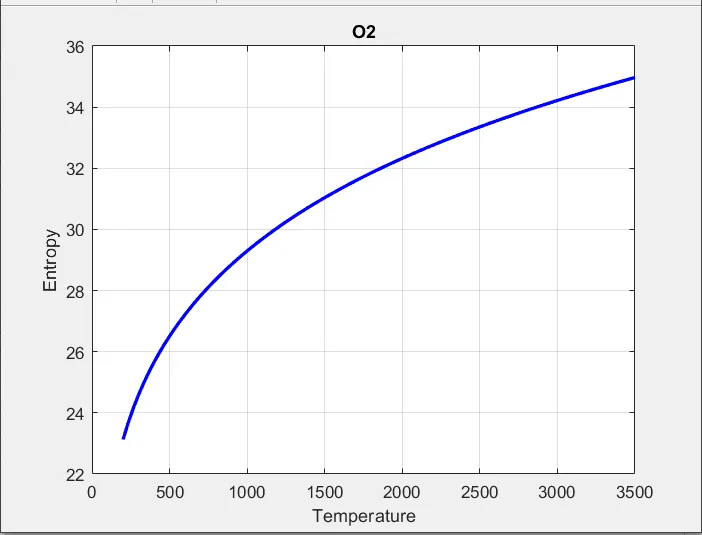
N2 PLOT :
CO2 PLOT :
MOLECULAR WEIGHT :
ans =

    'Molecular Weight of O:15.999000 u'

ans =

    'Molecular Weight of O2:31.998000 u'

ans =

    'Molecular Weight of H:1.007900 u'

ans =

    'Molecular Weight of H2:2.015800 u'

ans =

    'Molecular Weight of OH:17.006900 u'

ans =

    'Molecular Weight of H2O:18.014800 u'

ans =

    'Molecular Weight of HO2:33.005900 u'

ans =

    'Molecular Weight of H2O2:34.013800 u'

ans =

    'Molecular Weight of C:12.010700 u'

ans =

    'Molecular Weight of CH:13.018600 u'

ans =

    'Molecular Weight of CH2:14.026500 u'

ans =

    'Molecular Weight of CH2(S):14.026500 u'

ans =

    'Molecular Weight of CH3:15.034400 u'

ans =

    'Molecular Weight of CH4:16.042300 u'

ans =

    'Molecular Weight of CO:28.009700 u'

ans =

    'Molecular Weight of CO2:44.008700 u'

ans =

    'Molecular Weight of HCO:29.017600 u'

ans =

    'Molecular Weight of CH2O:30.025500 u'

ans =

    'Molecular Weight of CH2OH:31.033400 u'

ans =

    'Molecular Weight of CH3O:31.033400 u'

ans =

    'Molecular Weight of CH3OH:32.041300 u'

ans =

    'Molecular Weight of C2H:25.029300 u'

ans =

    'Molecular Weight of C2H2:26.037200 u'

ans =

    'Molecular Weight of C2H3:27.045100 u'

ans =

    'Molecular Weight of C2H4:28.053000 u'

ans =

    'Molecular Weight of C2H5:29.060900 u'

ans =

    'Molecular Weight of C2H6:30.068800 u'

ans =

    'Molecular Weight of CH2CO:42.036200 u'

ans =

    'Molecular Weight of HCCO:41.028300 u'

ans =

    'Molecular Weight of HCCOH:42.036200 u'

ans =

    'Molecular Weight of H2CN:28.033200 u'

ans =

    'Molecular Weight of HCN:27.025300 u'

ans =

    'Molecular Weight of HNO:31.013600 u'

ans =

    'Molecular Weight of N:14.006700 u'

ans =

    'Molecular Weight of NNH:29.021300 u'

ans =

    'Molecular Weight of N2O:44.012400 u'

ans =

    'Molecular Weight of NH:15.014600 u'

ans =

    'Molecular Weight of NH2:16.022500 u'

ans =

    'Molecular Weight of NH3:17.030400 u'

ans =

    'Molecular Weight of NO:30.005700 u'

ans =

    'Molecular Weight of NO2:46.004700 u'

ans =

    'Molecular Weight of HCNO:43.024300 u'


ans =

    'Molecular Weight of HOCN:43.024300 u'


ans =

    'Molecular Weight of HNCO:43.024300 u'


ans =

    'Molecular Weight of NCO:42.016400 u'


ans =

    'Molecular Weight of CN:26.017400 u'


ans =

    'Molecular Weight of HCNN:41.032000 u

ans =

    'Molecular Weight of N2:28.013400 u'


ans =

    'Molecular Weight of AR:39.948000 u'


ans =

    'Molecular Weight of C3H8:44.095300 u'


ans =

    'Molecular Weight of C3H7:43.087400 u'


ans =

    'Molecular Weight of CH3CHO:44.052000 u'


ans =

    'Molecular Weight of CH2CHO:43.044100 u'


ans =

     0

>>
CONCLUSION : Hence, we have successfully parsed the NASA thermodynamic data and plot the graphs of specific heat, enthalpy and entropy.