Project 1 - Parsing NASA thermodynamic data
1.Aim:
To write a code in MATLAB to parse the provided NASA thermodynamic data file and calculate the thermodynamic properties of various gas species.
2.Objectives:
- To write a function that extracts all the coefficients and calculates the enthalpy, entropy, and specific heats for all the species in the data file.
- To Calculate the molecular weight of each species and display it in the command window.
- To Plot the Specific heat, Enthalpy, and Entropy for the local temperature range (low temperature: high temperature) specific for each species.
- To save the plots as images with appropriate names and arrange them in separate folders for each species. The main program should just take the '*.dat' file ( which contains NASA's thermodynamic data) as an input and generate all the relevant plots.
3.Principles Involved:
- Parsing or syntax analysis, or syntactic analysis is the process of analyzing a string of symbols, either in natural language, computer language, or data structures, conforming to the rules of formal grammar. The term parsing comes from Latin pars (orationis), meaning part(of speech).
-
Within computational linguistics the term is used to refer to the formal analysis by a computer of a sentence or other string of words into its constituents, resulting in a parse tree showing their syntactic relation to each other, which may also contain semantic and other information (pvalues). Some parsing algorithms may generate a parse forest or list of parse trees for syntactically ambiguous input.
-
So basically parsing of a file implies 'splitting' i.e data from an external file can be read, split, stored, or manipulated and used in a computer program. By doing this a string is split into parts which are subsequently recognized and converted into something simpler than a string.
-
Specific Heat: Specific heat is the amount of heat energy required to raise the temperature of the body per unit of mass. Specific heat is also known as specific heat capacity or mass-specific heat. In SI units, specific heat is the amount of heat in joules required to raise 1 gram of a substance 1 Kelvin.
-
Enthalpy: When a substance changes at constant pressure, enthalpy tells how much heat and work was added or removed from the substance. Enthalpy is similar to energy but not the same. When a substance grows or shrinks, energy is used up or released.
-
Entropy: The entropy of an object is a measure of the amount of energy that is unavailable to do work. Entropy is also a measure of the number of possible arrangements of atoms a system can have. In this sense, entropy is the measure of uncertainty or randomness.
-
Gas Constant: The gas constant is a physical constant denoted by R and is expressed in terms of units of energy per temperature increment per mole. The gas constant value is equivalent to the Boltzmann constant but expressed as the pressure-volume product instead of energy per increment of temperature per particle.
-
Molecular Weight: Molecular weight is a measure of the sum of the atomic weight values of the atoms in a molecule. Molecular weight is used in chemistry to determine stoichiometry in chemical reactions and equations.
- Thermodynamic properties like Enthalpy, Entropy, Specific Heat for various species values at different temperatures are required to extensively analyze the thermodynamics process. For example, if the combustion process is considered during this, these quantities are required to observe how the combustion is going on and how efficient it will be. It eventually allows seeking the scope of improvement in the process. Similarly in the other processes like refrigeration, air conditioning, chemical kinetics, nozzle flow, detonation process, etc, these quantities are widely involved to observe the phenomenon.
4. Problem Definition:
NASA came up with polynomials that can be used to evaluate thermodynamic properties such as Specific Heat(Cp), Enthalpy(H), and Entropy(S). They have documented the coefficients that are required to evaluate these polynomials for 1000+ species. The NASA polynomials have the form:

Where R is the universal gas constant, T is the temperature, and a1, a2, a3, a4, a5, a6, and a7 are the numerical coefficients supplied in the thermodynamic file. The FIRST 7 coefficients are HIGH-temperature coefficients (above 1000 K) and the SECOND 7 coefficients are LOW-temperature coefficients (below 1000 K).
NASA thermodynamics file which is THERMO.dat file in which there are temperature range and 53 species are given in these data and each species contains 14 coefficients and temperature ranges and we have to parse these 14 coefficients to find Specific heat, Entropy and Enthalpy using formula as:-
where,
R = Universal Gas constant (Kj/Kg-K), T = Temperature (K), Cp = Specific heat (KJ/Kg) S = Entropy(KJ/kg-K) H = Enthalpy(KJ/kg) a(i) = Coefficients where, i =1 to 14
5. MATLAB Code:
5A. Individual functions: coded to calculate specific heat, enthalpy & entropy at high and low temperatures. These functions are called by the main program.
I. Function for 'Specific Heat: High Temperature'
function Cp_high=func_specific_heat_high(b,HT,R)
%the given equation is Cp/R=a1+a2*T+a3*T^2+a4*T^3
specific_heat_high=(b{1}+b{2}.*HT+b{3}.*HT.^2+b{4}.*HT.^3+b{5}.*HT.^4)*R;
Cp_high=specific_heat_high;
II. Function for 'Specific Heat: Low Temperature'
function Cp_low=func_specific_heat_low(a,LT,R)
%the given equation is Cp/R=a1+a2*T+a3*T^2+a4*T^3
specific_heat_low=(a{1}+a{2}.*LT+a{3}.*LT.^2+a{4}.*LT.^3+a{5}.*LT.^4)*R;
Cp_low=specific_heat_low;
III. Function for 'Enthalpy: High Temperature'
function H_high=func_enthalpy_high(b,HT,R)
%the given equation is
%H/RT=a1+(a2*T)/2+(a3*T^2)/3+(a4*T^3)/4+(a5*T^4)/5+(a6)/T
enthalpy_high=(b{1}+(b{2}.*HT)/2+(b{3}.*HT.^2)/3+(b{4}.*HT.^3)/4+(b{5}.*HT.^4)/5+b{6}./HT).*R.*HT;
H_high=enthalpy_high;
IV. Function for 'Enthalpy: Low Temperature'
function H_low=func_enthalpy_low(a,LT,R)
%the given equation is
%H/RT=a1+(a2*T)/2+(a3*T^2)/3+(a4*T^3)/4+(a5*T^4)/5+(a6)/T
enthalpy_low=(a{1}+(a{2}.*LT)/2+(a{3}.*LT.^2)/3+(a{4}.*LT.^3)/4+(a{5}.*LT.^4)/5+a{6}./LT).*R.*LT;
H_low=enthalpy_low;
V. Function for 'Entropy: High Temperature'
function S_high=func_entropy_high(b,HT,R)
%the given equation is
%S/R=a1*logT+(a2*T)+(a3*T^2)/2+(a4*T^3)/3+(a5*T^4)/4+a7
entropy_high=(b{1}.*log(HT)+(b{2}.*HT)+(b{3}.*HT.^2)/2+(b{4}.*HT.^3)/3+(b{5}.*HT.^4)/4+b{7})*R;
S_high=entropy_high;
VI. Function for 'Entropy: Low Temperature'
function S_low=func_entropy_low(a,LT,R)
%the given equation is
%S/R=a1*logT+(a2*T)+(a3*T^2)/2+(a4*T^3)/3+(a5*T^4)/4+a7
entropy_low=(a{1}.*log(LT)+(a{2}.*LT)+(a{3}.*LT.^2)/2+(a{4}.*LT.^3)/3+(a{5}.*LT.^4)/4+a{7})*R;
S_low=entropy_low;
5A. Main program:
%This program parses the thermodynamic data file from NASA

clc
clear all
close all


%_____________________Step#01-READING THE DATA FILE________________________
%^^^^^^^^^^^^^^^^^^^^^^^^^^^^^^^^^^^^^^^^^^^^^^^^^^^^^^^^^^^^^^^^^^^^^^^^^^

f1=fopen('THERMO.dat','r');%reads the THERMO.DAT file
fgetl(f1);%the header file is read via variable f1
globaltemp=fgetl(f1);%the second line is read
temp=strsplit(globaltemp,' ');%space in the data file acts as a delimiter
t=str2double(temp);%converts the string to number
global_low_temp=t(2);% assigns the 2nd element in 't' matrix as global low temp
global_mid_temp=t(3);% assigns the 3rd element in 't' matrix as global mid temp
global_high_temp=t(4);% assigns the 4th element in 't' matrix as global high temp

%the comment lines in the data files are skipped from reading through this loop
for i=3:5
    fgetl(f1);
end


%_________________Step#02-EXTRACTING ALL THE SPECIES DATA__________________
%^^^^^^^^^^^^^^^^^^^^^^^^^^^^^^^^^^^^^^^^^^^^^^^^^^^^^^^^^^^^^^^^^^^^^^^^^^

%this for loop extracts data in all the 213 lines of the dat file
for j=1:213%the dat file has 213 lines of data
    A{j}=fgetl(f1);% data extracted is stored in the variable 'A'
end
A=A';%previously 'A' was a row matrix, transpose operation converts it to a coloumn matrix
species=A(1:4:end);%extracting only those lines which have the name of the species

%this for loop extracts only the name of the species
for k=1:53%there are 53 lines of species names in 'species' array
    species_name=strtok(species);%strtok parses string from left to right with white space as the delimiter
    species_char=char(species_name)
    species_temp{k}=strsplit(species{k},' ');%reads the temperature from species file and space in the data file acts as a delimiter
    temp_range=species_temp';% species_temp is a row matrix,its transpose is done & as assigned as temp_range
end


%_________________Step#03-GETTING INPUT FROM THE USER______________________
%^^^^^^^^^^^^^^^^^^^^^^^^^^^^^^^^^^^^^^^^^^^^^^^^^^^^^^^^^^^^^^^^^^^^^^^^^^

user_input=input('Enter the name of the species: ','s');%user is asked to enter the name of the species in string format
species_input=upper(user_input);% converts the user's input into upper case as the dat file has upper case alhabets

%this loop compares the species_input with species_name for each line.
for k=1:53
    if strcmp(species_input,species_name{k})%strcmp compares the two strings
        X=k;%The position of line cursor is saved as 'X'
        fprintf('the species is at line number %d',X);
    end
end


%___________Step#04-EXTRACTING THE COEFFICIENTS FOR ALL GAS SPECIES________
%^^^^^^^^^^^^^^^^^^^^^^^^^^^^^^^^^^^^^^^^^^^^^^^^^^^^^^^^^^^^^^^^^^^^^^^^^^
%finds the 14 coefficients
line_1=strfind(A{4*X-3+1},'E');
a{1,1}=A{4*X-3+1}(1:line_1(1)+3);
a{2,1}=A{4*X-3+1}(line_1(1)+4:line_1(2)+3);
a{3,1}=A{4*X-3+1}(line_1(2)+4:line_1(3)+3);
a{4,1}=A{4*X-3+1}(line_1(3)+4:line_1(4)+3);
a{5,1}=A{4*X-3+1}(line_1(4)+4:line_1(5)+3);

line_2=strfind(A{4*X-3+2},'E');
a{6,1}=A{4*X-3+2}(1:line_2(1)+3);
a{7,1}=A{4*X-3+2}(line_2(1)+4:line_2(2)+3);
a{8,1}=A{4*X-3+2}(line_2(2)+4:line_2(3)+3);
a{9,1}=A{4*X-3+2}(line_2(3)+4:line_2(4)+3);
a{10,1}=A{4*X-3+2}(line_2(4)+4:line_2(5)+3);


line_3=strfind(A{4*X-3+3},'E');
a{11,1}=A{4*X-3+3}(1:line_3(1)+3);
a{12,1}=A{4*X-3+3}(line_3(1)+4:line_3(2)+3);
a{13,1}=A{4*X-3+3}(line_3(2)+4:line_3(3)+3);
a{14,1}=A{4*X-3+3}(line_3(3)+4:line_3(4)+3);

for i=1:14
    coeff{i}=str2double(a{i});%converts the string to number
end

high_temp_coeff_range=coeff(1:7);% the first 7 coefficients are high temp coefficients
low_temp_coeff_range=coeff(8:14);% the last 7 coefficients are low temp coefficients


%___________Step#05-EXTRACTING THE LOCAL TEMPERATURE VALUES________________
%^^^^^^^^^^^^^^^^^^^^^^^^^^^^^^^^^^^^^^^^^^^^^^^^^^^^^^^^^^^^^^^^^^^^^^^^^^
Temp=size(temp_range{X,1});
if Temp(2)==8
        temp1=temp_range{X,1}(1,5);
        temp2=temp_range{X,1}(1,7);
        temp3=temp_range{X,1}(1,6);
else
if Temp(2)==9
        temp1=temp_range{X,1}(1,6);
        temp2=temp_range{X,1}(1,8);
        temp3=temp_range{X,1}(1,7);
else
if Temp(2)==10
        temp1=temp_range{X,1}(1,7);
        temp2=temp_range{X,1}(1,9);
        temp3=temp_range{X,1}(1,8);
else
if Temp(2)==11
        temp1=temp_range{X,1}(1,8);
        temp2=temp_range{X,1}(1,10);
        temp3=temp_range{X,1}(1,9);
else
if Temp(2)==12
        temp1=temp_range{X,1}(1,9);
        temp2=temp_range{X,1}(1,11);
        temp3=temp_range{X,1}(1,10);
else
end
end
end
end
end

%conversion of local temperature string values into numbers
low_temp=str2double(temp1);%Low temperature
mid_temp=str2double(temp2);%Mid temperature
high_temp=str2double(temp3);%High temperature

%creating a range of low and high temperature values
low_temp_range=linspace(low_temp,mid_temp,20);
high_temp_range=linspace(mid_temp,high_temp,20);


%___________Step#06-FUNCTION INPUTS & FUNCTION CALLS_______________________
%^^^^^^^^^^^^^^^^^^^^^^^^^^^^^^^^^^^^^^^^^^^^^^^^^^^^^^^^^^^^^^^^^^^^^^^^^^

%Inputs to the function
LT=low_temp_range;
HT=high_temp_range;
R=8.314;%universal gas constant 8.314 KJ/Kmol-K
a=low_temp_coeff_range;%low temperature coeff rangeis from coefficients 8-14
b=high_temp_coeff_range;%high temperature coeff rangeis from coefficients 1-7

%Specific heat calculation via function call
Cp_low=func_specific_heat_low(a,LT,R);
Cp_high=func_specific_heat_high(b,HT,R);

%Enthalpy calculation via function call
H_low=func_enthalpy_low(a,LT,R);
H_high=func_enthalpy_high(b,HT,R);

%Entropy calculation via function call
S_low=func_entropy_low(a,LT,R);
S_high=func_entropy_high(b,HT,R);


%___________Step#07-MOLECULAR WEIGHT CALCULATIONS__________________________
%^^^^^^^^^^^^^^^^^^^^^^^^^^^^^^^^^^^^^^^^^^^^^^^^^^^^^^^^^^^^^^^^^^^^^^^^^^

species_elements={'O','H','C','N','S','A'};%Declaring species elements
atomic_mass = [16,1,12,14,32,40];%Declaring the atomic mass value
mol_wt=0;%Declaring molecular weight is 0 in initial stage
for i=1:length(species_input)
    for u=1:length(species_elements)
        if strcmp(species_input(i),species_elements(u))
            mol_wt= mol_wt+atomic_mass(u);
            y=u;% position is stored
        end
    end
    n = str2double(species_input(i));
    if n>1
       mol_wt = mol_wt + (atomic_mass(y))*(n-1);
    end
end


%_____________________Step#08-PLOTTING_____________________________________
%^^^^^^^^^^^^^^^^^^^^^^^^^^^^^^^^^^^^^^^^^^^^^^^^^^^^^^^^^^^^^^^^^^^^^^^^^^

%Plotting specific heat vs temperature
figure(1)
plot(low_temp_range,Cp_low,'b','linewidth',3);
hold on
grid on
plot(high_temp_range,Cp_high,'r','linewidth',3);
xlabel('Temperature[K]')
ylabel('Specific Heat[KJ/Kg-K]')
legend('Low Temp','High Temp','location','southeast');
title({'Specific Heat vs Temperature',['Species name= ',species_input,' & Molecular weight= ',num2str(mol_wt)]});

%Plotting Enthalpy vs temperature
figure(2)
plot(low_temp_range,H_low,'g','linewidth',3);
hold on
grid on
plot(high_temp_range,H_high,'c','linewidth',3);
xlabel('Temperature[K]')
ylabel('Enthalpy[KJ/Kg-K]')
legend('Low Temp','High Temp','location','southeast');
title({'Enthalpy vs Temperature',['Species name= ',species_input,' & Molecular weight= ',num2str(mol_wt)]});

%Plotting Entropy vs temperature
figure(3)
plot(low_temp_range,S_low,'m','linewidth',3);
hold on
grid on
plot(high_temp_range,S_high,'y','linewidth',3);
xlabel('Temperature[K]')
ylabel('Entropy KJ/Kg-K]')
legend('Low Temp','High Temp','location','southeast');
title({'Entropy vs Temperature',['Species name= ',species_input,' & Molecular weight= ',num2str(mol_wt)]});


%___________Step#09-SAVING THE PLOTS IN SEPARATE FOLDERS & WRITING THE MOLECULAR WEIGHTS_______________
%^^^^^^^^^^^^^^^^^^^^^^^^^^^^^^^^^^^^^^^^^^^^^^^^^^^^^^^^^^^^^^^^^^^^^^^^^^

%Saving the plots in separate folders
mkdir(['F:\Studies\Skill lync course\Matlab for Mechanical Engineers\challenges attempted\C-9\species_files\',species_input])
cd(['F:\Studies\Skill lync course\Matlab for Mechanical Engineers\challenges attempted\C-9\species_files\',species_input])
saveas(figure(1),'sp heat vs Temp.jpg')
saveas(figure(2),'Enthalpy vs Temp.jpg')
saveas(figure(3),'Entropy vs Temp.jpg')

%writing the mo0lecular weights in a txt file
cd('F:\Studies\Skill lync course\Matlab for Mechanical Engineers\challenges attempted\C-9\species_files\');
fileID=fopen('molecular_weight.txt','w');
% fwrite(fileID,sprintf('%s %6srn',species_char,mol_wt));
fwrite(fileID,sprintf('%s %20.2f',species_input,mol_wt));
fclose(fileID);
6. Explanation of the MATLAB code:
I. Step 1-READING THE DATA FILE:
- The file is opened and the data is read. The commands used in this step are: (fopen,fgetl,strsplit,str2double)
- Here we are going to open the THEMO.dat file for reading, by using the command 'fopen' and assigning it to a variable called f1. Then, the fgetl(f1) command acts like a line cursor, which will retrieve the next line. After reading the second line we split the string with 'strsplit' command by giving the string name as 'GlobalTemp' and the delimiter to be used for splitting as space(' '). Then it is assigned to the variable called 'temp'. This will split the whole line into several cells.
- Then the string values are converted into numbers by using the command called 'str2double' or 'str2num' and assigned to the variable t. In this line t(2) indicates the index position. We can observe that in the second line we are having some unwanted space in front of 300.00, which is considered as the first value in that line. So 300.00 takes the 2nd position. This 300.00 string is converted as the number 300 and assigned to the variable called Global_low_Temp. The same command is followed for the next values. The line with ! says that they are all comment lines which is not needed for the calculation. so we can skip those by executing 'for loop'.
II. Step 2-EXTRACTING ALL THE SPECIES DATA:
- The commands used in this step are:(fgetl,strtok,strsplit)
- In this step we extract the species data, with the help of for loop' and store it in the variable called W. This will extract all the data in a single row. so we have to convert the row data into column data by using the transpose operation. After transposing, we are going to extract the row which is having only species names. For that species=A(1:4:end) is used, this will fetch the row with the difference of 4, which means it will fetch 1st row and then 4th row and then 8th up to the end and stores the information in the variable called 'species'.
- The extracted species data contains 53 rows, from these we are going to extract only the species names which are located in the first in all the rows. For this operation, 'strtok' command is used. This command parses strings from left to right, using whitespace characters as delimiters, and returns part or all of the text in a row. Then from species data, local temperature is extracted with the strsplit command and stored as 'species_temp'. Again this 'species_temp' data is transposed into the column and stored as 'temp_range.' These operations are done inside the 'for loop,' so that we can extract all 53 species data.
III. Step 3-GETTING INPUT FROM THE USER:
In this step, we get the input from the user-end by prompting "Enter the valid species name ". This input received from the user is in the form of a string. Then this input is converted into upper case.
After getting user input, this uppercased string is then compared with the stored 'species_name' value inside the 'for loop' & under 'if statement'. 'strcmp' is used to compare the two data. After comparison, the line cursor position is saved as 'X'.
IV. Step 4-EXTRACTING THE COEFFICIENTS FOR ALL GAS SPECIES:
- Here we extract the 14 coefficients of gas species. The coefficients locations are like five in the 2nd row, the next five in the 3rd row, and the final four in the 4th row in the given NASA data. Now for extracting this we are going to locate the string 'E' first, which is present in each coefficient value. For doing that 'strfind 'command is used. {4*X-3+1} says the exact location of the line from the user input to species location. From that line, it fetches the string 'E' location value. After finding the location of E, for the first coefficient, we are saying that A(4*X-3+1} (1:line_1(1)+3). This means that form A,(contains 213 rows) (4*X-3+1) - gives the string E location cell value and (1:line_1(1)+3) gives the value from 1 to 12, (i.e up to string E) by adding +3 it will give the whole coefficient value.(line_1 = 12 27 42 57 72) these are all the location values of E.
- After getting the first coefficient, the second coefficient value starts from the end of the first coefficient value. line_1(1) says the end location of string E position in the first coefficient. So line_1(1)+4 says the starting point of the second coefficient. Then line_1(2) says the location of string E in the second coefficient and by adding +3 we will reach the endpoint of the second coefficient.
- By doing this we can extract the 14 coefficient values. But remember the extracted coefficient values are still in the form of string only. For converting this to the number 'strdouble' command is used inside the for loop for 14 coefficient. After converting this into the number, then we are dividing the first 70:14) coefficient as high-temperature coefficient and the next 7(8:14) as low-temperature coefficient and stored in the variable respectively.
V. Step 5-EXTRACTING THE LOCAL TEMPERATURE VALUES:
- Each species is having its local temperature values. These temperatures are different from species to species. For getting this first we are going to see the cell size for each species. It also differs from species to species, but it ranges from 1x8 to 1x12. So 'if-else condition statement is used for extracting local temp value. The temp_range size is 53x1, by saying Temp= size(temp_range{X,1) gives the species row value from the user input. And for that, if the species is having the cell size with 8,9,10,11, or 12 as the column value, then we are executing the condition statement if Temp(2) denotes species column size is equal to 8, then fetch the data for (1,5) which is having local temp value in the particular species row. Then it stored as 'temp1' and next (1,7) and (1,6) is also having the local temp value.
- After extracting all the local temperature values, then it is converted from string to number and sored as low_temp, mid_temp, and high_temp. Then linspace command is used from low_temp to mid_temp and stores as low_temp_range. The same is followed for high_temp_range but with mid_temp to high_temp as the range.
VI. Step 6-FUNCTION INPUTS & FUNCTION CALLS:_
Functions are created for the calculation of Specific heat, enthalpy, and entropy. The function is used, by declaring the input parameters outside the function i.e in the main program & called at appropriate times. The calculation is done for both high and low-temperature coefficient values.
VII. Step 7-MOLECULAR WEIGHT CALCULATIONS:
The species elements are declared in the form of a cell array. Their atomic mass is declared in the form of an array as well. The initial molecular weight is declared as zero. Then in the 'for loop' for the 'species_input' which is the user input string comparison is done for 'species_input' and the 'species_elements'. Then in the formula, molecular weight and the atomic mass is added for that particular species. This position is now stored as 'y'. After that in the nested 'for loop,' the species_input which is in the form of a string is converted into a number with 'strdouble' command. The species_input which is now a number is greater than 1, molecular weight is again calculated by having the atomic mass for the current species by multiplying (n-1)
VIII. Step 8-PLOTTING:
Plotting is done for Specific Heat and Temperature, Enthalpy vs Temperature, and Entropy vs Temperature for both low and high-temperature ranges.
IX. Step 9-SAVING THE PLOTS IN SEPARATE FOLDERS & WRITING THE MOLECULAR WEIGHTS:
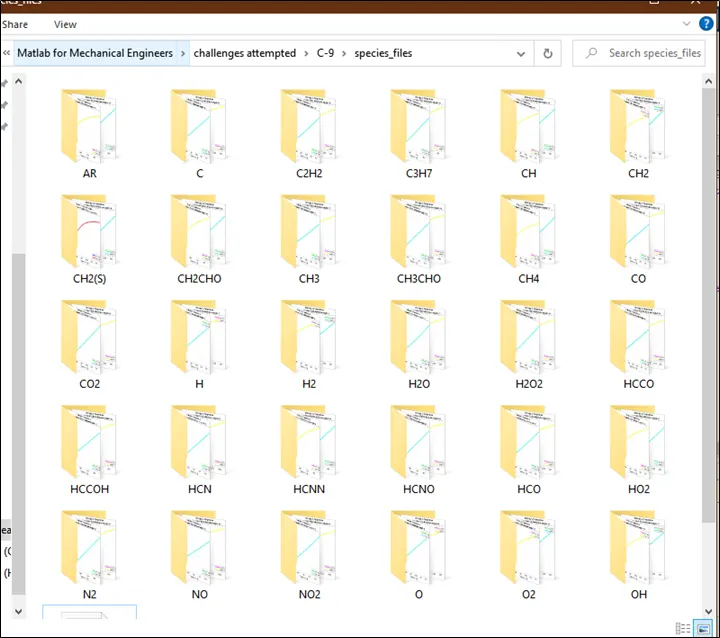
- The plots are saved in a separate directory or folder by using Matlab commands. The first line 'mkdir' says create a new directory or folder with a name called Fileparsing and the specific folder name inside file parsing is taken from the species_input. cd says the current directory, with these plots, is saved inside the folder name called file parsing with the specific species input as the folder name. so each species folder saves 3 plots inside it.
- Then in the same directory, a new .txt file is open in the name of molecular weight and the inputs which is given from the user end i.e species input will append into the '*.txt ' file in the form of a string. 'fwrite' is used to write the input and 'sprintf' is used for writing the value as a string. Then format specifier %s is used to specify the format and rn is used as entering which writes the input in the next row.
7. Results and Conclusions:
I. Plots for Species:02
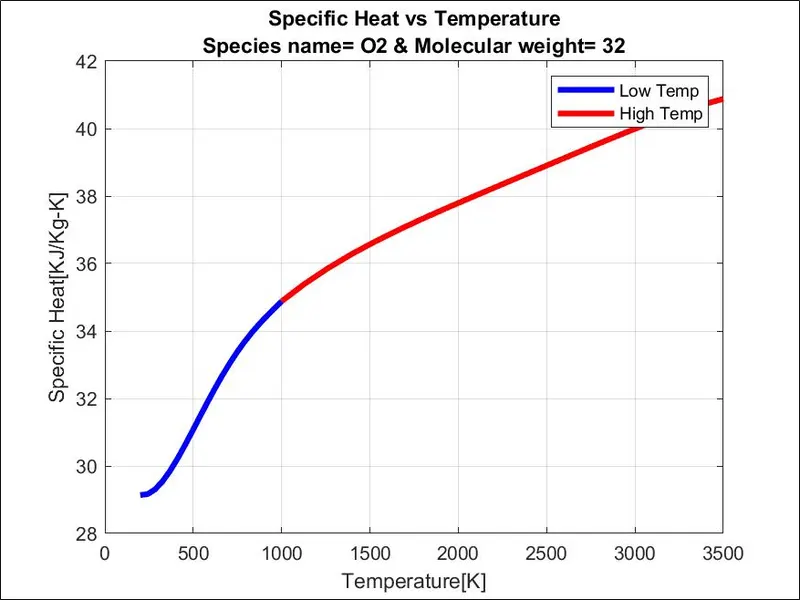
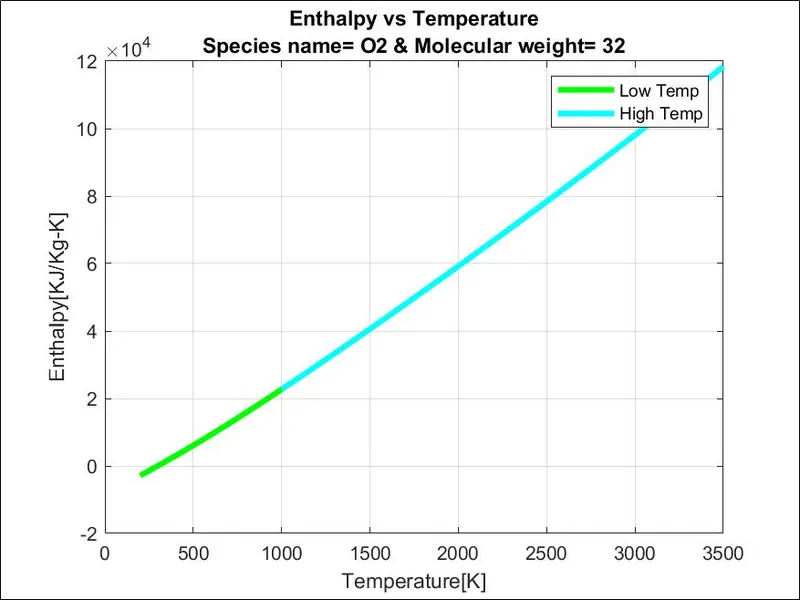
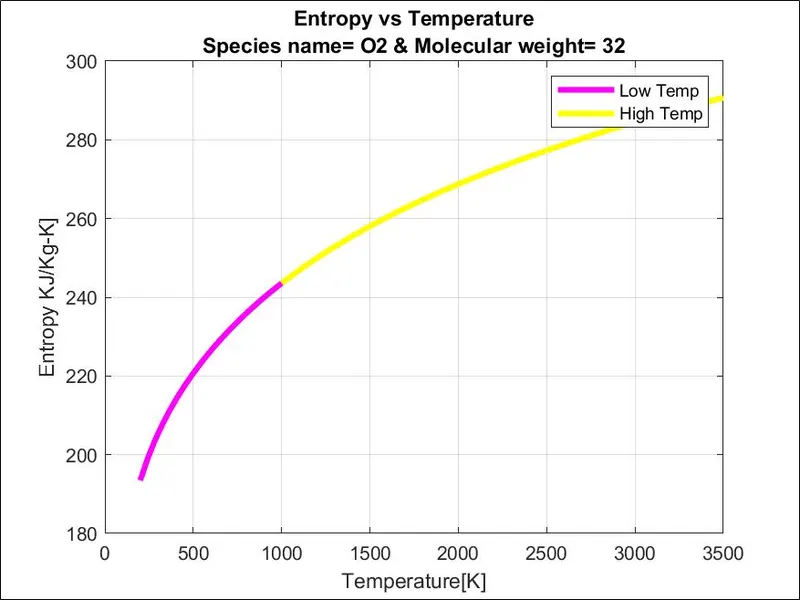
II. Plots for Species: N2
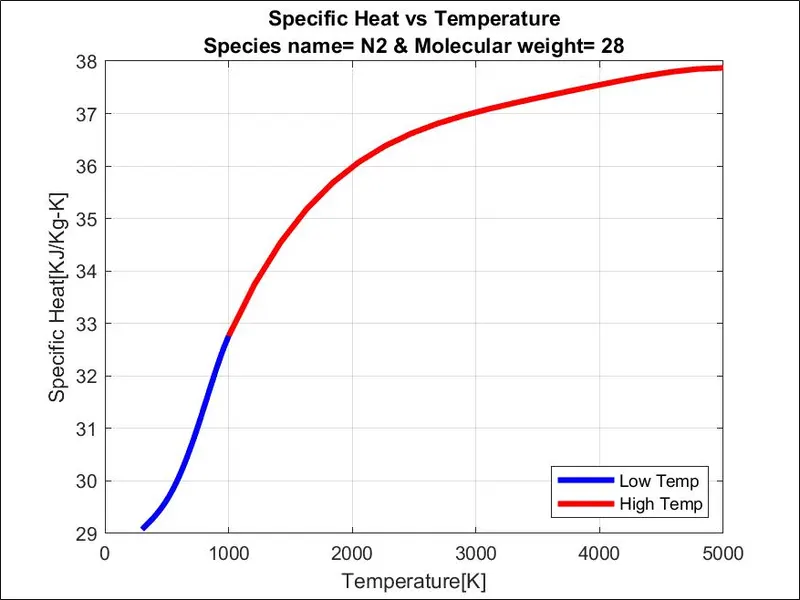
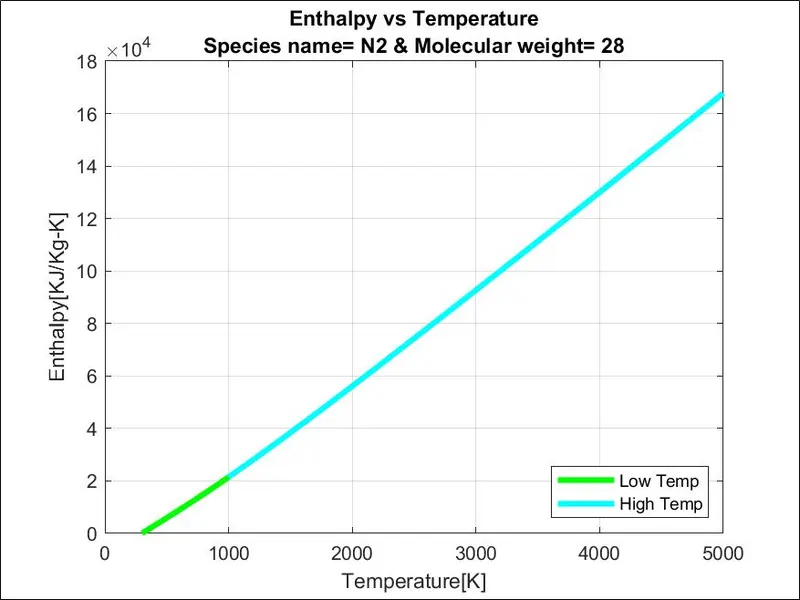
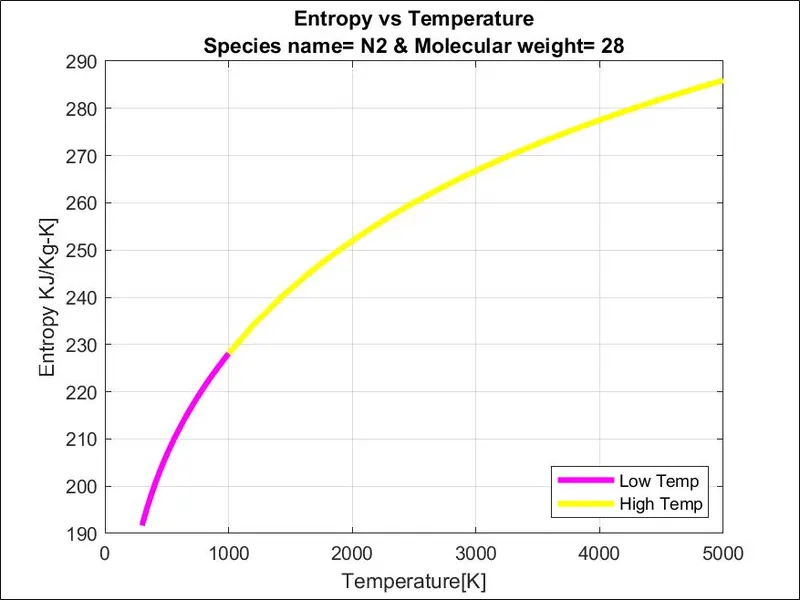
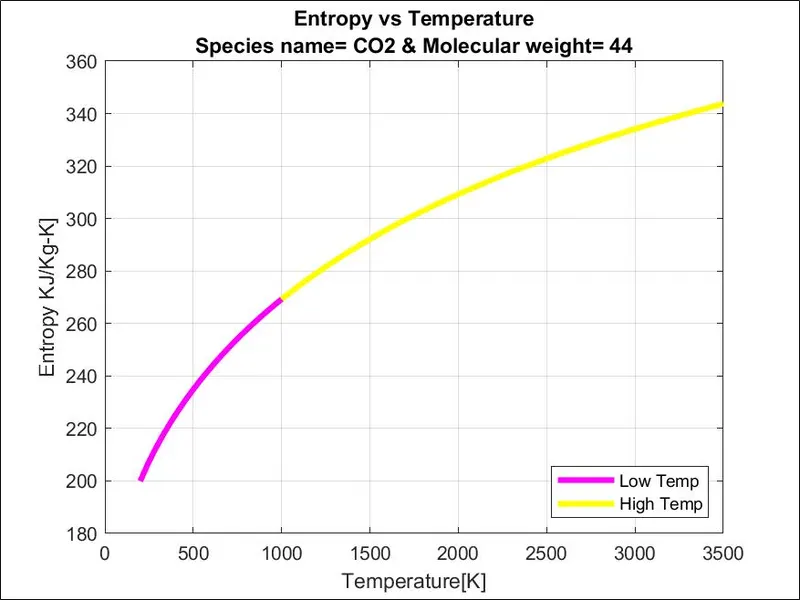
III. Plots for Species:C02
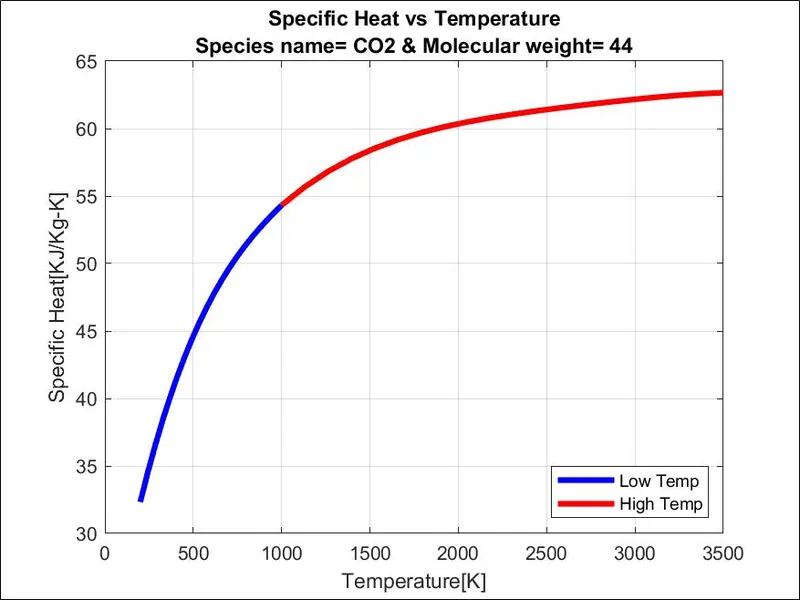
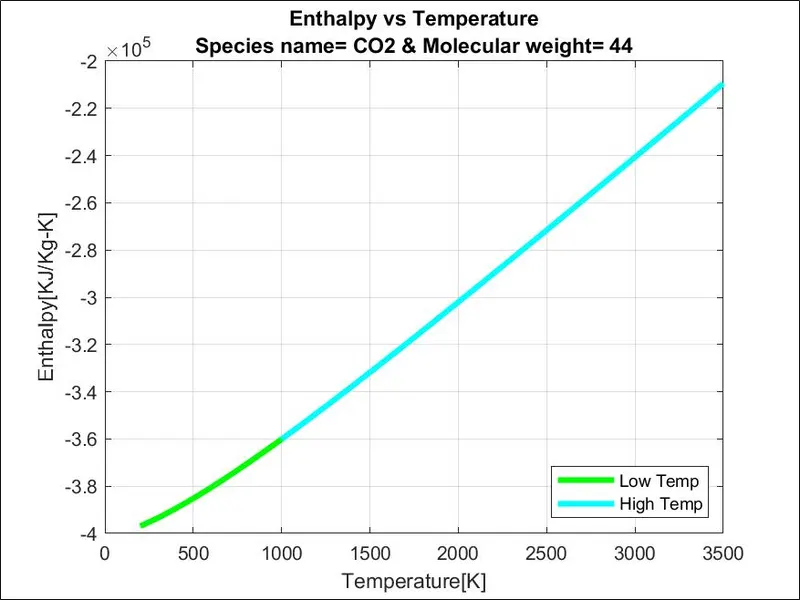
IV. This program neatly arranges all the species into individual folders
8. Errors faced during coding and steps undertaken to overtake them:
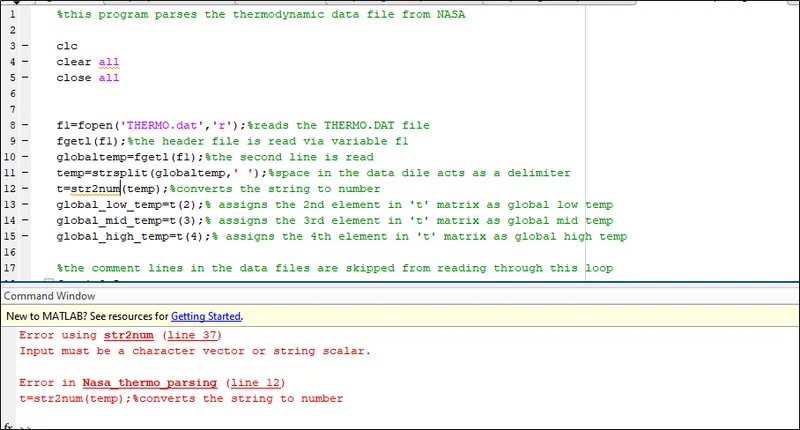
I. When converting a string to a number , it is recommended to use 'str2souble' & not 'str2num':
II. Care is to be taken to enter the correct inputs:
It is paramount to enter the correct input and in the right format. Simple mistakes like entering '0 '(zero) instead of 'O'(English alphabet) can lead to errors.

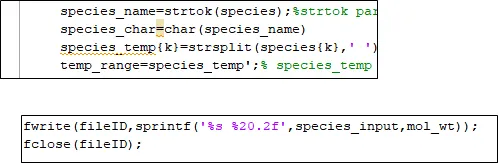
III. :'sprintf' can handle only characters & not numbers:
therefore the matrix which is to be handled by 'sprintf' must be converted to a character matrix
9.References: