Project 1 - Parsing NASA thermodynamic data
AIM : Write a code in matlab to parse the NASA thermodybnamic data file and then calculate thermodynamic properties of various gas species.
OBJECTIVE :
- Write a function that extracts the 14 co-efficient and calculate the enthalpy, entroy and specific heat for all the species in the data file
- calculate the molecular weight of each species and display it in the command window
- plot the Cp, enthalpy and entropy for the local temperature range specific for each species
- save the plots as images with appropriate names and dump them in seperate folders for each species with suitable name. all these should be genrated autiomatically.
- the main program that must be submitted will just take THERMO.dat file as an input and generate Cp,H and S plots.
FILE PARSING : Parse essentially means to ''resolve (a sentence) into its component parts and describe their syntactic roles''. ... [Google Dictionary]File parsing in computer language means to give a meaning to the characters of a text file as per the formal grammar.
The Input Parser provides a consistent way to validate and assign defaults to inputs, improving the robustness and maintainability of your code. To validate the inputs, you can take advantage of existing MATLAB® functions or write your own validation routines.
- Step 1. Define your function : Create a function in a file named m. The printPhotofunction has one required input for the file name, and optional inputs for the finish (glossy or matte), color space (RGB or CMYK), width, and height.
- Step 2. Create an inputParser object : Within your function, call inputParserto create a parser object.
Step 3. Add inputs to the scheme : Add inputs to the parsing scheme in your function using addRequired, addOptional, or addParameter. For optional inputs, specify default values.
For each input, you can specify a handle to a validation function that checks the input and returns a scalar logical (true or false) or errors. The validation function can be an existing MATLAB function (such as ischar or isnumeric) or a function that you create (such as an anonymous function or a local function).
In the printPhoto function, filename is a required input. Define finish and color as optional inputs, and width and height as optional parameter value pairs. Inputs that you add with addRequired or addOptional are positional arguments. When you call a function with positional inputs, specify those values in the order they are added to the parsing scheme.
Inputs added with addParameter are not positional, so you can pass values for height before or after values for width. However, parameter value inputs require that you pass the input name (height or width) along with the value of the input.
If your function accepts optional input strings or character vectors and name-value arguments, specify validation functions for the optional inputs. Otherwise, the Input Parser interprets the optional strings or character vectors as parameter names. For example, the checkFinish validation function ensures that printPhoto interprets 'glossy' as a value for finish and not as an invalid parameter name.
Step 4. Set properties to adjust parsing (optional) : By default, the Input Parser makes assumptions about case sensitivity, function names, structure array inputs, and whether to allow additional parameter names and values that are not in the scheme. Properties allow you to explicitly define the behavior. Set properties using dot notation, similar to assigning values to a structure array.
Allow printPhoto to accept additional parameter value inputs that do not match the input scheme by setting the KeepUnmatched property of the Input Parser. If KeepUnmatched is false (default), the Input Parser issues an error when inputs do not match the scheme.
- Step 5. Parse the inputs : Within your function, call the parse Pass the values of all of the function inputs.
Step 6. Use the inputs in your function : Access parsed inputs using these properties of the inputParser object:
- Results— Structure array with names and values of all inputs in the scheme.
- Unmatched— Structure array with parameter names and values that are passed to the function, but are not in the scheme (when KeepUnmatched is true).
- UsingDefaults— Cell array with names of optional inputs that are assigned their default values because they are not passed to the function.
Within the printPhoto function, display the values for some of the inputs
Step 7. Call your function : The Input Parser expects to receive inputs as follows:
- Required inputs first, in the order they are added to the parsing scheme with addRequired.
- Optional positional inputs in the order they are added to the scheme with addOptional.
- Positional inputs before parameter name and value pair inputs.
- Parameter names and values in the form Name1,Value1,...,NameN,ValueN.
Pass several combinations of inputs to printPhoto, some valid and some invalid
NASA Thermodynamic File:-
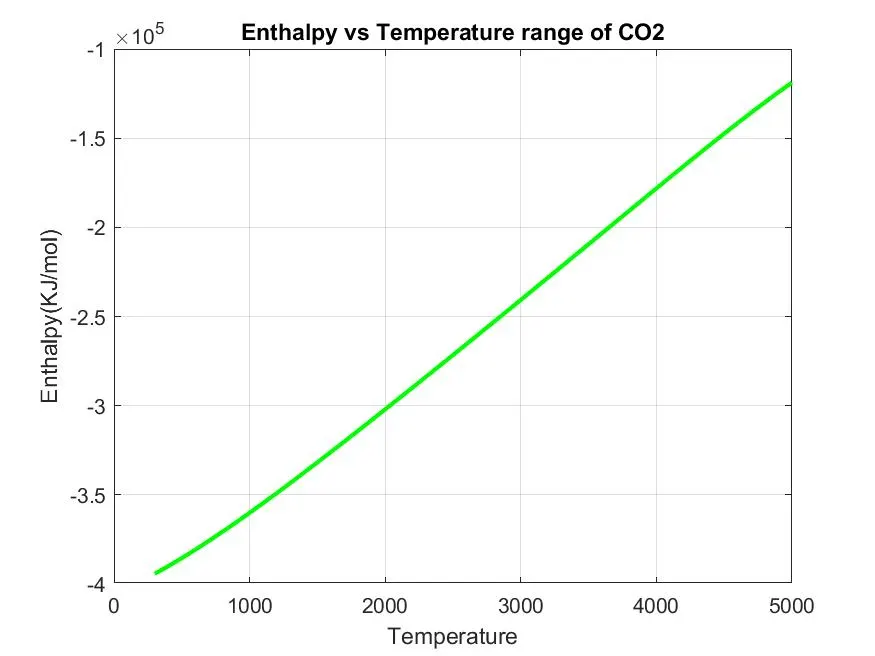
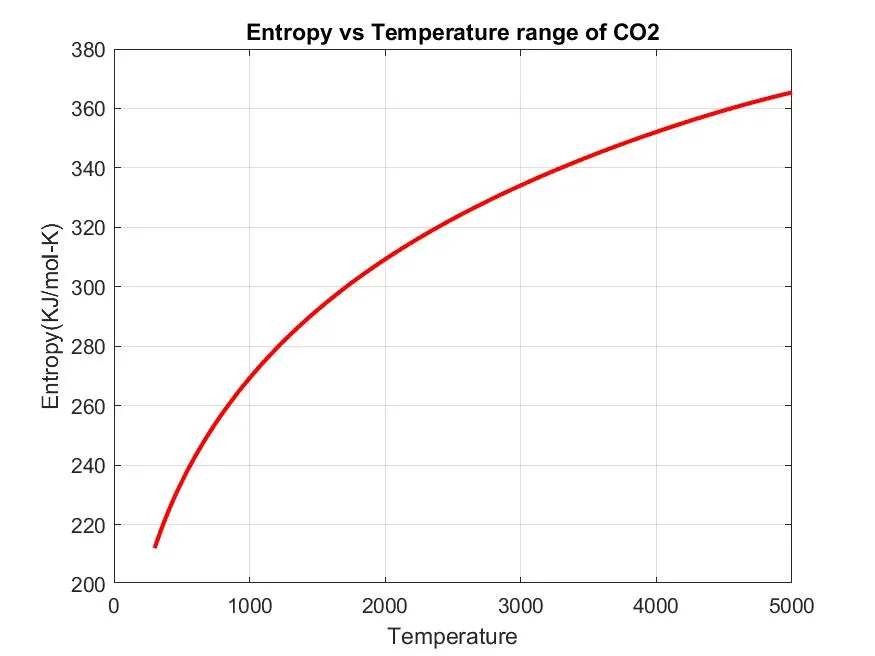
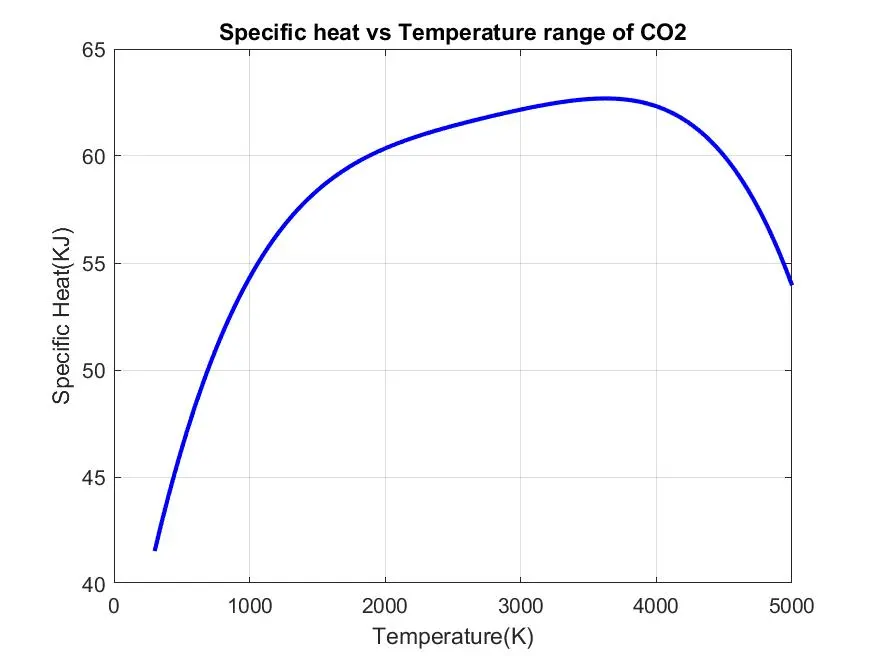
NASA thermodynamic file which is THERMO.dat file in whuch there are temperatures range and 53 species are given in these data and each species contains 14 coeddicients and temperature ranges and we have to Parse these 14 coefficients to find the specific heat, entropy and enthalpy using formula as :-
R = Universal gas constant
T = Temperature
Cp = specific heat
S = entropy(Kj/mol-k)
H = Enthalpy(Kj/mol)
a(i) = coefficents where i = 1to14
clear all
close all
clc

%input
R=8.314; %gas constant

%Reading data file
%Open file and reading THERMo.dat file
f1 = fopen('THERMO.dat','r');
get = fget(f1);

%Reading the temperature form this file
temp = fget1(f1);

%splitting
s = stsplit(temp);

%converting strings cells into numbers
templow = str2num(s{2});
tempmid = str2num(s{3});
temphigh = str2num(s{4});

%temperature Range
T = linspace(templow,temphugh,1000);

%skipping coment lines
for i=1:3
    get=fget1(f1);

    A=strsplit(tline,' ');
    species = (A{1});

    %converting string to number
    lowtemp = str2num(A{end-3});
    midtemp = str2num(A{end-2});
    hightemp = str2num(A{end-1});

    tline1 = fget(f1);
    a = strfind(tline1, 'E');
    %finding first 7 higher and second 7 lower coefficients
    %finding Higher coefficients
    a1 = tline1(1:a(1)+3);
    a2 = str2num(a1);
    a2 = tline(a(1)+4:a(2)+3);
    a2 = str2num(a2);
    a3 = tline1(a(2)+4:a(3)+3);
    a3 = str2num(a3);
    a4 = tline1(a(3)+4:a(4)+3);
    a4 = sr2num(a4);
    a5 = tline1(a(4)+4:a(5)+3);
    a5 = str2num(a5);

    tline2 = fget1(f1);
    b = strfind(tline2,'E');
    a6 = tline2(1:b(1)+3);
    a6 = str2num(a6);
    a7 = tline2(b(1)+4:b(2)+3);
    a7 = str2num(a7);

    %finding lower coeffficeints
    a8 = tline2(b(2)+4:b(3)+3);
    a8 = str2num(a8);
    a9 = tline2(b(4)+4:b(5)+3);
    a9 = str2num(a9);
    a10 = tline2(b(4)+4:b(5)+3);
    a10 = str2num(a10);

    tline3 = fget1(f1);
    c = strfind(tline3,'E');
    a11 = tline3(1:c(1)+3);
    a11 = str2num(a11);
    a12 = tline3(c(1)+4:c(2)+3);
    a12 = str2num(a12);
    a13 = tline3(c(2)+4:c(3)+3);
    a13 = str2num(a13);
    a14 = tline3(c(3)+4:c(4)+3);
    a14 = str2num(a14);
    %calculate specific heat
    Cp = specific_heat(a1,a2,a3,a4,a5,a6,a7,a8,a9,a10,a11,a12,T,R,tempmid);

    %calculate entropy
    S = Entropy(a1,a2,a3,a4,a5,a6,a7,a8,a9,a10,a12,a14,T,R,tempmid);

    %calculate Enthalpy
    H = Enthalpy(a1,a2,a3,a4,a5,a6,a8,a9,a10,a12,a13,T,R,tempmid);
    %calculate molecular weight of the species
    W = Molecular_weight(species);

    %writing molecular weight file
    MW_file = fopen('Molecular weight.txt' , 'w');
    fprintf(MW_file, 'Molecular weight of %s is %d ',species,W);
    fclose(MW_file); %closing the file

    %Plotting Cp, H and S with temperature
    %saving in a folder
    cd('C:/Users/Akshay/Desktop/skill lync/Specices')
    mkdir(species); %creating directory
    cd(species);

    %plot1 Cp vs T
    figure(1)
    plot(T,Cp,'linewidth',2,'color','b');
    xlabel('Temperature(K)');
    ylabel('Specific heat(KJ');
    title(sprintf('Specific heat vs Temperature range of %s',species));
    grid on
    saveas(figure(1),'SPecific Heat.jpg');

    %Plot2 S vs T
    figure(2)
    plot(T,S 'linewidth',2;'color';'r');
    xlabel('Temperature');
    ylabel('Entropy(KJ/mol-k)');
    title(sprintf('Entropy vs temperature range of %s',species));
    grid on
    saveas(figure(2),'Entropy.jpg');

    %plot3 Cp vs T
    figure(3)
    plot(T,H,'linewidth',2,'color','g');
    xlabel('Temperature');
    ylabel('Enthalpy(KJ/nol)');
    title(sprintf('Enthalpy vs Temperature range of %s',species));
    grid on
    saveas(figure(3),'Enthalpy.jpg');
    cd('C:/Users/Akshay/desktop/skill lync')
end

%specific heat
function Cp = specific_heat(a1,a2,a3,a4,a5,a8,a9,a10,a11,T,R,tempmid)
%calculating specific heat

if (T <= tempmid)
    Cp = R*(a8+ (a9*T) + (a10*(T).^2) + (a11(T).^3 + (a12*(T).^4));
else
    Cp = R*(a1 + (a2*T) + (a3*(T).^2) + (a4*(T).^3) + (a5*(T).^4));
end
end

%Find Entropy

function S = Entropy(a1,a2,a3,a4,a5,a6,a7,a8,a9,a10,a11,a12,a14,T,R,tempmid)
%calculating entropy

if (T <= tempmid)
    s = R*(a8.*log(T) + (a9*T) + ((a10*(T).^2)/2) + ((a11*(T).^3)/3) + ((a12*(T).^4)/4) + a14);
else
    S = R*(a1.*log(T) + (a2*T) + ((a3*(T).^2)/2) + ((a4*(T).^3)/3) + ((a5*(T).^4)/4) + a7);

end
end


%funtion to find Enthalpy

function H = Enthalpy(a1,a2,a3,a4,a5,a6,a7,a8,a9,a10,a11,a12,a13,T,R,tempmid)
%calculating enthalpy

if (T <= tempmid)
    H = R*T.*(a8 + ((a(*T)/2) + ((a10*(T).^2)/3) + ((a11*(T).^3)/4) + ((a12*(T).^4)/5 + ((a13./T)));
else
    H = R*T.*(a1 + ((a2*T)/2) + ((a3*(T).^2)/3) + ((a4*(T).^3)/4) + ((a5*(T).^4)/5) + ((a6./T)));
end
end

%funtion to fing molecular weight

function W = Molecular_weight(species)
%defining Atomic name of the species
atomic_name = ['H','C','O','N','Ar'];

%defining atomic masses of main species
atomic_weight = [1.008 12.011 15.999 14.007 39.948];
W=0;
for i=1:length(species)
    for j=1:length(atomic_name)
        if strcmp(species(i), atomic_name(j))
            W = W + atomic_weight(j);
            position = j;
        end
    end
    n = str2num(species);

    if n>1
        W = W + atomic_weight(position)*(n-1);
    end
end

fprintf('Molecular Weight of %s :- ', species);
fprintf('%f', W);
disp(' ')
end
FINAL RESULTS :
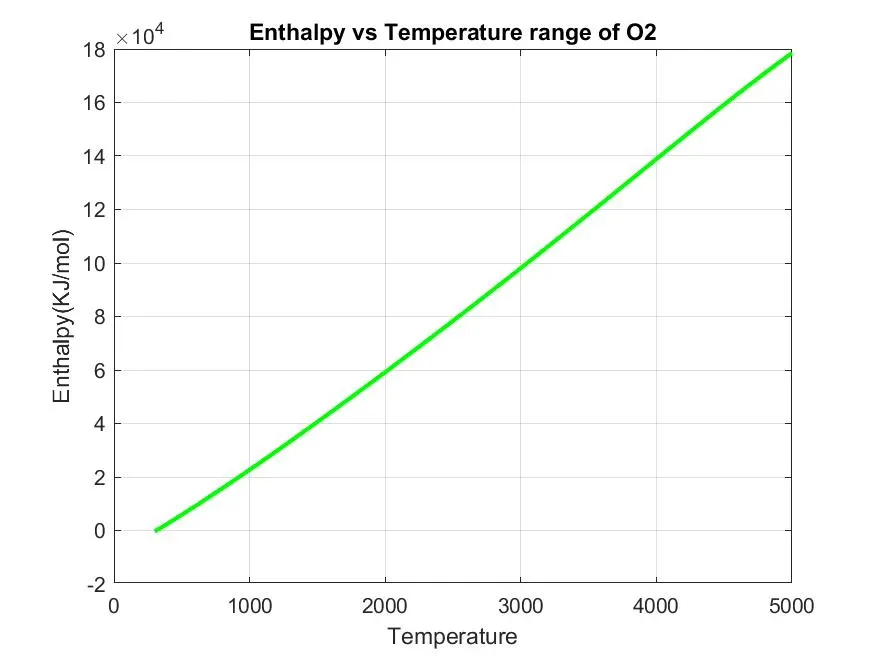
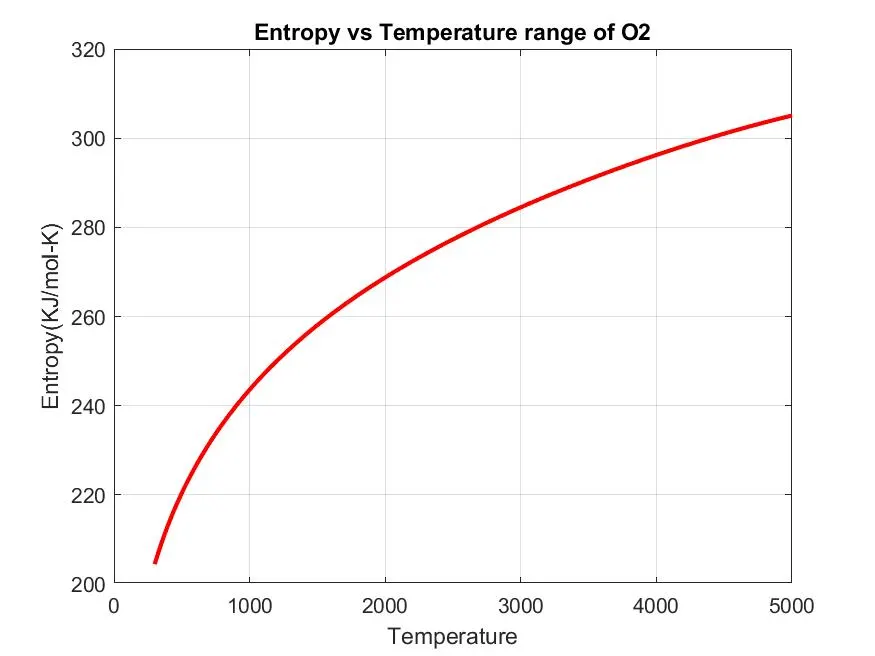
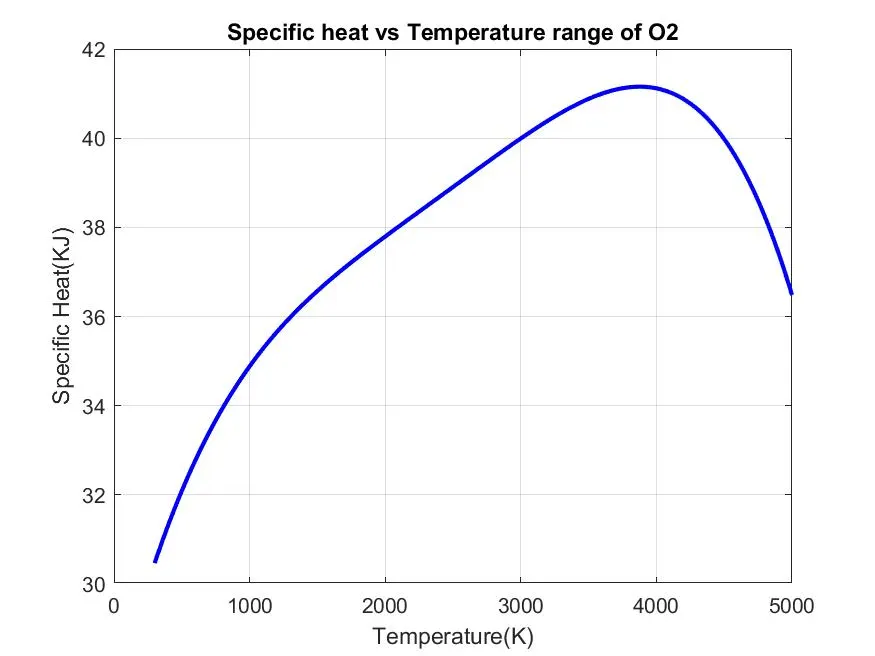
Plot of species O2:
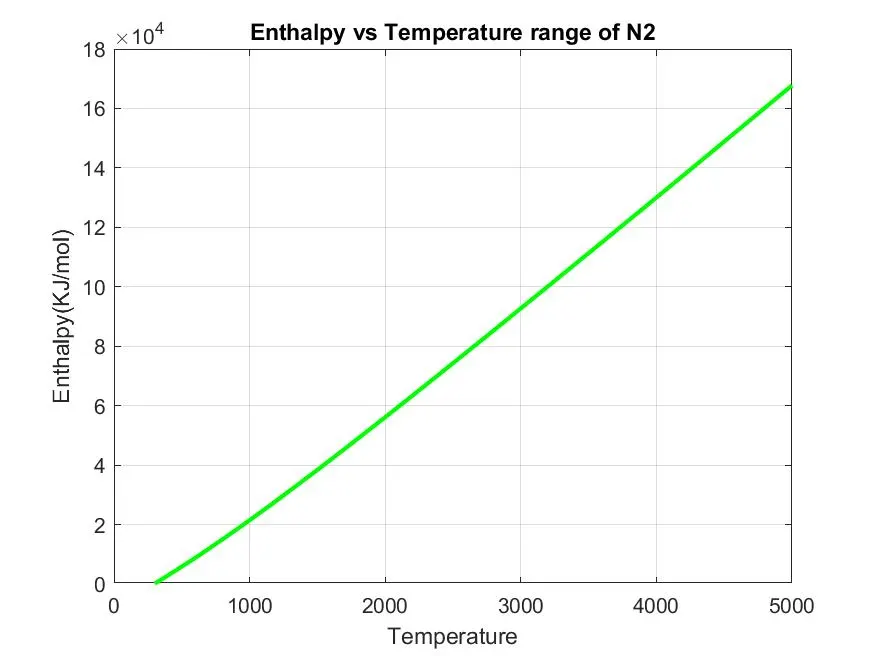
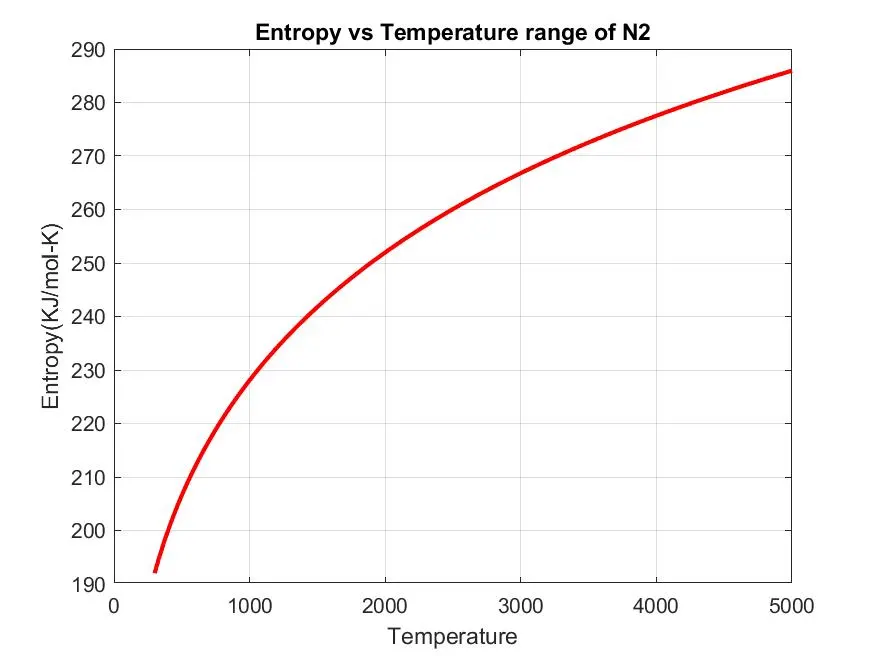
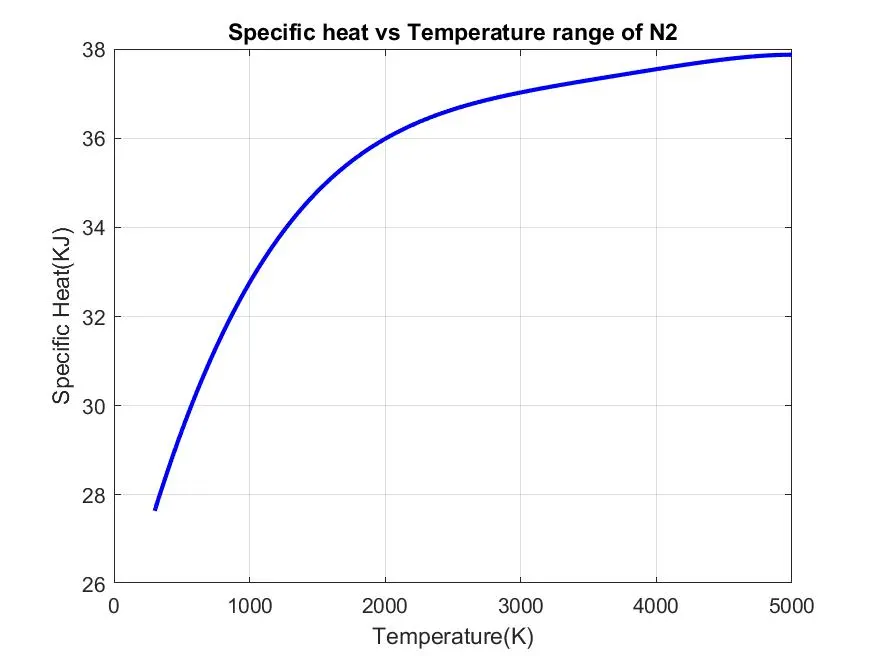
plot of species of N2 :
plot of species of CO2 :