Project 1 - Parsing NASA thermodynamic data
Aim:-
To write a code in MATLAB to parse the NASA thermodynamics data file and then calculate Thermodynamic properties, Molecular weight and Plot nature of the thermodynamics properties of various species.
Objectives:-
- To write a function that extracts the 14 co-efficients for a given species fro the given from the given species.
- To write function that calculate the enthaply, entropy and specific heat using the NASA polynomials for the given species.
- To write a function that plots the Cp, Enthaply and Entropy of an input species.
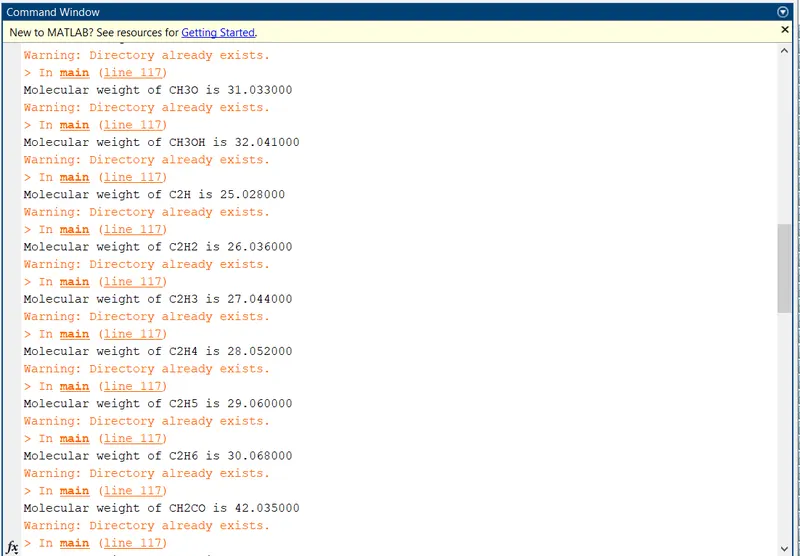
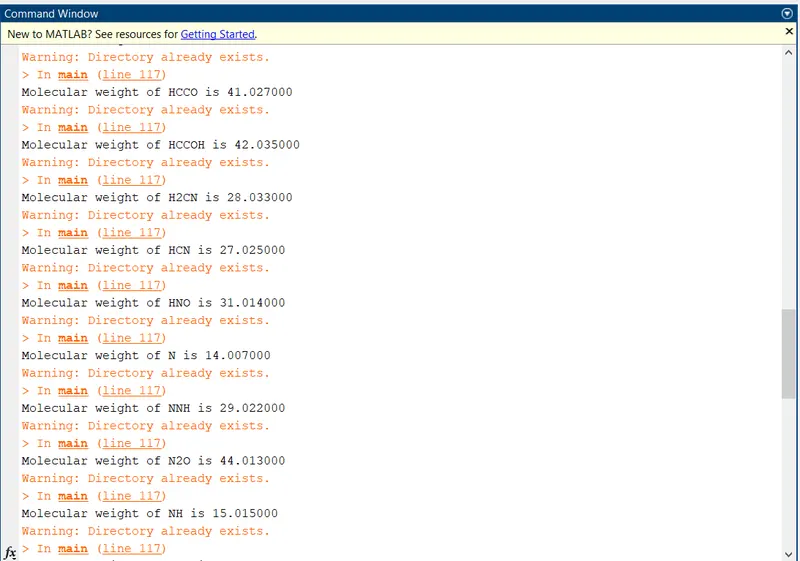
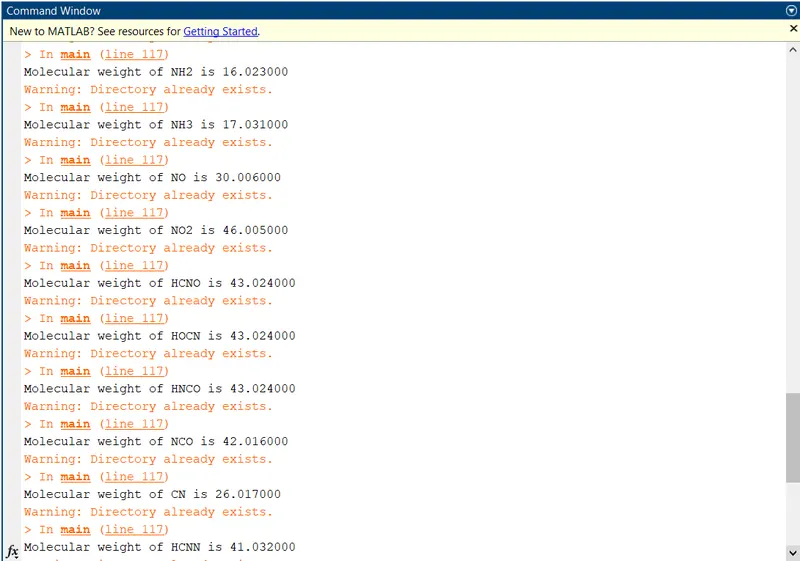
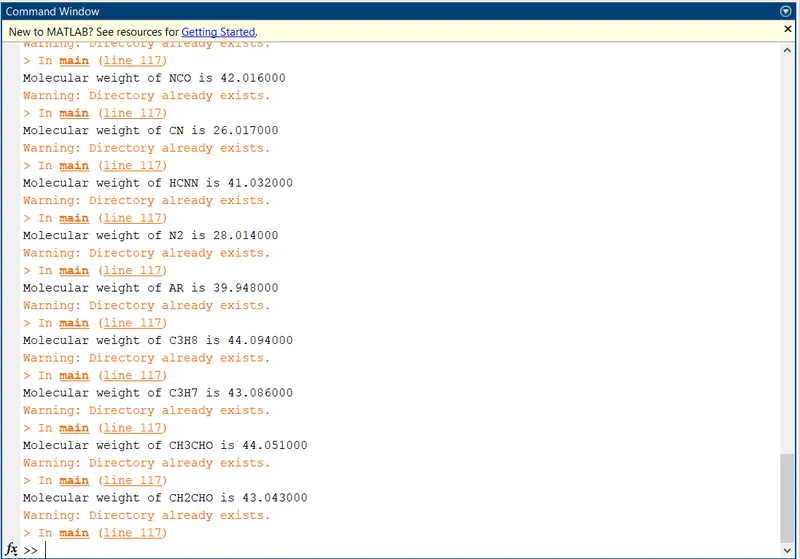
- To write a function that calculates the molecular weight of each species.
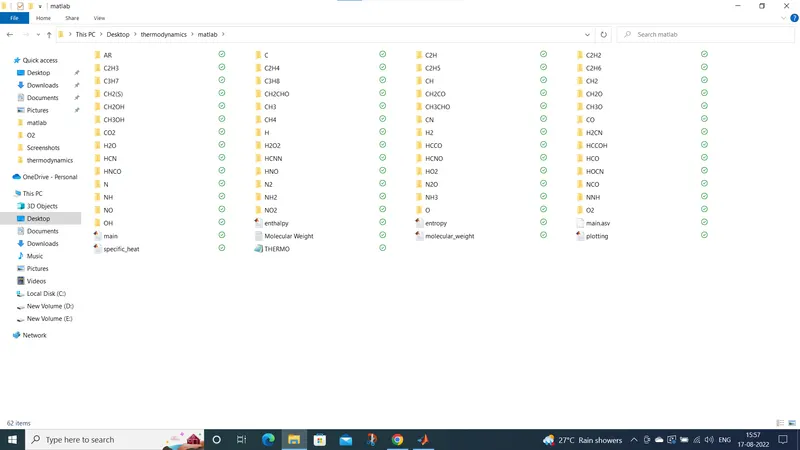
- To save the plots as images with appropriate names and save them in seperate folders.
- The main program that you will submit will just take the 'Thermo.dat' files as an input and generate Cp, H and S plots.
- Screenshots of the window where all the folders are saved.
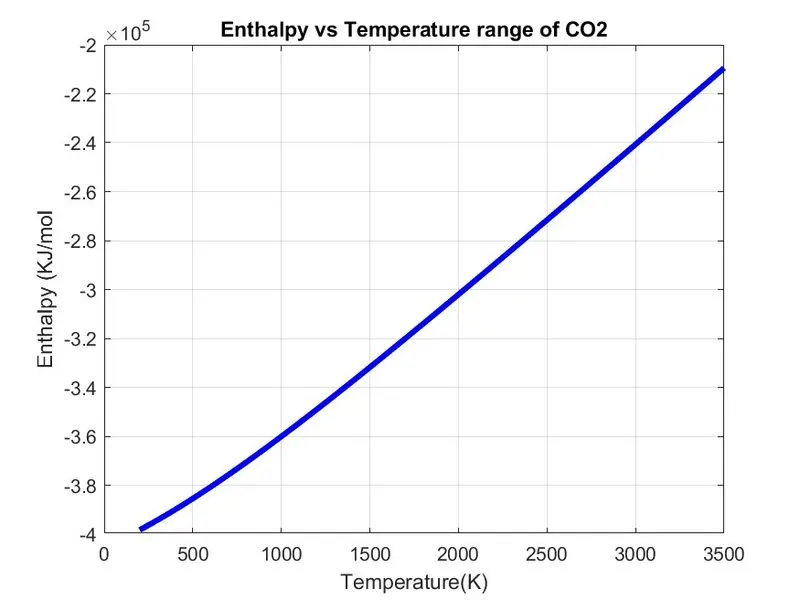
- Plots for O2, N2 and CO2 seperate to be shown.
The Formulae:-

Where,
R = Universal Gas Constant.
T = Temperature.
Cp = Specific Heat(KJ)
S = Entropy(KJ/mol-K)
H = Enthalpy(Kj/mol)
a(i) = coefficients where , i = 1 to 14.
Introduction:-
Parsing is the process a breaking a data book into smaller chunks by following a set of rules, so that it can be more easily interpreted, managed, or transmitted by a computer. NASA came up with polynomials that can be used to evaluate thermodynamic properties such as Cp,H, and S using polynomials. They have also documents the co-efficients that are required to evaluate these polynomials for 1000+ species.
File Parsing:-
What is file parsing?
File parsing means reading a file from the outer folder inside the matlab or extarcting the value of a folder provided extracting the value inside the folder. The name Parse refers in matlab reading a function, script or internal code inside the memory. Some of the common comands used are (fopen, fgetl, fgets,etc.)
Parsing is the of analysing a string of symbols, either in natural language, computer language or data structures, conforming to the rukes of a formal grammar. The term parsing comes from latin pars (orationis). meaning part (of speech), within computational linguistics the term is used to refer to the formal analysis by a computer of a sentence or other string of words into its constituent, resulting in a parse tree showing their syntactic relation to reach other, which may also contain sematic and other information. Some parsing algorithms may generate a parse forest or list of parse trees for a syntactically ambiguous input.
NASA Thermodynamics File:-
NASA Thermodynamics file which is THERMO.dat file in which there are temperature range and 53 species are given in these data and species contains 14 coefficients and temperature ranges and we have to parse these 14 coefficients to find Specific heat, Entropy and Entalpy using formulae.
Specific Heat:-
The specific heat capacity of a substance is the heat capacity of a sample of the substance divided by the mass of the sample. Informally, it is the amount of energy that must be added in the form of heat, to one unit of mass of the substance in order to cause an increase of one unit in its temperature. The SI unit of specific heat is joule per kelvin. The specific heat is the amount of heat per unit mass required to raise the temperature by one degree celcius.
we can define an additional variable called the specific heat ratio, which is given the greek symbol 'gamma' which is equal to cp/cv.
gamma = cp/cv.
Entropy:-
Entropy, the measure of a system's thermal energy per unit temperature that is unavialable for doing useful work. Because work is obtained from ordered molecular motion, the amount of entropy is also a measure of the molecular disorder or randomness, of a system.
The term and concept are used in diverse fileds, from classical thermodynamics, where it was first recoginzed, to the microscopic description of nature in statistical physics, and to the principles of information theory.
Enthalpy:-
Enthalpy, a property of a thermodynamics system, is equal to the system's internal energy plus the product of its presure and volume. In a system contained so as to prevent mass transfer, for processes at constant pressure, the heat absobed or released equals the change in enthalpy.
If we are dealing with a gas, it is most convenient to use forms of the thermodynamics equations based on the enthalpy of the gas. From the defination of enthalpy:-
H = e + p*v
PROGRAM:-
FUNCTIONS:-
Functions to find specific Heat:-
%function to calculate specific heat:
%Cp/R = a1 + a2*T + a3*T^2 + a4*T^3 + a5*T^4


function c_p = specific_heat(a1,a2,a3,a4,a5,a6,a7,a8,a9,a10,a11,a12,a13,a14,R,T,midtemp)

if (T<=midtemp)
    c_p = R*(a8 + a9.*T + a10.*(T.^2) + a11.*(T.^3) + a12.*(T.^4));

else
    c_p = R*(a1 + a2.*T + a3.*(T.^2) + a4.*(T.^3) + a5.*(T.^4));
end
STEPS:-
- Now we will find the specific heat by creating specific heat function and assigning its related formula coeficients from 14 coefficients, gas constant, temperature and mid temperature.
- Then we will create a condition using if loop and make the temperature less than and equal to mid temp. to specify lower temperature coefficient in the formula.
- Then we will use else condition to specify coeffiecient of higher temp coefficient in the formula.
- Then end loop and function to calculate the specific heat.
Functions to find Entropy:-
%Function to calculate entropy:-
% S/R = a1 lnT + a2/T + a3*T^2/2 + a4*T^3/3 + a5*T^4/4 + a7

function S = entropy(a1,a2,a3,a4,a5,a6,a7,a8,a9,a10,a11,a12,a13,a14,R,T,midtemp)


if T<=midtemp
    S = R*(a8.*log(T) + a9.*T + a10.*(T.^2)./2 + a11.*(T.^3)./3 + a12.*(T.^4)./4 + a14);

else
    S = R*(a1.*log(T) + a2.*T + a3.*(T.^2)./2 + a4.*(T.^3)./3 + a5.*(T.^4)./4 + a7);

end
STEPS:-
- Now we find the Entropy function and assigning its related formula coefficients from 14 coeffients, gas constant, temperature and mid temperature.
- Then we will create a condition using if loop and make the temperature less than and equal to mid temp. to specify lower temperature coefficient in the formula.
- Then we will use else condition to specify coeffiecient of higher temp coefficient in the formula.
- Then end loop and function to calculate the specific heat.
Functions to find Enthalpy:-
% function to calculate enthalpy:
% H/RT = a1 + a2*T/2 + a3*T^2/3 + a4*T^3/4 + a5*T^4/5 + a6/T
% T= [200-----,1000,-------3500]
% a1,a2,a3,a4,a5,a6,a7---higher temp. range.
% a8,a9,a10,a11,a12,a13,a14---lower temp. range.


function H = enthalpy(a1,a2,a3,a4,a5,a6,a7,a8,a9,a10,a11,a12,a13,a14,R,T,midtemp)


%Calculating enthalpy for higher and lower temp:-

if (T<=midtemp)

    H = R*T.*(a8 + ((a9*T)/2) + ((a10*(T).^2)/3) + ((a11*(T).^3)/4) + ((a12*(T).^4)/5) + ((a13./T)));

else
    H = R*T.*(a1 + ((a2*T)/2) + ((a3*(T).^2)/3) + ((a4*(T).^3)/4) + ((a5*(T).^4/5)+((a6./T))));

end


end
STEPS:-
- Now we find the Enthalpy function and assigning its related formula coefficients from 14 coeffients, gas constant, temperature and mid temperature.
- Then we will create a condition using if loop and make the temperature less than and equal to mid temp. to specify lower temperature coefficient in the formula.
- Then we will use else condition to specify coeffiecient of higher temp coefficient in the formula.
- Then end loop and function to calculate the specific heat.
Function to calculate Molecular weight of different species:-
%function for calculating molecular weight:
function MW = molecular_weight(species)

%Defining atomic name of species

atomic_name = ['H', 'C', 'O','N','A'];
%Atomic names = Hydorgen, carbon, oxygen, nitrogen, argon.


%Atomic masses of main species:-
atomic_wt = [1.008 12.01 15.999 14.007 39.948];

%Molecular starting range:-
MW = 0;


%Adding atomic number to obtain particular value:-

for i = 1:length(species)               %loop runs to the length of the species
for j = 1:length(atomic_name)              %loop runs to the length of the atomic name
 if strcmp(species(i),atomic_name(j))      %Function to compare two string.
     MW = MW + atomic_wt(j);

%storing the position of matched element
position = j;

 end

end

n = str2double(species(i));
%Finding more elements in the species and incrementing atomic weight of species

if n>1
MW = MW + atomic_wt(position)*(n-1);

end

end
% fprintf('Molecular weight of %s  : ', species);
% fprintf('%f', MW);
fprintf('Molecular weight of %s is %f ', species, MW);
disp(' ')
end
STEPS:-
- Firstly we create an molecular_weight function MW and assigning its species input to that.
- Then define the main element of 53 species in an array atomic_name that are H, C, O, N, Ar.
- Then by taking the above main elements we will create there atomin_weight array from any source like internet that are:- 1.008, 12.011 15.999, 14.007, 39.948.
- Then we will assign molecular starting range from MW to zero and then create 'for' loop is created which runs to the length of the string atomic_name.
- Then we will create a condition using 'if' condition and 'strcmp' commands to compare the species and atomic_name strings to calculate molecular masses, if by comparision both string found same then we will assign its molecular weight.
- Now we will convert the string to numbers using 'str2double' command and then we will run a condition of 'if' loop to find whether the species contains more than one element and if there are more than one element i.e n>1 then we will increment the atomic weight by multiplication of position and n-1 to the atomic_weight array.
- Then we wil print the molecular weight using fprintf command and display it using disp.
MAIN CODE:-
clc
close all


%Inputs
%gas constant(jol/mol-k))

R = 8.314;

%Reading data file
%Open and read thermo.dat file

f1 = fopen('THERMO.dat','r');

fgetl(f1);    % reads first line: THERMO

%Now reading temperature from this file:-
temp = fgetl(f1);

% Splitting
s = strsplit(temp);

%Converting string cells to numbers:-
%templow = str2double(s{2});
%tempmid = str2double(s{3});
%temphigh = str2double(s{4});


%Temperature range
%T = linspace(templow,temphigh,1000);

%Skipping comment line:-
for i = 1:3
    get = fgetl(f1);
end

%Reading the species:-
for j = 1:53
tline = fgetl(f1);

A = strsplit(tline,' ');   %Splitting cell into array
species = (A{1});          %To read the name of species.

%converting string cells to numbers:-
lowtemp = str2double(A{end-3});
hightemp = str2double(A{end-2});
midtemp = str2double(A{end-1});
T = linspace(lowtemp,hightemp,1000);
tline1 = fgetl(f1);          %for getting next line
a = strfind(tline1, 'E');     %Finding the string E

%Finding the higher coefficients:-
a1 = tline1(1:a(1)+3);
a1 = str2double(a1);
a2 = tline1(a(1)+4:a(2)+3);
a2 = str2double(a2);
a3 = tline1(a(2)+4:a(3)+3);
a3 = str2double(a3);
a4 = tline1(a(3)+4:a(4)+3);
a4 = str2double(a4);
a5 = tline1(a(4)+4:a(5)+3);
a5 = str2double(a5);


tline2 = fgetl(f1);
b = strfind(tline2, 'E');
a6 = tline2(1:b(1)+3);
a6 = str2double(a6);
a7 = tline2(b(1)+4:b(2)+3);
a7 = str2double(a7);

%finding lower coefficients:-
a8 = tline2(b(2)+4:b(3)+3);
a8 = str2double(a8);
a9 = tline2(b(3)+4:b(4)+3);
a9 = str2double(a9);
a10 = tline2(b(4)+4:b(5)+3);
a10 = str2double(a10);


tline3 = fgetl(f1);
c = strfind(tline3, 'E');
a11 = tline3(1:c(1)+3);
a11 = str2double(a11);
a12 = tline3(c(1)+4:c(2)+3);
a12 = str2double(a12);
a13 = tline3(c(2)+4:c(3)+3);
a13 = str2double(a13);
a14 = tline3(c(3)+4:c(4)+3);
a14 = str2double(a14);


%Calculating specific heat
c_p = specific_heat(a1,a2,a3,a4,a5,a6,a7,a8,a9,a10,a11,a12,a13,a14,R,T,midtemp);

%Calculating Enthaply
H = enthalpy(a1,a2,a3,a4,a5,a6,a7,a8,a9,a10,a11,a12,a13,a14,R,T,midtemp);

%Calculating Entropy
S = entropy(a1,a2,a3,a4,a5,a6,a7,a8,a9,a10,a11,a12,a13,a14,R,T,midtemp);

%calculating molecular weight of the species:-

MW = molecular_weight(species);

%writing molecular weight file:-

MW_file = fopen('Molecular Weight.txt','W');
fprintf(MW_file,'Molecular weight of %s is %d ', species, MW);
fclose(MW_file);              %closing the file


%Plotting Cp,H &S with temperature:-
%saving in a folder

cd('C:/Users/LENOVO/OneDrive/Desktop/thermodynamics/matlab')  %changing directory
mkdir(species);                                     %changing directory
cd(species);

%Plot 1 | Cp vs T
figure(1)
plot(T,c_p,'linewidth',3,'color','r');
xlabel('Temperature(K)');
ylabel('Specific heat (KJ');
title(sprintf('Specific heat vs Temperature range of %s', species));
grid on
saveas(figure(1), 'Specific Heat.jpg');


%Plot 2 | S vs T
figure(2)
plot(T,S,'linewidth',3,'color','g');
xlabel('Temperature(K)');
ylabel('Entropy (KJ/mol-K');
title(sprintf('Entropy vs Temperature range of %s', species));
grid on
saveas(figure(2), 'Entropy.jpg');


%Plot 3 | H vs T
figure(3)
plot(T,H,'linewidth',3,'color','b');
xlabel('Temperature(K)');
ylabel('Enthalpy (KJ/mol');
title(sprintf('Enthalpy vs Temperature range of %s', species));
grid on
saveas(figure(3), 'Enthalpy.jpg');

cd('C:/Users/LENOVO/OneDrive/Desktop/thermodynamics/matlab')


end
STEPS:-
- Clear all, Close all and clc is used to create all previous commands and plots.
- 'fopen' is used to open the file named 'dat'.
- 'r' is used for read mode.
- 'fgetl' is used to read the file line-by-line.
- 'strsplit' command is used for splitting the string or character vectors at specified delimiter.
- 'str2double' command is used to convert character array or string to numeric array.
- Using 'for & end' loops to skip the next 3 comments.
- 'linspace' is used to genarate the temperature range.
- 'for' loop to read all 53 species one by one and plot them to different folder.
- 'strfind' to find one string within another.
- All function defined previously like 'Specific heat, Enthalpy, Entropy and Molecular weight' are called one by one.
- Calculate and display molecular weight.
- 'fclose' is used to close the data file.
RESULTS & PLOTS:-
PLOTS:-
Plots for O2:-
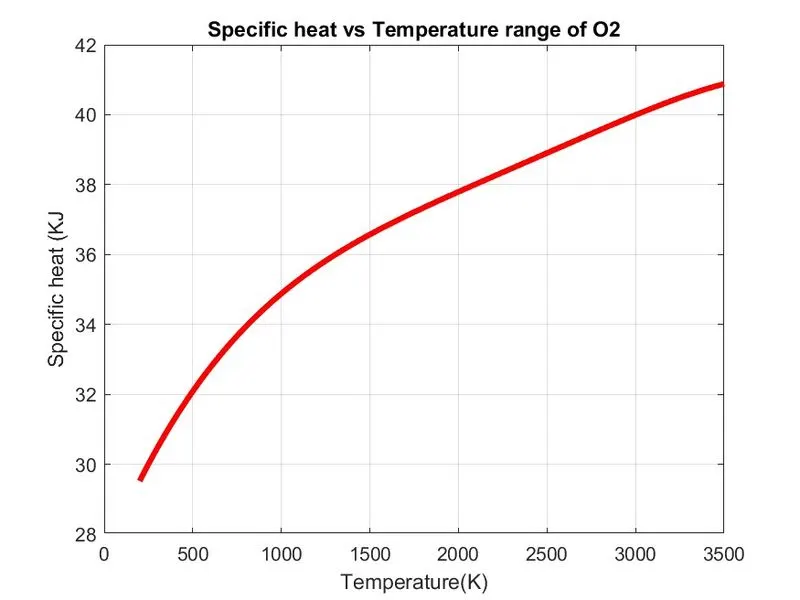
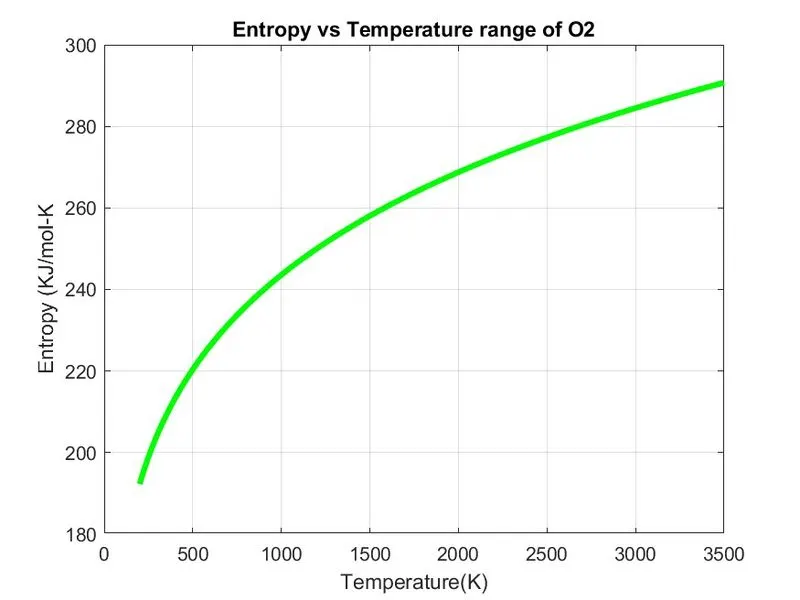
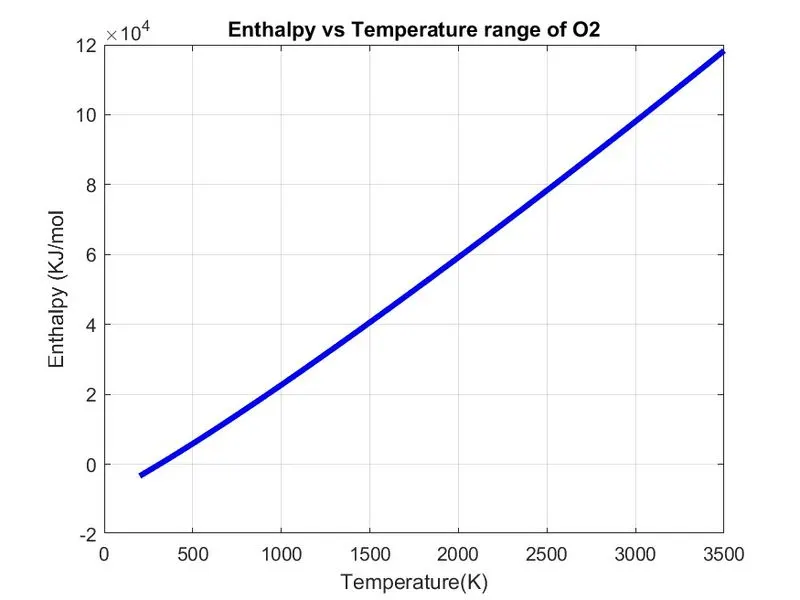
PLOTS OF N2:-
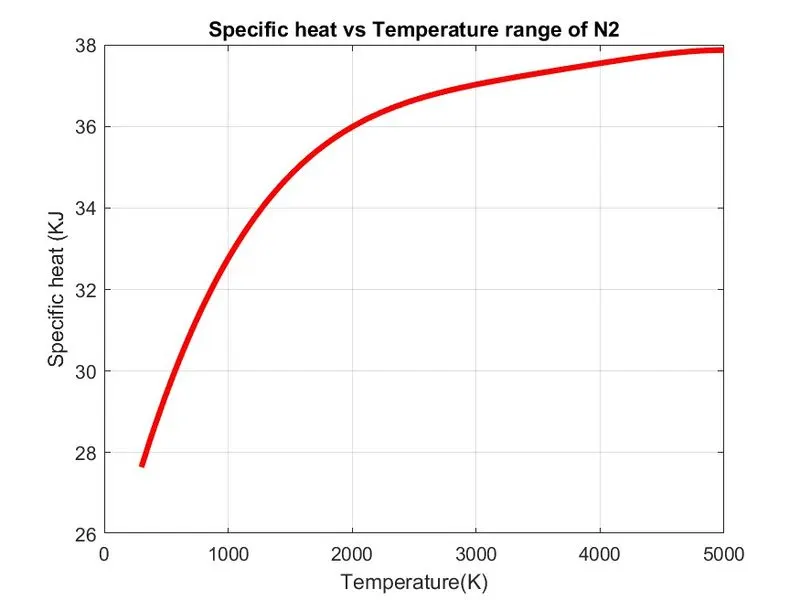
PLOTS OF CO2:-
SCREENSHOT OF DIRECTORY WHERE DIFFERENT SPECIES ARE SAVED:-
MOLECULAR WEIGHTS OF ALL SPECIES:-
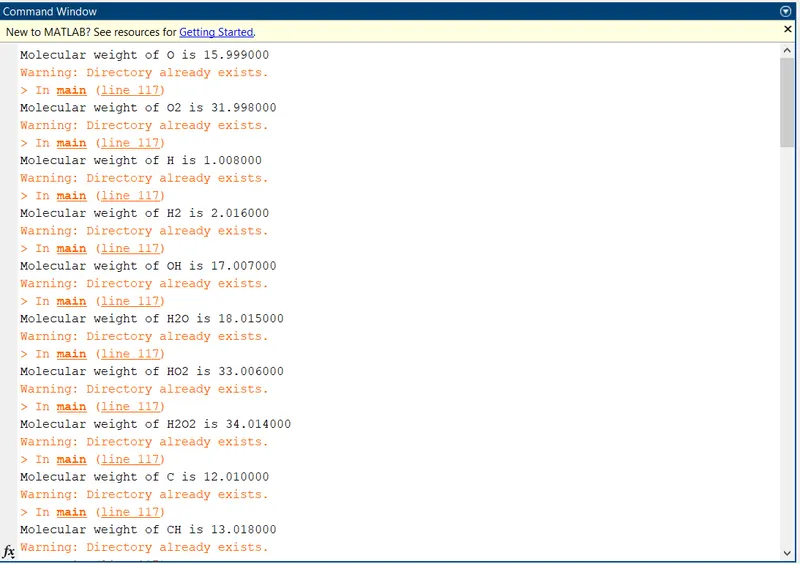
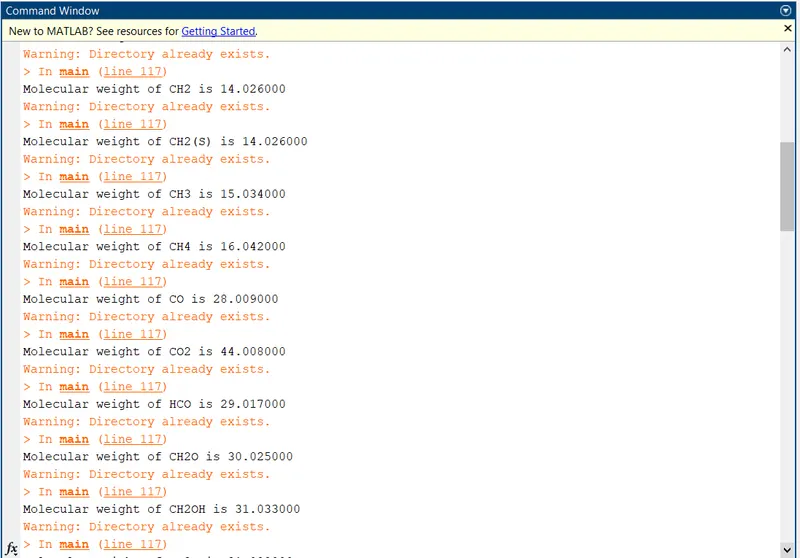
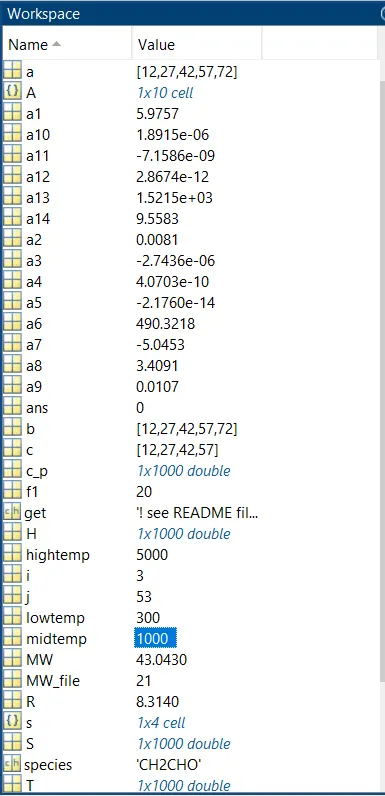
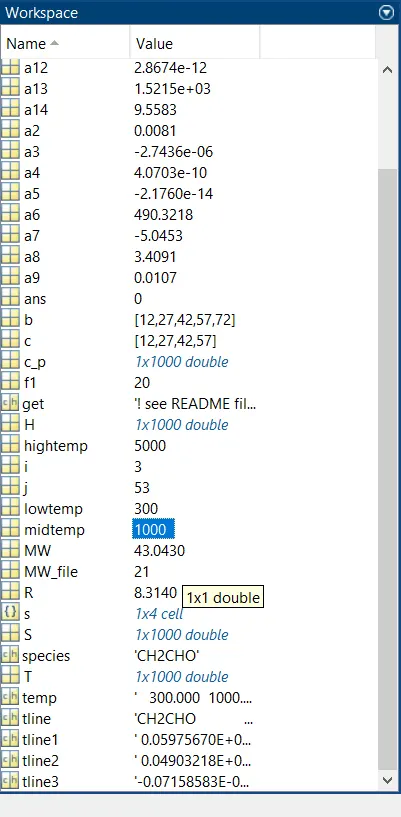
WORKSPACE OUTPUT:-
ERRORS WHILE CODING:-
- There are basic syntactic error and some new command error which have been resolved immediately.
- Typing error.
CONCLUSION:-
- The thermodynamics data has been parsed and thermodynamic data has been calculated and plotted for each species.
- It has been clearly seen that the data of cp, h and s vary at different temperature range from low temperature to high temperature at each compound.
- Hence, we have calculated the molecular weight of different species and stored the data using file file parsing technique.
REFERENCES:-
- Google.
- wikipedia.
- Thermodynamics books(hardcopy).