Project 1 - Parsing NASA thermodynamic data
AIM :
To write a code in MATLAB to parse the NASA thermodynamic data file to calculate thermodynamic properties of various gas species and obtain thermodynamic property plots along with molecular mass of the desired species.
Objectives :
- Write a function that extracts the 14 coefficients and calculates the enthalpy, entropy and specific heats for all the species in the data file.
- Calculate the molecular weight of each species and display it in the command window.
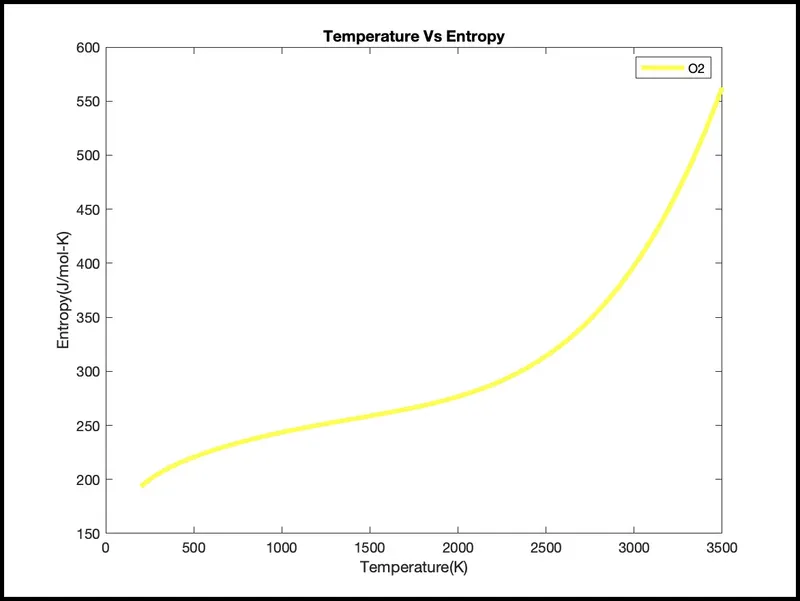
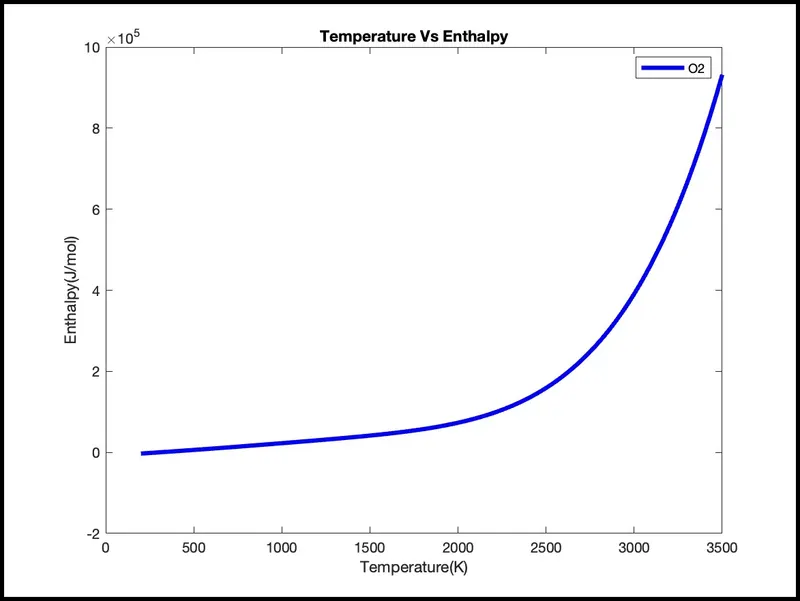
- Plot the Cp, Enthalpy and Entropy for the local temperature range (low temperature : high temperature) specific for each species.
- Save the plots as images with appropriate names and dump them in separate folders for each species with suitable name. All these should be generated automatically.
- The main program that you will submit will just take the "THERMO.dat" file as an input and generate Cp, H and S plots.
- Please write a detailed report to describe your logic.
Input Information:
The File Parser process enables you to convert data from an external file into PeopleSoft data and place it into tables in your Campus Solutions database. The external file can be a delimited file or a flat file. It can be a simple file with one row type or a complex file with several row types.
You will be reading this file NASA thermodynamic data
(Tip: use fopen and fgetl). The formulae are shown below.
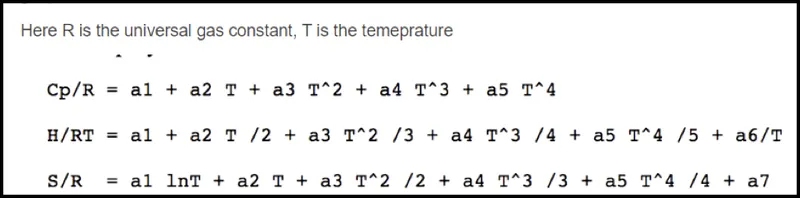
Here R is the universal gas constant, T is the temperature
The FIRST 7 coefficients are HIGH-temperature coefficients and the SECOND 7 coefficients are LOW-temperature coefficients.
Also use the LOCAL TEMPERATURE RANGES which is unique for each individual species, not the GLOBAL TEMPERATURE RANGE.
MATHEMATICAL EQUATION:
FORMULA USED:
Formula used to calculate the thermodynamic properties are as follows:
Code Description:
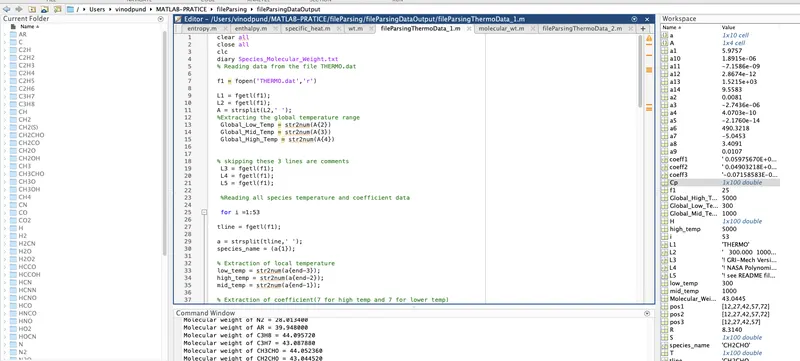
- To Calculate the molecular weight of each species and display it in the command window and write data on plain paper using start command: diary Species_Molecular_Weight.txt
- Initially the given data file is read with help of fopen command with reading function. Then successive lines in the data file is extracted for global temperature range using fgetl command. The input string is then split and extracted global temperatures.
- The desired input from the user is stored as a string.
- Type fgetl three times to skip three lines as those are comments.
- Sixth time fgetl gives species string which contains species name and local low, high and medium temperatures.
- Different coefficients in a particular line is sorted out by specifying the place in that line. Similarly the local temperature range for the input molecule is also extracted from the data file.
- Now, for the thermodynamic property values ( Cp, H, S) , the associated functions are called. As per formula used to create functions for specific heat, enthalpy and entropy.
- Basic information about elements Hydrogen,Cardon,Oxygen…etc Elements = ['H' 'C' 'O' 'N' 'A' ’S']; and its Atomic_weight = [ 1.00784 12.011 15.999 14.0067 39.948 32.065]; This information get from internet .
- The input string is then compared with the molecule available in data file using strcmp. If a match is obtained, respective coefficients are extracted from the data file using fgetl command in-order to get the molecular weight, the function for calculating the molecular weight is called and stored to a variable and is displayed.
- mkdir command is then used to create a directory to store the ouput figures. Command cd helps to locate folder.
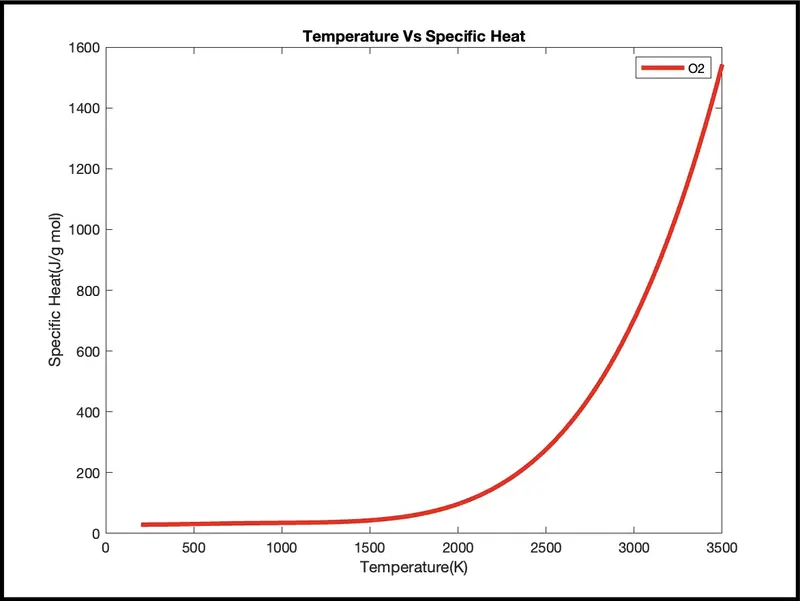
- Plots are created to the Cp, Enthalpy and Entropy for the local temperature range (low temperature : high temperature) specific for each species.
- Current folder is defined where the figure should be stored and saveas command is used to store the figure to that particular folder created.
- current folder is again defined to make the directory back to parent folder .To close and start from initial folder used cd command.
- To capture data for all elements ‘for loop’ to this whole process 53 times run and collect 53 species data.
Molecular Weight function
- A character array is defined for the atoms and array of atomic weights respective to character array is defined.
- The input string is compared with character array, when a match occurs, associated atomic weight is taken.
- For molecules having numbers defining the number of atoms, that number is first extracted, and calculation is made to account for multiple atomic weights.
- a variable is assigned to store the output value of the function.
Enthalpy, Entropy and Specific Heat function
- Since the coefficients available in data file is having a temperature constraint, an if condition is used
- First 7 coefficients are high temperature coefficients and last 7 are low temperature coefficients, to calculate the thermodynamic property values, coefficients are selected with reference to temperature range.
Matlab Amon code for the file parsing data.
clear all
close all
clc
diary Species_Molecular_Weight.txt
% Reading data from the file THERMO.dat

f1 = fopen('THERMO.dat','r')

L1 = fgetl(f1);
L2 = fgetl(f1);
A = strsplit(L2,' ');
%Extracting the global temperature range
 Global_Low_Temp = str2num(A{2})
 Global_Mid_Temp = str2num(A{3})
 Global_High_Temp = str2num(A{4})


% skipping these 3 lines are comments
 L3 = fgetl(f1);
 L4 = fgetl(f1);
 L5 = fgetl(f1);

 %Reading all species temperature and coefficient data

 for i =1:53

tline = fgetl(f1);

a = strsplit(tline,' ');
species_name = (a{1});

% Extraction of local temperature
low_temp = str2num(a{end-3});
high_temp = str2num(a{end-2});
mid_temp = str2num(a{end-1});

% Extraction of coefficient(7 for high temp and 7 for lower temp)

coeff1 = fgetl(f1);
pos1 = strfind(coeff1,'E');
    a1 = str2double(coeff1(1:(pos1(1)+3)));
    a2 = str2double(coeff1((pos1(1)+4):(pos1(2)+3)));
    a3 = str2double(coeff1((pos1(2)+4):(pos1(3)+3)));
    a4 = str2double(coeff1((pos1(3)+4):(pos1(4)+3)));
    a5 = str2double(coeff1((pos1(4)+4):(pos1(5)+3)));

coeff2 = fgetl(f1);
pos2 = strfind(coeff2,'E');
    a6 = str2double(coeff2(1:(pos2(1)+3)));
    a7 = str2double(coeff2((pos2(1)+4):(pos2(2)+3)));
    a8 = str2double(coeff2((pos2(2)+4):(pos2(3)+3)));
    a9 = str2double(coeff2((pos2(3)+4):(pos2(4)+3)));
    a10 = str2double(coeff2((pos2(4)+4):(pos2(5)+3)));

    coeff3 = fgetl(f1);
pos3 = strfind(coeff3,'E');
    a11 = str2double(coeff3(1:(pos3(1)+3)));
    a12 = str2double(coeff3((pos3(1)+4):(pos1(2)+3)));
    a13 = str2double(coeff3((pos3(2)+4):(pos1(3)+3)));
    a14 = str2double(coeff3((pos3(3)+4):(pos1(4)+3)));

% Temperature array creation

T = linspace(low_temp,high_temp,100);


R = 8.314; % Gas constant

%Obtaining value of SPECIFIC HEAT (Cp)
Cp = specific_heat(a1,a2,a3,a4,a5,a8,a9,a10,a11,a12,mid_temp,T,R);


%Obtaining value of ENTHALPY (H)
H = enthalpy(a1,a2,a3,a4,a5,a6,a8,a9,a10,a11,a12,a13,mid_temp,T,R);

%Obtaining value of ENTROPY (S)
S = entropy(a1,a2,a3,a4,a5,a7,a8,a9,a10,a11,a12,a14,mid_temp,T,R);

% Calculating molecular weight and printing it.

Molecular_Weight = wt(species_name);


fprintf('Molecular weight of %s = %f \n',species_name,Molecular_Weight);

% creation of folder in macbook
 mkdir('/Users/vinodpund/MATLAB-PRATICE/fileParsing/fileParsingDataOutput',species_name)

 %  changing the folder to species folder in Macbook
cd(species_name)


% plotting T Vs Cp

figure(1)
plot(T,Cp,'LineWidth',3,'Color','r');
xlabel('Temperature(K)')
ylabel('Specific Heat(J/g mol)')
title('Temperature Vs Specific Heat')
legend(species_name)
saveas(1,'Specific Heat.jpg');


% plotting T Vs H
 figure(2)
plot(T,H,'LineWidth',3,'Color','b')
xlabel('Temperature(K)')
ylabel('Enthalpy(J/mol)')
title('Temperature Vs Enthalpy')
legend(species_name)
saveas(2,'Mole enthalpy.jpg');

% plotting T vs S

figure(3)
 plot(T,S,'LineWidth',3,'Color','y')
xlabel('Temperature(K)')
ylabel('Entropy(J/mol-K)')
title('Temperature Vs Entropy')
legend(species_name)
saveas(3,'Mole entropy.jpg');

 %  changing the folder to species folder in Macbook
cd('/Users/vinodpund/MATLAB-PRATICE/fileParsing/fileParsingDataOutput')

 end
Matlab code for the function that calculates ‘Cp’(specific heat) for the range of temperature.
function Cp = specific_heat(a1,a2,a3,a4,a5,a8,a9,a10,a11,a12,mid_temp,T,R)

if (T>=mid_temp)
Cp = (a1+ (a2*T) + (a3*T.^2) + (a4*T.^3) + (a5* T.^4))*R;
else
    Cp = (a8+ (a9*T) + (a10*T.^2) + (a11*T.^3) + (a12*T.^4))*R;
end
end
From the above function the calculation for the Cp(specific heat)is done over a range of local temperatures. The 1st 7 coefficient(a1 to a7) are used for the higher temperature range and next 7(a8 to a14) are used for lower temperature range.
Matlab code for the function that calculates ‘H’(enthalpy) for the range of temperature.
function H = enthalpy(a1,a2,a3,a4,a5,a6,a8,a9,a10,a11,a12,a13,mid_temp,T,R)

    if (T>=mid_temp)
   H = ((a1*T)+ ((a2*T.^2)/2) + ((a3*T.^3)/3) +((a4*T.^4)/4) + ((a5*T.^5)/5) + a6)*R;
    else

   H = ((a8*T)+ ((a9*T.^2)/2) + ((a10*T.^3)/3) +((a11*T.^4)/4) + ((a12*T.^5)/5) + a13)*R;
    end
end
From the above function the calculation for the H (enthalpy) is done over a range of local temperatures. The 1st 7 coefficient(a1 to a7) are used for the higher temperature range and next 7(a8 to a14) are used for lower temperature range.
Matlab code for the function that calculates ‘ S ' (entropy) for the range of temperature.
function S = entropy(a1,a2,a3,a4,a5,a7,a8,a9,a10,a11,a12,a14,mid_temp,T,R)

    if (T>=mid_temp)
    S = ((a1*log(T)) + (a2*T)  + ((a3*T.^2)/2) + ((a4*T.^3)/3) + ((a5*T.^4)/4) + (a7))*R;
    else
    S = ((a8*log(T)) + (a9*T)  + ((a10*T.^2)/2) + ((a11*T.^3)/3) + ((a12*T.^4)/4) + (a14))*R;
    end
end
From the above function the calculation for the S(entropy) is done over a range of local temperatures. The 1st 7 coefficient(a1 to a7) are used for the higher temperature range and next 7(a8 to a14) are used for lower temperature range.
Matlab code for the function that calculate the molecular weight for the given gas-species
function molecular_weight = wt(species)


Elements = ['H' 'C' 'O' 'N' 'A' ’S']

Atomic_weight = [ 1.00784 12.011 15.999 14.0067 39.948 32.065];


molecular_weight = 0;

for i = 1:length(species)

    for j = 1: length(Elements)

        if strcmp(species(i),Elements(j))

            molecular_weight = molecular_weight+ Atomic_weight(j);

            k=j;

        else
            n = str2double(species(i));

            if n>1
                molecular_weight = molecular_weight + Atomic_weight(k)*(n-1);
                break
            end
        end
    end

end
From the above function the calculation for the molecular wt is done. The different element are stored in array called Elements_name and their respective weight in array Atomic_weight. The string are compared with each elements and particular weight is calculated.
Results and Attachments
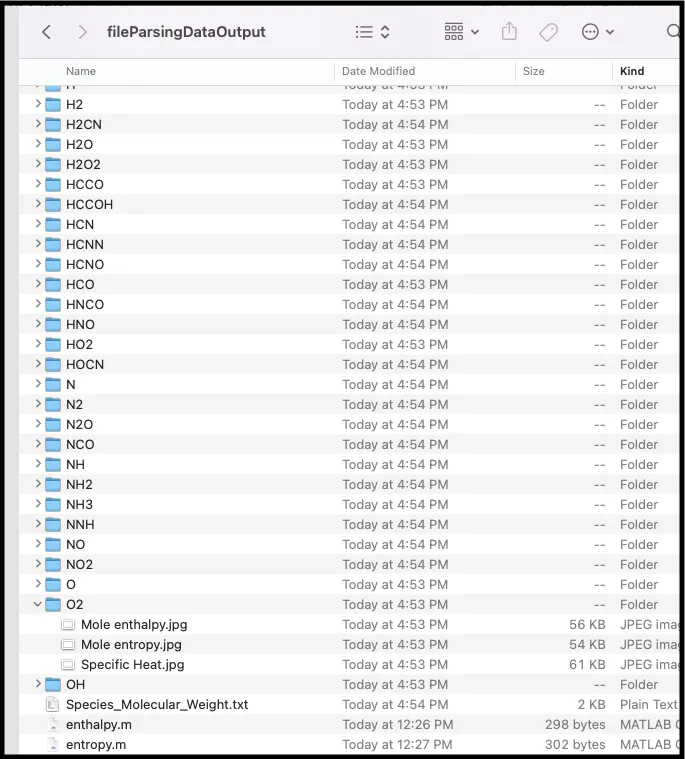
Sample plots for O2:
Command window data as displayed
Global_Low_Temp =
300
Global_Mid_Temp =
1000
Global_High_Temp =
5000
Molecular weight of O = 15.999000
Molecular weight of O2 = 31.998000
Molecular weight of H = 1.007840
Molecular weight of H2 = 2.015680
Molecular weight of OH = 17.006840
Molecular weight of H2O = 18.014680
Molecular weight of HO2 = 33.005840
Molecular weight of H2O2 = 34.013680
Molecular weight of C = 12.011000
Molecular weight of CH = 13.018840
Molecular weight of CH2 = 14.026680
Molecular weight of CH2(S) = 46.091680
Molecular weight of CH3 = 15.034520
Molecular weight of CH4 = 16.042360
Molecular weight of CO = 28.010000
Molecular weight of CO2 = 44.009000
Molecular weight of HCO = 29.017840
Molecular weight of CH2O = 30.025680
Molecular weight of CH2OH = 31.033520
Molecular weight of CH3O = 31.033520
Molecular weight of CH3OH = 32.041360
Molecular weight of C2H = 25.029840
Molecular weight of C2H2 = 26.037680
Molecular weight of C2H3 = 27.045520
Molecular weight of C2H4 = 28.053360
Molecular weight of C2H5 = 29.061200
Molecular weight of C2H6 = 30.069040
Molecular weight of CH2CO = 42.036680
Molecular weight of HCCO = 41.028840
Molecular weight of HCCOH = 42.036680
Molecular weight of H2CN = 28.033380
Molecular weight of HCN = 27.025540
Molecular weight of HNO = 31.013540
Molecular weight of N = 14.006700
Molecular weight of NNH = 29.021240
Molecular weight of N2O = 44.012400
Molecular weight of NH = 15.014540
Molecular weight of NH2 = 16.022380
Molecular weight of NH3 = 17.030220
Molecular weight of NO = 30.005700
Molecular weight of NO2 = 46.004700
Molecular weight of HCNO = 43.024540
Molecular weight of HOCN = 43.024540
Molecular weight of HNCO = 43.024540
Molecular weight of NCO = 42.016700
Molecular weight of CN = 26.017700
Molecular weight of HCNN = 41.032240
Molecular weight of N2 = 28.013400
Molecular weight of AR = 39.948000
Molecular weight of C3H8 = 44.095720
Molecular weight of C3H7 = 43.087880
Molecular weight of CH3CHO = 44.052360
Molecular weight of CH2CHO = 43.044520
CONCLUSION:
On successful parsing of data from NASA's Thermodynamic Data file, variation of thermodynamic properties with temperature of certain species of molecules are observed with the help of plots obtained.
So with the help of the method called file parsing where we can extract the data from a file in a reading mode and further that data can be used for calculation of properties, values etc.. Additional those extracted data is can also be converted in plots or graphs which help us to analyse information in a quick detailed and an organised way.
Finally we get molecular weight of each species.
References:
https://in.mathworks.com/help/matlab/ref/fopen.html
https://in.mathworks.com/help/matlab/ref/fclose.html
https://in.mathworks.com/help/matlab/ref/fprintf.html
https://in.mathworks.com/help/matlab/ref/sprintf.html
https://in.mathworks.com/help/matlab/ref/fscanf.html
https://in.mathworks.com/help/matlab/ref/str2double.html
https://in.mathworks.com/help/matlab/ref/mkdir.html