Project 1 - Parsing NASA thermodynamic data
File parsing is a method that helps us to read the data and use it for serveral parameters calculations. The data must be broken into meningful bits inorder to do file parsing. NASA came up with polynomials that can be used to determine entropy, enthalpy and specific heat of a system includind the coefficients that can be used to evaluate several species.
clear all
close all
clc

% Program to read NASA Thermodynamic Data

file = fopen ('THERMO.dat','r'); %Opens file to read it for matlab
line1 = fgetl(file); % help in reading line by line but line will act as a string
fprintf('Title of Data is : %s\n',line1)  %Printing title

% Finding the global temperature values out of string in line 2
line2 = fgetl(file); % Jump to next line of data file
% global_Temp = fscanf(file,'%f'); it can be a way instead of below lines

S2s = strsplit(line2,' '); %Spliting line into parts checking spaces and making a cell array out of string
Global_LowestTemp = str2num(S2s{2}); % Initializing values of cell array to variable after convering to number instead of string
Global_MediumTemp = str2num(S2s{3}); % Initializing values of cell array to variable after convering to number instead of string
Global_HighestTemp = str2num(S2s{4}); % Initializing values of cell array to variable after convering to number instead of string

Message = 'Please enter name of Gas in Capitals :  '; %Storing poping message into a variable
x = input(Message,'s'); % storing input given by user into a variable by poping message and giving input type

while ~feof(file) % ~ Here this sign says run loop till this condition remain true i.e. 1 if it becomes false i.e. 0, than terminate loop

    line = fgetl(file); % Jump to next line of data file and it is in loop so we can access every line of file
    S2S1 = strsplit(line,' '); % Splitting line.

    if            S2S1{1}== '!' % Checking all line if they have comment sign at 1st location to skip code for that line

        fprintf('%s\n',line);
        fprintf( ' Operation not reguired for this line\n\n') %Printing message for skiping line
    end

    P = length(S2S1); % Calculating length of every line to run code according to species requirement

    if       S2S1{P} == '1' %Checking if end character is 1 or not in line to have access next few lines for that species
        if strcmpi(S2S1{1},x) % checking species name matches with input from user and give values for that particlular species and skip other for now.

            fprintf( ' Operation required for this line\n\n')
            fprintf('%s\n',line);
            fprintf('Name of Gas is : %s\n',S2S1{1})
            gas_name = S2S1{1}; % Copying species name to a variable
            molecular_weight_of_gas = weight_calculation(gas_name); % calling function by giving species name as input and getting molecular mass of that species
            fprintf('Molecular weight of Gas is : %f\n',molecular_weight_of_gas)

         Local_Min_Temp = str2num(S2S1{P-3});   % Extracting species temp. ranges from line
         Local_Max_Temp = str2num(S2S1{P-2});    % Extracting species temp. ranges from line
         Local_Med_Temp = str2num(S2S1{P-1});    % Extracting species temp. ranges from line
         Local_Temp = Local_Min_Temp : Local_Max_Temp;
         fprintf('Local Temp. Values of Data are : %f %f %f\n',Local_Min_Temp, Local_Max_Temp, Local_Med_Temp)

         % Finding coefficients value for given gas after jumping to line
         % than splitting it according to situtation and extract values of
         % coefficients out of line

         % iN LINE 1
         coeff_line1 = fgetl(file);
         S2S2 = findstr(coeff_line1,'E');
         c1 = str2num(coeff_line1(1:S2S2(1)+3));  %Extracting coefficient values by detecting their position in line same for other coefficents too
         c2 = str2num(coeff_line1(S2S2(1)+4:S2S2(2)+3));
         c3 = str2num(coeff_line1(S2S2(2)+4:S2S2(3)+3));
         c4 = str2num(coeff_line1(S2S2(3)+4:S2S2(4)+3));
         c5 = str2num(coeff_line1(S2S2(4)+4:S2S2(5)+3));
         fprintf('Coefficients Values of Data are : %s %s %s %s %s\n',c1,c2,c3,c4,c5);

             % iN LINE 2
         coeff_line2 = fgetl(file);
         S2S3 = findstr(coeff_line2,'E');
         c6 = str2num(coeff_line2(1:S2S3(1)+3));
         c7 = str2num(coeff_line2(S2S3(1)+4:S2S3(2)+3));
         c8 = str2num(coeff_line2(S2S3(2)+4:S2S3(3)+3));
         c9 = str2num(coeff_line2(S2S3(3)+4:S2S3(4)+3));
         c10 = str2num(coeff_line2(S2S3(4)+4:S2S3(5)+3));
         fprintf('Coefficients Values of Data are : %s %s %s %s %s\n',c6,c7,c8,c9,c10);

             % iN LINE 3
         coeff_line3 = fgetl(file);
         S2S4 = findstr(coeff_line3,'E');
         c11 = str2num(coeff_line3(1:S2S4(1)+3));
         c12 = str2num(coeff_line3(S2S4(1)+4:S2S4(2)+3));
         c13 = str2num(coeff_line3(S2S4(2)+4:S2S4(3)+3));
         c14 = str2num(coeff_line3(S2S4(3)+4:S2S4(4)+3));
         fprintf('Coefficients Values of Data are : %s %s %s %s\n\n',c11,c12,c13,c14);

         % Calulation of Cp (Specific Heat, J/K.Mol), H (Enthalpy, J/Kg), & S(Entropy, J/K)
         % considering only Local Temp. Range1
         %The FIRST 7 coefficients are HIGH-temperature coefficients and the SECOND 7 coefficients are LOW-temperature coefficients.

         %For High Temperature Range i.e.    Local_Med_Temp : Local_Max_Temp
         Cp = 0;
         S = 0;
         H=0;
         R = 8.3145;
         for i = 1 : length(Local_Temp) % Running loop for whole range of local temp to get values at every point of temp.

              if Local_Temp(i) >= Local_Med_Temp  %For High Temperature Range i.e.    Local_Med_Temp : Local_Max_Temp

                 Cp(i) = (c1+(c2.*Local_Temp(i))+(c3.*(Local_Temp(i).^2))+(c4.*(Local_Temp(i).^3))+(c5.*(Local_Temp(i).^4))).*R; %#ok<*SAGROW>
                 H(i) = (c1+((c2.*Local_Temp(i))./2)+((c3.*(Local_Temp(i).^2))./3)+((c4.*(Local_Temp(i).^3))./4)+((c5.*(Local_Temp(i).^4))./5)+(c6./Local_Temp(i))).*R.*Local_Temp(i);
                 S(i) = ((c1.*log(Local_Temp(i)))+(c2.*Local_Temp(i))+(c3.*(Local_Temp(i).^2)./2)+(c4.*(Local_Temp(i).^3)./3)+(c5.*(Local_Temp(i).^4)./4)+c7).*R;

              elseif Local_Temp(i) < Local_Med_Temp     %For Low Temperature Range i.e.    Local_Min_Temp : Local_Med_Temp


                 Cp(i) = (c8+(c9.*(Local_Temp(i)))+(c10.*(Local_Temp(i).^2))+(c11.*(Local_Temp(i).^3))+(c12.*(Local_Temp(i).^4))).*R;
                 H(i) = (c8+((c9.*Local_Temp(i))./2)+((c10.*(Local_Temp(i).^2))./3)+((c11.*(Local_Temp(i).^3))./4)+((c12.*(Local_Temp(i).^4))./5)+(c13./Local_Temp(i))).*R.*Local_Temp (i);
                 S(i) = ((c8.*log(Local_Temp(i)))+(c9.*Local_Temp(i))+(c10.*(Local_Temp(i).^2)./2)+(c11.*(Local_Temp(i).^3)./3)+(c12.*(Local_Temp(i).^4)./4)+c14).*R;

              end
         end

         foldername = sprintf(S2S1{1}) % Copying species name to a variable
         mkdir(foldername) % Creating foldername as of species name
         cd(foldername)  % moving to current folder and saving species folder in current directory

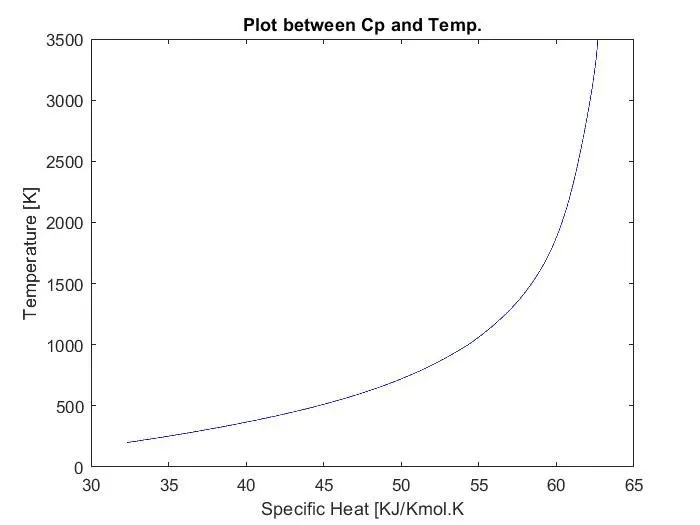
         figure(1)   % Creating a figure
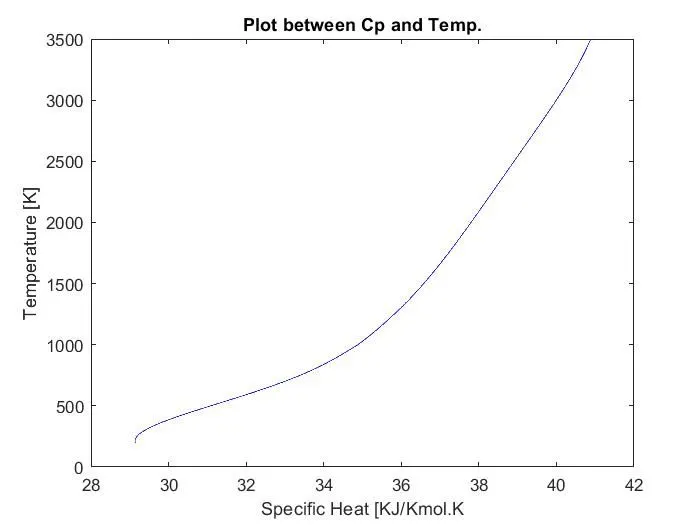
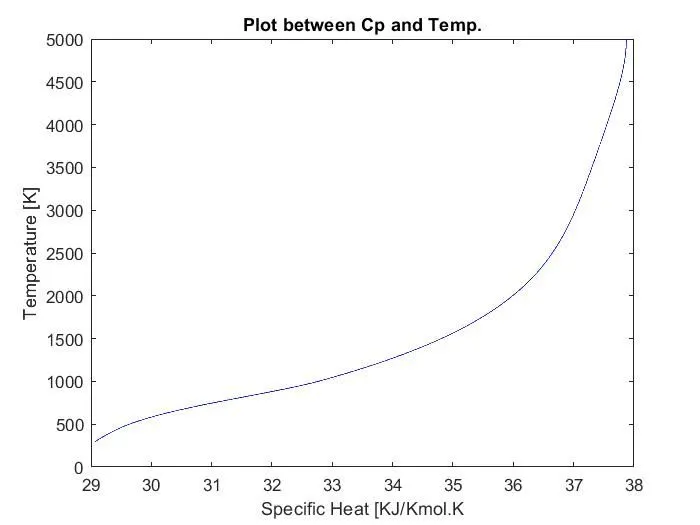
         plot(Cp, Local_Temp,'color','b')  % making a graph out of data calculated
         title('Plot between Cp and Temp.')
         ylabel('Temperature [K]')
         xlabel('Specific Heat [KJ/Kmol.K')
         saveas (figure(1),'Cp.jpg') % saving figure to species folder by name and type defined in command

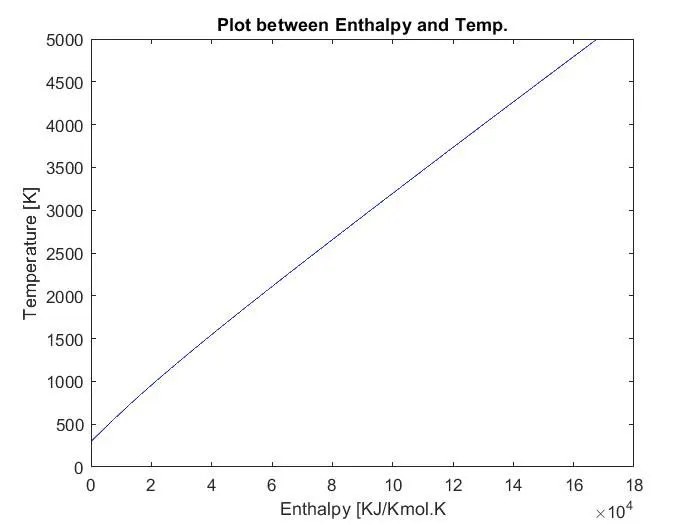
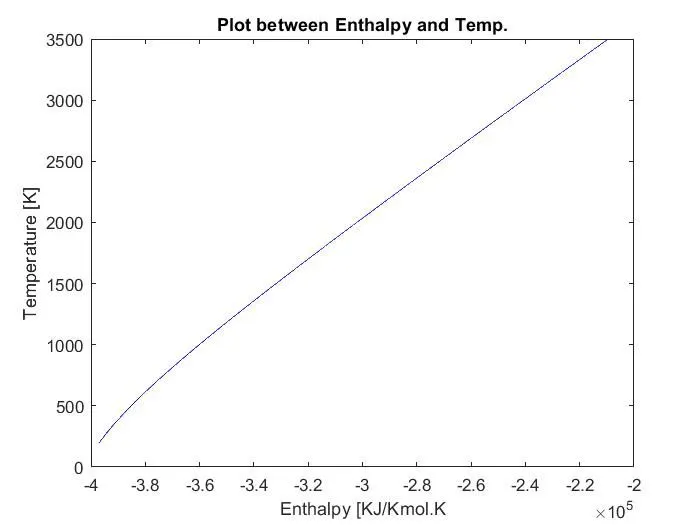
         figure(2)
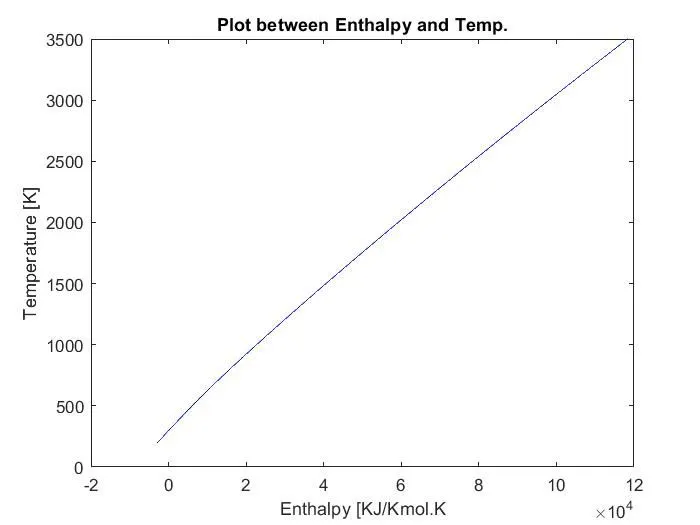
         plot(H, Local_Temp,'color','b')
         title('Plot between Enthalpy and Temp.')
         ylabel('Temperature [K]')
         xlabel('Enthalpy [KJ/Kmol.K')
         saveas(figure(2),'H.jpg') % saving figure to species folder by name and type defined in command

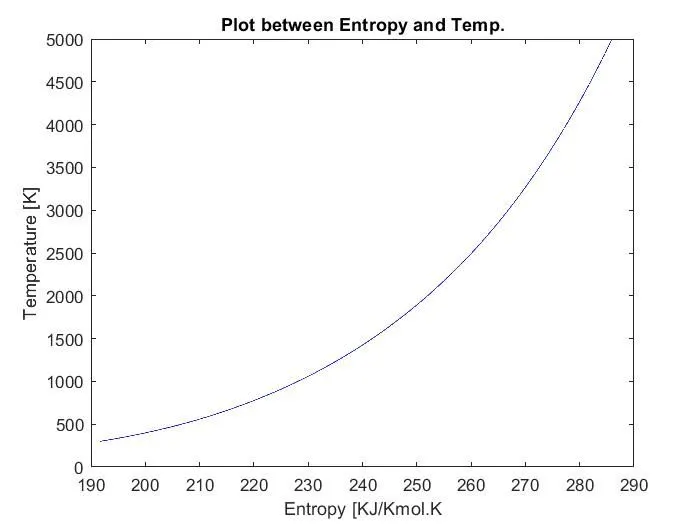
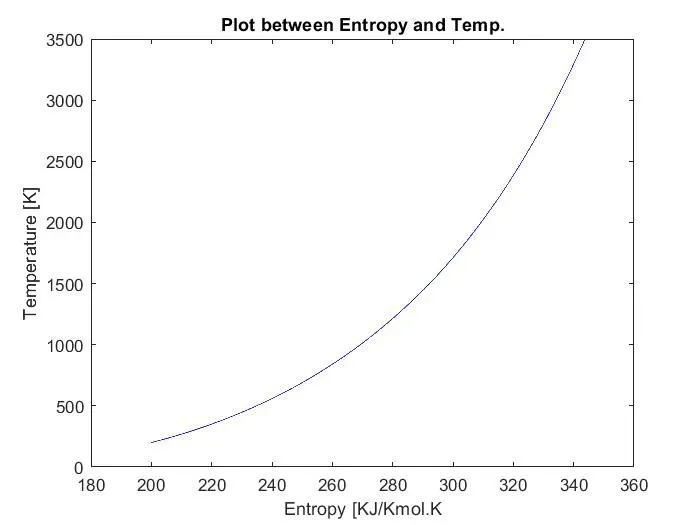
         figure(3)
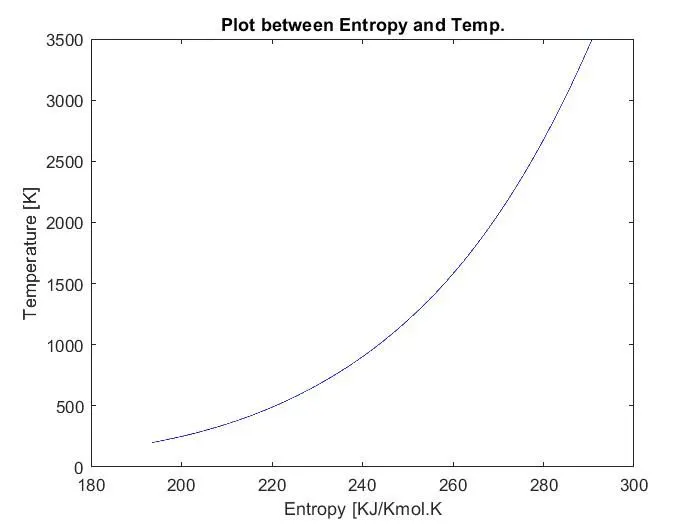
         plot(S, Local_Temp,'color','b')
         title('Plot between Entropy and Temp.')
         ylabel('Temperature [K]')
         xlabel('Entropy [KJ/Kmol.K')
         saveas (figure(3),'S.jpg') % saving figure to species folder by name and type defined in command

         cd .. % coming one step out of current folder to avoid creation of new folder within new created folder

    end
    end
end

fclose(file);   % closing file

% Function to calculate moecular mass of gas

function weight = weight_calculation (gas_name)   % Function defination

  gas = gas_name; % copying user input to a variable

  Element = {'H' 'C' 'N' 'O' 'Ar'};  % Creating cell array of elements present in data
  atom_mass=[1.00797 12.011 14.0067 15.9994 39.948];  % creating array containing atomic masses of elements

 a=0;
 weight = 0;

  for i = 1 : length(gas)  % Running loop till total length of user input
      for j = 1:length(Element)

        if  strcmpi(gas,Element(5))  % comparying 2 strings
             weight=atom_mass(5);

        end

        if  strcmpi(gas(i),Element(j)) % comparying 2 strings
            weight = weight + atom_mass(j); % Calculating weight of species
            a = atom_mass(j);

        end

      end
        x = str2num(gas(i)); % convering string to number type

        if x>1

            weight = (a*(x-1)) + weight; %% Calculating weight of species
          end

  end
end