Project 1 - Parsing NASA thermodynamic data
Aim: To Write a code in MATLAB to Parsing the NASA Thermodynamic Data File and Calculate Thermodynamic Properties of Species.
Objective:
- Write a function that extracts the 14 co-efficients and calculates the enthalpy, entropy and specific heats for all the species in the data file.
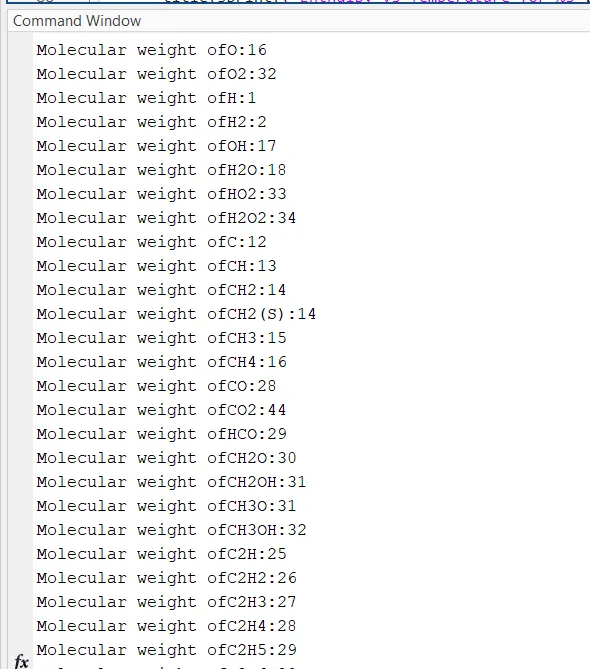
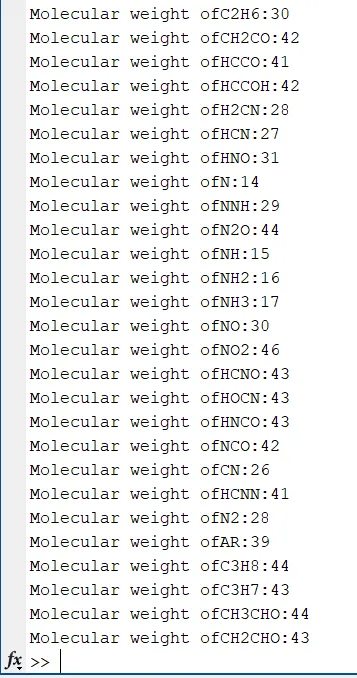
- Calculate the molecular weight of each species and display it in the command window.
- Plot the Cp, Enthalpy and Entropy for the local temperature range (low temperature : high temperature) specific for each species.
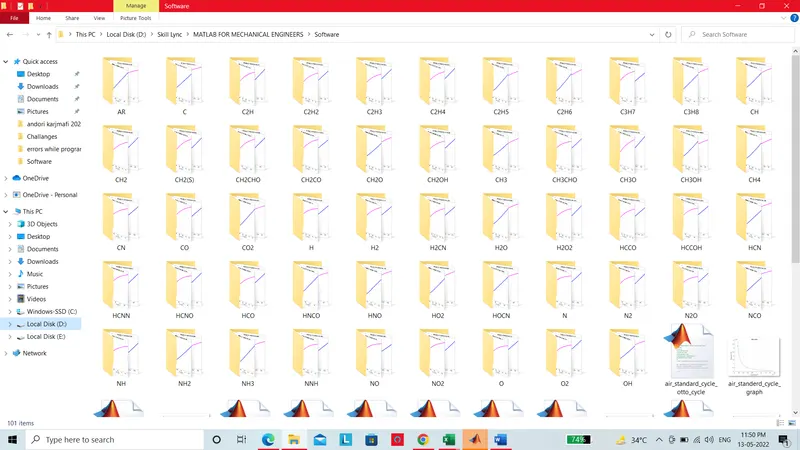
- Save the plots as images with appropriate names and dump them in separate folders for each species with suitable name. All these should be generated automatically.
Theory:
Specific Heat (CP):-
Specific Heat is the amount of heat that must be added to one unit of mass of the substance in order to cause an increase of one unit in temperature.
Polynomial Specific Heat Equation as below,
`(CP)/(R)=a1+a2.T+a3.T^2+a4.T^3+a5.T^4`
Where,
CP= Specific Heat,
R=R= Universal Gas Constant,
T= Temperature,
Enthalpy(H):-
The enthalpy H of a thermodynamic system is defined as the sum of its internal energy and the product of its pressure and volume.
`H = U + pV`
Where,
H= Enthalpy,
U= Internal Energy,
P= Pressure,
V= Volume of the System,
Polynomial Enthalpy Equation as below,
`(H)/(RT)=a1+a2.T/2+a3.T^2/3+a4.T^3/4+a5.T^4/5+(a6)/T`
Where,
H= Enthalpy,
R= Universal Gas Constant,
T= Temperature,
Entropy(S):-
The entropy of an object is a measure of the amount of energy which is unavailable to do work. Entropy is also a measure of the number of possible arrangements the atoms in a system.
Polynomial Entropy Equation as below,
`(S)/(R)=a1.logT+a2.T+a3.T+a3.T^2/2+a4.T^3/3+a5.T^4/4+a7`
Where,
S= Entropy,
R= Universal Gas Constant,
T= Temperature,
Molecular Weight(MW):-
Molecular weight is measured in Atomic Mass Units, usually expressed as u or amu. In order to calculate the molecular weight of a formula, you'll need to add up the atomic masses of each element present.The unit of Molecular weight is 'amu'or 'Daltons'(Da).
File Parsing:-
- Parsing is the process of analyzing a string of symbols, either in natural language, computer languages or data structures, conforming to the rules of a formal grammar. The term parsing comes from Latin pars , meaning part (of speech).
- Parsing is the process of analyzing a string of symbols, either in natural language, computer languages, or data structures, conforming to formal grammar rules.
- Data parsing is a method where one string of data gets converted into a different type of data. So let’s say you receive your data in raw HTML. A parser will take the said HTML and transform it into a more readable data format easily read and understood such as plain text.
Main MATLAB Code:-
clear all
close all
clc

f1=fopen('THERMO.dat','r');
%reading the First line data
first_line=fgetl(f1);

% Universal Gas Constant
R=8.314;

Comments_1=fgetl(f1);
Comments_2=fgetl(f1);
Comments_3=fgetl(f1);
Comments_4=fgetl(f1);
for i=1:53

    first_line=fgetl(f1);
    element_name=strtok(first_line);
% obtaining Local Max,min,mediun Temperature
% obtaining Temperature value by Splitting data

temp_range=strsplit(first_line,' ');
Local_min_temp=str2num(temp_range{end-3});
Local_mid_temp=str2num(temp_range{end-1});
Local_max_temp=str2num(temp_range{end-2});

% create a vector of 500 evenly spaced teperature points

T= linspace(Local_min_temp,Local_max_temp,500);
    line2=fgetl(f1);
    A=findstr(line2,'E');

    line3=fgetl(f1);
    B=findstr(line3,'E');

    line4=fgetl(f1);
    C=findstr(line4,'E');

    a1=str2num(line2(1:A(1)+3));
    a2=str2num(line2(A(1)+4:A(2)+3));
    a3=str2num(line2(A(2)+4:A(3)+3));
    a4=str2num(line2(A(3)+4:A(4)+3));
    a5=str2num(line2(A(4)+4:A(5)+3));

    a6=str2num(line3(1:B(1)+3));
    a7=str2num(line3(B(1)+4:B(2)+3));

    a8=str2num(line3(1:B(2)+3));
    a9=str2num(line3(B(3)+4:B(4)+3));
    a10=str2num(line3(B(4)+4:B(5)+3));
    a11=str2num(line4(1:C(1)+3));
    a12=str2num(line4(C(1)+4:C(2)+3));
    a13=str2num(line4(C(2)+4:C(3)+3));
    a14=str2num(line4(C(3)+4:C(4)+3));

    % specific Heat
    cp=specific_heat(a1,a2,a3,a4,a5,a8,a9,a10,a11,a12,T,R,Local_mid_temp);

    % Enthalpy
    H=enthalpy(a1,a2,a3,a4,a5,a6,a8,a9,a10,a11,a12,a13,T,R,Local_mid_temp);

    % Entropy
    S=entropy(a1,a2,a3,a4,a5,a7,a8,a9,a10,a11,a12,a13,a14,T,R,Local_mid_temp);

    % calculating molecular weight of the Species
     molecular_wt(i)=molecular_weight(element_name);
    warning('off')
    % saving the plot data
    cd('D:\Skill Lync\MATLAB FOR MECHANICAL ENGINEERS\Software')
    mkdir(element_name)
    cd(element_name)


    figure(1)
    plot(T,cp,'LineWidth',3,'color','r')
    title(sprintf('specific heat vs Temperature for %s',element_name))
    xlabel('Temperature')
    ylabel('specific Heat')
    grid on

    saveas(figure(1),'specific heat.png');

    figure(2)
    plot(T,H,'LineWidth',3,'color','b')
    title(sprintf('Enthalpy vs Temperature for %s',element_name))
    xlabel('Temperature')
    ylabel('Enthalpy')
    grid on

    saveas(figure(2),'Enthalpy.png');

    figure(3)
    plot(T,S,'LineWidth',3,'color','m')
    title(sprintf('Entropy vs Temperature for %s',element_name))
    xlabel('Temperature')
    ylabel('Entropy')
    grid on

    saveas(figure(3),'Entropy.png');

    cd('D:\Skill Lync\MATLAB FOR MECHANICAL ENGINEERS\Software')
end
Explaination Of Above MATLAB Code:-
Step-1: First of all we can Open NASA Thermodynamic THERMO.dat file by using 'fopen' Command.
Step-2: we can use 'fgetl' command for Reading data.
Step-3: by Using 'fgetl' command we can access Comments lines from the file.
Step-4: we can use 'strtok' command for getting selected part of the string, then we can use For loop for get the values of 53 species of CP,H and S.
Step-5: For obtaining Local Min Temp,Local mid Temp and Local max Temperature,we have to use 'strsplit' command for splitting data. then we have to convert data String into Number bu Using 'str2num' Command.
Step-6: create 500 Evenly spaced vector for Temperature point by using linspace command. Then we have Coeeficcient values in Line number 2 we have to access the all values we have to use 'fgetl' command, then we have locate the 'E' we can find by using 'finstr' command. we use A to store these values, like This we can store B and C.
Step-7: By using 'str2num' command we can extract coeficients a1,a2,a3,a4,a5,a6,a7,a8,a9,a10,a11,a12,a13,a14.
Step-8: Then we have to call the function for calculating Specific Heat,Enthalpy,entropy and molecular weight.
Step-9: To save The Plots in Directory we use 'mkdir' and cd Command. then we can plot Figures like Figure(1),Figure(2) and Figure(3) and save as respective Names.
Step-10: we can plot the graphs of Specific Heat,Enthalpy,Entropy, To make different Species name in Title we use 'sprintf' Command.
Function Code for Specific Heat:
function cp=specific_heat(a1,a2,a3,a4,a5,a8,a9,a10,a11,a12,T,R,Local_mid_temp)
% comparing with local Temperature
if T <= Local_mid_temp
    cp=R.*(a8+a9.*T+a10.*T.^2+a11.*T.^3+a12.*T^4);
else
    cp=R.*(a1+a2.*T+a3.*T.^2+a4.*T.^3+a5.*T.^4);
end
Function Code for Enthalpy:
function H=enthalpy(a1,a2,a3,a4,a5,a6,a8,a9,a10,a11,a12,a13,T,R,Local_mid_temp)
% comparing with local Temperature
if T<=Local_mid_temp
    H=R.*(a8.*T+(a9.*T.^2)./2+(a10.*T.^3)./3+(a11.*T.^4)./4+(a12.*T.^5)./5+a13);
else
    H=R.*(a1.*T+(a2.*T.^2)./2+(a3.*T.^3)./3+(a4.*T.^4)./4+(a5.*T.^5)./5+a6);
end
Function Code for Entropy:
function S=entropy(a1,a2,a3,a4,a5,a7,a8,a9,a10,a11,a12,a13,a14,T,R,Local_mid_temp)
% comparing with Local Temperature
if T<= Local_mid_temp
S=R.*(a8*log(T)+a9.*T+a10.*(T.^2)./2+a11.*(T.^3)./3+a12.*(T.^4)./4+a14);
else
S=R.*(a1*log(T)+a2.*T+a3.*(T.^2)./2+a4.*(T.^3)./3+a5.*(T.^4)./4+a7);
endFunction Code for Molecular weight :
function MW= molecular_weight(element_name)
atoms={'H','C','N','O','A'};
fprintf('Molecular weight of');
fprintf(element_name)
fprintf(':');
atomic_weight=[1 12 14 16 39];
MW=0;
for i=1:length(element_name)
    for j=1:length(atoms)
        if strcmp(element_name(i),atoms(j))
            MW=MW+atomic_weight(j);
            position =j;
        end
    end
    n=str2num(element_name(i));
    if n>1
        MW=MW+atomic_weight(position)*(n-1);
    end
end
fprintf('%d',MW);
disp(' ');
end
Explaination of Function Code:
Step-1: We use the Different Functions for Specific Heat,Enthaply, Entropy and Molecular Weight.
Step-2: We use If else Loop for calculating Specific Heat,Enthaply and Entropy.
Step-3: for creating function for Molecular weight got the atomic weight of hydrogen,carbon,nitrogen,oxygen and Argon.
Step-4: We use the For loop and 'strcmp' command for comparing species data
if they are macthing
Step-5: Now let us take the string name and position to calculate the molecular weight, here we get n is the no.of molecules of the element in the species.
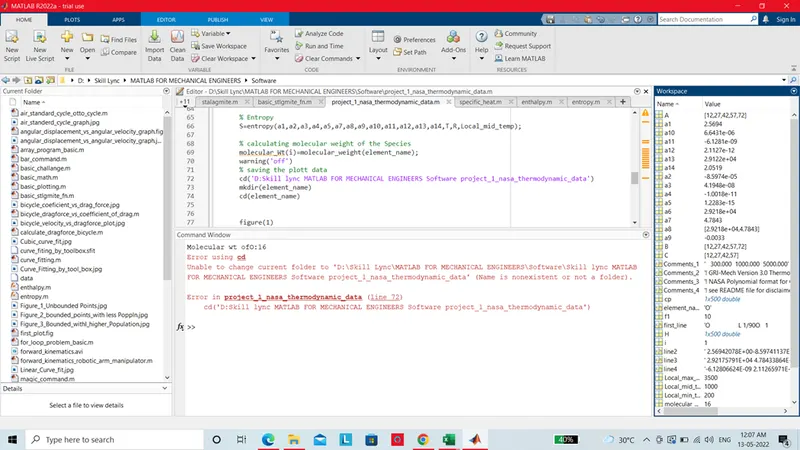
Errors Occurred While Programming:-
Results :
Screenshot of All plots Saved Folder:
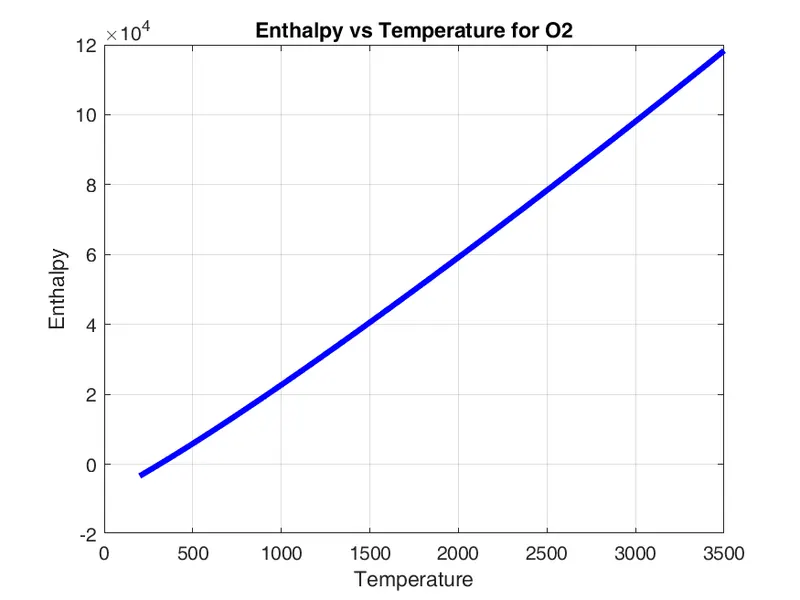
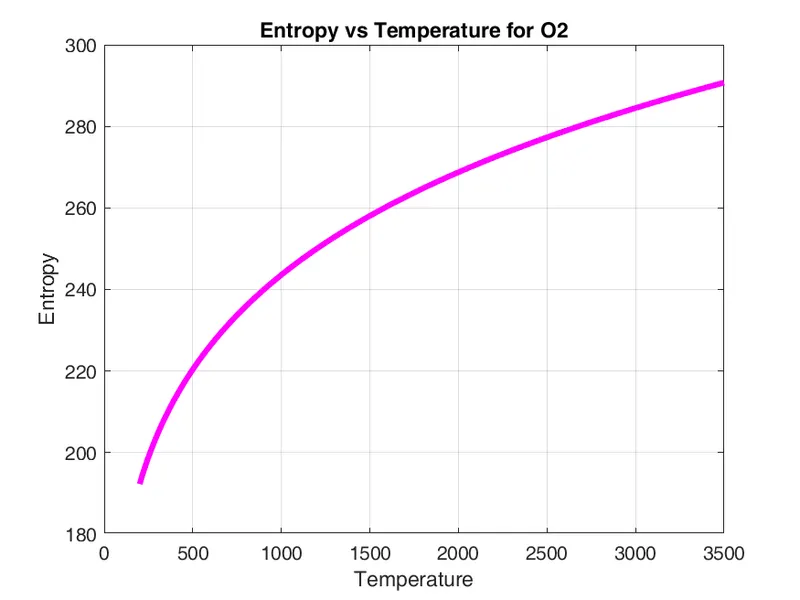
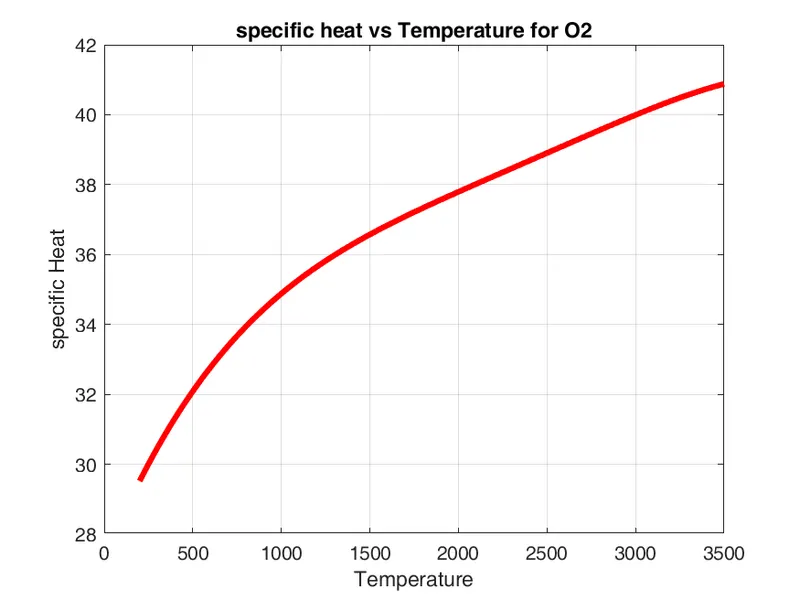
Plots of O2 :
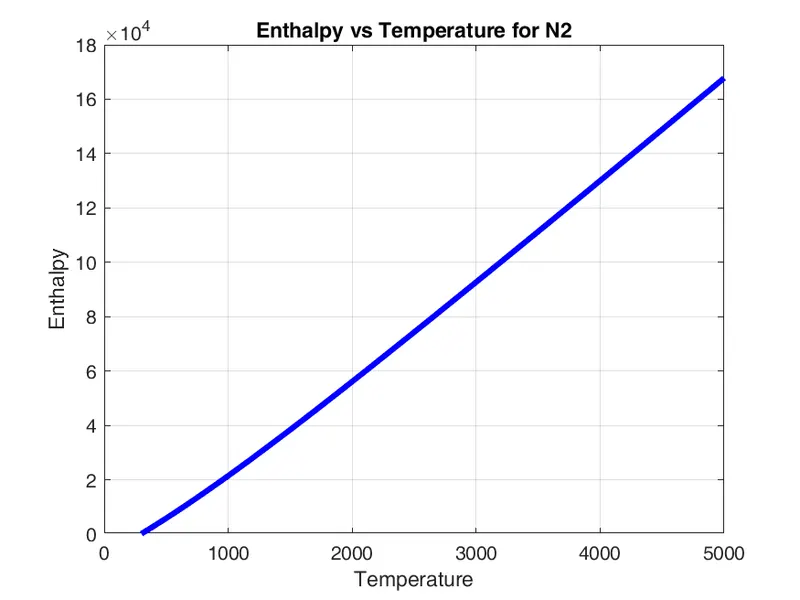
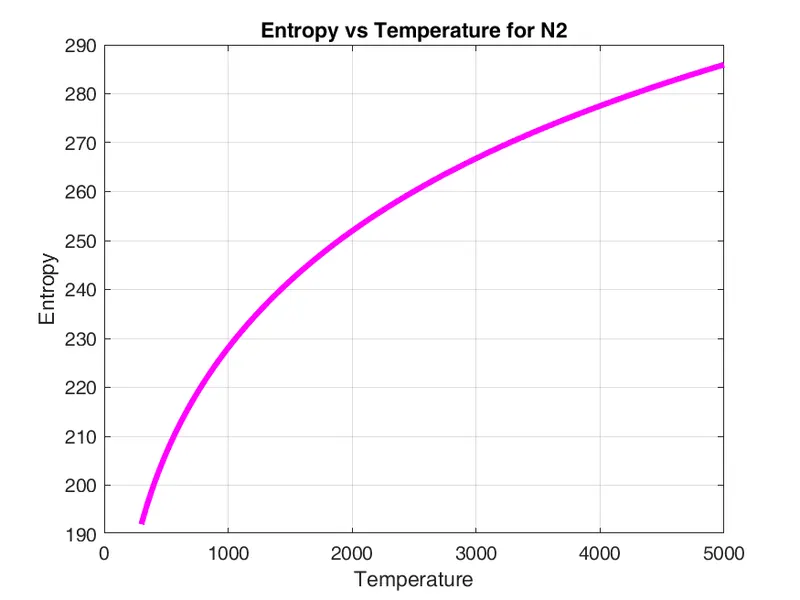
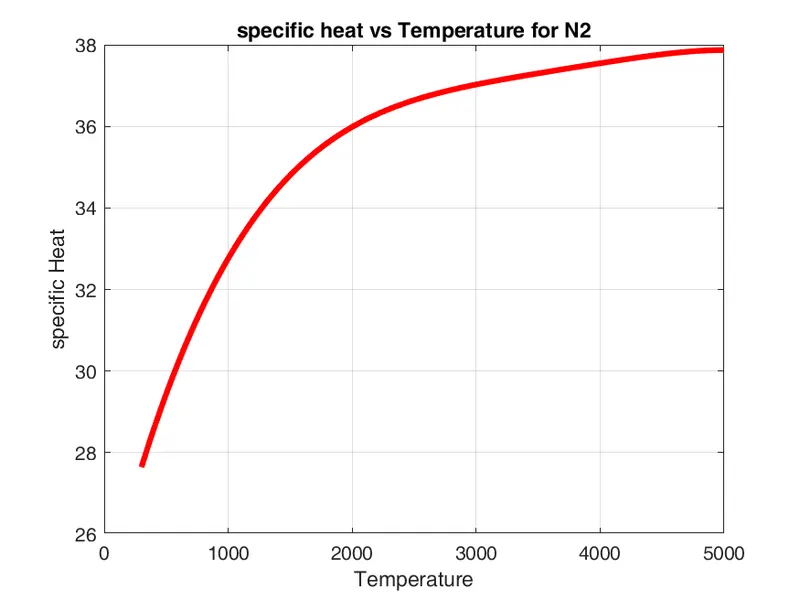
Plots of N2 :
Plots of CO2 :
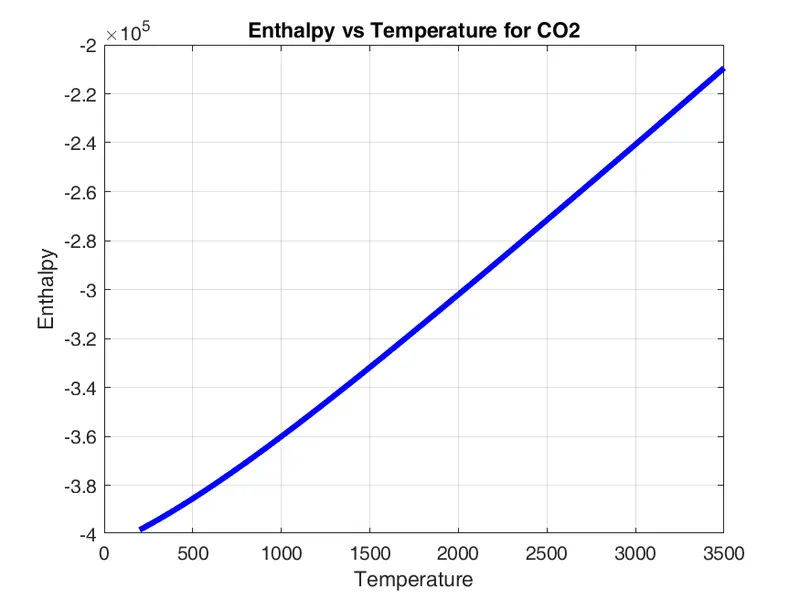
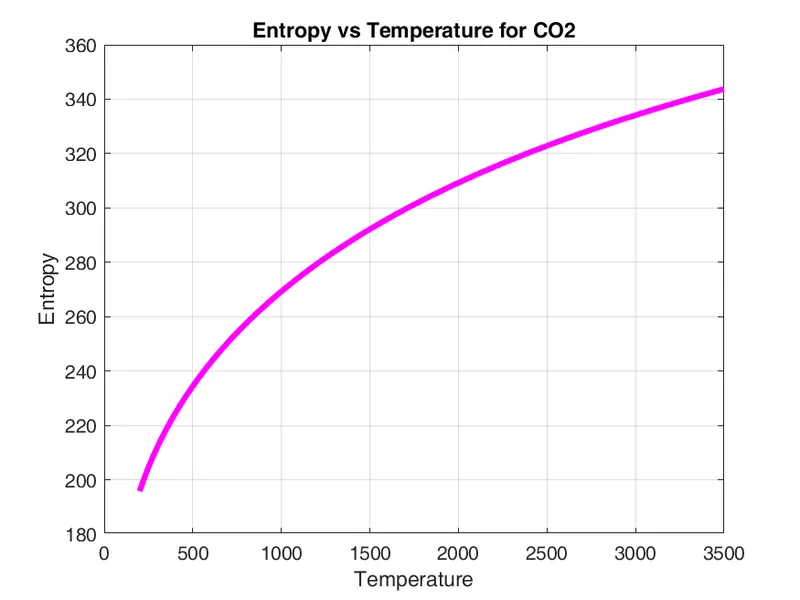
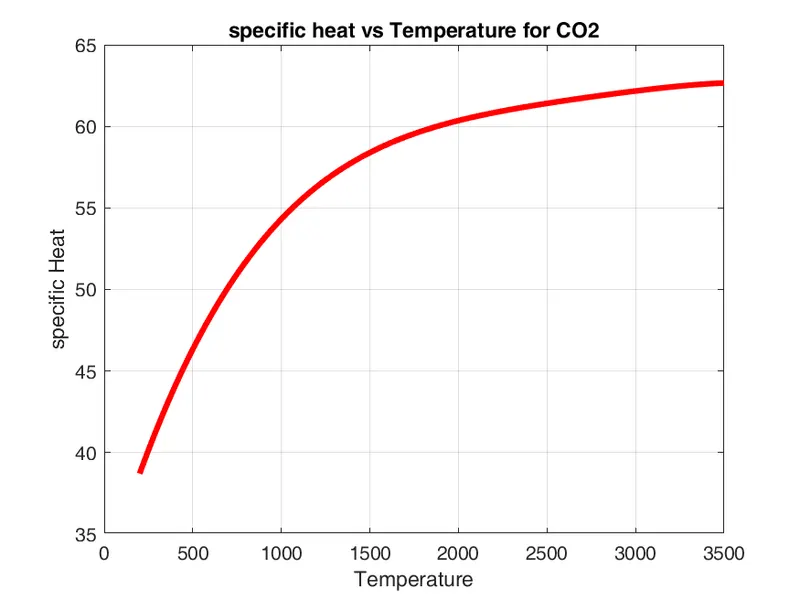
Molecular Weight Command Window:
Conclusion:-
By using MATLAB Parsing We can read file and make useful for important Data Comparison.
Refrerences:
https://en.wikipedia.org/wiki/Parsing
https://www.mathworks.com/help/matlab/ref/fgetl.html
https://www.mathworks.com/help/matlab/ref/fopen.html
https://www.mathworks.com/help/matlab/ref/str2num.html
https://www.mathworks.com/help/matlab/ref/findstr.html