Project 1 - Parsing NASA thermodynamic data
Aim:
- To write a function that extracts the 14 coefficients and calculates the enthalpy, entropy and specific heats for all the species in the data file.
- Must calculate the molecular weight of each species and display it in the command window.
- To plot the Cp, Enthalpy and Entropy for the local temperature range (low temperature: high temperature) specific for each species.
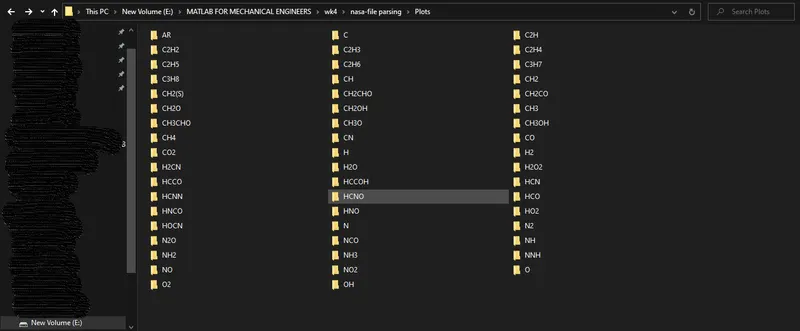
- Save the plots as images with appropriate names and dump them in separate folders for each species with suitable name. All these should be generated automatically.
- The main program that you will submit will just take the "THERMO.dat" file as an input and generate Cp, H and S plots.
Theory:
Parsing:
Parsing, syntax analysis, or syntactic analysis is the process of analysing a string of symbols, either in natural language, computer languages or data structures, conforming to the rules of a formal grammar.
The term has slightly different meanings in different branches of linguistics and computer science. Traditional sentence parsing is often performed as a method of understanding the exact meaning of a sentence or word, sometimes with the aid of devices such as sentence diagrams. It usually emphasizes the importance of grammatical divisions such as subject and predicate.
Within computational linguistics the term is used to refer to the formal analysis by a computer of a sentence or other string of words into its constituents, resulting in a parse tree showing their syntactic relation to each other, which may also contain semantic and other information. Some parsing algorithms may generate a parse forest or list of parse trees for a syntactically ambiguous input.
Nasa polynomials:
CHEMKIN files can be used to import data for simulation of complex chemical reactions in the gas phase. These input files may contain three basic sets of information — chemical kinetics, species thermodynamic properties, and species transport properties for either volumetric or surface species. Use imported data to set up and do the following:
- Solve mass and energy balances for ideal reactor systems (reactors, semi- reactors, CSTRs, and plug flow reactors).
- Evaluate species transport properties as a function of reactor conditions.
- Evaluate mass, energy, and momentum balances for space-dependent models, and transfer them to COMSOL Multiphysics.
It is possible to read the input files for kinetics, thermodynamic, and transport properties independently and use these as separate data resources. For example, if a set of reactions is entered into the Reaction Engineering interface, species thermodynamic and transport data can be supplied by reading the appropriate input files. The full functionality of the physics interface is retained even after the import procedure. This means that all expressions and all data imported into the software are available for reference and for editing.
The following CHEMKIN files are compatible:
- Transport CHEMKIN files that supply data used to compute Transport Properties.
- Thermodynamic CHEMKIN files containing data for Gordon and McBride or NASA polynomials. These polynomials are denoted NASA format and compute the species’ heat capacity, Cp, molar enthalpy, h, and molar entropy, s:
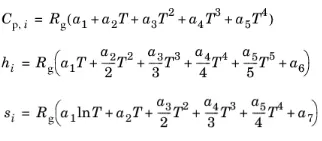
Here:
Cp,i : (SI unit: J/(mol·K)) denotes the species’ molar heat capacity,
T : (SI unit: K) is the temperature,
Rg : the ideal gas constant, 8.314 J/(mol·K),
hi : (SI unit: J/mol) is the species’ molar enthalpy, and
si : (SI unit: J/(mol·K)) represents its molar entropy at standard state.
Function code:
A slightly complex code:
Explanation:
- This function starts with naming the output 'w' and the name of the function is declared along with passing an input argument(species_name).
- The atomic names and its corresponding weights are declared in order, the initial value of 'w' is declared.
- The first 'for' loop calls the 'compound name' and runs the loop until all individual elements are read by the code.
- The second 'for' loop is used to verify is the individual element from the 'species_name' exists in the array of 'atomic_names'.
- If the name of the element is same as name of the element in the species, the if loop adds the value of an element to calculate the molecular weight.
- The position of the element is noted.
- After converting the character into a number, the next if loop is used to add molecular weights of the following elements.
- The fprintf stamement is used to print the molecular weight of each compound/molecule.
function [w]=challenge_molecular_wt(species_name)

    atomic_names=['H','C','O','N','S','Ar'];
    atomic_weights=[1.00784, 12.0107, 15.999, 14.0067, 32.065, 39.948];
    w=0;

    for p=1:length(species_name)
        for o=1:length(atomic_names)

            if species_name(p)==atomic_names(o)
                w=w+atomic_weights(o);
                pos=o;
            end
        end

        n=str2num(species_name(p));

        if n>=1
            w=w+atomic_weights(pos)*(n-1);
        end

    end
        % to print the values of molecular weight in the console for each compound
        fprintf('Molecular weight of %s = %f',species_name,w)
        fprintf('\n')
end
Code:
Datafile:
https://drive.google.com/file/d/1AikCHDlz9s_fu8whE81qee_GD4AyYpCP/view
Explanation:
- The thermodynamic file is opened from the directory, make sure to save the main program, function and datafile within the same folder.
- The first for loop is used to skip the first 5 lines from the datafile, 'fgetl' command is used to achieve this.
- The next for loop is used to isolate all the important quantities in the datafile, the loop runs from 1 to 53 because in total there are 212 lines of data which can be used to calculate the thermodynamic data.
Each species occupies 4 lines in the file so 212/4=53. - After isolating the coefficients of the species and storing them as a separate variable we proceed to calculate specific heat, enthalpy and entropy for low and high temperature ranges.
The first 7 coefficients are used to calculate thermodynamic quantities at high temperatures and the last 7 coefficients are used to calculate thermodynamic data at low temperatures.
An if and else condition is used to obtain 2 values of data to calculate the thermodynamic quantities. - The next step is used to create new directories to save the data in form of plots into separate folders, note the directory in which the code is running while saving images because for MATLAB to calculate the molecular weights the directory must be changed.
Failing to do this will produce errors. - Function call to calculate molecular weight is declared along with a line of code which asks MATLAB to not print warning messages in the console.
clear all
close all
clc

fid=fopen('THERMO.dat','r');
% str=textscan(fid,'%s','HeaderLines',0,'delimiter','\r\n');
class(fid)

for j=1:5
   b=fgetl(fid);
end

% 217-5=212, 212/4=53;
for i=1:53

        one=fgetl(fid);
        A=strsplit(one,' ');
        species_name=(A{1});
        class(species_name);
%  to save local temperature files
        T=strfind(one,'G');
        t_one=str2double(one(T+3:T+7));
        t_two=str2double(one(T+12:T+20));
        t_three=str2double(one(T+22:T+30));

        t_array=linspace(t_one,t_two,2000);

        two=fgetl(fid);
        c_1=str2double(two(1:15));
        c_2=str2double(two(16:30));
        c_3=str2double(two(31:45));
        c_4=str2double(two(46:60));
        c_5=str2double(two(61:75));

        three=fgetl(fid);
        c_6=str2double(three(1:15));
        c_7=str2double(three(16:30));
        c_8=str2double(three(31:45));
        c_9=str2double(three(46:60));
        c_10=str2double(three(61:75));

        four=fgetl(fid);
        c_11=str2double(four(1:15));
        c_12=str2double(four(16:30));
        c_13=str2double(four(31:45));
        c_14=str2double(four(46:60));

        R=8.314462618;

        for k=1:length(t_array)
            if t_array(k)>t_three
                cp(k)=R.*(c_1+c_2.*t_array(k)+c_3.*t_array(k).^2+c_4.*t_array(k).^3+c_5.*t_array(k).^4);
                h(k)=R.*t_array(k)*(c_1+c_2.*(t_array(k))./2+c_3.*(t_array(k))./3+c_4.*(t_array(k))./4+c_5.*(t_array(k))./5+c_6./t_array(k));
                s(k)=R*(c_1.*log(t_array(k))+c_2.*t_array(k)+c_3.*(t_array(k)^2)./2+c_4.*(t_array(k)^3)./3+c_5.*(t_array(k).^4)./4+c_7);

            else
                cp(k)=R.*(c_8+c_9.*t_array(k)+c_10.*t_array(k).^2+c_11.*t_array(k).^3+c_12.*t_array(k).^4);
                h(k)=R.*t_array(k).*(c_8+c_9.*(t_array(k))./2+c_10.*(t_array(k))./3+c_11.*(t_array(k))./4+c_12.*(t_array(k))./5+c_13./t_array(k));
                s(k)=R.*(c_8*log(t_array(k))+c_9.*t_array(k)+c_10.*(t_array(k).^2)/2+c_11.*(t_array(k).^3)/3+c_12.*(t_array(k).^4)./4+c_14);
            end
        end

        % creates a new folder for saving plots
        mkdir('Plots')
        % specifying the location where the plots have to be saved
        cd('E:\MATLAB FOR MECHANICAL ENGINEERS\wk4\nasa-file parsing\Plots')
        % creating folder within the main folder with the name of each compound
        mkdir(species_name);
        % to save the images of the last compound in its own directory
        cd(species_name);

                figure(1)
                plot(t_array,cp)
                xlabel('Temperature')
                ylabel('Specific heat')
                title(sprintf('Plot for Specific heat and Temperature for species: %s', species_name))
                saveas(figure(1),'Specific heat.jpg')

                figure(2)
                plot(t_array,h)
                xlabel('Temperature')
                ylabel('Enthalpy')
                title(sprintf('Plot for Enthalpy and Temperature for species: %s', species_name))
                saveas(figure(2),'Enthalpy.jpg')

                figure(3)
                plot(t_array,s)
                xlabel('Temperature')
                ylabel('Entropy')
                title(sprintf('Plot of Entropy and Temperature for species: %s', species_name))
                saveas(figure(3),'Entropy.jpg')

 %   To redirect MATLAB to a directory where the function is saved
 %   Previously the directory of matlab had been changed to a new folder called Plots
 %   In 'Plots' all the plots had been saved with respect to each compound
    cd('E:\MATLAB FOR MECHANICAL ENGINEERS\wk4\nasa-file parsing')

 %   Function call
    [w]=challenge_molecular_wt(species_name);

 %   To remove unwanted trivial warning messages in the console
    warning('off', 'all')

end
Results and plots:
Click on the below link to view all the plots generated from the code.
Drive link for plots obtained
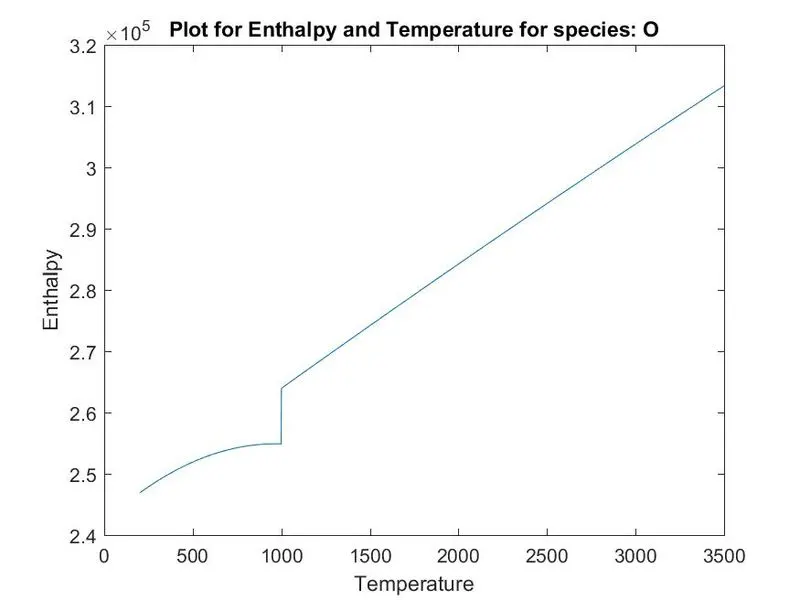
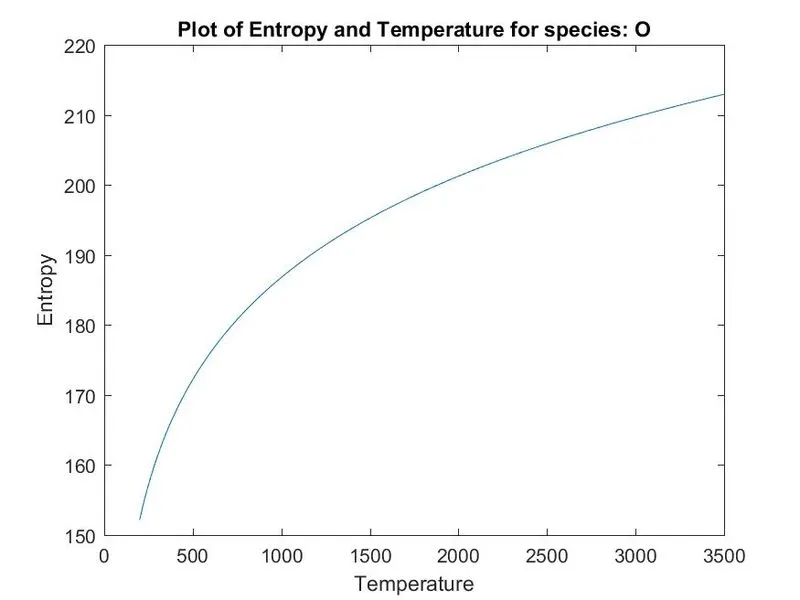
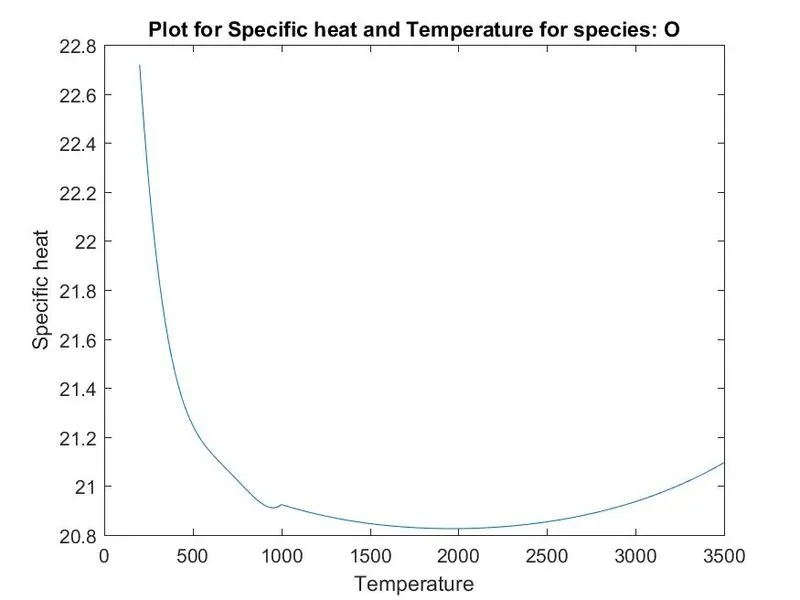
Example plots:
Molecular weight of C2H4 = 28.052760
Molecular weight of C2H5 = 29.060600
Molecular weight of C2H6 = 30.068440
Molecular weight of CH2CO = 42.036080
Molecular weight of HCCO = 41.028240
Molecular weight of HCCOH = 42.036080
Molecular weight of H2CN = 28.033080
Molecular weight of HCN = 27.025240
Molecular weight of HNO = 31.013540
Molecular weight of N = 14.006700
Molecular weight of NNH = 29.021240
Molecular weight of N2O = 44.012400
Molecular weight of NH = 15.014540
Molecular weight of NH2 = 16.022380
Molecular weight of NH3 = 17.030220
Molecular weight of NO = 30.005700
Molecular weight of NO2 = 46.004700
Molecular weight of HCNO = 43.024240
Molecular weight of HOCN = 43.024240
Molecular weight of HNCO = 43.024240
Molecular weight of NCO = 42.016400
Molecular weight of CN = 26.017400
Molecular weight of HCNN = 41.031940
Molecular weight of N2 = 28.013400
Molecular weight of AR = 39.948000
Molecular weight of C3H8 = 44.094820
Molecular weight of C3H7 = 43.086980
Molecular weight of CH3CHO = 44.051760
Molecular weight of CH2CHO = 43.043920
The folders created from running the code.
References:
Warning off
https://in.mathworks.com/matlabcentral/answers/39435-find-if-a-folder-already-exists-and-act-depending-on-the-result
https://doc.comsol.com/5.6/doc/com.comsol.help.chem/chem_ug_chemsptrans_re.07.12.html