Project 1 (Mini Project on Vehicle Direction Detection
General Overview:
Identifying the direction of the vehicle is one of the important & diverse features in Autonomous driving & Advanced Driver Assistance Features. This particular sub-feature of identifying the direction of vehicle is basically identifying the direction the vehicle is taking based on the camera input.
Camera reads the road signs & stores into its memory with unique values for left turn, right turn & straight drive. Depending on the direction it is taking, final indication is given to the driver – as an indication if he is driving in the recommended direction or not.
Vehicle Direction Determination can also be coupled along - side features like GPS systems to identify whether the vehicle is reaching its destination in an optimized manner. This sub feature can also be used along with Lane Detection, Highway Warning, Ramp Entry / Exit in Wrong Way Detection etc.
Objective of Mini Project:
- Development of MATLAB Simulink model as per requirement.
- Tag the requirements to the simulink model; tagging requirement 1 & requirement 2 to their corresponding subsystems is fine.
- MBD compliant changes, Data Dictionary creation & code generation is added advantage, and that is not scope of this project.
- If choosing code generation, Storage class for Input signals: ImportedExtern; Storage class for Output signal: Export to File; Storage class for local signals: localizable; Storage class for calibration signals: Const.
- Choose sample time for all signals as 0.01s
Requirement - 1:
- Steering wheel input as yaw rate (Signal name: SteeringWheel_YawDegreeInput) is the input for this system.
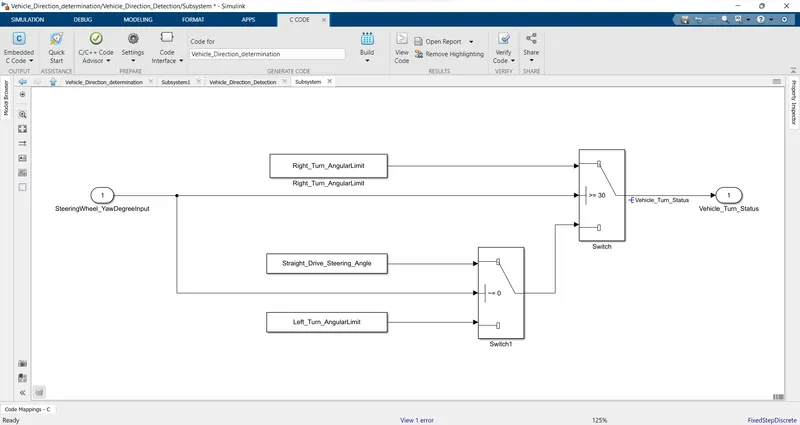
- This is compared against 3 angular values, one each for left turn, right turn & straight drive (Calibration Values: Right_Turn_AngularLimit, Left_Turn_AngularLimit, Straight_Drive_Steering_Angle) to say which specific direction the steering wheel is turning towards.
- Use switch blocks to compare & develop this requirement. Keep this requirement in a subsystem & output of this requirement is a local signal (Signal Name: Vehicle_Turn_Status).
Requirement – 2:
- Keep this requirement as a separate subsystem. Inputs to this requirement are local signal from requirement 1 (Signal Name: Vehicle_Turn_Status) & an input signal from camera (Signal Name: CameraInput_RoadSign), which confirms the occurrence of a road sign.
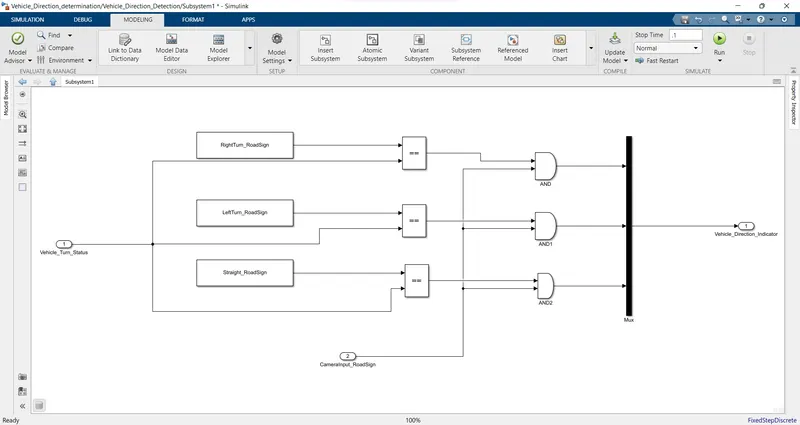
- Signal Vehicle_Turn_Status is compared against calibration values (Calibration Values: RightTurn_RoadSign, LeftTurn_RoadSign, Straight_RoadSign), if each of them is found equal, then each of the three corresponding output is compared against the camera input signal,
- Using a logical operator block, only one among them is finally given as output signal (Signal Name: Vehicle_Direction_Indicator).
Signals & Calibration Data List:
|
Signal / Calibration Name |
Signal Type |
Data Type |
Dimension |
Min |
Max |
Initial Value |
Units |
|
SteeringWheel_YawDegreeInput |
Input |
Int16 |
1 |
-180 |
180 |
- |
Deg |
|
CameraInput_RoadSign |
Input |
Boolean |
1 |
0 |
1 |
- |
- |
|
Vehicle_Turn_Status |
Local |
Int16 |
1 |
-180 |
180 |
- |
Deg |
|
Right_Turn_AngularLimit |
Calibration |
Int16 |
[1 1] |
-180 |
180 |
30 |
Deg |
|
Left_Turn_AngularLimit |
Calibration |
Int16 |
[1 1] |
-180 |
180 |
-120 |
Deg |
|
Straight_Drive_Steering_Angle |
Calibration |
Int16 |
[1 1] |
-180 |
180 |
0 |
Deg |
|
RightTurn_RoadSign |
Calibration |
Int16 |
[1 1] |
-180 |
180 |
30 |
|
|
LeftTurn_RoadSign |
Calibration |
Int16 |
[1 1] |
-180 |
180 |
-120 |
|
|
Straight_RoadSign |
Calibration |
Int16 |
[1 1] |
-180 |
180 |
0 |
|
|
Vehicle_Direction_Indicator |
Output |
Boolean |
1 |
0 |
1 |
- |
- |
Open the matlab simulink model then Model setting give a Configuration parameters from given data of stop time, sample time then apply it.
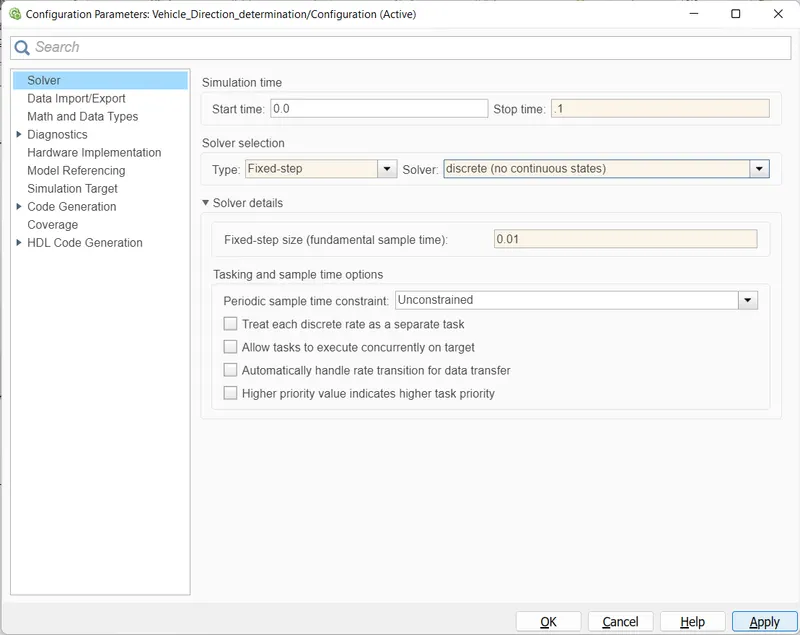
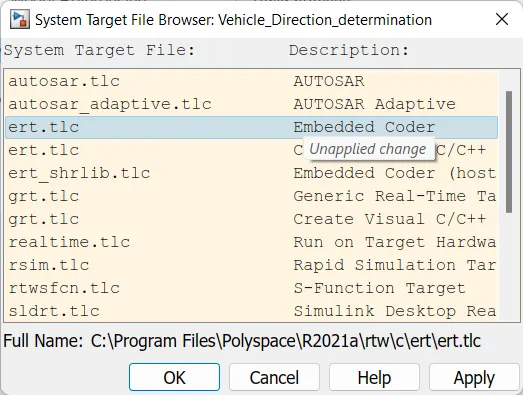
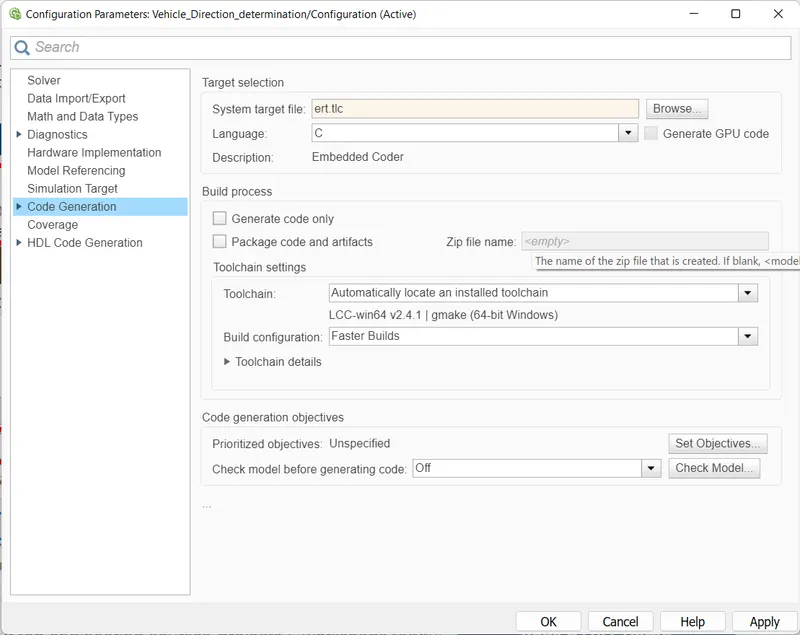
we need embedded coder so click code generation. browse the Embedded coder then apply it. set all given configeration perameters
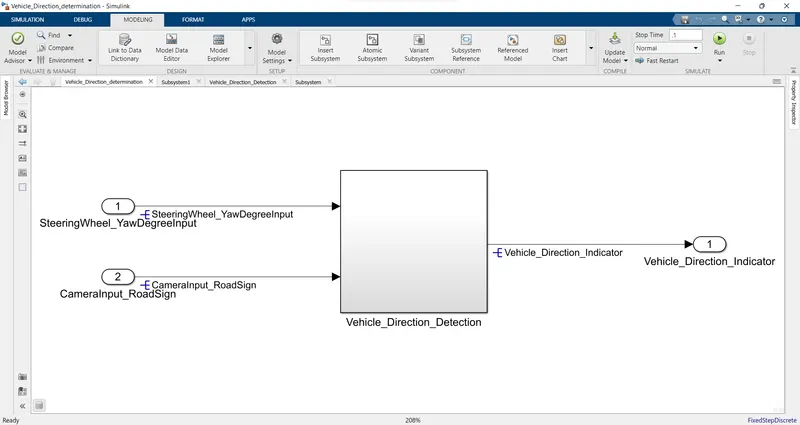
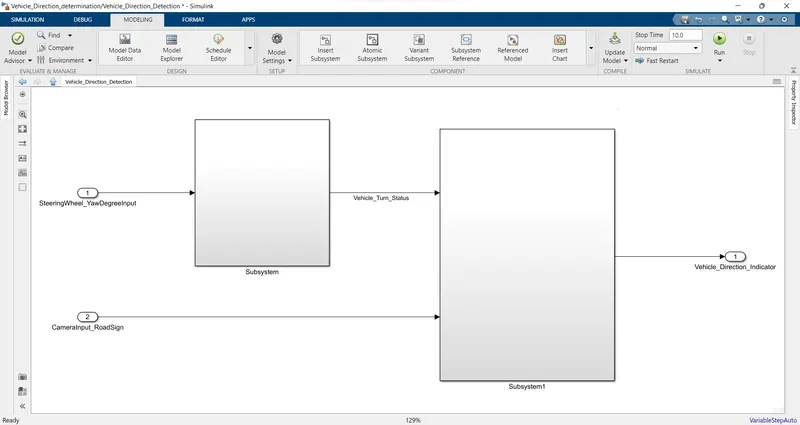
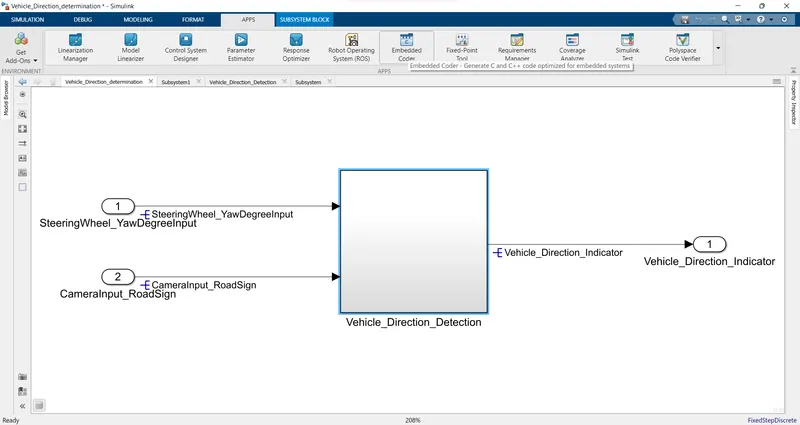
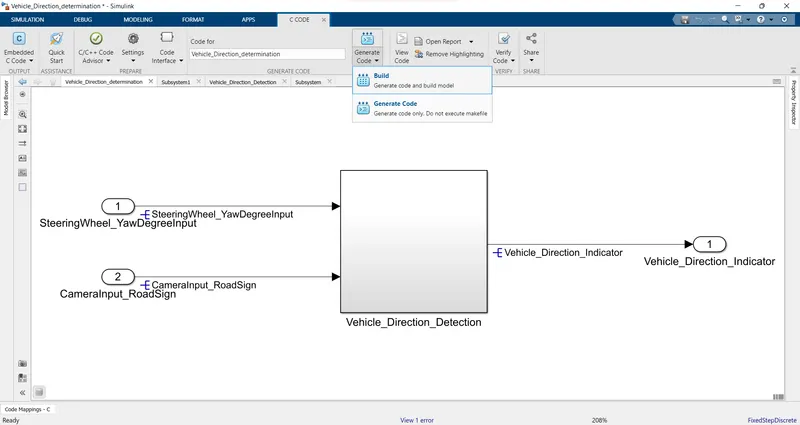
A main block subsystem of Vehicle direction detection, they are two inputs Steeringwheel yaw degree input and camerainput road sign and only one output Vehicle direction indicator.
- Keep this requirement as a separate subsystem. Inputs to this requirement are local signal from requirement 1 (Signal Name: Vehicle_Turn_Status) & an input signal from camera (Signal Name: CameraInput_RoadSign), which confirms the occurrence of a road sign.
- This is compared against 3 angular values, one each for left turn, right turn & straight drive (Calibration Values: Right_Turn_AngularLimit, Left_Turn_AngularLimit, Straight_Drive_Steering_Angle) to say which specific direction the steering wheel is turning towards.
- Use switch blocks to compare & develop this requirement. Keep this requirement in a subsystem & output of this requirement is a local signal (Signal Name: Vehicle_Turn_Status).
- Signal Vehicle_Turn_Status is compared against calibration values (Calibration Values: RightTurn_RoadSign, LeftTurn_RoadSign, Straight_RoadSign), if each of them is found equal, then each of the three corresponding output is compared against the camera input signal,
- Using a logical operator block, only one among them is finally given as output signal (Signal Name: Vehicle_Direction_Indicator)
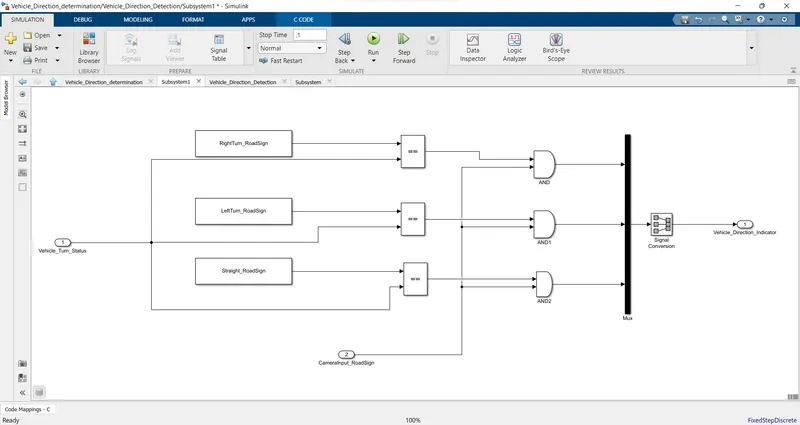
- Input of Vehicle Trun status connected to relational operator block. and other signals are RightTurn_RoadSign, LeftTurn_RoadSign, Straight_RoadSign connected with relational operator block.
- AND logical operator block using for conneted with CameraInput_RoadSign and others conneccted with relational operator block.
- MUx block using for take 3 input and given one output to Vehicle_Direction_Indicator.
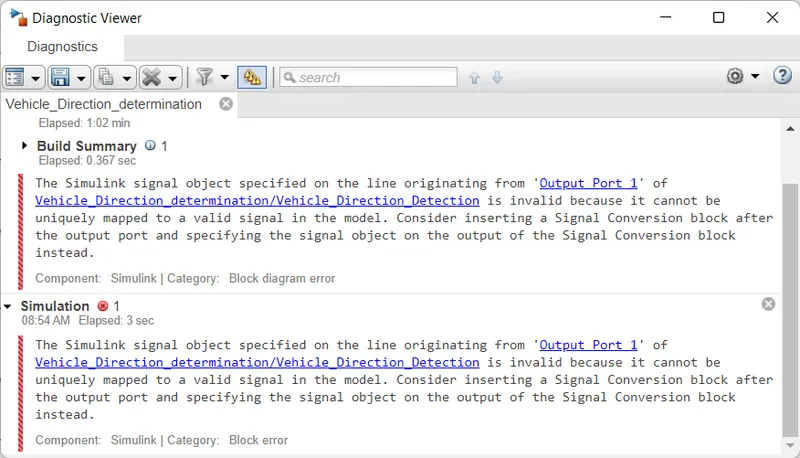
After running this subsystem i get error missing signal conversion block of the output.
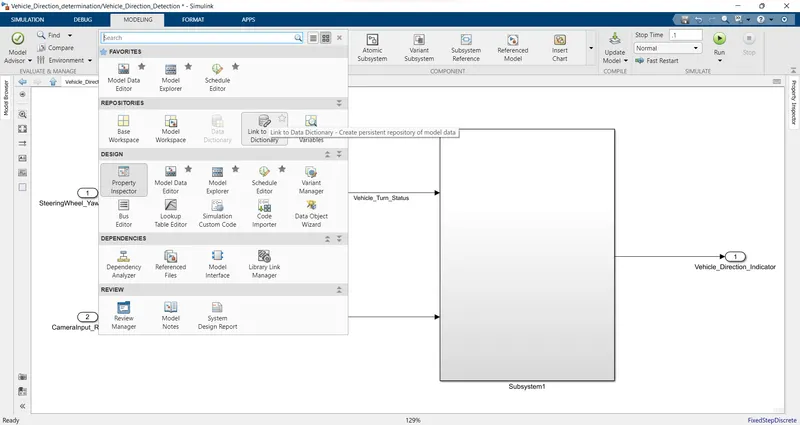
Create SLDD file from given Signals & Calibration Data List:
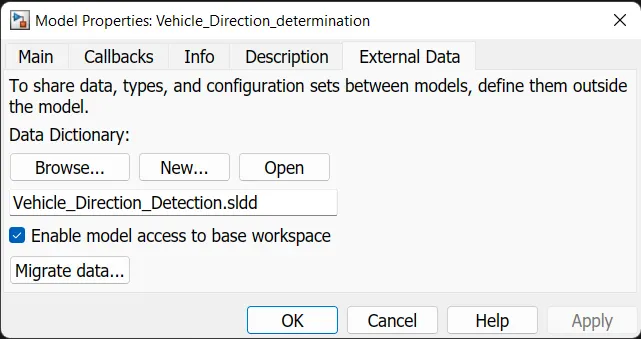
Link to Data Dictionary over all blocks. In model properties block click external data and creat Vehicle_Direction_Detection.sldd then click new they are stored
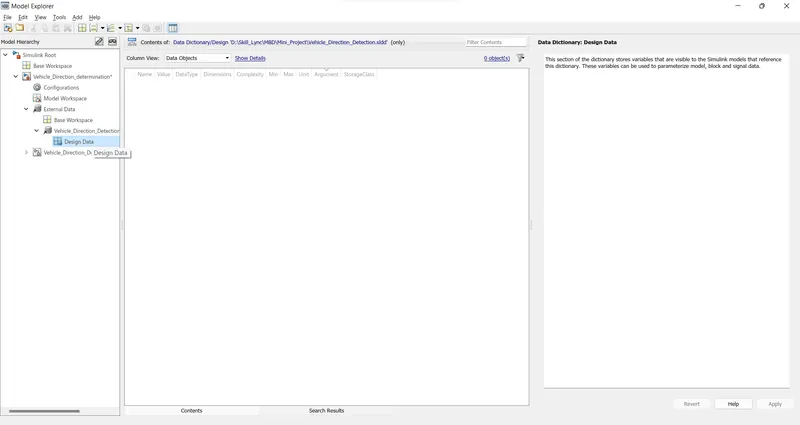
open the Model Exploer showing Vehicle Direction Detection.sldd file. click design data then give to Signals & Calibration Data List
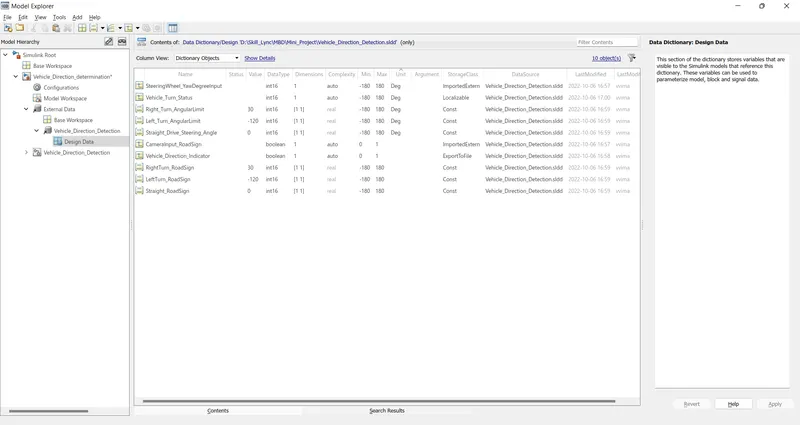
Resolve and propagate
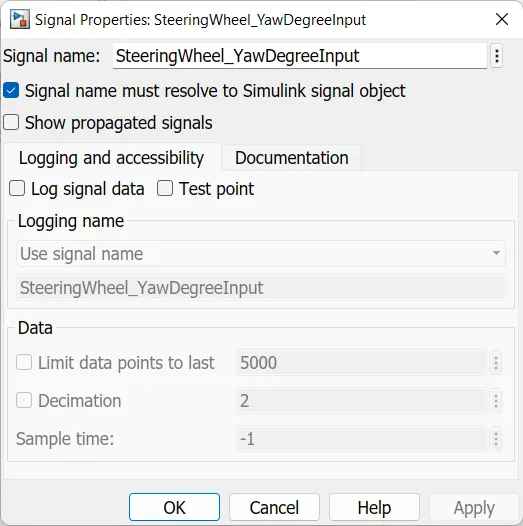
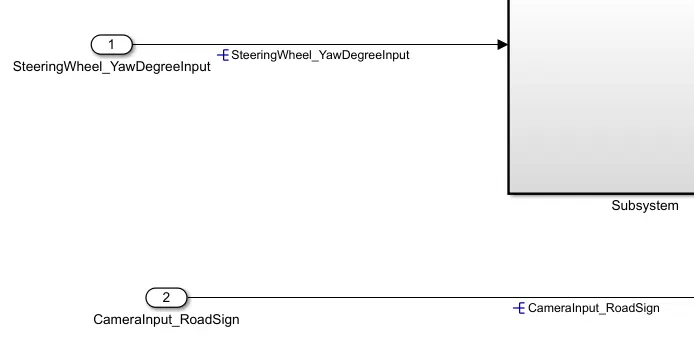
select the subsystem right click a properties given a input & output name SteeringWheel_YawDegreeInput,Vehicle_Turn_Status,CameraInput_RoadSign.
click the box signal name must resolve to simulink signal object. then apply and ok
Tagging
as a required document of requirment 1 & 2. Creata a word document with given information. Select the requirment word 1 then click with subsystem>> right click>>link to selection word then save requirment that showing requirment datas.
its similerly same subsystem 2. create a requirment datas.
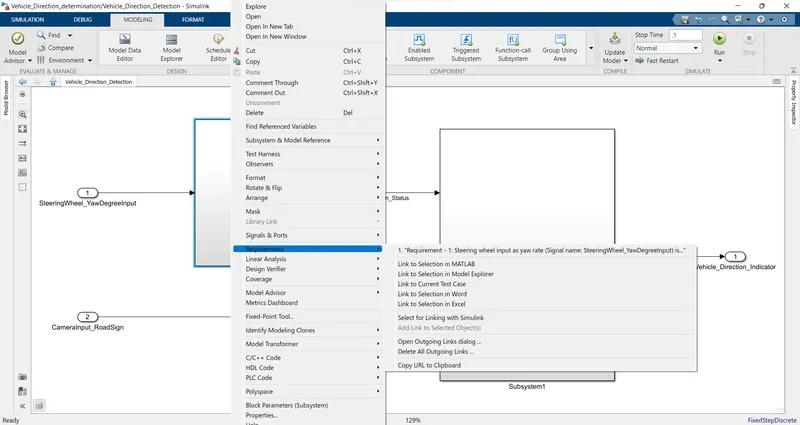
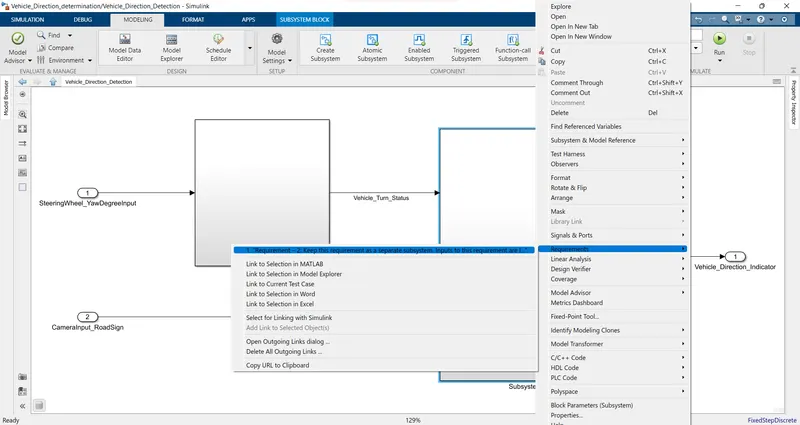
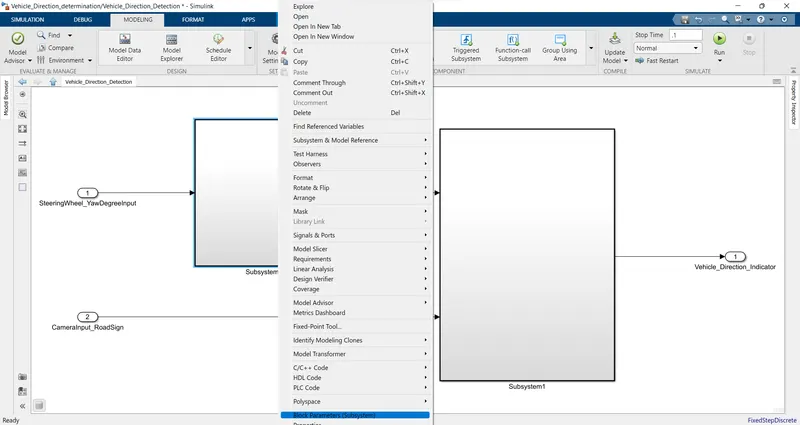
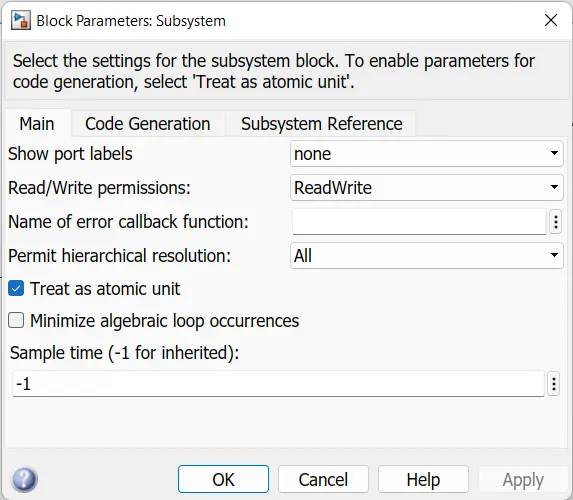
now change a subsystem perameters click a subsystem>>right click>>block peramters>>Treat as atomic unit then click apply and ok.
Code generation
Open APPS block open a Embedded coder then generat a code generation
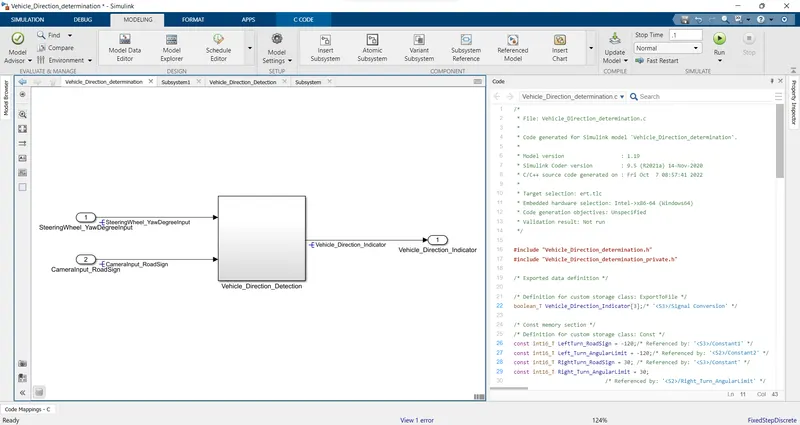
/*
 * File: Vehicle_Direction_determination.c
 *
 * Code generated for Simulink model 'Vehicle_Direction_determination'.
 *
 * Model version                  : 1.19
 * Simulink Coder version         : 9.5 (R2021a) 14-Nov-2020
 * C/C++ source code generated on : Fri Oct  7 08:57:41 2022
 *
 * Target selection: ert.tlc
 * Embedded hardware selection: Intel->x86-64 (Windows64)
 * Code generation objectives: Unspecified
 * Validation result: Not run
 */

#include "Vehicle_Direction_determination.h"
#include "Vehicle_Direction_determination_private.h"

/* Exported data definition */

/* Definition for custom storage class: ExportToFile */
boolean_T Vehicle_Direction_Indicator[3];/* '/Signal Conversion' */

/* Const memory section */
/* Definition for custom storage class: Const */
const int16_T LeftTurn_RoadSign = -120;/* Referenced by: '/Constant1' */
const int16_T Left_Turn_AngularLimit = -120;/* Referenced by: '/Constant2' */
const int16_T RightTurn_RoadSign = 30; /* Referenced by: '/Constant' */
const int16_T Right_Turn_AngularLimit = 30;
                             /* Referenced by: '/Right_Turn_AngularLimit' */
const int16_T Straight_Drive_Steering_Angle = 0;/* Referenced by: '/Constant' */
const int16_T Straight_RoadSign = 0;   /* Referenced by: '/Constant2' */

/* Model step function */
void Vehicle_Direction_determination_step(void)
{
  /* local block i/o variables */
  int16_T Vehicle_Turn_Status;

  /* Outputs for Atomic SubSystem: '/Subsystem'
   *
   * Block requirements for '/Subsystem':
   *  1. Requirement - 1: Steering wheel input as yaw rate (Signal name: SteeringWheel_YawDegreeInput) is the input for this system. This is compared against 3 angular values, one each for left turn, right turn & straight drive (Calibration Values: Right_Turn_AngularLimit, Left_Turn_AngularLimit, Straight_Drive_Steering_Angle) to say which specific direction the steering wheel is turning towards. Use switch blocks to compare & develop this requirement. Keep this requirement in a subsystem & output of this requirement is a local signal (Signal Name: Vehicle_Turn_Status).
   */
  /* Switch: '/Switch' incorporates:
   *  Inport: '/SteeringWheel_YawDegreeInput'
   *  Switch: '/Switch1'
   */
  if (SteeringWheel_YawDegreeInput >= 30) {
    /* Switch: '/Switch' incorporates:
     *  Constant: '/Right_Turn_AngularLimit'
     */
    Vehicle_Turn_Status = Right_Turn_AngularLimit;
  } else if (SteeringWheel_YawDegreeInput != 0) {
    /* Switch: '/Switch1' incorporates:
     *  Constant: '/Constant'
     *  Switch: '/Switch'
     */
    Vehicle_Turn_Status = Straight_Drive_Steering_Angle;
  } else {
    /* Switch: '/Switch' incorporates:
     *  Constant: '/Constant2'
     *  Switch: '/Switch1'
     */
    Vehicle_Turn_Status = Left_Turn_AngularLimit;
  }

  /* End of Switch: '/Switch' */
  /* End of Outputs for SubSystem: '/Subsystem' */

  /* Outputs for Atomic SubSystem: '/Subsystem1'
   *
   * Block requirements for '/Subsystem1':
   *  1. Requirement – 2: Keep this requirement as a separate subsystem. Inputs to this requirement are local signal from requirement 1 (Signal Name: Vehicle_Turn_Status) & an input signal from camera (Signal Name: CameraInput_RoadSign), which confirms the occurrence of a road sign. Signal Vehicle_Turn_Status is compared against calibration values (Calibration Values: RightTurn_RoadSign, LeftTurn_RoadSign, Straight_RoadSign), if each of them is found equal, then each of the three corresponding output is compared against the camera input signal, Using a logical operator block, only one among them is finally given as output signal (Signal Name: Vehicle_Direction_Indicator).
   */
  /* SignalConversion: '/Signal Conversion' incorporates:
   *  Constant: '/Constant'
   *  Constant: '/Constant1'
   *  Constant: '/Constant2'
   *  Inport: '/CameraInput_RoadSign'
   *  Logic: '/AND'
   *  Logic: '/AND1'
   *  Logic: '/AND2'
   *  RelationalOperator: '/Equal'
   *  RelationalOperator: '/Equal1'
   *  RelationalOperator: '/Equal2'
   */
  Vehicle_Direction_Indicator[0] = ((RightTurn_RoadSign == Vehicle_Turn_Status) &&
    CameraInput_RoadSign);
  Vehicle_Direction_Indicator[1] = ((LeftTurn_RoadSign == Vehicle_Turn_Status) &&
    CameraInput_RoadSign);
  Vehicle_Direction_Indicator[2] = ((Straight_RoadSign == Vehicle_Turn_Status) &&
    CameraInput_RoadSign);

  /* End of Outputs for SubSystem: '/Subsystem1' */
}

/* Model initialize function */
void Vehicle_Direction_determination_initialize(void)
{
  /* Registration code */

  /* block I/O */

  /* custom signals */
  Vehicle_Direction_Indicator[0] = false;
  Vehicle_Direction_Indicator[1] = false;
  Vehicle_Direction_Indicator[2] = false;
}

/*
 * File trailer for generated code.
 *
 * [EOF]
 */
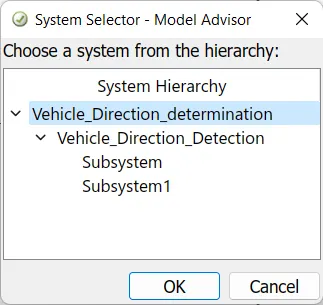
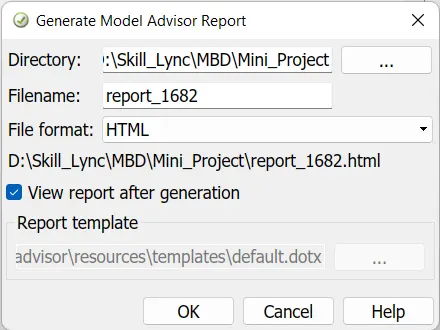
then click the model advisor button and loading a data
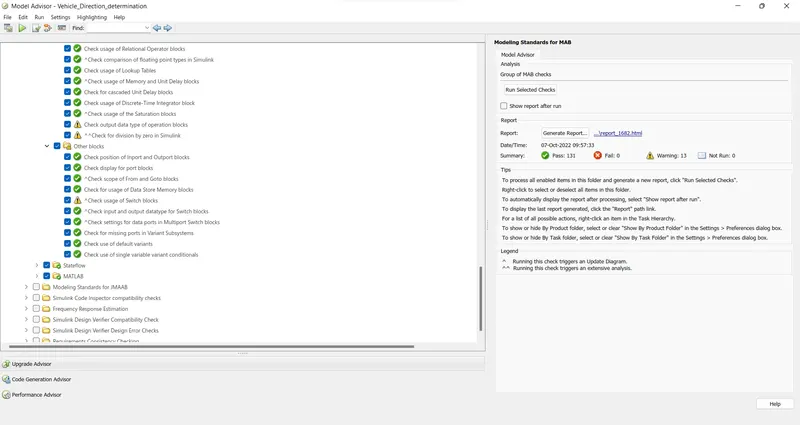
| Model Advisor Report - Vehicle_Direction_determination.slx | |
| Simulink version: 10.3 | Model version: 1.25 |
| System: Vehicle_Direction_determination | Current run: 07-Oct-2022 09:57:33 |
 143 items with a timestamp different than 07-Oct-2022 09:57:33 143 items with a timestamp different than 07-Oct-2022 09:57:33 |
|
| Treat as Referenced Model: off | |
Run Summary
| Pass | Fail | Warning | Not Run | Total |
|---|---|---|---|---|
 131 131 |
 0 0 |
 13 13 |
 0 0 |
144 |
Modeling Standards for MAB
1 Naming Conventions
20 0 0 0
1.1 General
4 0 0 0
Check file names (07-Oct-2022 09:25:54)Check the model file name to ensure that the name complies with the recommended guidelines.
Passed
All files have correct names.
Check folder names (07-Oct-2022 09:07:43)Check the folder name to ensure that the name complies with the recommended guidelines.
Passed
All folders have correct names.
Check length of model file name (07-Oct-2022 09:07:43)Check length of model file name
Passed
Model name is valid.
1.2 Content
16 0 0 0
Check subsystem names (07-Oct-2022 09:07:43)Identify subsystem names with incorrect characters.
Passed
All the subsystem names use correct characters.
Check port block names (07-Oct-2022 09:07:43)Identify Inport or Outport block names with incorrect characters.
Passed
All the Inport or Outport block names use correct characters.
Check character usage in block names (07-Oct-2022 09:07:43)Identify block names with incorrect characters.
Passed
All the block names use correct characters.
Check length of subsystem names (07-Oct-2022 09:07:43)Check length of subsystem names
Passed
All subsystem names are valid.
Check length of block names (07-Oct-2022 09:07:43)Check length of block names
Passed
All block names are valid.
Check length of Inport and Outport names (07-Oct-2022 09:07:43)Check length of Inport and Outport names
Passed
All Inport and Outport names are valid.
Check character usage in signal names and bus names (07-Oct-2022 09:07:43)Identify signal and bus names with invalid characters.
Passed
No invalid characters are used in signal and bus names.
Check character usage in parameter names (07-Oct-2022 09:07:43)Identify parameter names with invalid characters.
Passed
No invalid characters are used in parameter names.
Check length of signal and bus names (07-Oct-2022 09:07:43)Check length of signal and bus names
Passed
All signal and bus names are valid.
Check length of parameter names (07-Oct-2022 09:07:43)Check length of parameter names
Passed
All parameter names are valid.
Check character usage in Stateflow data names (07-Oct-2022 09:07:43)Identify Stateflow data names with invalid characters.
Passed
No invalid characters are used in Stateflow data names.
Check length of Stateflow data name (07-Oct-2022 09:07:43)Check if the length of Stateflow data names are within limit.
Passed
All Stateflow data names are valid.
Check duplication of Simulink Data names (07-Oct-2022 09:07:43)Simulink Data names should be unique across base workspace, model workspace and data dictionary.
Passed
All Simulink Data names are unique.
Check unused data in Simulink Model (07-Oct-2022 09:07:43)Identify unused data in model workspace and data dictionary.
Passed
No unused data found in model workspace and/or data dictionary.
Check for unused data in Stateflow Charts (07-Oct-2022 09:07:43)Checks if the model parameter 'Unused data, events, messages and functions' is not set to 'none'.
Passed
All constraints on model configuration parameters have been met.
| Status | Parameter | Current Value | Recommended Values |
|---|---|---|---|
| Pass | Unused data, events, messages and functions (SFUnusedDataAndEventsDiag) | warning | error, warning |
2 Simulink
50 0 13 0
2.1 Configuration Parameters
4 0 0 0
Check Implement logic signals as Boolean data (vs. double) (07-Oct-2022 09:07:43)Identify whether Implement logic signals as Boolean data (vs. double) is selected.
Passed
Implement logic signals as Boolean data (vs. double) is selected.
Check Signed Integer Division Rounding mode (07-Oct-2022 09:07:43)jc_0642: Integer rounding mode setting
Identifies blocks with block parameter 'Integer Rounding Mode' set to 'Simplest' when the configuration parameter 'Signed integer division rounds to' is set to 'Undefined'.
Passed
Configuration parameter 'Signed integer division rounds to' is not set to 'Undefined'.
Check diagnostic settings for incorrect calculation results (07-Oct-2022 09:07:43)Identify data validity diagnostic settings which detect incorrect calculation results.
Passed
All constraints on model configuration parameters have been met.
| Status | Parameter | Current Value | Recommended Values |
|---|---|---|---|
| Pass | Division by singular matrix (CheckMatrixSingularityMsg) | error | error |
| Pass | Inf or NaN block output (SignalInfNanChecking) | error | error |
| Pass | Wrap on overflow (IntegerOverflowMsg) | error | error |
| Pass | Saturate on overflow (IntegerSaturationMsg) | error | error |
2.2 Diagram Appearance
13 0 4 0
Check for Simulink diagrams using nonstandard display attributes (07-Oct-2022 09:20:29)Identify nonstandard display attributes in Simulink diagrams.
_________________________________________________________________________________________
Check format settings
Identify incorrect model-level format options.
Warning
The following format display options are incorrect.
| Display Attribute | Recommended Value | Actual Value |
|---|---|---|
| Debug > Information Overlays > Nonscalar Signals | on | off |
| Modeling > Environment > Model Browser | off | on |
| Debug > Information Overlays > Show All Links | none | disabled |
Recommended Action
Set the format options to the recommended value.
_________________________________________________________________________________________
Check block colors
Identify blocks using nonstandard colors.
Passed
All blocks use standard colors.
_________________________________________________________________________________________
Check canvas colors
Identify canvases that are not white.
Passed
All diagrams use a white canvas.
_________________________________________________________________________________________
Check diagram zoom
Identify diagrams that do not have zoom factor set to 100 %.
Note: Zoom factors can differ for each instance of a model diagram opened in Simulink Editor
Warning
The following diagrams do not have zoom factor set to 100 percent:
- Vehicle_Direction_determination
- Vehicle_Direction_determination/Vehicle_Direction_Detection
- Vehicle_Direction_determination/Vehicle_Direction_Detection/Subsystem
For each listed diagram, select Modeling > Environment > Zoom > Normal View (100%).
Check Model font settings (07-Oct-2022 09:07:43)Identify blocks and charts with different font settings from input parameters.
Passed
Font settings of the blocks and charts and input parameters are same.
Check whether block names appear below blocks (07-Oct-2022 09:07:43)Identify blocks where the name is not displayed below the block.
Passed
All blocks have names displayed below the block.
Check the display attributes of block names (07-Oct-2022 09:07:43)Identify whether to display block names.
Check for missing block names
Identify block names that are hidden but should be displayed to show a descriptive name.
Passed
All displayed names provide descriptive information.
Check for blocks with hidden names and obvious function
Identify block names that are displayed but can be hidden due to obvious behavior.
Warning
The following block names can be hidden:
- ..../Vehicle_Direction_Detection/Subsystem/Switch
- ..../Vehicle_Direction_Detection/Subsystem/Switch1
- Vehicle_Direction_determination/Vehicle_Direction_Detection/Subsystem1/AND
- Vehicle_Direction_determination/Vehicle_Direction_Detection/Subsystem1/AND1
- Vehicle_Direction_determination/Vehicle_Direction_Detection/Subsystem1/AND2
Hide the block name by selecting (Format > Auto Name > Hide Automatic Block Name).
_________________________________________________________________________________________
Check for non-descriptive displayed block names
Identify block names that are displayed but should be hidden due to a lack of a descriptive name.
Warning
The following blocks have a name displayed, however, the name is not descriptive:
- Vehicle_Direction_determination/Vehicle_Direction_Detection/Subsystem
- Vehicle_Direction_determination/Vehicle_Direction_Detection/Subsystem1
- Vehicle_Direction_determination/Vehicle_Direction_Detection/Subsystem1/Mux
Modify the block name to provide descriptive information, or hide the block name by selecting (Format > Auto Name > Hide Automatic Block Name).
Check for nondefault block attributes (07-Oct-2022 09:36:18)Identify blocks that use and fail to display nondefault values.
Passed
Model displays all block parameter values that are not default values.
Check Model Description (07-Oct-2022 09:07:43)Identify layers in the model having inconsistent description format.
Warning
Following layers do not have model descriptions:
- Vehicle_Direction_determination
- Vehicle_Direction_determination/Vehicle_Direction_Detection
- Vehicle_Direction_determination/Vehicle_Direction_Detection/Subsystem
- Vehicle_Direction_determination/Vehicle_Direction_Detection/Subsystem1
Consider adding model description for all the layers.
Check if blocks are shaded in the model (07-Oct-2022 09:07:43)Check if blocks are shaded in the model
Passed
Blocks in the model are not shaded.
Check for unconnected signal lines and blocks (07-Oct-2022 09:07:43)Identify unconnected signal lines, subsystems and basic blocks.
Passed
All signal lines and blocks in the model are connected.
Check signal line connections (07-Oct-2022 09:07:43)Check signal intersections
Warning
The following signals intersect with other signals in the diagram:
- Vehicle_Direction_determination/Vehicle_Direction_Detection/Subsystem1
- Vehicle_Direction_determination/Vehicle_Direction_Detection/Subsystem1
Reposition the above listed signals to avoid intersections.
Check signal flow in model (07-Oct-2022 09:07:43)Identify subsystems which do not have a signal flow from left to right.
Passed
No subsystems found with inappropriate signal flow.
Check usage of tunable parameters in blocks (07-Oct-2022 09:07:43)Identify tunable parameters used to specify expressions, data type conversions, or indexing operations.
Passed
Tunable parameters are not used in the model.
Check connections between structural subsystems (07-Oct-2022 09:07:43)Identify connections between structural subsystems.
Passed
All connections to structural subsystems adhere to the guideline.
Check for consistency in model element names (07-Oct-2022 09:07:43)Check if model elements connected to a signal are following consistent naming.
Passed
Model elements connected to a signal are following consistent names.
Check trigger signal names (07-Oct-2022 09:07:43)Identify trigger blocks where the origin of the trigger signal and the destination have dissimilar names.
Passed
No violation of the guideline for use of trigger signal names.
Check for mixing basic blocks and subsystems (07-Oct-2022 09:07:43)Identify levels in the model that include basic blocks and subsystems. Each level of a model must be designed with blocks of the same level (for example, only subsystems or only basic blocks).
Passed
The model does not mix basic blocks and subsystems at the same level.
2.3 Signal
1 0 5 0
Check usage of vector and bus signals (07-Oct-2022 09:07:43)Identify mixed usages of vector and bus signals.
Passed
No mixing of vector and bus signals found in the system.
Check definition of signal labels (07-Oct-2022 09:07:43)Identify blocks that require labeled signals. A subset of source and destination blocks require labeled signals.
Check source block labels
Warning
The following signals have no label:
- Vehicle_Direction_determination/Vehicle_Direction_Detection/Subsystem/SteeringWheel_YawDegreeInput/
- Vehicle_Direction_determination/Vehicle_Direction_Detection/Subsystem1/Vehicle_Turn_Status/
- Vehicle_Direction_determination/Vehicle_Direction_Detection/Subsystem1/CameraInput_RoadSign/
Add a new or propagated label to the signal line.
_________________________________________________________________________________________
Identify blocks that require labeled signals. A subset of source and destination blocks require labeled signals.
Check destination block labels
Warning
The following signals have no label:
- Vehicle_Direction_determination/Vehicle_Direction_Detection/Subsystem1/Vehicle_Direction_Indicator/
- Vehicle_Direction_determination/Vehicle_Direction_Detection/Subsystem1/Mux/
- Vehicle_Direction_determination/Vehicle_Direction_Detection/Subsystem1/Mux/
- Vehicle_Direction_determination/Vehicle_Direction_Detection/Subsystem1/Mux/
Add a new or propagated label to the signal line.
Check Signal name propagation (07-Oct-2022 09:07:43)Check Signal name propagation for subsystems
Warning
The following subsystems do not display propagated signals but have signal names:
- Vehicle_Direction_determination/Vehicle_Direction_Indicator
- Vehicle_Direction_determination/Vehicle_Direction_Detection/Vehicle_Turn_Status
- Vehicle_Direction_determination/Vehicle_Direction_Detection/Vehicle_Direction_Indicator
Remove labels and enable signal propagation by selecting 'Show propagated signal' parameter for signals.
Check position of signal labels (07-Oct-2022 09:07:43)Check location of signal labels
Warning
The following signals do not have labels located at the origin of the signal line:
- Vehicle_Direction_determination/Vehicle_Direction_Detection/CameraInput_RoadSign
- Vehicle_Direction_determination/Vehicle_Direction_Detection/Vehicle_Turn_Status
- Vehicle_Direction_determination/Vehicle_Direction_Detection/SteeringWheel_YawDegreeInput
Consider placing the labels at the origin of the signal line.
Check signal line labels (07-Oct-2022 09:07:43)Identify blocks that require labeled signals. A subset of source and destination blocks require labeled signals.
Check source block labels
Warning
The following signals have no label:
- Vehicle_Direction_determination/Vehicle_Direction_Detection/Subsystem/SteeringWheel_YawDegreeInput/
- Vehicle_Direction_determination/Vehicle_Direction_Detection/Subsystem1/Vehicle_Turn_Status/
- Vehicle_Direction_determination/Vehicle_Direction_Detection/Subsystem1/CameraInput_RoadSign/
Add a new or propagated label to the signal line.
_________________________________________________________________________________________
Identify blocks that require labeled signals. A subset of source and destination blocks require labeled signals.
Check destination block labels
Warning
The following signals have no label:
- Vehicle_Direction_determination/Vehicle_Direction_Detection/Subsystem1/Vehicle_Direction_Indicator/
- Vehicle_Direction_determination/Vehicle_Direction_Detection/Subsystem1/Mux/
- Vehicle_Direction_determination/Vehicle_Direction_Detection/Subsystem1/Mux/
- Vehicle_Direction_determination/Vehicle_Direction_Detection/Subsystem1/Mux/
Add a new or propagated label to the signal line.
Check for propagated signal labels (07-Oct-2022 09:07:43)Identify propagated labels on signal lines.
Warning
The following subsystem-level Inport block signals should propagate signal labels from the parent system:
- Vehicle_Direction_determination/Vehicle_Direction_Detection/SteeringWheel_YawDegreeInput
- Vehicle_Direction_determination/Vehicle_Direction_Detection/CameraInput_RoadSign
Add labels to the input signals.
_________________________________________________________________________________________
Identify propagated labels on signal lines.
Warning
The following signal labels are not propagated. Propagate signals coming from Subsystem blocks.
- Vehicle_Direction_determination/Vehicle_Direction_Indicator
- Vehicle_Direction_determination/Vehicle_Direction_Detection/Vehicle_Turn_Status
- Vehicle_Direction_determination/Vehicle_Direction_Detection/Vehicle_Direction_Indicator
Add labels to the output signals.
2.4 Block Consistency
5 0 1 0
Check Indexing Mode (07-Oct-2022 09:07:43)Identify blocks and charts with inconsistent Indexing mode.
Passed
No inconsistent Indexing mode used in the model.
Check block orientation (07-Oct-2022 09:07:43)Identify blocks which are rotated or reversed.
Passed
No blocks found with rotated or reversed orientation
Check if tunable block parameters are defined as named constants (07-Oct-2022 09:37:17)Check if tunable block parameters are defined as named constants
Warning
The following tunable block parameters are not defined as named constants.
| Block | Violations |
|---|---|
| ..../Subsystem/Switch | Threshold : 30 |
Recommended Action
Consider changing tunable block parameter literal values to named constants.
Check for sample time setting (07-Oct-2022 09:07:43)Check if sample time property of a block is set to -1 (inherited).
Passed
All permitted blocks have sample time set to -1 (inherited).
2.5 Conditional Subsystem relations
5 0 0 0
Check position of conditional blocks and iterator blocks (07-Oct-2022 09:07:43)Identify conditional and iterative blocks that are positioned inconsistently in the model.
Passed
The conditional and iterative blocks are correctly placed in the model.
Check undefined initial output for conditional subsystems (07-Oct-2022 09:07:43)Identify undefined initial output for Outports/Merge blocks in conditional subsystems
Passed
The initial output setting for all Conditional Subsystems are valid.
Check usage of Merge block (07-Oct-2022 09:07:43)jc_0659: Usage restrictions of signal lines input to Merge blocks
There must not be any block between a Conditional Subsystem block and a Merge block.
Passed
No Merge block found.
2.6 Operation Blocks
13 0 2 0
Check fundamental logical and numerical operations (07-Oct-2022 09:07:43)Identify the usage of logical and numerical operations.
Passed
No numerical operation blocks found with boolean inputs.
No logical operation blocks found with non-boolean inputs.
Check usage of Sum blocks (07-Oct-2022 09:07:43)Identify Sum block usage that can affect readability.
Passed
No violations of the guideline found with the usage of the Sum block.
Check operator order of Product blocks (07-Oct-2022 09:07:43)Operator order for Product blocks.
Passed
All Product blocks have valid operator order.
Check signs of input signals in product blocks (07-Oct-2022 09:07:43)jc_0611: Input sign for multiplication and division blocks
Identify blocks that perform division whose inputs have different sign bit.
Passed
No product block with division of different sign bits found.
Check for parentheses in Fcn block expressions (07-Oct-2022 09:07:43)Identify order of parentheses in Fcn block expressions.
Passed
All Fcn blocks use parentheses to mark operator precedence.
Check icon shape of Logical Operator blocks (07-Oct-2022 09:51:03)Icon shape of Logical Operator blocks.
Passed
All Logical Operator blocks have consistent icon shape.
Check usage of Relational Operator blocks (07-Oct-2022 09:50:18)Identify Relational Operator blocks that connect to constants with the first (upper) input value.
Passed
All Relational Operator blocks with constant input values are configured correct.
Check comparison of floating point types in Simulink (07-Oct-2022 09:07:43)jc_0800: Comparing floating-point types in Simulink
Equivalence comparison should not be used for floating point numbers.
Passed
No Equivalence comparison done on floating point numbers.
Check usage of Lookup Tables (07-Oct-2022 09:07:43)Check usage of recommended settings for Lookup Table blocks to prevent unexpected results.
Passed
All Lookup Table blocks have recommended settings.
Check usage of Memory and Unit Delay blocks (07-Oct-2022 09:07:43)Identify Memory blocks not using a continuous sample time
Passed
No Memory blocks found with inappropriate sample time
_________________________________________________________________________________________
Identify Unit Delay blocks with non-discrete sample time
Passed
No Unit Delay blocks found with non-discrete sample time
Check for cascaded Unit Delay blocks (07-Oct-2022 09:07:43)Identify cascaded and tapped pattern of Unit Delay blocks.
Passed
No cascaded Unit Delay blocks found that can be changed to Tapped Delay/Delay block.
Check usage of Discrete-Time Integrator block (07-Oct-2022 09:07:43)Check usage of recommended settings for Discrete-Time Integrator blocks to prevent unexpected results.
Passed
All Discrete-Time Integrator blocks have recommended settings.
Check usage of the Saturation blocks (07-Oct-2022 09:07:43)jc_0628: Usage of Saturation blocks
Identify the Saturation and Saturation Dynamic blocks that perform type casting.
Passed
No Saturation and/or Saturation Dynamic blocks perform type casting
Check output data type of operation blocks (07-Oct-2022 09:07:43)jc_0651: Implementing a type conversion
Identify operation blocks that specify output data type.
Warning
Following operation blocks explicitly specify output data type:
- Vehicle_Direction_determination/Vehicle_Direction_Detection/Subsystem1/AND
- Vehicle_Direction_determination/Vehicle_Direction_Detection/Subsystem1/AND1
- Vehicle_Direction_determination/Vehicle_Direction_Detection/Subsystem1/AND2
- ..../Vehicle_Direction_Detection/Subsystem1/Equal
- ..../Vehicle_Direction_Detection/Subsystem1/Equal1
- ..../Vehicle_Direction_Detection/Subsystem1/Equal2
Instead of explicitly specifying output data type on operation blocks, use 'Data Type Conversion' block when changing the data type of the block output signal.
Check for division by zero in Simulink (07-Oct-2022 09:39:30)Identify division operations in Simulink resulting in divide-by-zero error.
Warning
The following blocks do not affect the output of the Simulink model and are not analyzed by Simulink Design Verifier:
Consider remodeling or connecting outports to the blocks.
2.7 Other blocks
9 0 1 0
Check position of Inport and Outport blocks (07-Oct-2022 09:55:39)Identify inappropriately placed Inport and Outport blocks.
Passed
No Inport or Outport blocks found which are inappropriately placed.
Check display for port blocks (07-Oct-2022 09:07:43)Identify Inport and Outport blocks that do not specify Port number for the Icon display block parameter.
Passed
All port blocks display the port number.
Check scope of From and Goto blocks (07-Oct-2022 09:07:43)Identify incorrect scoping of From and Goto blocks. For signal flows, From and Goto blocks must use local scope. Control flow can use global scope.
Passed
All From and Goto blocks are used correctly.
Check for usage of Data Store Memory blocks (07-Oct-2022 09:07:43)Identify the usage of Data Store Memory blocks.
Passed
Usage of Data Store Memory blocks is correct.
Check usage of Switch blocksIdentify Switch blocks that do not use Boolean inputs for the switch condition (input 2), and do not use u2 ~= 0 for the Criteria for passing first input block parameter.
_________________________________________________________________________________________
Check Switch block parameters
Identify Switch blocks with the parameter Criteria for passing first input not set to u2 ~= 0.
Warning
The block parameter Criteria for passing first input is not set to u2 ~= 0 for the following blocks:
Set the block parameter Criteria for passing first input to u2 ~= 0. This might require reworking the logic associated with the Switch block.
_________________________________________________________________________________________
Check for Boolean switch condition
Identify blocks that do not use Boolean signal switch conditions (input 2).
Warning
The following Switch blocks use non-Boolean signals for the switch condition:
- ..../Vehicle_Direction_Detection/Subsystem/Switch
- ..../Vehicle_Direction_Detection/Subsystem/Switch1
Convert the input condition to a Boolean signal.
Check input and output datatype for Switch blocks (07-Oct-2022 09:07:43)Identify Switch blocks with mismatched input and output data types.
Passed
No Switch blocks found with mismatched input and output data types
Check settings for data ports in Multiport Switch blocks (07-Oct-2022 09:07:43)Identify Multiport Switch blocks that violate data port settings.
Passed
No Multiport Switch blocks found with inappropriate data port settings.
Check for missing ports in Variant Subsystems (07-Oct-2022 09:07:43)Check for number of inputs/outputs to a Variant Subsystem.
Passed
No Variant Subsystems found having different number of inputs/outputs in the Variant Subsystem choices.
3 Stateflow
52 0 0 0
3.1 Block/Data/Events
7 0 0 0
Check for Strong Data Typing with Simulink I/O (07-Oct-2022 09:07:43)Check whether labeled input and output signals are strongly typed.
Passed
No Stateflow charts have Use Strong Data Typing with Simulink I/O cleared.
Check for names of Stateflow ports and associated signals (07-Oct-2022 09:07:43)
Identify mismatches between names of Stateflow ports and the associated signals.
Passed
No Stateflow charts were found.
Check execution timing for default transition path (07-Oct-2022 09:07:43)'Execute (enter) Chart At Initialization' should be set to OFF.
Passed
All Stateflow Charts pass the check.
Check definition of Stateflow data (07-Oct-2022 09:07:43)Identify the Scope value set on Stateflow data defined at machine level.
Passed
All Stateflow data at machine level has been defined as per guideline.
Check usable number for first index (07-Oct-2022 09:07:43)Identify usage of first index of Stateflow data.
Passed
All Stateflow data first index values are uniform.
3.2 Diagram
14 0 0 0
Check for unconnected objects in Stateflow Charts (07-Oct-2022 09:07:43)Identify dangling transitions and unconnected Stateflow States and Junctions in Stateflow Charts.
Passed
No unconnected transitions, states or junctions found in Stateflow Charts.
Check for exclusive states in state machines (07-Oct-2022 09:07:43)Identify states which are the only sub-state within a state with OR(exclusive) type decomposition.
Passed
All states with OR(exclusive) type decomposition have more than one sub-state.
Check usage of parallel states (07-Oct-2022 09:07:43)Substates of parallel states should not be parallel states.
Passed
All Stateflow Charts pass the check.
Check Stateflow transition appearance (07-Oct-2022 09:07:43)Identify Stateflow transitions visually overlapping other Stateflow objects.
Passed
No transition violates the guidelines for Stateflow transition appearance.
Check default transition placement in Stateflow charts (07-Oct-2022 09:07:43)jc_0531: Default transition
Identify all groupings of states that do not have a default transition or do not have the default state as the top-most state.
Passed
No Stateflow transitions and states found that violate the guidelines for default transition placement in Stateflow charts.
Check usage of transitions to external states (07-Oct-2022 09:07:43)Identify transitions ending on external child states.
Passed
No direct transitions found from external state to child state.
Check for unexpected backtracking in state transitions (07-Oct-2022 09:07:43)Identify configuration parameter settings which identify unexpected backtracking in state transitions.
Passed
All constraints on model configuration parameters have been met.
| Status | Parameter | Current Value | Recommended Values |
|---|---|---|---|
| Pass | Unexpected backtracking (SFUnexpectedBacktrackingDiag) | error | error |
Check usage of internal transition (07-Oct-2022 09:07:43)Internal transition lines should start from the left edge of the state.
Passed
No Stateflow transitions found that violate the guidelines for starting point of internal transition in Stateflow.
Check usage of internal transitions in Stateflow states (07-Oct-2022 09:07:43)Identify Stateflow states using multiple internal transitions.
Passed
No Stateflow states found with multiple internal transitions
Check prohibited combination of state action and flow chart (07-Oct-2022 09:07:43)State actions and flow charts should not be combined in states.
Passed
No Stateflow states were found that combine state action and flow chart.
Check transitions in Stateflow flow charts (07-Oct-2022 09:07:43)Identify transitions in Stateflow flow charts that are drawn incorrectly.
Passed
All Stateflow transitions in flow charts are drawn correctly.
Check usage of unconditional transitions in flow charts (07-Oct-2022 09:07:43)Identify unconditional transitions in flow charts.
Passed
All unconditional transitions adhere to the guideline.
3.3 Condition Transition/Action
17 0 0 0
Check Stateflow chart action language (07-Oct-2022 09:07:43)Check if the action language of Stateflow charts is set to 'C'.
Passed
All Stateflow Charts have action language set to 'C'.
Check usage of numeric literals in Stateflow (07-Oct-2022 09:07:43)Identify use of numeric literals in Stateflow states and transitions.
Passed
No numeric literals found in Stateflow charts.
Check for pointers in Stateflow charts (07-Oct-2022 09:07:43)Identify pointer operations on custom code variables.
Note: This check applies only to Stateflow charts that use C as the action language.
Passed
No pointer operations were found.
Check usage of events in Stateflow charts (07-Oct-2022 09:07:43)Identify undirected event broadcasts in Stateflow.
Passed
No instances of undirected event broadcast were found.
Check order of state action types (07-Oct-2022 09:07:43)Identify out of order state action types in Stateflow states.
Passed
No Stateflow states found with out of order state action types
Check repetition of Action types (07-Oct-2022 09:07:43)jc_0734: Number of state action types
Identifies repeated action types in a Stateflow State.
Passed
No Stateflow States were found.
Check if state action type 'exit' is used in the model (07-Oct-2022 09:07:43)Check if state action type 'exit' is used in the model.
Passed
State action type 'exit' is not used in the model.
Check updates to variables used in state transition conditions (07-Oct-2022 09:07:43)jc_0741: Timing to update data used in state chart transition conditions
Variables used in state transition conditions must not perform an update by "during" state action type.
Passed
No Stateflow states found that violate the guidelines for updating the variables used in state transition conditions.
Check usage of transition conditions in Stateflow transitions (07-Oct-2022 09:07:43)Identify unconditional Stateflow transitions with higher priority than conditional transitions.
Passed
No unconditional Stateflow transitions found with higher priority than conditional transitions
Check condition actions and transition actions in Stateflow (07-Oct-2022 09:07:43)Identify usage of transition actions in Stateflow.
Passed
No Stateflow charts have transition actions.
Check for MATLAB expressions in Stateflow blocks (07-Oct-2022 09:07:43)Identify MATLAB expressions that are not suitable for code generation in Stateflow blocks.
Passed
No Stateflow objects found using MATLAB expressions unsuitable for code generation.
Check usage of floating-point expressions in Stateflow charts (07-Oct-2022 09:07:43)Identify equality or inequality operations (==,~=,!=) in expressions involving floating-point variables or constants.
Passed
No equality or inequality to operations in expressions where at least one side of the expression is a floating-point variable or constant were found.
Check Stateflow operators (07-Oct-2022 09:07:43)Identify the usage of operators in Stateflow.
Passed
No Stateflow blocks found with incorrect operator usage.
Check prohibited comparison operation of logical type signals (07-Oct-2022 09:07:43)Identify boolean variables in Stateflow charts using comparison operations.
Passed
No boolean variables use comparison operations of logical type in the model.
Check usage of unary minus operations in Stateflow charts (07-Oct-2022 09:07:43)Identify unary minus operations applied to unsigned integers in Stateflow objects.
Passed
No unary minus operations applied to unsigned integers in Stateflow objects were found.
3.4 Label Description
10 0 0 0
Check uniqueness of Stateflow State and Data names (07-Oct-2022 09:07:43)jc_0732: Distinction between state names, data names, and event names
Identify Stateflow State and Stateflow Data that have identical names in a given chart.
Passed
No Stateflow charts were found.
Check uniqueness of State names (07-Oct-2022 09:07:43)jc_0730: Unique state name in Stateflow blocks
Identifies identical State names within a Stateflow Chart.
Passed
No Stateflow charts were found.
Check usage of State names (07-Oct-2022 09:07:43)jc_0731: State name format
Identify state names with '/' at its end.
Passed
No Stateflow states were found.
Check entry formatting in State blocks in Stateflow charts (07-Oct-2022 09:07:43)Identify missing line breaks between entry action (en), during action (du), and exit action (ex) entries in states. Identify missing line breaks after semicolons (;) in statements.
Passed
All state entries found are correctly formatted.
Check indentation of code in Stateflow states (07-Oct-2022 09:07:43)Identify non-uniform indentation in Stateflow blocks.
Passed
All Stateflow blocks have uniform indentation.
Check for usage of text inside states (07-Oct-2022 09:07:43)Identify Stateflow states with text exceeding the boundary of the state.
Passed
No Stateflow states found with text exceeding the boundary of the state.
Check position of label string in Stateflow transition (07-Oct-2022 09:07:43)Identify placement of label string in Stateflow transition.
Passed
All Stateflow transitions are placed uniformly.
Check position of comments in transition labels (07-Oct-2022 09:07:43)Identify comments in transition labels that are not positioned uniformly.
Passed
Comments in transition labels are positioned uniformly.
Check usage of parentheses in Stateflow transitions (07-Oct-2022 09:07:43)jc_0752: Condition action in transition label
Start new line before and after parentheses for condition actions in Stateflow transitions.
Passed
No Stateflow Transitions found that violate the requirement for new line for condition actions.
3.5 Miscellaneous
4 0 0 0
Check return value assignments in Stateflow graphical functions (07-Oct-2022 09:07:43)Identify graphical functions with multiple assignments of return values in Stateflow charts.
Passed
No Stateflow charts were found.
Check uniqueness of Stateflow State and Data names (07-Oct-2022 09:07:43)jc_0732: Distinction between state names, data names, and event names
Identify Stateflow State and Stateflow Data that have identical names in a given chart.
Passed
No Stateflow charts were found.
4 MATLAB
9 0 0 0
4.1 Data and Operations
3 0 0 0
Check MATLAB code for global variables (07-Oct-2022 09:07:43)Check for global variables in MATLAB code
_________________________________________________________________________________________
Check for global variables in MATLAB code used in MATLAB Function blocks
Passed
No MATLAB Function blocks found
_________________________________________________________________________________________
Check for global variables in MATLAB functions defined in Stateflow charts
Passed
No MATLAB functions defined in Stateflow charts found
_________________________________________________________________________________________
Check for global variables in called MATLAB functions
Passed
No external MATLAB functions found
_________________________________________________________________________________________
4.2 Usage
6 0 0 0
Check lines of code in MATLAB Functions (07-Oct-2022 09:07:43)Identify MATLAB Functions with high number of effective lines of code.
Passed
No MATLAB Function found with high number of effective lines of code.
Check the number of function calls in MATLAB Function blocks (07-Oct-2022 09:07:43)Checks whether number of function calls in MATLAB Function blocks is less than 3.
Passed
Number of function calls in MATLAB Function blocks is less than 3.
Check nested conditions in MATLAB Functions (07-Oct-2022 09:07:43)Identify nested if/else and case statements in MATLAB Functions.
Passed
No MATLAB Function found with deeply nested if/else and case statements.
Check usage of character vector inside MATLAB Function block (07-Oct-2022 09:07:43)Checks whether character vectors are being used inside MATLAB Function blocks
Passed
No character vectors found in MATLAB Function block