Week 2- 2R Robotic Arm Challenge
Write a program in matlab to simulate forward kinematic of 2R robotic arm
Aim:
To write a program in matlab to simulate forward kinematic of 2R robotic arm.
Objective :
- Objective of this program solve the forward kinematic of 2R robotic arm.
- To create a animation from various plots .
- To convert animation lab convert to matlab.
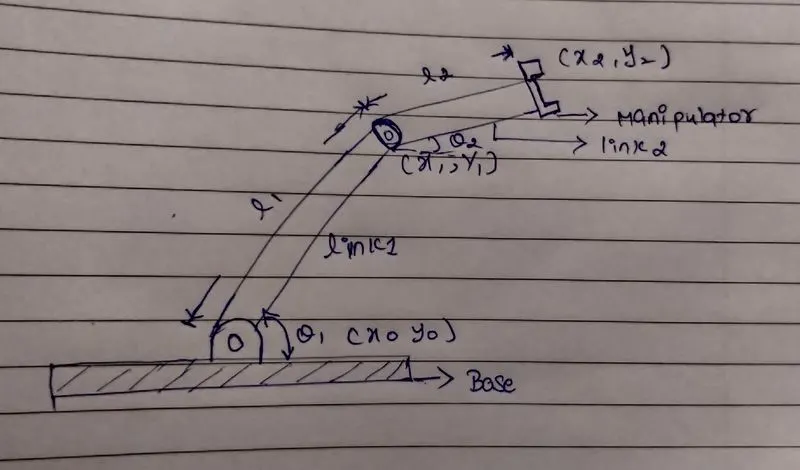
Introduction:
This type of kinematic used in robotics’. that robots working in mechanical auto motive industries in different operations and places. If understand this type of robotic program then easy create industrial robots it base on.
Basic details of 2R robotic arm with linkage position. Calculate position of link1 and link2.
X0,y0 starting point of link1 ,
X0,y0 = 0.
Link1 ending point x1,y1 its also starting point of link2,
x1,y1
x1=l1*cosd(theta1)
y2=l1*sind(theta1)
link2 ending point x2,y2. Angle between link1 & link2 represent by theta2.
X2,y2
X2=x1+l2*cosd(theta2)
Y2=y1+l2*sind(theta2)
Length of links are mentioned in meter,
Link(L1) = 1m
Link(L2)=0.5m
In program using clear all, close all, clc this functions clear workspace data, background dialogue box,figure,plots and clear commend windows.
CODE:
%forward kinemaicof 2R robotic arm manipulator
clear all
close all
clc

%inputs
l1 = 1;
l2 = 0.5;
theta1 = linspace(0,90,20)
theta2 = linspace(0,90,20)
ct = 1;

%plotting
for i = 1:length(theta1);
   THETA1 = theta1(i);
   for j = 1:length(theta2);
      THETA2 = theta2(j);
      %coordinates
      x0 = 0;
      y0 = 0;
      x1 = l1*cosd(THETA1);
      y1 = l1*sind(THETA1);

      x2 = x1+l2*cosd(THETA2);
      y2 = y1+l2*sind(THETA2);

      %plot
      plot([x0 x1],[y0 y1],[x1 x2],[y1 y2],'linewidth',2);
      axis([-0.2 2.5 0 2.5]);
      M(ct) = getframe (gcf);
      ct = ct+1;

   end
end
movie(M)
    videofile = VideoWriter('forward_kinematic.avi,''.Uncompressed.avi');
    open(videofile);
    writevideo(videofile,M)
    close(videofile)