Project 1 (Mini Project on Vehicle Direction Detection
Aim : The main aim of this project is to deterimine the vehicle direction as per given requirements and aslo develop the matlab simulink model for the vehicle direction detection
Answer:
About the vehicle direction detection:
- Here the Vehicle Direction Determination can also be done alongside features like GPS systems which helps to identify whether the vehicle is reaching its destination in an efficient manner.
- So This subfeature can also be used along with Lane Detection Highway Warning Ramp Entry Exit in Wrong Way Detection and so on
- So here we use a Advanced driver assistance systems which plays a major role in reducing traffic problems and vehicula accidents.
- So Among the many ADAS technologies is the blind spot alert monitor which alerts a vehicle or an obstruction before you change lanes.
- Now the monitoring concept to detect if a car emerging from the blind spot is attempting to cut into your lane.
- And In that we would select the direction of the vehicle.
- So There are various means of sensing such a situation including radar lidar camera and sonar
- But We focus on using lidar and deep learning for this purpose in this generation
- In particular we present the experiments carried out to verify the concept including details of the equipment experimental data and MATLAB Deep Learning for detection.
Reference :
https://link.springer.com/chapter/10.1007/978-3-030-82199-9_28
Now here we have built a simulink model for the vehicle direction detection:
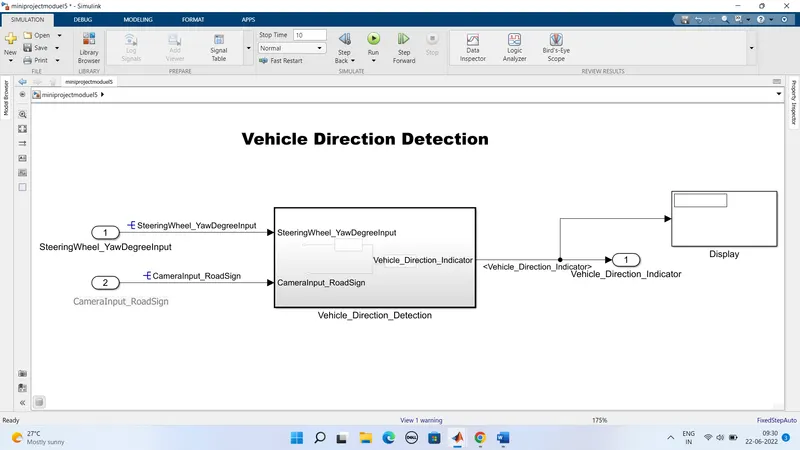
Sub system of vehicle direction detection:
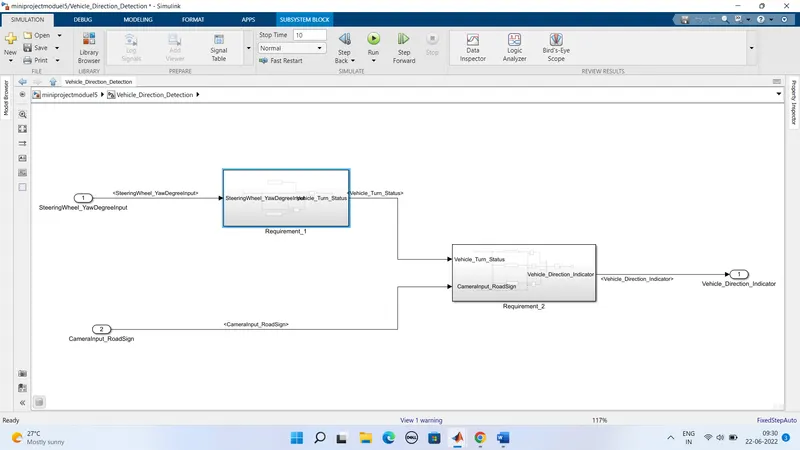
Here we created a two subsytems in the vehicle direction detection subsytems
They are
1) Requirement subsystem 1
2) Requirement susbsystem 2
1) Requirement subsystem 1:
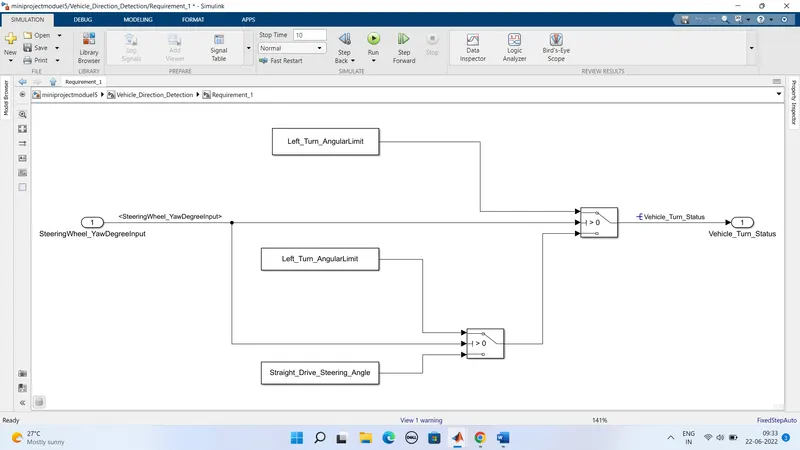
- In this subsystem we created by considering the given values for left_turn_angular limt and straight_drive_steering_angle
- Here we connected this given inputs to the switches and then to the output port which indicates us vehicle_turn_status
- Here the input is taken as steering_yawdegreeinput
- Based on this inputs given the vehicle will turn left are else straight drive this indication is given to the vehicle_turn status
2) Requirement susbsystem 2:
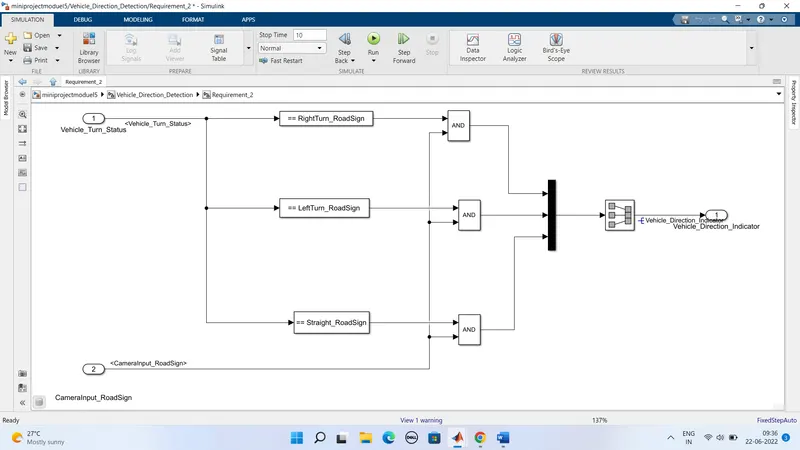
- In the requirment subsystem 2 we have considered two input ports they are vehicle_turn_status and camerinput_roadsign
- And here we taken the compare to constant block and given inputs are loaded into the compare to constant block
- The inputs given are Rightturn_roadsign,Leftturn_roadsign,Straight_roadsign these helps the vehicle to move in required direction
- And here we took the and gate operator and mux to get the combined siginals to the output part of the vehicle_direction_indicator
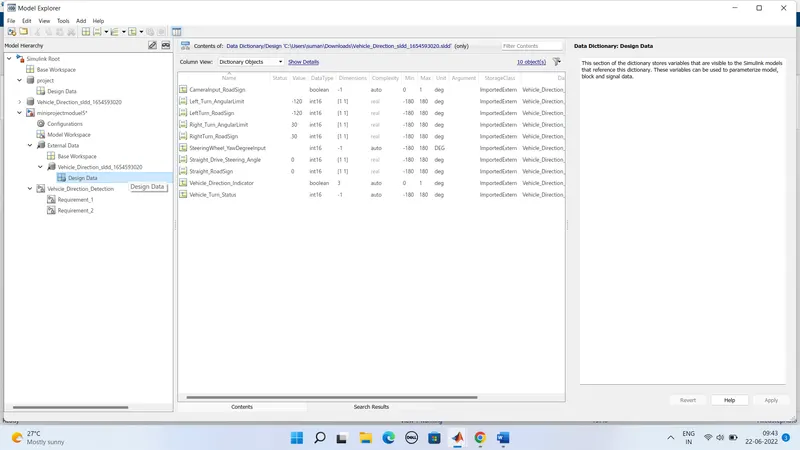
The Sldd file created as shown below:
Now steps to get the code generation :
Intailly select the main block vehicle direction detection and right click on it ,it shows the block paramters subsystem:
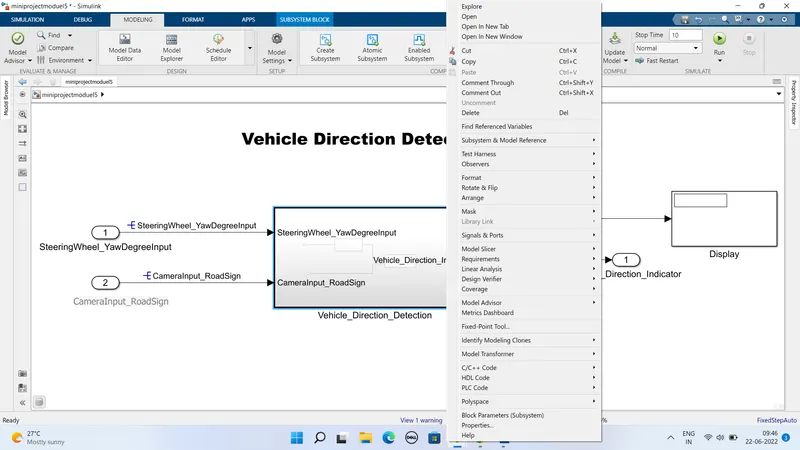
Then select the block paramter subsystem it will pop the below shown table
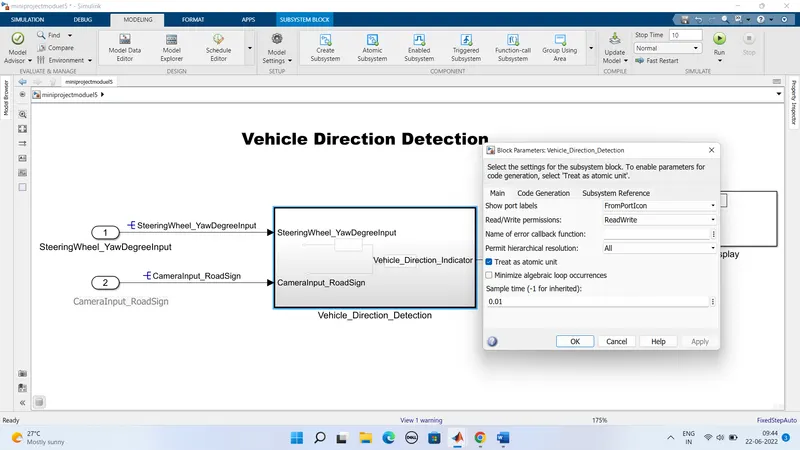
- Now select the treat as atomic unit and apply
- In the next step we need to change the configuration settings by going to the modeling selection and select the model settings
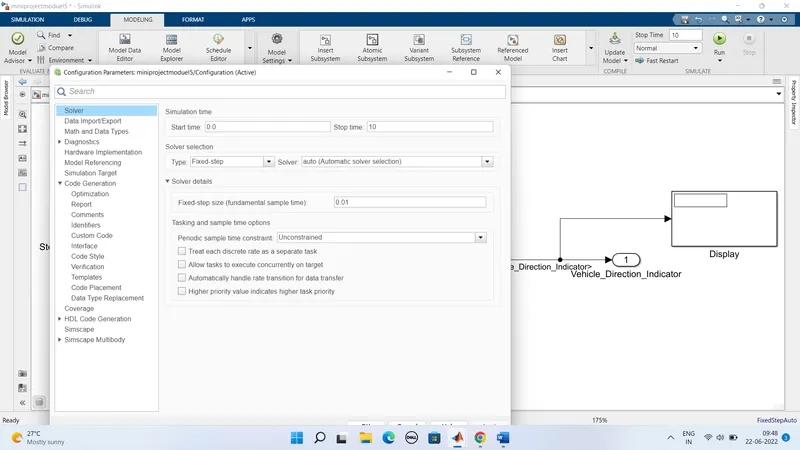
- Here we need to keep the solver configurations start time as 0.0 and stop time as 10
- And aslo solver selection type is set to fixed step
- Then in the next step we need change the code generation settings
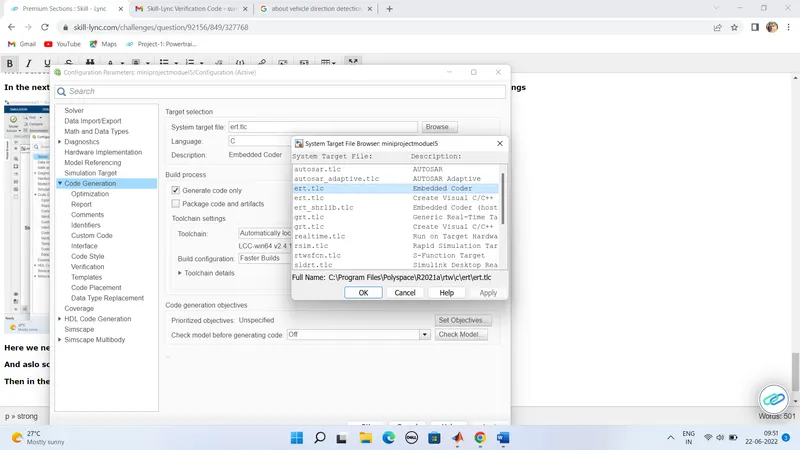
- Here we need to select the the system target file as ert.slc and tick the generate code only
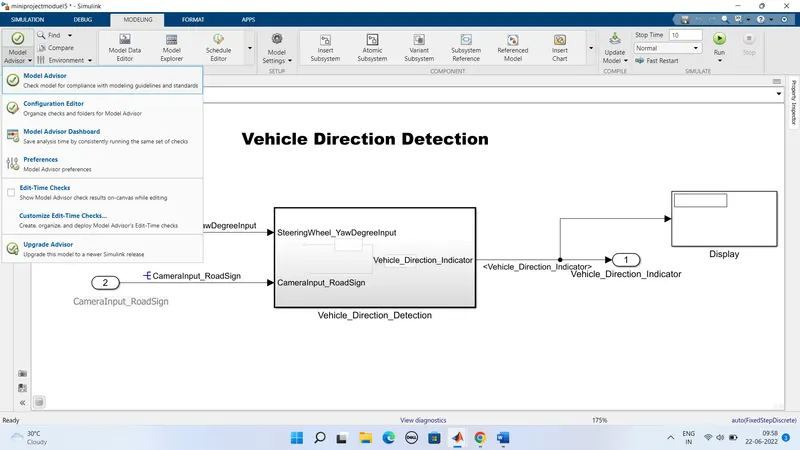
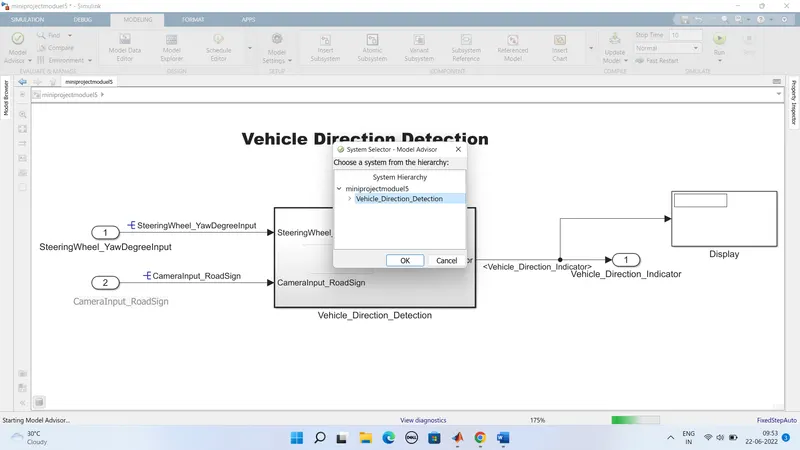
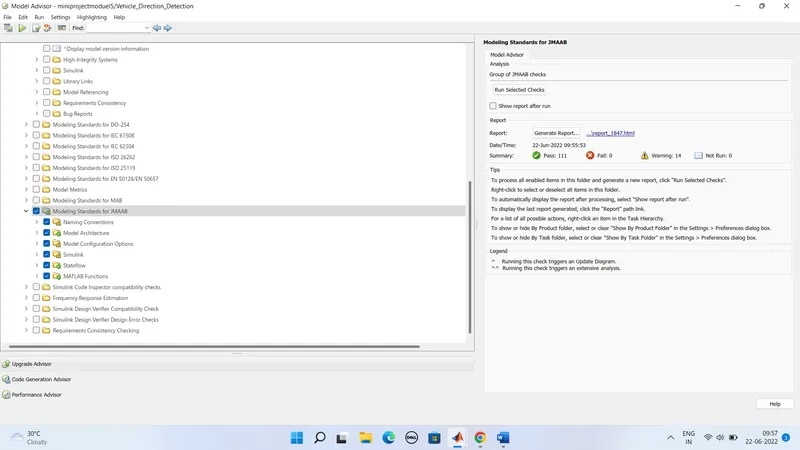
Now in the next step we need to check the errors warings test cases pass by clicking on the model adivisor option
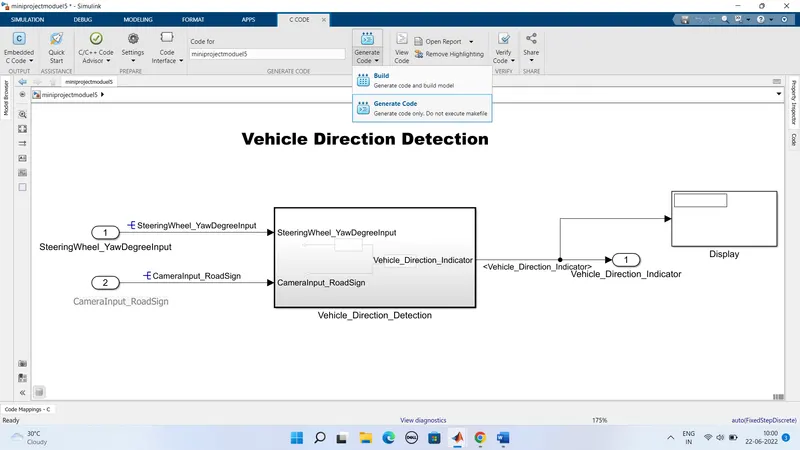
In the next step go the APPS section click on embedded code
Then click on the build option select the generate code option
if there is no errors then code will be generated
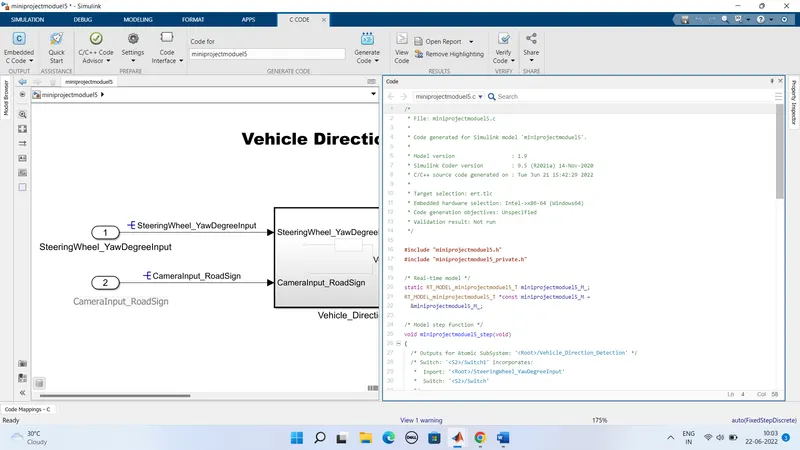
Code generated :
/*
 * File: miniprojectmoduel5.c
 *
 * Code generated for Simulink model 'miniprojectmoduel5'.
 *
 * Model version                  : 1.9
 * Simulink Coder version         : 9.5 (R2021a) 14-Nov-2020
 * C/C++ source code generated on : Tue Jun 21 15:42:29 2022
 *
 * Target selection: ert.tlc
 * Embedded hardware selection: Intel->x86-64 (Windows64)
 * Code generation objectives: Unspecified
 * Validation result: Not run
 */

#include "miniprojectmoduel5.h"
#include "miniprojectmoduel5_private.h"

/* Real-time model */
static RT_MODEL_miniprojectmoduel5_T miniprojectmoduel5_M_;
RT_MODEL_miniprojectmoduel5_T *const miniprojectmoduel5_M =
  &miniprojectmoduel5_M_;

/* Model step function */
void miniprojectmoduel5_step(void)
{
  /* Outputs for Atomic SubSystem: '<Root>/Vehicle_Direction_Detection' */
  /* Switch: '<S2>/Switch1' incorporates:
   *  Inport: '<Root>/SteeringWheel_YawDegreeInput'
   *  Switch: '<S2>/Switch'
   */
  if (SteeringWheel_YawDegreeInput > 0) {
    /* Switch: '<S2>/Switch1' incorporates:
     *  Constant: '<S2>/Constant'
     */
    Vehicle_Turn_Status = Left_Turn_AngularLimit;
  } else if (SteeringWheel_YawDegreeInput > 0) {
    /* Switch: '<S2>/Switch' incorporates:
     *  Constant: '<S2>/Constant1'
     *  Switch: '<S2>/Switch1'
     */
    Vehicle_Turn_Status = Left_Turn_AngularLimit;
  } else {
    /* Switch: '<S2>/Switch1' incorporates:
     *  Constant: '<S2>/Constant2'
     *  Switch: '<S2>/Switch'
     */
    Vehicle_Turn_Status = Straight_Drive_Steering_Angle;
  }

  /* End of Switch: '<S2>/Switch1' */

  /* SignalConversion: '<S3>/Signal Conversion' incorporates:
   *  Constant: '<S4>/Constant'
   *  Constant: '<S5>/Constant'
   *  Constant: '<S6>/Constant'
   *  Inport: '<Root>/Input1'
   *  Logic: '<S3>/Logical Operator'
   *  Logic: '<S3>/Logical Operator1'
   *  Logic: '<S3>/Logical Operator2'
   *  RelationalOperator: '<S4>/Compare'
   *  RelationalOperator: '<S5>/Compare'
   *  RelationalOperator: '<S6>/Compare'
   */
  Vehicle_Direction_Indicator[0] = ((Vehicle_Turn_Status == RightTurn_RoadSign) &&
    CameraInput_RoadSign);
  Vehicle_Direction_Indicator[1] = ((Vehicle_Turn_Status == LeftTurn_RoadSign) &&
    CameraInput_RoadSign);
  Vehicle_Direction_Indicator[2] = ((Vehicle_Turn_Status == Straight_RoadSign) &&
    CameraInput_RoadSign);

  /* End of Outputs for SubSystem: '<Root>/Vehicle_Direction_Detection' */
}

/* Model initialize function */
void miniprojectmoduel5_initialize(void)
{
  /* (no initialization code required) */
}

/* Model terminate function */
void miniprojectmoduel5_terminate(void)
{
  /* (no terminate code required) */
}

/*
 * File trailer for generated code.
 *
 * [EOF]
 */
Conclusion:
We have created a matlab simulink model for the vehicle direction detection according to the given requirements
And we also generated the code which is invovled in making the simulink model