Project 1 (Mini Project on Vehicle Direction Detection
Aim: To create a simulink model which assist driver to take right turn,left turn or straight turn. And to generate model advisor report and generate c-code for the simulink model.
Steps:1.Create two subsystems name them requirement1 and requirement2.
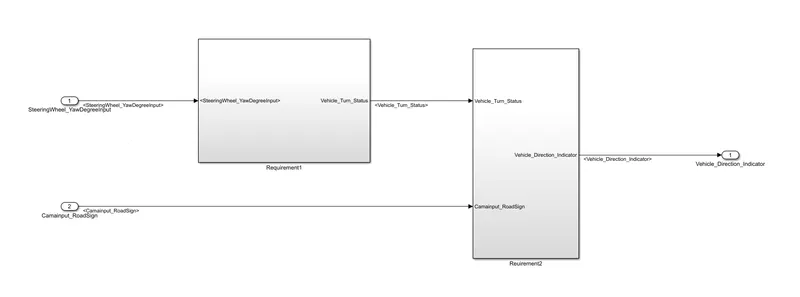
2.Connect two subsystems as per the diagram. Insert two input ports and one output port , name them as SteeringWheel_YawDegreeInput,CameraInput_RoadSign,Vehicle_Direction_Indicator respeccctively.
3.In requirement1 sybsystem add three constant block, two switch block and connect them as per diagram. Name the constant block as Right_Turn_AngularLimit,Left_Turn_AngularLimit and Straight_Drive_Steering_Angle.
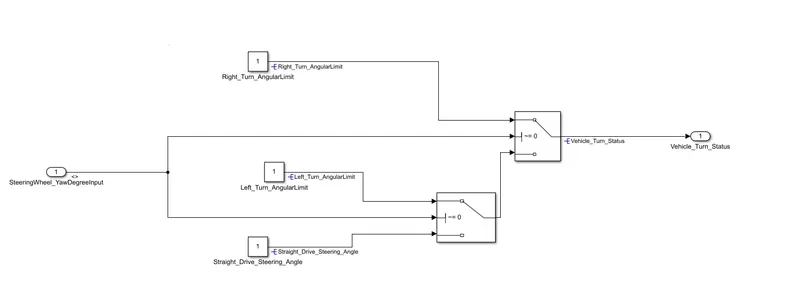
4.Here we are comparing the input signal with the three constants. If we give input to right turn then switch block enables the signal to right turn.
5.In requirement2 two inputs which are coming from requirement1 and camara input are comparied. Camara senses the road sign and forward to requirement2 block. These input signals are compaired with some constants and forward to and block.
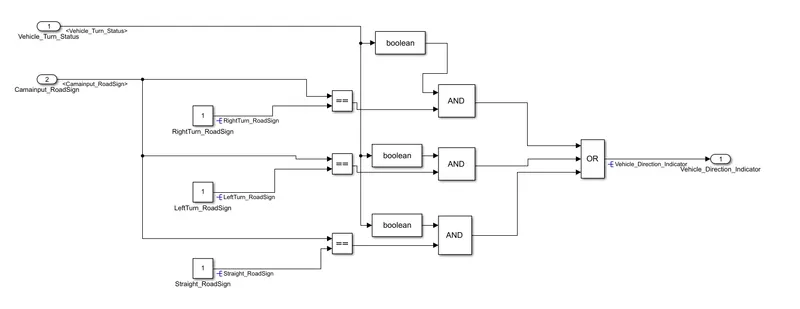
6.SLDD creation
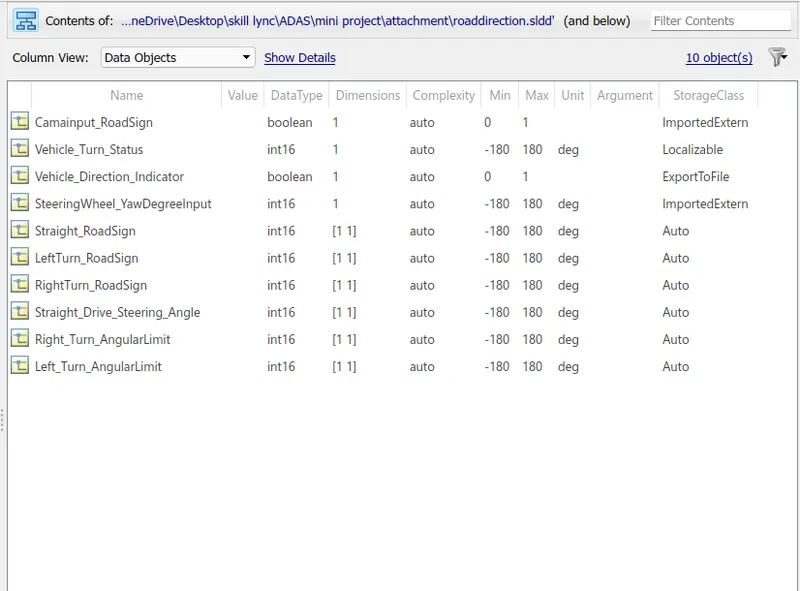
To create SLDD goto modeling>link to data dictionary>new>give name and save>uncheck link to base workspace>open.
Then click on add simulink signals.copy the names of signals from simulink model and paste to signal name. By this process add all the signals and fill the data type,dimension,initial value,maximum value, minimum value,and unit to the respective signals.
7.After linking all the signals run the simulink model. Then create model advisor report.To create model advisor report first set some parameters. click on modeling>model setting>solver selection type-fixed>solver-descrete(no contionous states)>fixed step size as 0.01.
8.code generation>system target file>ert.tic>apply>ok
9.Goto model advisor>select system>by task>select maab>Click on run>Generate report>save.
10.C-code generation
Goto apps>Embeded coder>c code>build.
Result:

The vihicle direction indicator indicates direction as per the comparison of camara input and steering wheel angular position comparison.
Above are the outputs generated while successfully running the simulink model.