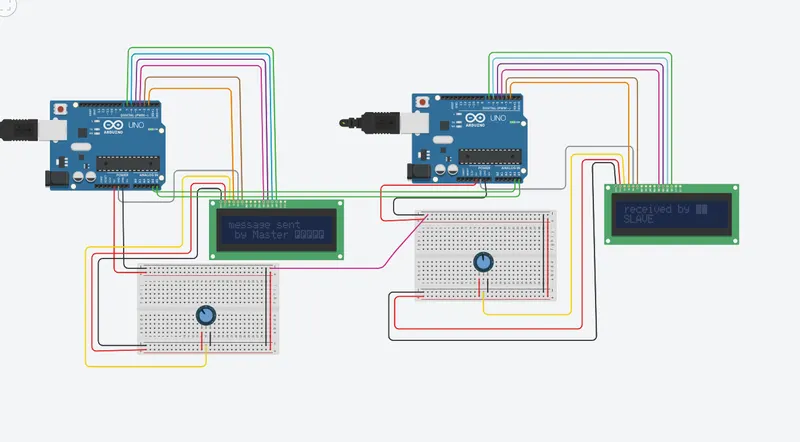
Project 1 - Interfacing a 16*2 LCD with Arduino using I2C protocol
This code is for Master
#include<LiquidCrystal.h>
#include<Wire.h>
#include<Wire.h>
LiquidCrystal lcd(2,3,4,5,6,7);
char MasterReceive[16];
void setup()
{
Serial.begin(9600);
Wire.begin();
lcd.begin(16,2);
lcd.clear();
}
void loop()
{
Wire.requestFrom(8,16);
lcd.setCursor(0,0);
lcd.print("message sent");
lcd.setCursor(0,1);
int i=0;
while(0<Wire.available())
{
MasterReceive[i]=Wire.read();
i++;
}
lcd.print(MasterReceive);
delay(1000);
Wire.end();
}
This code os for Slave
#include<LiquidCrystal.h>
#include<Wire.h>
LiquidCrystal lcd(2,3,4,5,6,7);
void setup()
{
Serial.begin(9600);
Wire.begin(8);
Wire.onRequest(send);
lcd.begin(16,2);
lcd.clear();
}
void loop()
{
lcd.setCursor(0,0);
lcd.println("received by ");
lcd.setCursor(0,1);
lcd.print("SLAVE");
}
void send()
{
char ch[47]=" by Master ";
Wire.write(ch);
}
Explaination:
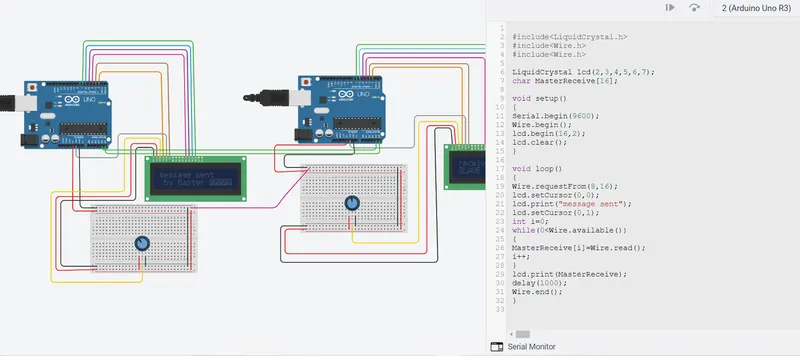
In this project implementing the Code for “Interfacing a 16*2 LCD with two Arduino’s (one for Master and one for Slave) using Inter-Integrated Circuit (I2C) communication protocol” by sending the message to LCD using I2C communication protocol and display the message on LCD screen.Communication between Arduino and 16*2 LCD using I2C protocol.Displaying the message sent by Master and received by slave i.e. LCD display.Using the inter-integrated circuit communication protocol, transferring the data i.e. the message we want to display is sent to the LCD.Two Arduino’s connected to the LCD display and the communication is executed using I2C protocol between Arduino and the LDC display.
LCD (Liquid Crystal Displays) offer a very quick and eye-catching to show messages. We can classify them on character LCDs and graphics LCDs (GLCD). The first is used to display ASCII and are sold in different sizes (16×2, 20×4…) where the first number indicates the number of characters that fit in a row, and the second number is the number of rows that fit on the screen. The latter is used to display, in addition to text, drawings, and images, and are also marketed in different sizes, which are defined by the number of pixels they can display (128×64, 128×128…).