Project 1 - English Dictionary App & Library Book Management System
ENGILISH DICTIONARY APP:
import json
from difflib import get_close_matches
import sys

    # i have created add function to add new words to the extisting file
def Add():
    f = open('words.txt','r+') # it opens the file in read and write mode
    words = json.load(f) # it converts the text file to  python dictioanry format
    word = input('Enter word: ') # asks the word to add
    mean = input('Enter meaning : ') # asks the meaning of the word
    words[word]=mean # it updates in dictionary
    f.seek(0) # the positon of the curson to add word
    json.dump(words,f,indent = 4) # it re-converts the python dictionary to text file
    f.truncate()

# here i created a fucntion to find the meaning of the word
def Meaning():
    words = json.load(open("words.txt","r"))
    word = input('Enter word to search : ')
    word = word.lower() # it converts the entered word to lowercase and searches
    if word in words:
        print(words[word],'\n') # if the word found then it returns the word
    elif word.title() in words: # it converts the entered word to title case because some words in file are Titles
        print(words[word.title()],'\n')
    elif word.upper() in words: # it converts the entered word to upper case as some acronyms are use uppercase letters
        print(words[word.upper()],'\n')

    # the following command checks similar words of entered word. it asks the user whether the similar word and entered
    # word both are same or not. if yes then it prints first word of those list of similar words
    elif len(get_close_matches(word , words.keys())) > 0 :
        print("did you mean %s instead\n" %get_close_matches(word, words.keys())[0])
        decide = input("press y for yes or n for no : ")
        if decide == "y":
            print(words[get_close_matches(word , words.keys())[0]])
        elif decide == "n":
            print("Word Not Found \n")
        else: # if user enter other than y and n then it throws an error
            print("You have entered wrong input please enter just y or n :")
    else:
        print("Word Not Found \n")

# the following function is for updating an existing word in the text file.
def Update():
    f = open("words.txt",'r+')
    words = json.load(f)
    word = input('Enter the word to update: ')
    if word in words: # if the word found in the file then it updates the word. otherwise skips
        meaning = input('Enter the meaning to update : ')
        words[word] = meaning
        f.seek(0)
    else :
        print("The word not exist in the data file \n")
    json.dump(words,f,indent=4)
    f.truncate()

def Exit(): # this function terminates the program and restarts the kernel
    print('Exiting the program.....\n')
    sys.exit()

#the following function displays main menu with four options. user should select one option among four.

def Menu():
    print('Main Menu \n1.Add a new word\n2.Find the meaning\n3.Update a word\n4.Exit')

    while True: # here i used while loop to iterate the selection if the user enters invalid choice. its keep on asking the
                # choice until user selects the correct option.
        choice = input('Select your option : ')
        if choice == '1':
            return  Add()
        elif choice == '2':
            return Meaning()
        elif choice == '3':
            return Update()
        elif choice == '4':
            return Exit()
        else:
            print('You have selected invalid choice. Please select a valid key')


# Calling the main Menu function.
while True:
    Menu()
SAMPLE OUTPUT:
Main Menu
1.Add a new word
2.Find the meaning
3.Update a word
4.Exit
Select your option : 2
Enter word to search : shnamukh
Word Not Found

Main Menu
1.Add a new word
2.Find the meaning
3.Update a word
4.Exit
Select your option : 2
Enter word to search : skill lync
an edutech company that provides online engineering courses

Main Menu
1.Add a new word
2.Find the meaning
3.Update a word
4.Exit
Select your option : 4
Exiting the program.....
An exception has occurred, use %tb to see the full traceback.

SystemExit


LIBRARY MANAGEMENT APPLICATION:
#================================ LIBRARIES ==============================

import tkinter
from tkinter import *

import sqlite3 as sq

import tkinter.ttk as ttk
from tkinter import messagebox


root = Tk()
root.title('A Library Application')
root.geometry('1200x800')
#===================================== METHODS ==========================================


def Database():
    global conn,cursor
    conn = sq.connect('books.db')
    cursor = conn.cursor()
    cursor.execute("CREATE TABLE IF NOT EXISTS mybooks(id INTEGER PRIMARY KEY AUTOINCREMENT NOT NULL,title TEXT,author TEXT,year INTEGER,isbn INTEGER)")

def Add():
    if TITLE.get()=='' or AUTHOR.get()=='' or YEAR.get()=='':
        txt_result.config(text="Please Enter all the fields",fg='red')
    else:
        Database()
        cursor.execute("INSERT INTO mybooks(title,author,year,isbn) VALUES(?,?,?,?)",(TITLE.get(),AUTHOR.get(),YEAR.get(),ISBN.get()))
        conn.commit()
        TITLE.set('')
        AUTHOR.set('')
        YEAR.set('')
        ISBN.set('')
        cursor.close()
        conn.close()
        txt_result.config(text="Record Added !",fg="green")
def Search():
    if TITLE.get()=='' and AUTHOR.get()=='' and YEAR.get()=='' and ISBN.get()=='':
        txt_result.config(text="Please Enter any of the details to search",fg='red')
    else:
        tree.delete(*tree.get_children())
        Database()
        cursor.execute('SELECT * FROM mybooks WHERE title=? OR author=? OR year=? OR isbn=?',(TITLE.get(),AUTHOR.get(),str(YEAR.get()),str(ISBN.get())))
        rows = cursor.fetchall()
        for data in rows:
            tree.insert("",'end',values=(data[1],data[2],data[3],data[4]))
        TITLE.set('')
        AUTHOR.set('')
        YEAR.set('')
        ISBN.set('')
        cursor.close()
        txt_result.config(text="Search completed and results displayed !",fg='green')
def Display():
    tree.delete(*tree.get_children())
    Database()
    cursor.execute('SELECT * FROM mybooks')
    fetch = cursor.fetchall()
    for data in fetch:
        tree.insert("",'end',values=(data[1],data[2],data[3],data[4]))
    cursor.close()
    txt_result.config(text="Successfully fetched data !",fg='blue')

def Exit():
    if messagebox.askokcancel("Quit", "Do you want to Exit?"):
        root.destroy()
        exit()


def Delete():
    if TITLE.get()=='' and AUTHOR.get()=='' and YEAR.get()=='' and ISBN.get()=='':
        txt_result.config(text="Please Enter any of the details to delete",fg='red')
    else:
        Database()
        cursor.execute('DELETE FROM mybooks WHERE title=? OR author=? OR year=? OR isbn=?',(TITLE.get(),AUTHOR.get(),YEAR.get(),str(ISBN.get())))
        conn.commit()
        TITLE.set('')
        AUTHOR.set('')
        YEAR.set('')
        ISBN.set('')
        cursor.close()
        conn.close()
        txt_result.config(text="Successfully deleted data and removed completely from the system !",fg='blue')


def Issue():
    if TITLE.get()=='' or AUTHOR.get()=='' or YEAR.get()=='':
        txt_result.config(text="Please Enter all the fields",fg='red')
    else:
        TITLE.set('')
        AUTHOR.set('')
        YEAR.set('')
        ISBN.set('')
        txt_result.config(text="Successfully Issued the Book...!",fg="black")
#====================================VARIABLE DECLARATION===================================

TITLE = StringVar()
AUTHOR = StringVar()
YEAR = StringVar()
ISBN = StringVar()
#=======================================FRAME=====================================

Top = Frame(root,width=1200,height=100,bg='blue', bd=8, relief='raise')
Top.pack(side=TOP)
Left = Frame(root, width=1000, height=800,bg='red', bd=8, relief='raise')
Left.pack(side=LEFT)
Right = Frame(root,width=300,height=800,bg='yellow', bd=8,relief='raise')
Right.pack(side=RIGHT)

Forms = Frame(Left,width=1000,height=800)
Forms.pack(side=TOP)

Buttons = Frame(Left,width=1000,height=100,bd=8,relief='raise')
Buttons.pack(side=BOTTOM)
# ================================= LABEL WIDGET ======================================

main_title =Label(Top,width=1000,font=('arial',24),text=".....Library Management Application.....")
main_title.pack()

txt_title = Label(Forms, text="Booktitle:",font=('arial',16),bd=15)
txt_title.grid(row=0, stick="e")
txt_author = Label(Forms, text="Author:",font=('arial',16),bd=15)
txt_author.grid(row=1, stick="e")
txt_year = Label(Forms, text="Year:",font=('arial',16),bd=15)
txt_year.grid(row=2, stick="e")
txt_isbn = Label(Forms, text="ISBN:",font=('arial',16),bd=15)
txt_isbn.grid(row=3, stick="e")

txt_result = Label(Buttons)
txt_result.pack()
# ================================= ENTRY WIDGET ==========================================
title = Entry(Forms,textvariable=TITLE, width=30)
title.grid(row=0,column=1)
author = Entry(Forms,textvariable=AUTHOR, width=30)
author.grid(row=1,column=1)
year = Entry(Forms,textvariable=YEAR, width=30)
year.grid(row=2,column=1)
isbn = Entry(Forms,textvariable=ISBN, width=30)
isbn.grid(row=3,column=1)
# ============================ BUTTONS WIDGET ================================================
btn_display = Button(Buttons, width=10, text="Display", command=Display)
btn_display.pack(side=LEFT)
btn_search = Button(Buttons,width=10,text='Search', command=Search)
btn_search.pack(side=LEFT)
btn_add = Button(Buttons, width=10, text="Add",command=Add)
btn_add.pack(side=LEFT)
btn_issue = Button(Buttons, width=10, text ="Issue",command=Issue)
btn_issue.pack(side=LEFT)
btn_delete = Button(Buttons,width=10,text='Delete',command=Delete)
btn_delete.pack(side=LEFT)
btn_exit = Button(Buttons,width=10,text='Exit',command = Exit)
btn_exit.pack(side=LEFT)
# ===================================== LIST WIDGET ==========================================

scrollbary = Scrollbar(Right, orient=VERTICAL)
scrollbarx = Scrollbar(Right, orient = HORIZONTAL)

tree = ttk.Treeview(Right, columns=("Booktitle","Author","Year","ISBN"))

scrollbary.config(command=tree.yview)
scrollbary.pack(side=RIGHT, fill=Y)
scrollbarx.config(command=tree.xview)
scrollbarx.pack(side=BOTTOM, fill=X)

tree.heading('Booktitle', text="Booktitle", anchor = W)
tree.heading('Author', text="Author", anchor = W)
tree.heading('Year', text="Year", anchor = W)
tree.heading('ISBN', text="ISBN", anchor = W)

tree.column('#0', stretch=NO, minwidth=0, width=0)
tree.column('#1', stretch=NO, minwidth=0, width=200)
tree.column('#2', stretch=NO, minwidth=0, width=100)
tree.column('#3', stretch=NO, minwidth=0, width=50)
tree.column('#4', stretch=NO, minwidth=0, width=100)


tree.pack()
# ==============================INITIALIZATION ===============================================
if __name__=='__main__':
root.mainloop()
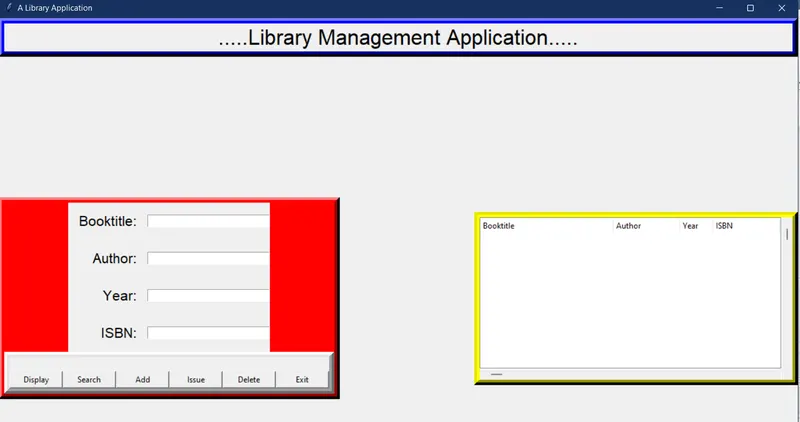
THE OUTPUT :