Project 1- Creating your own OpenFOAM solver
OBJECTIVES:
Project Description:
Use the icoFoam solver in the applications/solvers/incompressible/icoFoam directory to create your own solver - scalarFoam
The scalar transport equation is defined as:
`(dels)/(delt) + nabla.(us) = 0`
where s is the scalar quantity being transported by the velocity u.
- Edit icoFoam solver and add the scalar quantity s
- Add screenshots of full edited code
- Add screenshots of full edited code
- Run a test case using cavity tutorial problem using the edited solver.
Hint:
Changes in the solver:
- Replace the main working equation with
- What change will you make in the createFields.H file (Hint: the p field is originally created here)
- What change will you make in the UEqn.H file? (Hint: replace the solve function)
- Compile scalarFoam using wmake. How are the Make/files modified?
Changes in the case:
- Use the $FOAM_TUTORIALS/incompressible/icoFoam/cavity case to test out your solver. Rename it scalarCavity.
- The scalar transport equation has no pressure p to solve, instead a scalar s. What changes will you make in the 0 folder?
- You will have to change the interpolation scheme in fvSchemes to account for the `nabla.(us)` term. How will you do this?
- In fvSolutions, a solver has to be specified for the quantity s. Can you just replace this with the solver used for p?
- Run this case by making the appropriate change in controlDict.
by using this hints, my own openfoam solver was done and the detailed report is following;
the main objective of this challenge is to create an OpenFOAM solver for scalar transport by customizing an already existing solver called icoFoam.
for that the scalar transport equations will be added in the main source code.
in order to make a scalar transport solver , first go to solver folder by using the command $FOAM_SOLVERS, then further directed to the icofoam.
once the icofoam is reached, copy that into u r run folder and name it as scalarfoam-usr or anything.(i copy it as usr-scalarfoam)
open the usr-scalarfoam and inside that folder there are 3 files are ;
1. icoFoam.C (source code)
2. createFields.H (dictionary for IO objects)
3. Make folder
i)files
ii)options.
in order to the changes these icofoam solver into new one which is scalar transport solver, rename the icoFoam.C into scalarFoam.C by using the command mv icoFoam.C scalarFoam.C . now if u type ls , the name is changed as scalarFoam.C
open that scalarFoam.C in visual studio code,
Passive scalar transport equation is added in the source code after the PISO loop , so it comes at the line 115. the code for Passive scalar transport equation is ;
// Passive Scalar Transport Equation
fvScalarMatrix sEqn
(
fvm::ddt(s) // Temporal Term
+ fvm::div(phi, s) // Convection Term
- fvm::laplacian(su, s) // Diffusion Term
);
sEqn.relax();
sEqn.solve();
make sure the s to the Eqn objects so that the solver knows we are solving for the scalar s. this is the first thing we change in the source code to make new scalarFoam solver.
inside the source code file you will see this code::(after input new codes/codes need for scalarfoam or edited)
/*---------------------------------------------------------------------------*\
========= |
\\ / F ield | OpenFOAM: The Open Source CFD Toolbox
\\ / O peration |
\\ / A nd | www.openfoam.com
\\/ M anipulation |
-------------------------------------------------------------------------------
Copyright (C) 2011-2016 OpenFOAM Foundation
Copyright (C) 2019 OpenCFD Ltd.
-------------------------------------------------------------------------------
License
This file is part of OpenFOAM.
OpenFOAM is free software: you can redistribute it and/or modify it
under the terms of the GNU General Public License as published by
the Free Software Foundation, either version 3 of the License, or
(at your option) any later version.
OpenFOAM is distributed in the hope that it will be useful, but WITHOUT
ANY WARRANTY; without even the implied warranty of MERCHANTABILITY or
FITNESS FOR A PARTICULAR PURPOSE. See the GNU General Public License
for more details.
You should have received a copy of the GNU General Public License
along with OpenFOAM. If not, see
Application
icoFoam
Group
grpIncompressibleSolvers
Description
Transient solver for incompressible, laminar flow of Newtonian fluids.
\heading Solver details
The solver uses the PISO algorithm to solve the continuity equation:
\f[
\div \vec{U} = 0
\f]
and momentum equation:
\f[
\ddt{\vec{U}}
+ \div \left( \vec{U} \vec{U} \right)
- \div \left(\nu \grad \vec{U} \right)
= - \grad p
\f]
Where:
\vartable
\vec{U} | Velocity
p | Pressure
\endvartable
\heading Required fields
\plaintable
U | Velocity [m/s]
p | Kinematic pressure, p/rho [m2/s2]
\endplaintable
\*---------------------------------------------------------------------------*/
#include "fvCFD.H"
#include "pisoControl.H"
// * * * * * * * * * * * * * * * * * * * * * * * * * * * * * * * * * * * * * //
int main(int argc, char *argv[])
{
argList::addNote
(
"Transient solver for incompressible, laminar flow"
" of Newtonian fluids."
);
#include "postProcess.H"
#include "addCheckCaseOptions.H"
#include "setRootCaseLists.H"
#include "createTime.H"
#include "createMesh.H"
pisoControl piso(mesh);
#include "createFields.H"
#include "initContinuityErrs.H"
// * * * * * * * * * * * * * * * * * * * * * * * * * * * * * * * * * * * //
Info<< "\nStarting time loop\n" << endl>
while (runTime.loop())
{
Info<< "Time = " << runTime>
#include "CourantNo.H"
// Momentum predictor
fvVectorMatrix UEqn
(
fvm::ddt(U)
+ fvm::div(phi, U)
- fvm::laplacian(nu, U)
);
if (piso.momentumPredictor())
{
solve(UEqn == -fvc::grad(p));
}
// --- PISO loop
while (piso.correct())
{
volScalarField rAU(1.0/UEqn.A());
volVectorField HbyA(constrainHbyA(rAU*UEqn.H(), U, p));
surfaceScalarField phiHbyA
(
"phiHbyA",
fvc::flux(HbyA)
+ fvc::interpolate(rAU)*fvc::ddtCorr(U, phi)
);
adjustPhi(phiHbyA, U, p);
// Update the pressure BCs to ensure flux consistency
constrainPressure(p, U, phiHbyA, rAU);
// Non-orthogonal pressure corrector loop
while (piso.correctNonOrthogonal())
{
// Pressure corrector
fvScalarMatrix pEqn
(
fvm::laplacian(rAU, p) == fvc::div(phiHbyA)
);
pEqn.setReference(pRefCell, pRefValue);
pEqn.solve(mesh.solver(p.select(piso.finalInnerIter())));
if (piso.finalNonOrthogonalIter())
{
phi = phiHbyA - pEqn.flux();
}
}
#include "continuityErrs.H"
U = HbyA - rAU*fvc::grad(p);
U.correctBoundaryConditions();
}
fvScalarMatrix SEqn
(
fvm::ddt(S)
+ fvm::div(phi, S)
- fvm::laplacian(SU, S)
);
SEqn.solve();
runTime.write();
runTime.printExecutionTime(Info);
}
Info<< "End\n" << endl>
return 0;
}
// ************************************************************************* //
now open the createFields.H file ;
this is the place where we make the io objects and specify them in the upcoming initial conditioning of the test case.
we have to make the viscosity field & scalar field for our scalar s which in this case is initialized and declared as su acting as the diffusion coefficient.
viscosity field code:
dimensionedScalar su
(
"su",
dimViscosity,
transportProperties.lookup("su")
);
scalar field code:
Info<< "Reading field s \n" << endl>
volScalarField s
(
IOobject
(
"s",
runTime.timeName(),
mesh,
IOobject::MUST_READ,
IOobject::AUTO_WRITE
),
mesh
);
the main purpose of creating this scalar field s which is to be transported, and specifying the arguments that have to be taken for the IOobject and the mesh object.
inside the dictionary file you will see this code::(after input new codes/codes need for scalarfoam or edited)
Info<< "Reading transportProperties\n" << endl>
IOdictionary transportProperties
(
IOobject
(
"transportProperties",
runTime.constant(),
mesh,
IOobject::MUST_READ_IF_MODIFIED,
IOobject::NO_WRITE
)
);
dimensionedScalar nu
(
"nu",
dimViscosity,
transportProperties
);
dimensionedScalar SU
(
"SU",
dimViscosity,
transportProperties.lookup("su")
);
Info<< "Reading field p\n" << endl>
volScalarField p
(
IOobject
(
"p",
runTime.timeName(),
mesh,
IOobject::MUST_READ,
IOobject::AUTO_WRITE
),
mesh
);
Info<< "Reading field U\n" << endl>
volVectorField U
(
IOobject
(
"U",
runTime.timeName(),
mesh,
IOobject::MUST_READ,
IOobject::AUTO_WRITE
),
mesh
);
Info<< "Reading field S\n" << endl>
volScalarField S
(
IOobject
(
"S",
runTime.timeName(),
mesh,
IOobject::MUST_READ,
IOobject::AUTO_WRITE
),
mesh
);
#include "createPhi.H"
label pRefCell = 0;
scalar pRefValue = 0.0;
setRefCell(p, mesh.solutionDict().subDict("PISO"), pRefCell, pRefValue);
mesh.setFluxRequired(p.name());
now open the Make/files:
inside the files, since its the copy fo icofoam it has the icofoam.c in its first line and 2nd line, we have to change it as scalarfoam
after the code look like this;
scalarFoam.C
EXE = $(FOAM_USER_APPBIN)/scalarFoam
in make/options we dont want to make any changes.so keep the code as it is.
inside the make/ files file you will see this code::(after input new codes/codes need for scalarfoam or edited)
scalarFoam.C
EXE = $(FOAM_USER_APPBIN)/scalarFoam
inside the make/options file you will see this code::(after input new codes/codes need for scalarfoam or edited)
EXE_INC = \
-I$(LIB_SRC)/finiteVolume/lnInclude \
-I$(LIB_SRC)/meshTools/lnInclude
EXE_LIBS = \
-lfiniteVolume \
-lmeshTools
these are the changes thats needs to be done in order to crerate new solver.
after completeing all the changes in the terminal write wmake and hit enter, u will get a executable file name .if u dont know means just type ls $(FOAM_USER_APPBIN) and hit enter u will get that.
TEST CASE:
now the code ready we need to test the code whether it is work or not, to do that go to the tutorials bu using the tut .
the go to the icofoam tutorial and copy the cavity into the same folder where the scalarfoam.c files are there in the run folder.
once u copied that, go to run an dopen the cavity in it,
inside that three folders are there namely 0, constant, and system. the se are the general system of input files.
now open 0 inside there are p and u files are there , these are there the initial scalar and vector field for pressure and velocity and so on.
in our scalarFoam solver there is a scalar quantity s and we have to make a initial conditions as like p and u. in this 0 folder.
inside the p file you will see this code:(after input new codes/codes need for scalarfoam or edited)
/*--------------------------------*- C++ -*----------------------------------*\
| ========= | |
| \\ / F ield | OpenFOAM: The Open Source CFD Toolbox |
| \\ / O peration | Version: v2212 |
| \\ / A nd | Website: www.openfoam.com |
| \\/ M anipulation | |
\*---------------------------------------------------------------------------*/
FoamFile
{
version 2.0;
format ascii;
class volScalarField;
object p;
}
// * * * * * * * * * * * * * * * * * * * * * * * * * * * * * * * * * * * * * //
dimensions [0 2 -2 0 0 0 0];
internalField uniform 0;
boundaryField
{
movingWall
{
type zeroGradient;
}
fixedWalls
{
type zeroGradient;
}
frontAndBack
{
type empty;
}
}
// ************************************************************************* //
inside the s file you will see this code::(after input new codes/codes need for scalarfoam or edited)
/*--------------------------------*- C++ -*----------------------------------*\
| ========= | |
| \\ / F ield | OpenFOAM: The Open Source CFD Toolbox |
| \\ / O peration | Version: v2212 |
| \\ / A nd | Website: www.openfoam.com |
| \\/ M anipulation | |
\*---------------------------------------------------------------------------*/
FoamFile
{
version 2.0;
format ascii;
class volScalarField;
object s;
}
// * * * * * * * * * * * * * * * * * * * * * * * * * * * * * * * * * * * * * //
dimensions [0 0 0 1 0 0 0];
internalField uniform 400;
boundaryField
{
movingWall
{
type fixedValue;
value uniform 500;
}
fixedWalls
{
type fixedValue;
value uniform 500;
};
frontAndBack
{
type empty;
}
}
// ************************************************************************* /
inside the u file you will see this code::(after input new codes/codes need for scalarfoam or edited)
/*--------------------------------*- C++ -*----------------------------------*\
| ========= | |
| \\ / F ield | OpenFOAM: The Open Source CFD Toolbox |
| \\ / O peration | Version: v2212 |
| \\ / A nd | Website: www.openfoam.com |
| \\/ M anipulation | |
\*---------------------------------------------------------------------------*/
FoamFile
{
version 2.0;
format ascii;
class volVectorField;
object U;
}
// * * * * * * * * * * * * * * * * * * * * * * * * * * * * * * * * * * * * * //
dimensions [0 1 -1 0 0 0 0];
internalField uniform (0 0 0);
boundaryField
{
movingWall
{
type fixedValue;
value uniform (1 0 0);
}
fixedWalls
{
type noSlip;
}
frontAndBack
{
type empty;
}
}
// ************************************************************************* //
these are the changes needs to be done in 0 in order to make the scalarfoam solver.
now open the constant folder inside that there is a file called /transportProperties:
this folder is library of models for viscosity. In our case,
we have already the Newtonian model dimensionedScalar ν(nu) with a value of 0.01
and we need to add dimensionedScalar su with the value 0.01.
inside the /transportProperties file you will see this code::(after input new codes/codes need for scalarfoam or edited)
/*--------------------------------*- C++ -*----------------------------------*\
| ========= | |
| \\ / F ield | OpenFOAM: The Open Source CFD Toolbox |
| \\ / O peration | Version: v2212 |
| \\ / A nd | Website: www.openfoam.com |
| \\/ M anipulation | |
\*---------------------------------------------------------------------------*/
FoamFile
{
version 2.0;
format ascii;
class dictionary;
object transportProperties;
}
// * * * * * * * * * * * * * * * * * * * * * * * * * * * * * * * * * * * * * //
nu 0.01;
su 0.01;
// ************************************************************************* //
now open the system folder inside that the files are;
system/blockMeshDict:
the mesh is generated from the data specified in the blockMeshDict file.
inside the blockmeshdict file you will see this code::(after input new codes/codes need for scalarfoam or edited)
/*--------------------------------*- C++ -*----------------------------------*\
| ========= | |
| \\ / F ield | OpenFOAM: The Open Source CFD Toolbox |
| \\ / O peration | Version: v2212 |
| \\ / A nd | Website: www.openfoam.com |
| \\/ M anipulation | |
\*---------------------------------------------------------------------------*/
FoamFile
{
version 2.0;
format ascii;
class dictionary;
object blockMeshDict;
}
// * * * * * * * * * * * * * * * * * * * * * * * * * * * * * * * * * * * * * //
scale 0.1;
vertices
(
(0 0 0)
(1 0 0)
(1 1 0)
(0 1 0)
(0 0 0.1)
(1 0 0.1)
(1 1 0.1)
(0 1 0.1)
);
blocks
(
hex (0 1 2 3 4 5 6 7) (20 20 1) simpleGrading (1 1 1)
);
edges
(
);
boundary
(
movingWall
{
type wall;
faces
(
(3 7 6 2)
);
}
fixedWalls
{
type wall;
faces
(
(0 4 7 3)
(2 6 5 1)
(1 5 4 0)
);
}
frontAndBack
{
type empty;
faces
(
(0 3 2 1)
(4 5 6 7)
);
}
);
// ************************************************************************* //
system/controlDict:
it is a dictionary acts as the Input/Output database for our simulation. This dictionary sets the simulation start and end time, the number of time steps, and the intervals at which data has to be saved which will be post-processed for visualization.
it is so important to change the application as scalarFoam
inside the controldict file you will see this code::(after input new codes/codes need for scalarfoam or edited)
/*--------------------------------*- C++ -*----------------------------------*\
| ========= | |
| \\ / F ield | OpenFOAM: The Open Source CFD Toolbox |
| \\ / O peration | Version: v2212 |
| \\ / A nd | Website: www.openfoam.com |
| \\/ M anipulation | |
\*---------------------------------------------------------------------------*/
FoamFile
{
version 2.0;
format ascii;
class dictionary;
object controlDict;
}
// * * * * * * * * * * * * * * * * * * * * * * * * * * * * * * * * * * * * * //
application scalarFoam;
startFrom startTime;
startTime 0;
stopAt endTime;
endTime 0.5;
deltaT 0.005;
writeControl timeStep;
writeInterval 20;
purgeWrite 0;
writeFormat ascii;
writePrecision 6;
writeCompression off;
timeFormat general;
timePrecision 6;
runTimeModifiable true;
// ************************************************************************* //
system/fvSchemes:
The fvSchemes dictionary sets the numerical schemes for terms that are calculated in the simulation. So we specify the numerical schemes for the additional terms which we have added for our scalar transport equation.
div(phi,S) Gauss linear; in div schemes
/*--------------------------------*- C++ -*----------------------------------*\
| ========= | |
| \\ / F ield | OpenFOAM: The Open Source CFD Toolbox |
| \\ / O peration | Version: v2212 |
| \\ / A nd | Website: www.openfoam.com |
| \\/ M anipulation | |
\*---------------------------------------------------------------------------*/
FoamFile
{
version 2.0;
format ascii;
class dictionary;
object fvSchemes;
}
// * * * * * * * * * * * * * * * * * * * * * * * * * * * * * * * * * * * * * //
ddtSchemes
{
default Euler;
}
gradSchemes
{
default Gauss linear;
grad(p) Gauss linear;
}
divSchemes
{
default none;
div(phi,U) Gauss linear;
div(phi,S) Gauss linear;
}
laplacianSchemes
{
default Gauss linear orthogonal;
}
interpolationSchemes
{
default linear;
}
snGradSchemes
{
default orthogonal;
}
// ************************************************************************* //
system/fvSolutions:
it is a dictionary acts as the solution and algorithm control.
It specifies the method to solve matrix equations,like linear solver , that is used for each discretized equation. It also provides the tolerances for each said solver.
/*--------------------------------*- C++ -*----------------------------------*\
| ========= | |
| \\ / F ield | OpenFOAM: The Open Source CFD Toolbox |
| \\ / O peration | Version: v2212 |
| \\ / A nd | Website: www.openfoam.com |
| \\/ M anipulation | |
\*---------------------------------------------------------------------------*/
FoamFile
{
version 2.0;
format ascii;
class dictionary;
object fvSolution;
}
// * * * * * * * * * * * * * * * * * * * * * * * * * * * * * * * * * * * * * //
solvers
{
p
{
solver PCG;
preconditioner DIC;
tolerance 1e-06;
relTol 0.05;
}
pFinal
{
$p;
relTol 0;
}
U
{
solver smoothSolver;
smoother symGaussSeidel;
tolerance 1e-05;
relTol 0;
}
S
{
solver PBiCG;
preconditioner DILU;
tolerance 1e-06;
relTol 0.05;
}
}
PISO
{
nCorrectors 2;
nNonOrthogonalCorrectors 0;
pRefCell 0;
pRefValue 0;
}
// ************************************************************************* //
these are the changes nedd to done in the system folder and the files inside it.
after completeing all these , come out from cavity folder and u rin the place where the source code is.
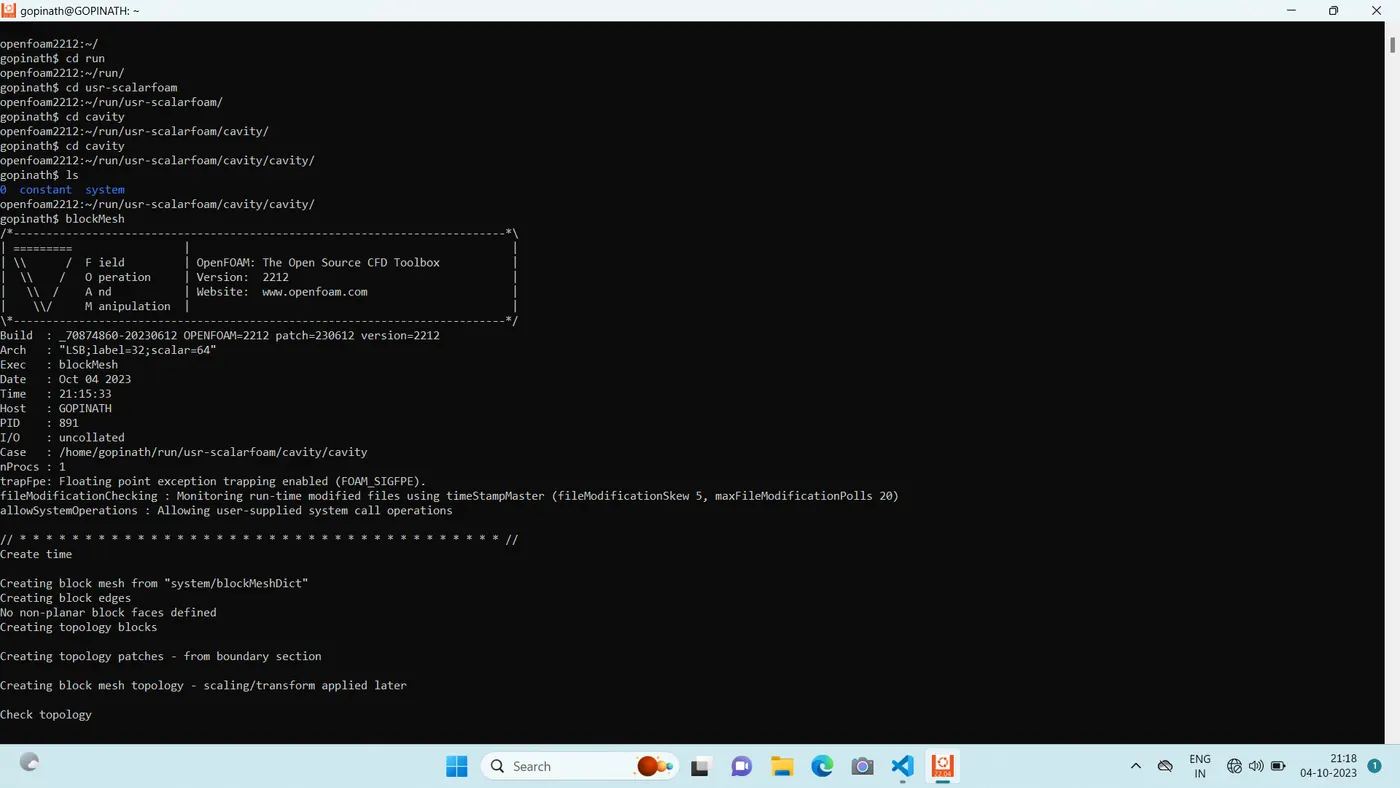
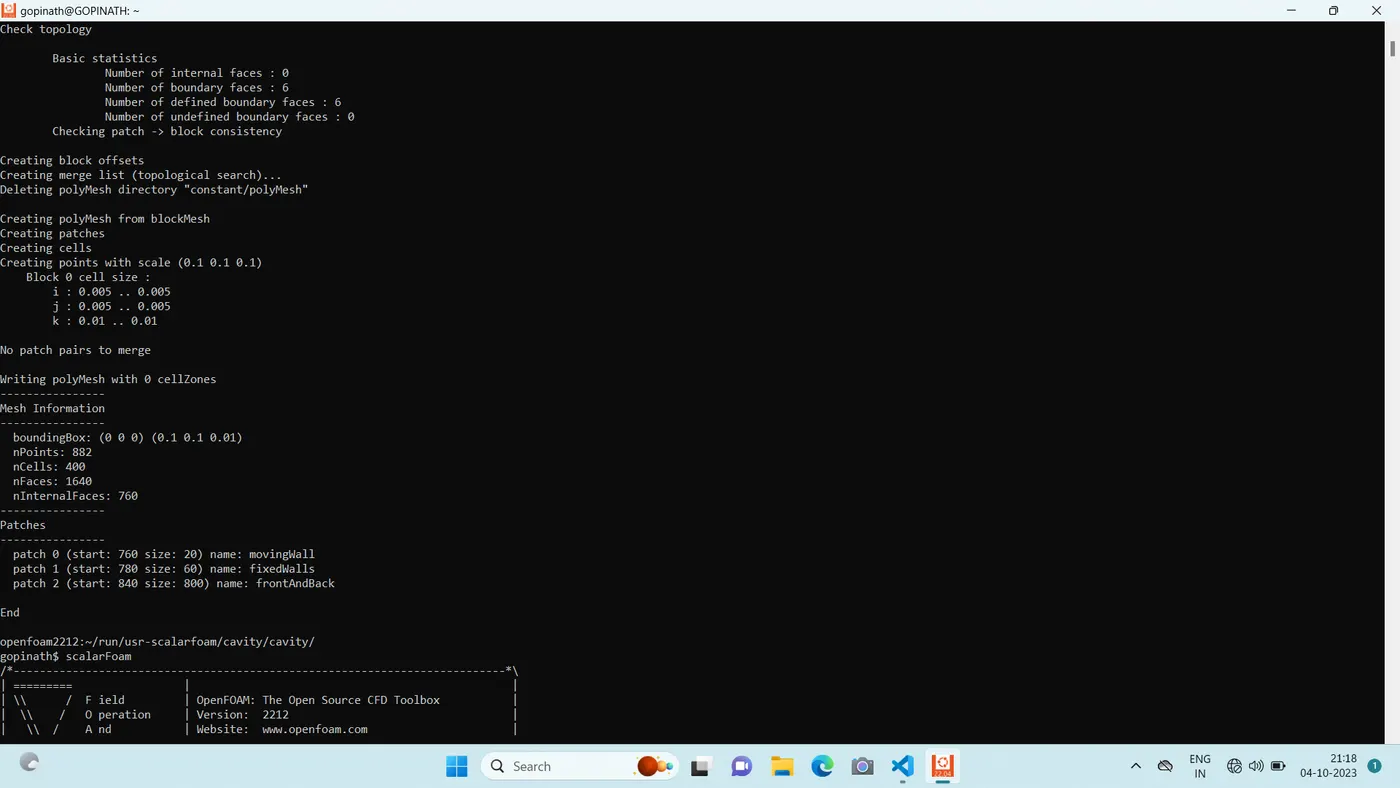
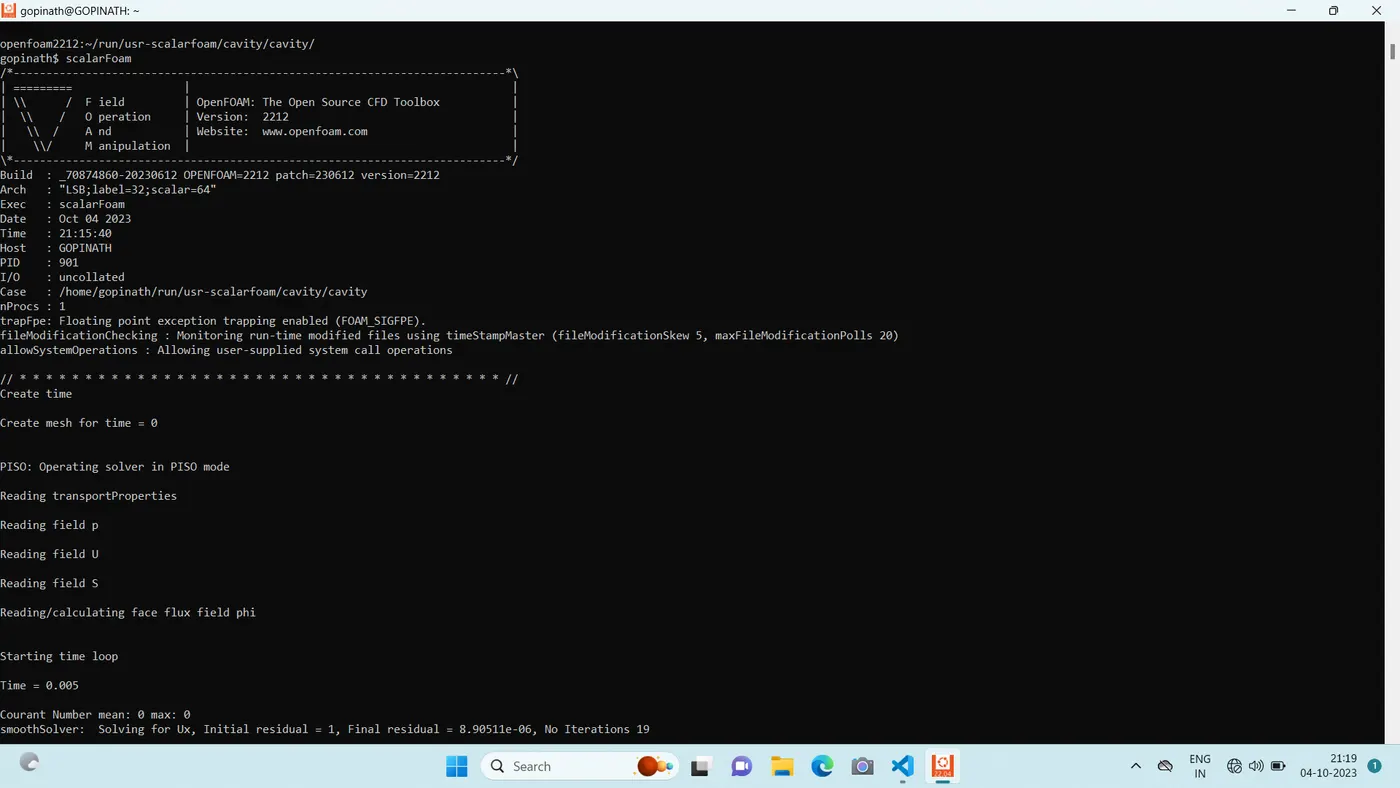
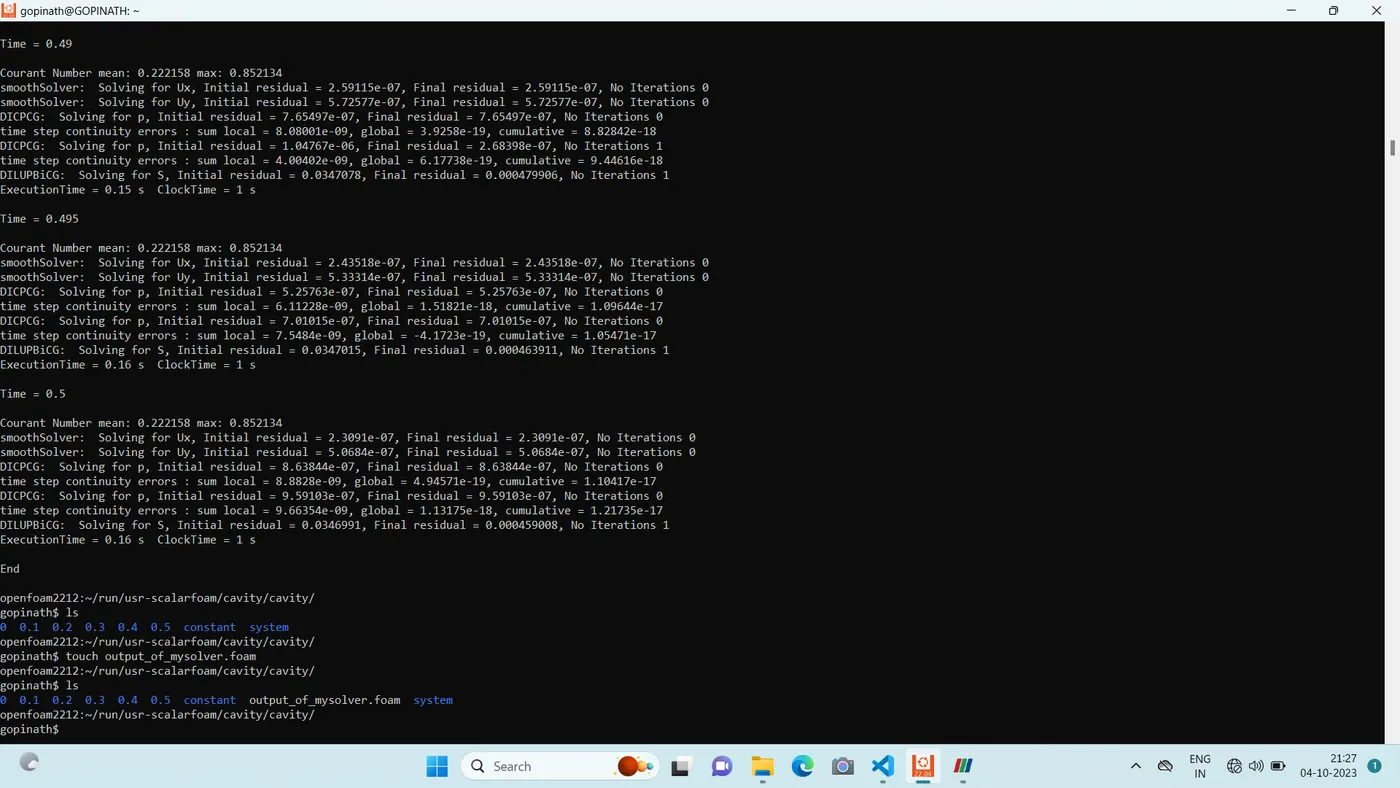
then type wmake first and enter it create sthe executable first and then go into cavity and type blockmesh and enter it creates the mesh and type scalarFoam (which is exectuable from wmake) and hit enter means the simulation starts.
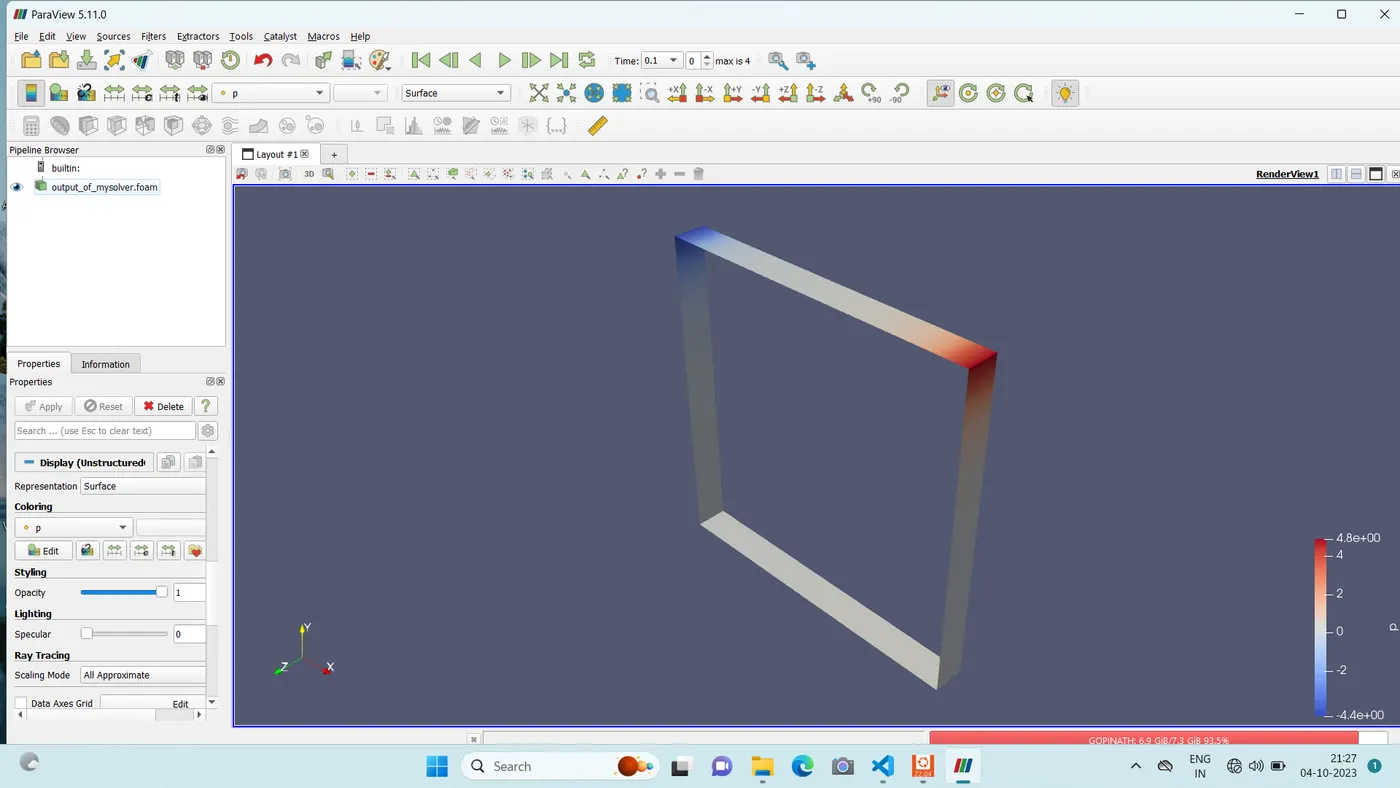
after that in order to get the .foam( which is the file format for paraview ) in the terminal type touch (any name u want).foam and hit enter and then type ls means u will c the .foam file is there. in this case i use the file name as output_my_solver.foam
the output for the simulation in the paraview is ;
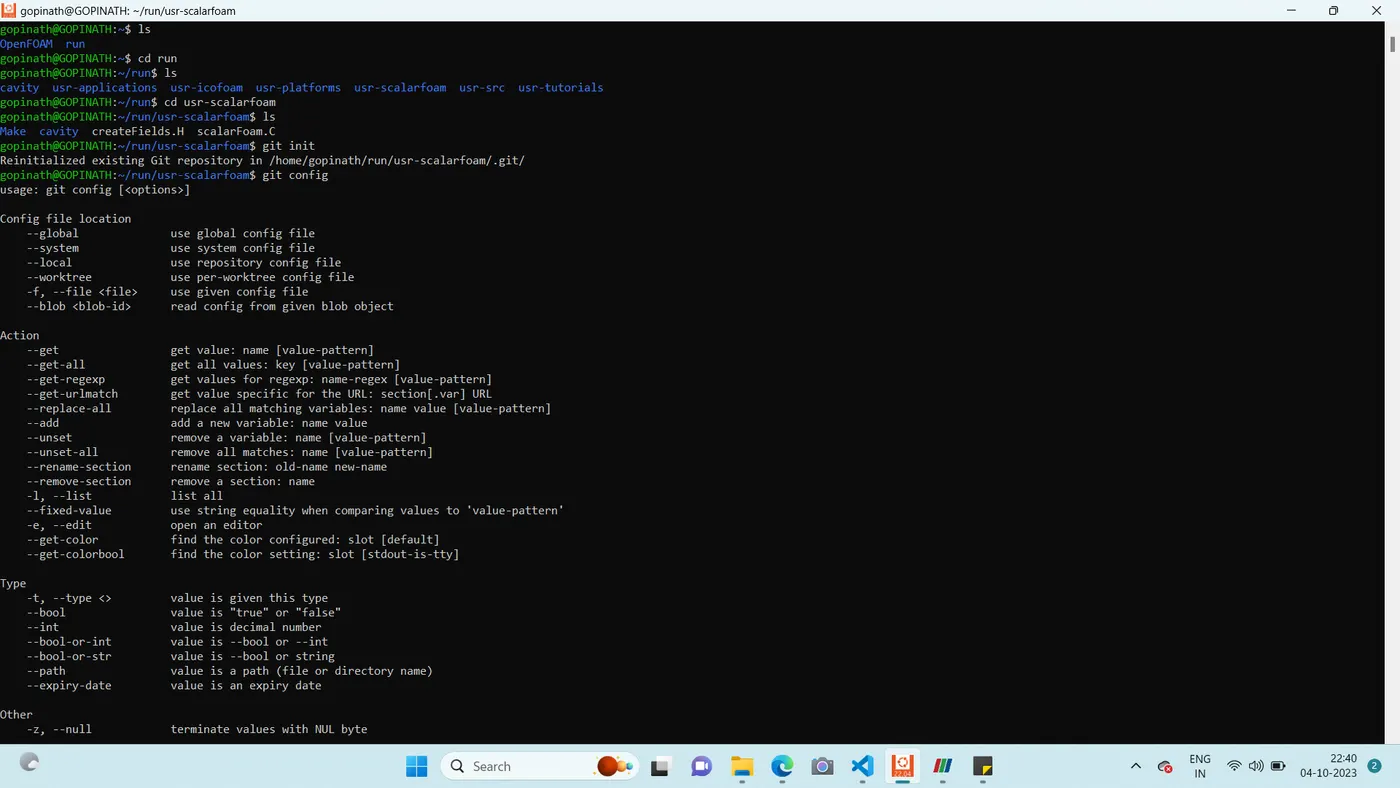
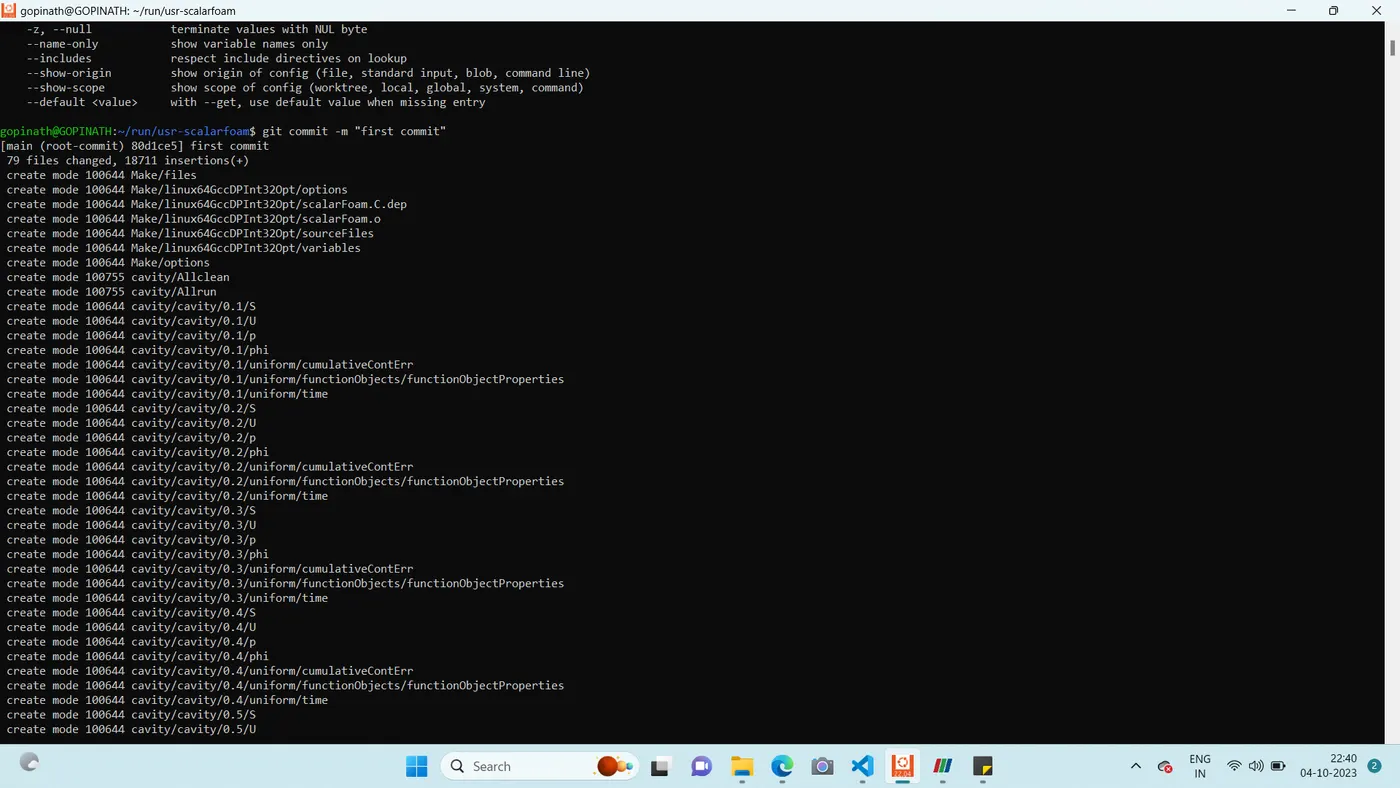
then i started to push my all solver folder into github account.
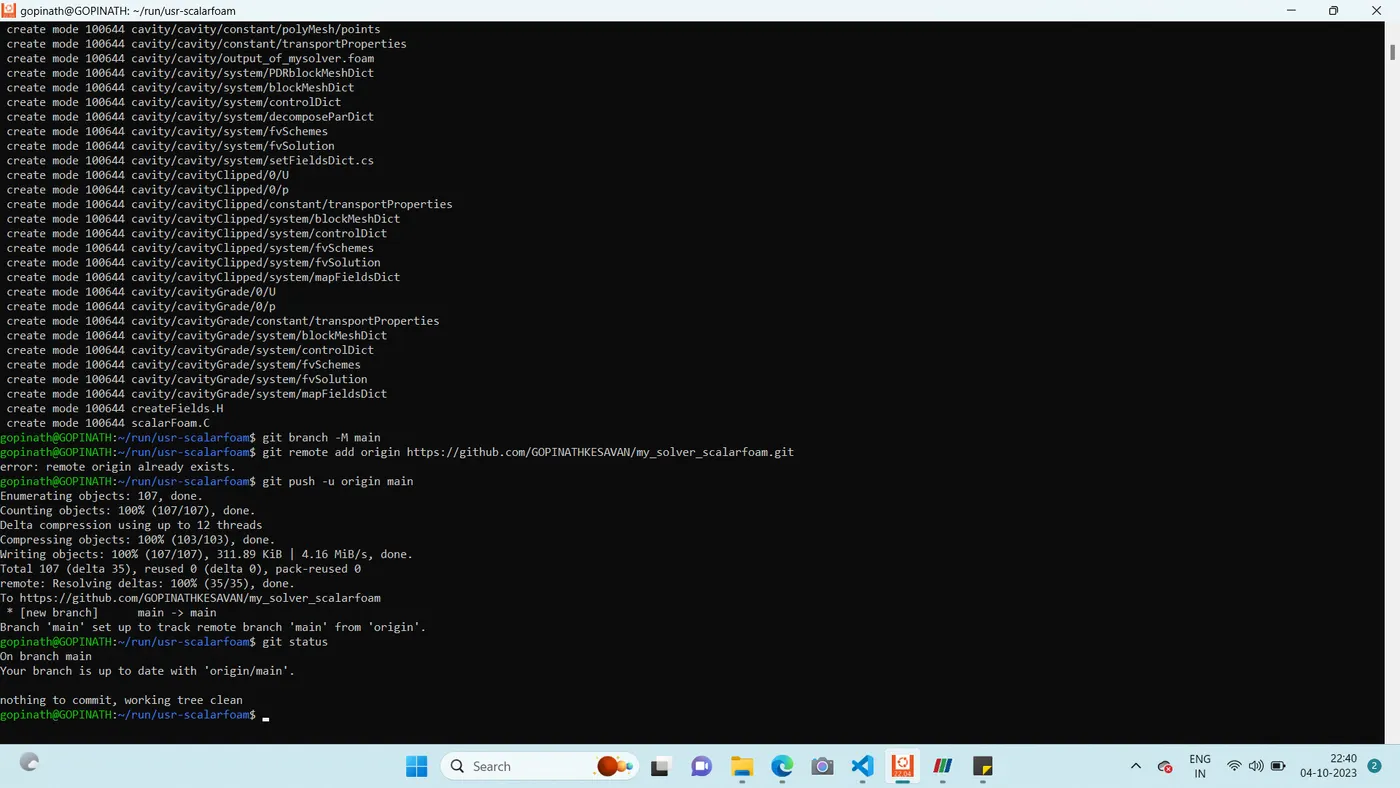
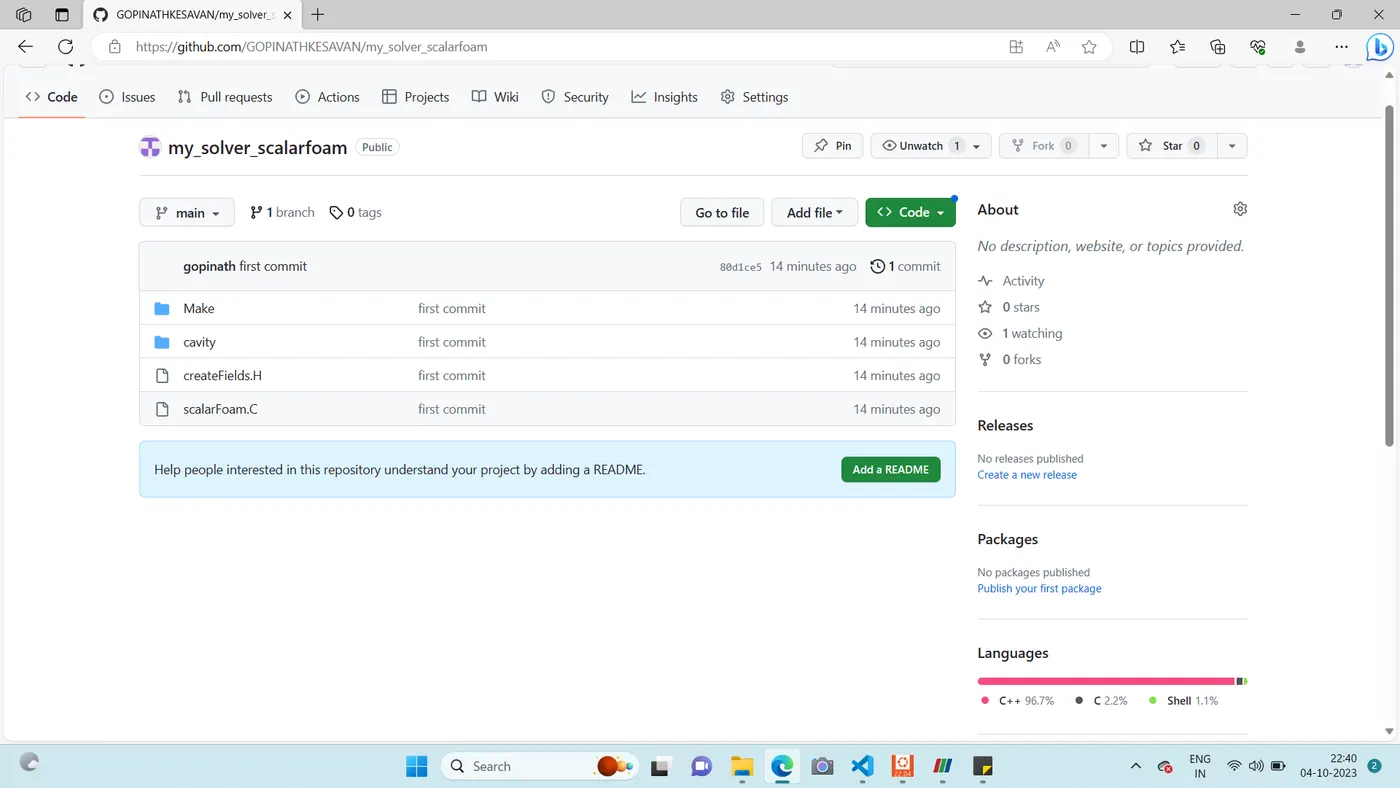
the github link for the my openfoam solver is ;