Project 1 _Creating an Architectural plan for the provided plot size and develop relevant basic structural drawings
AIM-Creating an Architectural plan for the provided plot size and develop relevant basic structural drawings
a. Plot Size: 31’x33’
b. Orientation- Facing East
Creating my own house layout and section .
procedure
ommand: _rectang
Specify first corner point or [Chamfer/Elevation/Fillet/Thickness/Width]:
Specify other corner point or [Area/Dimensions/Rotation]:
Command:
Command:
Command:
Command: _copyclip 1 found
Command:
Command:
Command: _pasteclip Duplicate definition of block _Oblique ignored.
Specify insertion point:
Command: _u INTELLIZOOM
Command: _u
Command: _u PASTECLIP GROUP
Command:
Command:
Command: _pasteclip Duplicate definition of block _Oblique ignored.
Specify insertion point:
Command:
Command:
Command: _pasteclip Duplicate definition of block _Oblique ignored.
Specify insertion point:
Command:
Command:
** STRETCH **
Specify stretch point:
Command: *Cancel*
Command:
Command:
Command: _qsave
Command: TR
TRIM
Current settings: Projection=UCS, Edge=None, Mode=Quick
Select object to trim or shift-select to extend or
[cuTting edges/Crossing/mOde/Project/eRase]:
Select object to trim or shift-select to extend or
[cuTting edges/Crossing/mOde/Project/eRase/Undo]:
Select object to trim or shift-select to extend or
[cuTting edges/Crossing/mOde/Project/eRase/Undo]:
Select object to trim or shift-select to extend or
[cuTting edges/Crossing/mOde/Project/eRase/Undo]:
Specify next fence point or [Undo]:
Specify next fence point or [Undo]:
Specify next fence point or [Undo]:
Specify next fence point or [Undo]:
Select object to trim or shift-select to extend or
[cuTting edges/Crossing/mOde/Project/eRase/Undo]:
Select object to trim or shift-select to extend or
[cuTting edges/Crossing/mOde/Project/eRase/Undo]:
Select object to trim or shift-select to extend or
[cuTting edges/Crossing/mOde/Project/eRase/Undo]:
*Cancel*
Command:
Command: _qsave
Command: H
HATCH
Pick internal point or [Select objects/Undo/seTtings]: Selecting everything...
Selecting everything visible...
Analyzing the selected data...
Analyzing internal islands...
Pick internal point or [Select objects/Undo/seTtings]: Selecting everything...
Selecting everything visible...
Analyzing the selected data...
Analyzing internal islands...
Pick internal point or [Select objects/Undo/seTtings]: Selecting everything...
Selecting everything visible...
Analyzing the selected data...
Analyzing internal islands...
Pick internal point or [Select objects/Undo/seTtings]: Selecting everything...
Selecting everything visible...
Analyzing the selected data...
Analyzing internal islands...
Pick internal point or [Select objects/Undo/seTtings]: Selecting everything...
Selecting everything visible...
Analyzing the selected data...
Analyzing internal islands...
Pick internal point or [Select objects/Undo/seTtings]: Selecting everything...
Selecting everything visible...
Analyzing the selected data...
Analyzing internal islands...
Pick internal point or [Select objects/Undo/seTtings]: Selecting everything...
Selecting everything visible...
Analyzing the selected data...
Analyzing internal islands...
Pick internal point or [Select objects/Undo/seTtings]: Selecting everything...
Selecting everything visible...
Analyzing the selected data...
Analyzing internal islands...
Pick internal point or [Select objects/Undo/seTtings]: Selecting everything...
Selecting everything visible...
Analyzing the selected data...
Analyzing internal islands...
Pick internal point or [Select objects/Undo/seTtings]: Selecting everything...
Selecting everything visible...
Analyzing the selected data...
Analyzing internal islands...
Pick internal point or [Select objects/Undo/seTtings]: Selecting everything...
Selecting everything visible...
Analyzing the selected data...
Analyzing internal islands...
Pick internal point or [Select objects/Undo/seTtings]: *Cancel*
Command:
Command: _qsave
Command: H
HATCH
Pick internal point or [Select objects/Undo/seTtings]: Selecting everything...
Selecting everything visible...
Analyzing the selected data...
Analyzing internal islands...
Pick internal point or [Select objects/Undo/seTtings]: '_-hatchedit_pAR-BRSTD'_-hatchedit_pAR-B88
Command: '_-hatchedit
>>Enter hatch option [DIsassociate/Style/Properties/DRaw order/ADd boundaries/Remove boundaries/recreate Boundary/ASsociate/separate Hatches/Origin/ANnotative/hatch COlor/LAyer/Transparency] <Properties>: _p
>>Enter a pattern name or [?/Solid/User defined/Gradient] <AR-BRSTD>: AR-B88
>>Specify a scale for the pattern <1.0000>:
>>Specify an angle for the pattern <0>:
Command: Selecting everything...
Selecting everything visible...
Analyzing the selected data...
This area has already been specified.
Pick internal point or [Select objects/Undo/seTtings]: *Cancel*
Command: *Cancel*
Command:
Command:
** STRETCH **
Specify stretch point or [Base point/Copy/Undo/eXit]:
Hatch boundary associativity removed.
Command: *Cancel*
Command:
Command: *Cancel*
Command:
Command:
Command: _line
Specify first point:
Specify next point or [Undo]:
Specify next point or [Undo]: *Cancel*
Command:
Command:
Command: _line
Specify first point:
Specify next point or [Undo]:
Specify next point or [Undo]:
Specify next point or [Close/Undo]:
Specify next point or [Close/Undo]:
Specify next point or [Close/Undo]:
Specify next point or [Close/Undo]:
Specify next point or [Close/Undo]: *Cancel*
Command:
Command:
** STRETCH **
Specify stretch point or [Base point/Copy/Undo/eXit]:
Command:
Command:
Command: _dim
Select objects or specify first extension line origin or [Angular/Baseline/Continue/Ordinate/aliGn/Distribute/Layer/Undo]:
Specify first extension line origin or [Angular/Baseline/Continue/Ordinate/aliGn/Distribute/Layer/Undo]:
Specify second extension line origin or [Undo]:
Specify dimension line location or second line for angle [Mtext/Text/text aNgle/Undo]:
Select objects or specify first extension line origin or [Angular/Baseline/Continue/Ordinate/aliGn/Distribute/Layer/Undo]:
Specify first extension line origin or [Angular/Baseline/Continue/Ordinate/aliGn/Distribute/Layer/Undo]:
Specify second extension line origin or [Undo]:
Specify dimension line location or second line for angle [Mtext/Text/text aNgle/Undo]:
Select objects or specify first extension line origin or [Angular/Baseline/Continue/Ordinate/aliGn/Distribute/Layer/Undo]:
Specify first extension line origin or [Angular/Baseline/Continue/Ordinate/aliGn/Distribute/Layer/Undo]:
Specify second extension line origin or [Undo]:
Specify dimension line location or second line for angle [Mtext/Text/text aNgle/Undo]:
Select objects or specify first extension line origin or [Angular/Baseline/Continue/Ordinate/aliGn/Distribute/Layer/Undo]:
Specify first extension line origin or [Angular/Baseline/Continue/Ordinate/aliGn/Distribute/Layer/Undo]:
Specify second extension line origin or [Undo]:
Specify dimension line location or second line for angle [Mtext/Text/text aNgle/Undo]:
Select objects or specify first extension line origin or [Angular/Baseline/Continue/Ordinate/aliGn/Distribute/Layer/Undo]:
Specify first extension line origin or [Angular/Baseline/Continue/Ordinate/aliGn/Distribute/Layer/Undo]:
Specify second extension line origin or [Undo]:
Specify dimension line location or second line for angle [Mtext/Text/text aNgle/Undo]:
Select objects or specify first extension line origin or [Angular/Baseline/Continue/Ordinate/aliGn/Distribute/Layer/Undo]:
Specify first extension line origin or [Angular/Baseline/Continue/Ordinate/aliGn/Distribute/Layer/Undo]:
Specify second extension line origin or [Undo]:
Specify dimension line location or second line for angle [Mtext/Text/text aNgle/Undo]:
Select objects or specify first extension line origin or [Angular/Baseline/Continue/Ordinate/aliGn/Distribute/Layer/Undo]:
Select objects or specify first extension line origin or [Angular/Baseline/Continue/Ordinate/aliGn/Distribute/Layer/Undo]:
Command:
Command:
** STRETCH **
Specify stretch point or [Base point/Copy/Undo/eXit]:
Dimension disassociated.
Command: *Cancel*
Command: *Cancel*
Command:
Command:
** STRETCH **
Specify stretch point or [Base point/Copy/Undo/eXit]:
Command: *Cancel*
Command: *Cancel*
Command:
Command:
Command: _dim
Select objects or specify first extension line origin or [Angular/Baseline/Continue/Ordinate/aliGn/Distribute/Layer/Undo]:
Specify first extension line origin or [Angular/Baseline/Continue/Ordinate/aliGn/Distribute/Layer/Undo]:
Specify second extension line origin or [Undo]:
Specify dimension line location or second line for angle [Mtext/Text/text aNgle/Undo]:
Select objects or specify first extension line origin or [Angular/Baseline/Continue/Ordinate/aliGn/Distribute/Layer/Undo]:
Specify first extension line origin or [Angular/Baseline/Continue/Ordinate/aliGn/Distribute/Layer/Undo]:
Specify second extension line origin or [Undo]:
Specify dimension line location or second line for angle [Mtext/Text/text aNgle/Undo]:
Select objects or specify first extension line origin or [Angular/Baseline/Continue/Ordinate/aliGn/Distribute/Layer/Undo]:
Specify first extension line origin or [Angular/Baseline/Continue/Ordinate/aliGn/Distribute/Layer/Undo]:
Specify second extension line origin or [Undo]:
Specify dimension line location or second line for angle [Mtext/Text/text aNgle/Undo]:
Select objects or specify first extension line origin or [Angular/Baseline/Continue/Ordinate/aliGn/Distribute/Layer/Undo]:
Select objects or specify first extension line origin or [Angular/Baseline/Continue/Ordinate/aliGn/Distribute/Layer/Undo]:
Command:
Command: _qsave
Command: TEXT
Current text style: "Standard" Text height: 0'-0 3/16" Annotative: No Justify: Left
Specify start point of text or [Justify/Style]:
Specify height <0'-0 3/16">: 10"
Specify rotation angle of text <0>: 0
Command:
TEXT
Current text style: "Standard" Text height: 0'-10" Annotative: No Justify: Left
Specify start point of text or [Justify/Style]:
Specify height <0'-10">: *Cancel*
Command: *Cancel*
Command: Specify opposite corner or [Fence/WPolygon/CPolygon]:
Command:
Command:
Command:
Command:
Command:
Command: *Cancel*
Command:
Command: _.erase 1 found
Command:
Command:
Command:
Command: _textedit
Current settings: Edit mode = Multiple
Select an annotation object or [Undo/Mode]:
Select an annotation object or [Undo/Mode]:
Select an annotation object or [Undo/Mode]: *Cancel*
Command:
Command: _qsave
Window Lasso Press Spacebar to cycle options
Command:
Command:
Command: _move 342 found
Specify base point or [Displacement] <Displacement>:
Too many objects selected for INTERSECT
Specify second point or <use first point as displacement>: <Ortho off>
Command:
Command:
Command:
Command:
Command:
Window Lasso Press Spacebar to cycle options
Command:
Command:
Command: _move 220 found
Specify base point or [Displacement] <Displacement>:
Specify second point or <use first point as displacement>:
Window Lasso Press Spacebar to cycle options
Command:
Command:
Command: _move 131 found
Specify base point or [Displacement] <Displacement>:
Checking 666 intersections...
Specify second point or <use first point as displacement>:
Hatch boundary associativity removed.
Command: H
HATCH
Pick internal point or [Select objects/Undo/seTtings]: Selecting everything...
Selecting everything visible...
Analyzing the selected data...
Command cancelled.
Valid hatch boundary not found.
Window Lasso Press Spacebar to cycle options
Command:
Command:
Command: _move 2217 found
Specify base point or [Displacement] <Displacement>:
Specify second point or <use first point as displacement>:
Window Lasso Press Spacebar to cycle options
Command:
Command:
Command: _move 131 found
Specify base point or [Displacement] <Displacement>:
Specify second point or <use first point as displacement>:
Command:
Command: _.erase 1 found
Command:
Command:
Command:
Window Lasso Press Spacebar to cycle options
Window Lasso Press Spacebar to cycle options
Command: _.erase 26 found
Window Lasso Press Spacebar to cycle options
Command:
Command:
Command: _move 2217 found
Specify base point or [Displacement] <Displacement>:
Specify second point or <use first point as displacement>:
Command:
Command:
Command: _qsave
Command: Regenerating model.
Result-
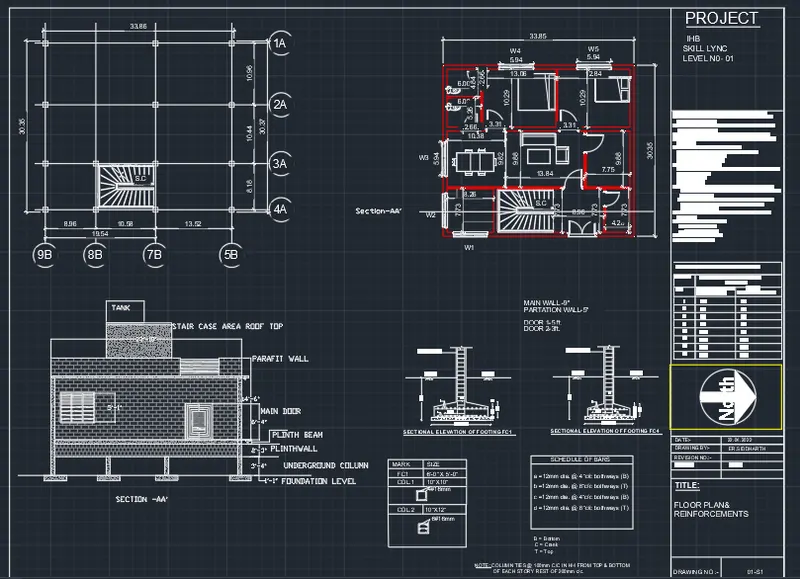
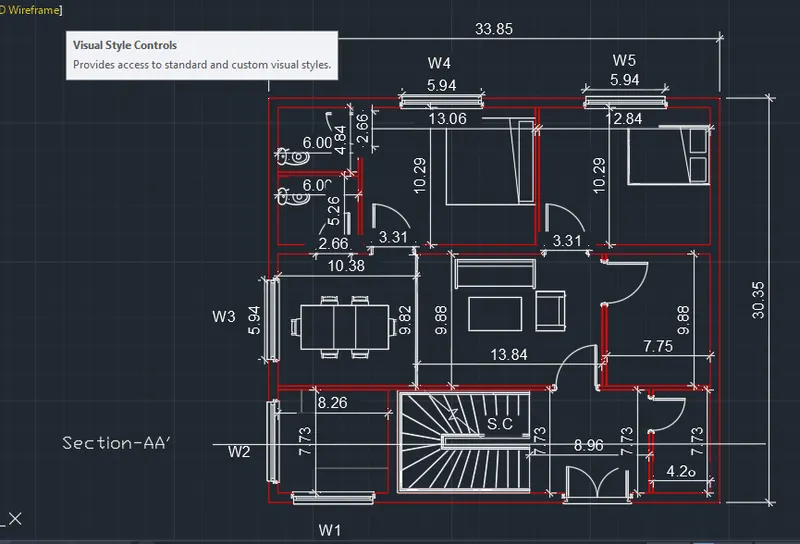
plan
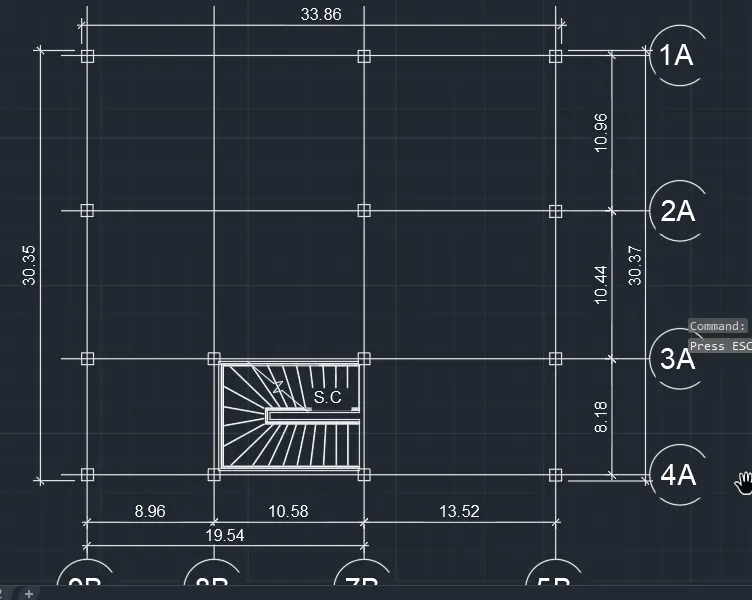
footing and column plan
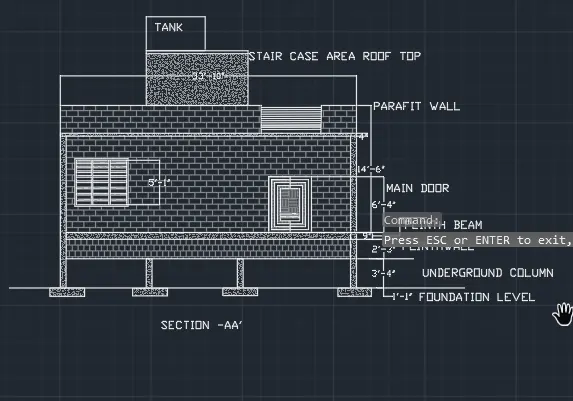
section-aa'
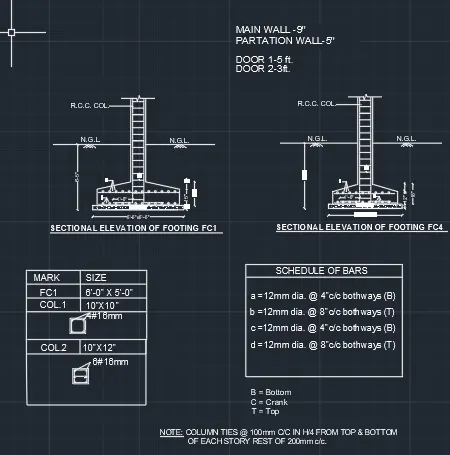
Basic structural and column beam details .
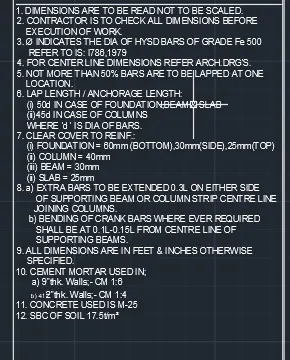
basic IS 456: GUIDELINES