Project 1 - Controlling a DC motor using PWM and monitoring its Running status
/* Project 1 - Controlling a DC motor using PWM and monitoring its Running status , Atmega32, L293, HD44780 LCD, DC Motor*/
#define F_CPU 16000000L //connect push button, for turn on and off, display interfacing,end
#define sw (PINB&(1<<0)) //sw defined for keep on pressing the button exposure
#include<avr/io.h>
#include<avr/interrupt.h>
#include<util/delay.h>
#define RS_LOW PORTD &=~ (1<<6);
#define RS_HIGH PORTD |= (1<<6);
#define EN_LOW PORTD &=~ (1<<7);
#define EN_HIGH PORTD |= (1<<7);
unsigned char i;
void lcd_cmd(unsigned char cmd)
{
PORTC = cmd; //assigning the command to pinc
RS_LOW;
EN_HIGH;
_delay_ms(1);
EN_LOW;
}
void lcd_data(unsigned char data)
{
PORTC = data;
RS_HIGH;
EN_HIGH;
_delay_ms(1);
EN_LOW;
}
void lcd_init()
{
lcd_cmd(0x38);
_delay_ms(5);
lcd_cmd(0x02);
_delay_ms(5);
lcd_cmd(0x01);
_delay_ms(5);
lcd_cmd(0x0c);
_delay_ms(5);
lcd_cmd(0x06);
_delay_ms(5);
lcd_cmd(0x80);
_delay_ms(5);
lcd_cmd(0x02);
_delay_ms(5);
}
void cursorpos(char x , char y){
if((x<1 || x>2) || (y<1 || y>16))
{
x=1;
y=1;
}
if (x==1)
{
lcd_cmd(0x7f+y);
}
else
{
lcd_cmd(0xbf+y);
}
}
void lcd_out(char a,char b,char *str){
cursorpos(a,b);
while(*str)
{
lcd_data(*str);
str++;
}
}
int main(void)
{
DDRB &=~ (1<<0); //resetting B0 bit
PORTB |= (1<<0); //push for
DDRD &=~ (1<<0);
PORTD |= (1<<0);
DDRA=0xff; // activating PORTC for output to motor
lcd_init();
i=64;
OCR0=1; //output control register
TCCR0 =0x61;
DDRB |= (1<<PB3);
DDRD &=~(1<<PD2); //setting DDRD register
PORTD |= (1<<PD2); // activating PD2 pin as input (PD2-speed controlling) INT0=PD2
GICR = (1<<INT0); //enable int0
MCUCR = 0x02;
sei();
while(1)
{
if(sw==0){
PORTA = 0x01; //0000 0001 clk
lcd_cmd(0x01);
lcd_out (1,1,"Motor-On");
lcd_out (2,1,"Clock");
_delay_ms (500);
}
if(!(sw==0)) {
PORTA = 0x02; //0000 0010 anti-clk
lcd_cmd(0x01);
lcd_out (1,1,"Motor-On");
lcd_out (2,1,"Anti-Clock");
_delay_ms(500);
}
OCR0=i;
}
return 0;
}
ISR(INT0_vect)
{
i=i+10;
}
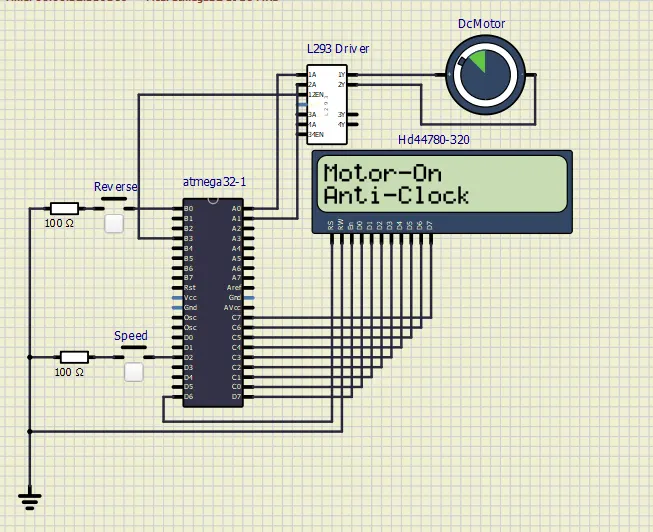
By default the motor is set Anti-clock wise .
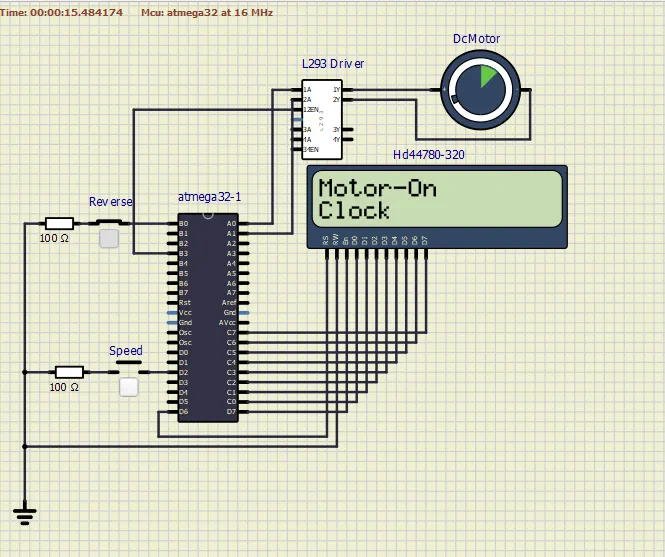
By Keep pressing the push button connected to B0 reverse the motor will rotate in clock wise direction, as shown also in display
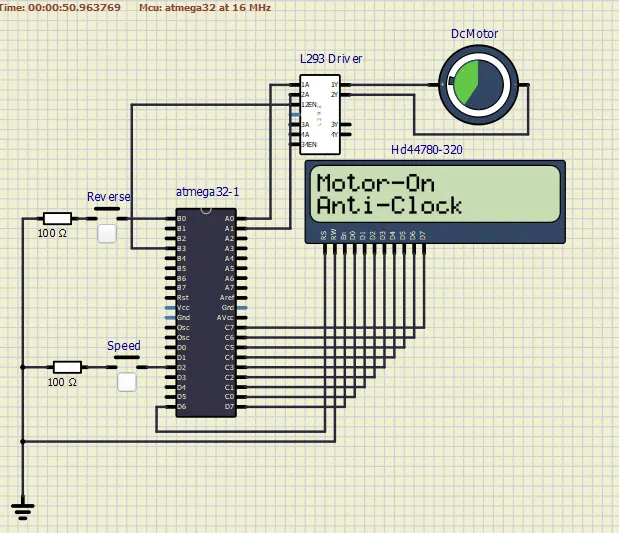
By more we press the speed push button connected to D2, the speed of the motor will increase continuously.
Thanks...