Project 1 - Controlling a DC motor using PWM and monitoring its Running status
Controlling a DC motor using PWM and monitoring its Running status
Overview of the Project:
Implement a system on the simulator for controlling a DC motor using the L293 motor driver, monitor its status and print the running status of the motor on the LCD Display.
- DC motor:
- Working principle of DC motor
When kept in a magnetic field, a current-carrying conductor gains torque and develops a tendency to move.
In short, when electric fields and magnetic fields interact, a mechanical force arises. This is the principle on which the DC motors work.
2. PWM
- Pulse Width Modulation (PWM) is a technique to generate low-frequency output signals from high-frequency pulses.
- Rapidly switching the output voltage of an inverter leg between the upper and lower DC rail voltages, the low-frequency output can be thought of as the average voltage over a switching period
3 .L293 Motor Driver
- Motor drivers act as an interface between Arduino and the motors. The most commonly used motor driver IC's are from the L293 series such as L293D, L293NE, etc. These ICs are designed to control 2 DC motors simultaneously. L293D consists of two H-bridge.
Goals:
- Implement a system on a simulator for Controlling the DC motor using the L293 motor driver.
- Displaying the running status of the DC motor on the LCD display.
Key Highlights of the Project:
- The DC motor can be controlled by using the L293 motor driver.
- The speed of a DC motor can be controlled by varying its input voltage, for doing this is to use PWM (Pulse Width Modulation).
- L293D IC is a typical Motor Driver IC that allows the DC motor to drive in any direction
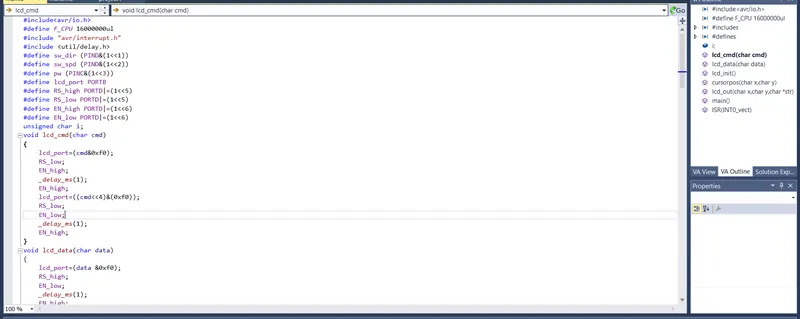
Program Code
#include<avr/io.h>
#define F_CPU 16000000ul
#include "avr/interrupt.h"
#include <util/delay.h>
#define sw_dir (PIND&(1<<1))
#define sw_spd (PIND&(1<<2))
#define pw (PINC&(1<<3))
#define lcd_port PORTB
#define RS_high PORTD|=(1<<5)
#define RS_low PORTD|=(1<<5)
#define EN_high PORTD|=(1<<6)
#define EN_low PORTD|=(1<<6)
unsigned char i;
void lcd_cmd(char cmd)
{
lcd_port=(cmd&0xf0); //Masking 4 bits for 4 bit LCD mode//
RS_low;
EN_low;
_delay_ms(1);
EN_high;
lcd_port=((cmd<<4)&(0xf0));
RS_low;
EN_low;
_delay_ms(1);
EN_high;
}
void lcd_data(char data)
{
lcd_port=(data &0xf0); //masking 4 bits for bit LCD mode//
RS_high;
EN_low;
_delay_ms(1);
EN_high;
lcd_port=((data<<4)&(0xf0));
RS_high;
EN_low;
_delay_ms(1);
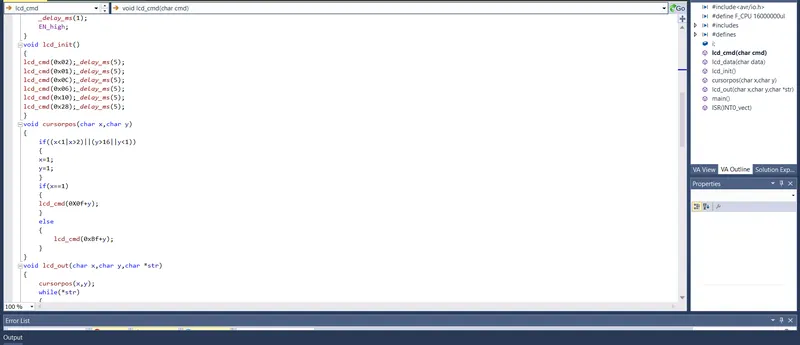
EN_high;
}
void lcd_init()
{
lcd_cmd(0x02);_delay_ms(5); //return the cursor to home//
lcd_cmd(0x01);_delay_ms(5); //clear screen //
lcd_cmd(0x0C);_delay_ms(5); //display ON cursor OFF//
lcd_cmd(0x06);_delay_ms(5); //increment cursor//
lcd_cmd(0x80);_delay_ms(5); //force cursor to begin 1st line //
lcd_cmd(0x28);_delay_ms(5); //used for 4 bits lcd mode //
}
void lcd_out(char x, char y, char *str)
{
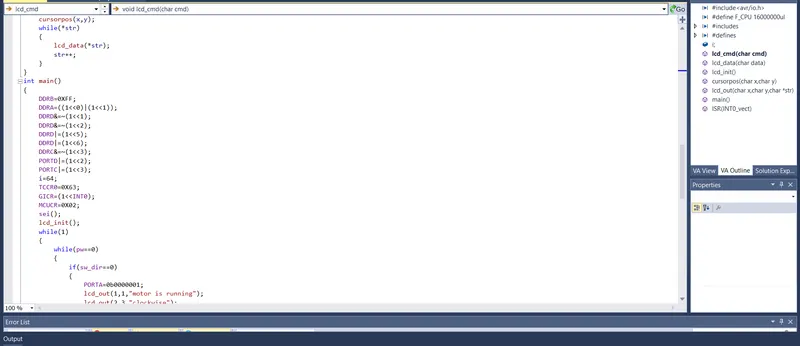
cursorpos(x,y);
while (*str)
{
lcd_data(*str);
str++;
}
}
void cursorpos(char x, char y)
{
if ((x<1||x>2)||(y>16)||(y<1))
{
x=1;
y=1;
}
if (x==1)
{
lcd_cmd(0x7f+y);
}
else
{
lcd_cmd(0xBF+y);
}
}
int main()
{
DDRB=0xFF;
DDRA|=((1<<0)|(1<<1));
DDRD&=~(1<<1);
DDRD&=~(1<<2);
DDRD|=(1<<5);
DDRD|=(1<<6);
DDRC&=~(1<<3);
PORTD|=(1<<2);
PORTC|=(1<<3);
i=64;
TCCR0=0X61;
GICR=(1<<INT0);
MCUCR=0X02;
sei();
lcd_init();
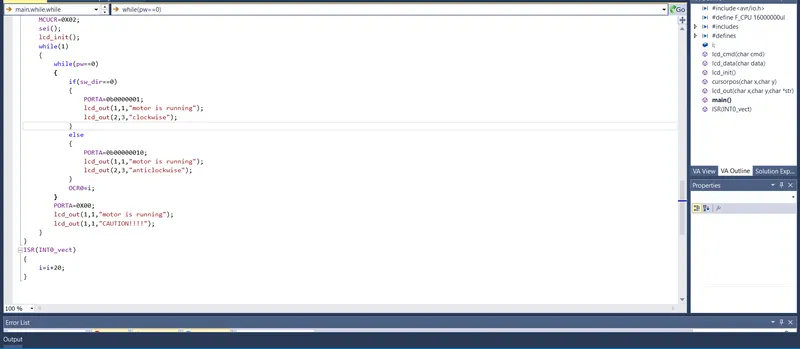
while (1)
{
while(pw==0)
{
if (sw_dir==0)
{
PORTA=0b00000001;
lcd_out(1,1,"Motor is Running");
lcd_out(2,3,"clockwise");
}
else
{
PORTA=0b00000010;
lcd_out(1,1,"Motor is Running");
lcd_out(2,3,"anticlockwise");
}
OCR0=i;
}
PORTA=0X00;
lcd_out(1,1," Motor is OFF");
lcd_out(2,3,"CAUTION !!!");
}
}
ISR(INT0_vect)
{
i=i+20;
}
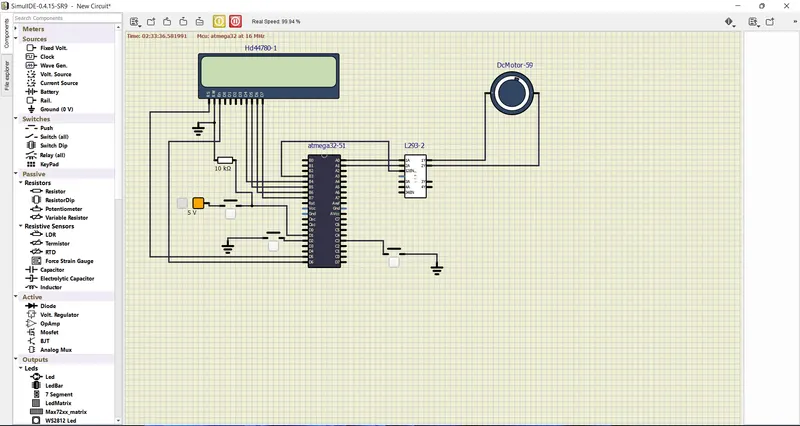
Deliverables of this project:
- Implement the system for controlling the DC motor.
- Controlling the speed of the DC motor using PMW.
- Displaying the present running status of DC machine on the LCD display
Expected Outcomes:
- Implement a system on the simulator to control a DC motor using PWM
- Monitoring the running status of the DC motor using the L293 motor driver which allows the DC motor to drive on any direction.
- Running status i.e. in which direction the DC motor is running is to be displayed on the LCD screen.