Project 1- Building a Master TCL/TK Macro
Objective:
Build a master tcl/tk macro
It should contain buttons that will call all utilities created as assignments during this course
Segregate the buttons as per their utility. Color code the buttons as you see fit.
Display labels that indicate an idea of your segregation
The design must look ergonomic and clutter free
Test all the buttons thoroughly on am empty file too.
Procedure:
In the previous challenges, macro is created for normals, reflect, creating collectors and property, deleting unused and empty components, spotwelding and for element quality check.
Using the procedures that are all written in the above mentioned course work, create a new macro as a master window which leads us to each individual tk window.
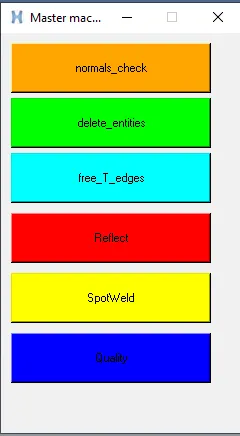
Each button leads to the each individual macro windows.
to execute the function within the buttons, each each is created using a separate procedure. And those procedures are stored in the command section for each buttons created in this master window. for example,
proc cleanup_tool {} {
*clearmarkall 1
proc empty {a} {
*EntityPreviewEmpty $a 1
if {[hm_marklength $a 1] != 0} {*deletemark $a 1}
}
proc unused {b} {
*EntityPreviewUnused $b 1
if {[hm_marklength $b 1] != 0} {*deletemark $b 1}
}
proc entities {c} {
*createmark $c 1 "displayed"
if {[hm_marklength $c 1] != 0} {*deletemark $c 1}
}
proc del_nodes {d} {
*createmark $d 1 "displayed"
if {[hm_marklength $d 1] != 0} {*nodemarkcleartempmark 1}
}
In the above commands all the procedures for deleting the empty and unused entities are called under a single procedure named cleanup_tool.
This makes it a governing procedure which is stored in the command section of cleanup tool button in master window.
Result:
The master window for all procedures are created and executed.
This results in optimization of huge time conception while executing the same set of operations repeatedly.